
If you own an Instant Pot, you already know how much time it can save in the kitchen. But did you know that it’s also great for sautéing? Many people use their Instant Pot only for pressure cooking and slow cooking, missing out on the powerful sauté function.
Sautéing in an Instant Pot lets you brown meats, soften vegetables, and build flavor before pressure cooking, all in one pot. This guide will show you exactly how to sauté in your Instant Pot, covering every detail, common mistakes, tips, and even troubleshooting.
You’ll learn everything you need to master this feature and make your meals taste even better.
What Does Saute Mean In Instant Pot Cooking?
Sautéing is a method of cooking food quickly in a small amount of oil over medium to high heat. In a traditional pan, this means cooking onions, garlic, or meat until browned. In the Instant Pot, the “Sauté” button heats the bottom of the inner pot, so you can cook just like you would on the stove. This is important because browning ingredients first brings out deeper flavors in your dishes. The Instant Pot Sauté function makes it easy to do this without using extra pans.
Why Use The Saute Function In An Instant Pot?
The Instant Pot’s Sauté function is not just a convenience—it’s a way to improve your cooking. Here’s why:
- Better Flavor: Browning meats and vegetables adds a rich, deep taste.
- One-Pot Cooking: You don’t have to dirty extra pans. Sauté, then cook everything in the same pot.
- Time Saving: Less cleaning, and no need to transfer hot food.
- Texture: Sautéing can give a crispy or caramelized texture to certain foods, making your meals more interesting.
- Prevents Sogginess: Sautéing removes water from vegetables, so your final dish isn’t watery.
Many Instant Pot recipes, like beef stew or chili, begin with sautéing. Skipping this step often leads to bland or mushy meals.
Getting To Know The Saute Button
Before you start, it’s important to understand how the Sauté setting works. On most Instant Pots, you’ll find a “Sauté” button on the control panel. Pressing it will heat the inner pot, just like a frying pan.
- Heat Levels: Many models have three heat settings—Normal, Less, and More.
- Less: Lower heat, good for simmering or sweating onions.
- Normal: Medium heat, great for most vegetables and meats.
- More: High heat, best for browning meat fast or boiling off liquid.
You can cycle through these by pressing the “Sauté” button multiple times. The display will show the current setting, for example, “Sauté Normal. ”
How To Saute In An Instant Pot: Step-by-step
If you want to use the Sauté feature like a pro, follow these steps:
Step 1: Prepare Your Ingredients
Before you start, make sure all your ingredients are ready. Chop vegetables, measure spices, and cut meats. Sautéing goes quickly, so you don’t want to stop in the middle.
Step 2: Turn On The Saute Function
Plug in your Instant Pot and press the “Sauté” button. Wait until the display says “Hot. ” This means the pot is ready.
Pro Tip: Always let the pot heat fully before adding food. This prevents sticking and helps with even browning.
Step 3: Add Oil Or Fat
Pour in a small amount of cooking oil, butter, or another fat. About 1-2 tablespoons is enough for most recipes. Use oils with a high smoke point, like vegetable oil, canola oil, or avocado oil. Olive oil works for lower heat but may smoke at higher settings.
Step 4: Add Ingredients To Saute
Put your ingredients in the pot. Spread them out so they cook evenly. For meats, don’t overcrowd—brown in batches if needed.
- Meat: Sear both sides until brown. Remove and set aside if you want to sauté vegetables next.
- Vegetables: Stir often to prevent burning. Onions, garlic, celery, and carrots are popular for a flavor base.
Step 5: Stir As Needed
Use a wooden spoon or silicone spatula to move the food around. This prevents sticking and ensures even cooking. Avoid metal utensils that can scratch the pot.
Step 6: Deglaze The Pot
After browning, you may notice brown bits stuck to the bottom. Add a splash of broth, water, or wine and scrape with your spoon. This is called “deglazing,” and it adds flavor while preventing the “Burn” warning during pressure cooking.
Step 7: Continue With Your Recipe
When you finish sautéing, press “Cancel” to turn off the Sauté function. Now you can add other ingredients and switch to pressure cooking, slow cooking, or keep warm.
What Can You Saute In An Instant Pot?
You can use the Sauté function for many foods:
- Onions, garlic, and aromatics: Sautéing these first adds sweetness and depth.
- Ground meat: Brown beef, turkey, pork, or chicken for tacos or pasta sauce.
- Stew meat: Sear cubes of beef, pork, or chicken before stewing.
- Vegetables: Mushrooms, peppers, carrots, and celery cook well.
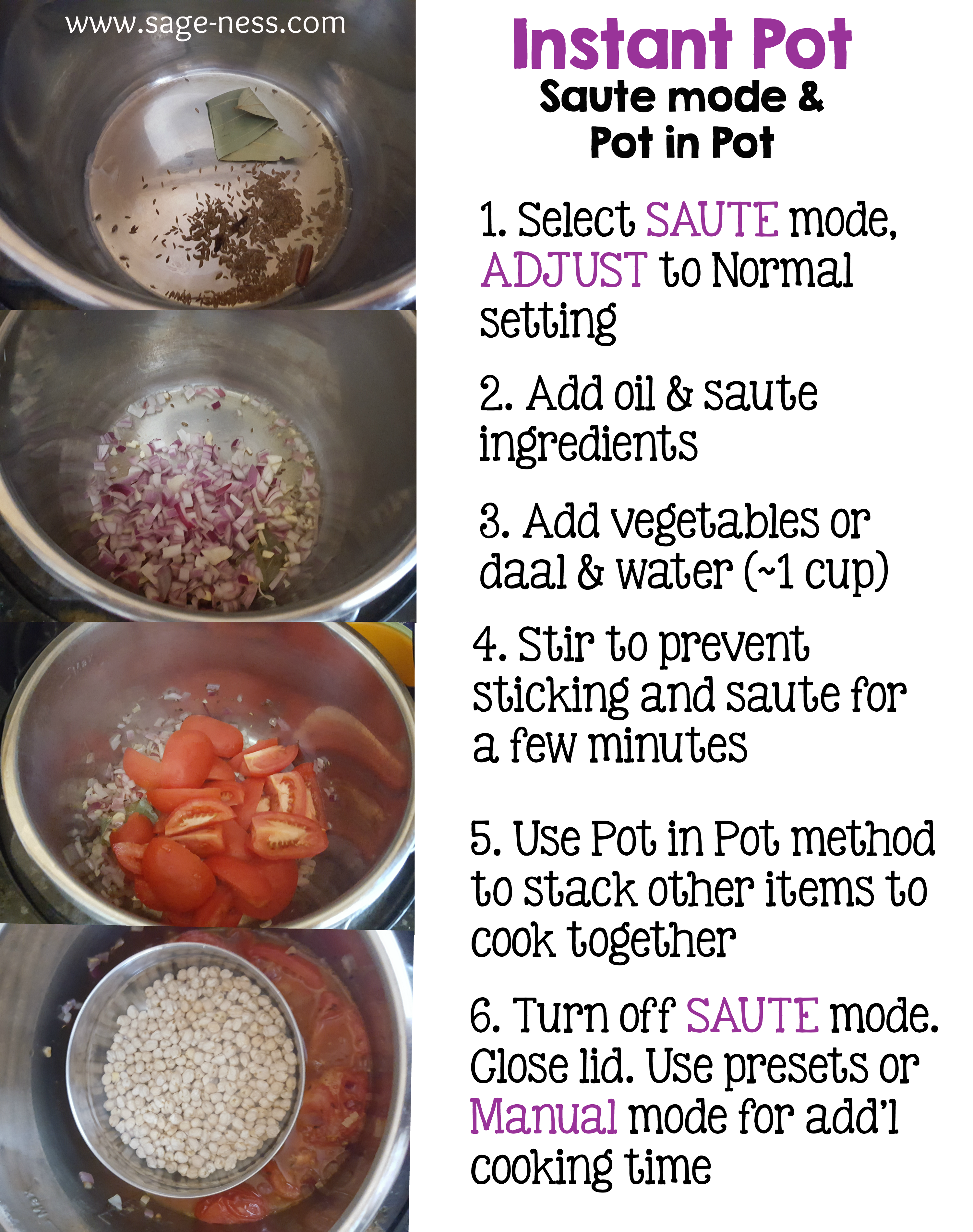
- Spices: Toast cumin, curry powder, or other spices to bring out their oils and flavors.
Some foods, like delicate fish or leafy greens, are better added later to avoid overcooking.
Saute Time And Temperature: What To Know
Sautéing in an Instant Pot is a bit different from a stovetop pan. Here’s what you need to know:
- Heat-up time: It usually takes 3-5 minutes for the pot to show “Hot.”
- Cooking time: Onions take about 5 minutes; ground meat about 6-8 minutes per pound.
- Batch size: Don’t crowd the pot. Too much food lowers the temperature and causes steaming, not browning.
- High vs. Medium: Use “More” for fast browning, “Normal” for most veggies, “Less” for delicate foods.
Non-obvious insight: The bottom of the Instant Pot can get hotter than a regular nonstick pan, so watch your food closely to avoid burning.
Table: Instant Pot Sauté Settings Compared To Stovetop
Here’s a quick comparison of Instant Pot Sauté settings versus a regular stovetop:
| Instant Pot Setting | Approximate Temperature (°F) | Stovetop Equivalent | Best For |
|---|---|---|---|
| Less | 221°F | Low Heat | Simmering, sweating onions, garlic |
| Normal | 320°F | Medium Heat | Most vegetables, ground meat |
| More | 338°F | Medium-High Heat | Browning meat, boiling off liquid |
Essential Tips For Perfect Saute In Instant Pot
- Preheat fully: Wait for the “Hot” sign before adding food.
- Use enough oil: The stainless steel pot can stick; oil helps prevent this.
- Don’t overload: Brown in small batches for even color and flavor.
- Deglaze every time: This removes stuck bits and prevents errors.
- Stir often: Prevents burning at the bottom.
- Season early: Salt and pepper your food as it cooks for better taste.
- Watch the pot: Instant Pots can heat quickly; don’t walk away.
- Use the right utensils: Wooden or silicone spatulas are safe for the inner pot.
- Finish with butter: Adding a little butter at the end adds shine and flavor.
Advanced tip: After sautéing, let the pot cool for a minute before pressure cooking. This prevents the liquid from boiling over or causing “Burn” errors.

Credit: kristineskitchenblog.com
Common Mistakes When Sautéing In An Instant Pot
Even experienced cooks make mistakes with the Sauté function. Here are the most frequent ones:
Not Preheating
Adding food before the pot is hot leads to sticking and uneven browning. Always wait for the “Hot” signal.
Using Too Little Oil
The stainless steel insert is not nonstick. Without enough oil, foods will stick and may burn.
Overcrowding The Pot
If you add too much at once, food steams instead of browning. Brown in batches for best results.
Not Deglazing
If you skip deglazing, stuck bits may burn during pressure cooking. This often causes the “Burn” warning.
Walking Away
The Sauté setting heats food quickly. If you leave, you risk burning your food. Stay nearby and stir often.
Using Metal Utensils
Metal tools can scratch the pot. Use wooden or silicone spatulas instead.
Beginner’s insight: Many people don’t realize that the Sauté function keeps heating until you press “Cancel.” Always turn it off before switching to another cooking mode.
Troubleshooting Saute Problems
If you have trouble with the Sauté function, here’s how to fix common issues:
Food Is Sticking
- Add more oil.
- Wait until “Hot” before adding ingredients.
- Stir more often.
Food Burns
- Lower the heat to “Normal” or “Less.”
- Stir constantly.
- Don’t leave the food unattended.
Food Isn’t Browning
- Dry your meat or vegetables before adding.
- Don’t overcrowd.
- Use the “More” heat setting.
“burn” Message After Saute
- Always deglaze the pot.
- Scrape up all brown bits.
- Use enough liquid for pressure cooking.
Pot Doesn’t Heat Up
- Make sure the Instant Pot is plugged in and the inner pot is seated correctly.
- Check for error codes.

Credit: www.youtube.com
Table: Common Instant Pot Saute Issues And Solutions
| Problem | Possible Cause | Solution |
|---|---|---|
| Food sticking | Not enough oil, cold pot | Add oil, preheat fully |
| Food burning | Heat too high, no stirring | Lower heat, stir more |
| No browning | Overcrowded pot, wet food | Cook in batches, dry food |
| “Burn” warning | Not deglazed, not enough liquid | Deglaze pot, add liquid |
Sauteing Different Foods: Practical Examples
Sautéing Onions And Garlic
Set the Instant Pot to “Sauté Normal. ” Add oil, then onions. Cook for 3-5 minutes, stirring until soft. Add garlic for the last 30 seconds. This is the start for soups and stews.
Browning Ground Beef
Heat on “Sauté More. ” Add oil, then ground beef. Break it up with a spatula. Cook until browned, about 6-8 minutes per pound. Drain excess fat if needed.
Searing Chicken Thighs
Pat chicken dry. Use “Sauté More,” add oil, and sear chicken skin-side down for 3-4 minutes. Flip and cook 2-3 more minutes. Remove and proceed with your recipe.
Toasting Spices
Set to “Sauté Less. ” Add dry spices and toast for 1-2 minutes, stirring. This brings out extra aroma in curries and chili.
Cooking Mushrooms
Use “Sauté Normal. ” Add oil, then mushrooms. Cook without stirring for 2-3 minutes, then stir and continue until browned.
Non-obvious insight: Mushrooms release water as they cook. Letting them sit undisturbed helps them brown instead of steam.
Cleaning Up After Saute
Sautéing sometimes leaves residue on the bottom of the pot. Here’s how to clean it easily:
- Let the pot cool.
- Fill with warm, soapy water.
- Use a soft sponge to scrub—never steel wool, which can scratch.
- For stubborn bits, simmer water in the pot for a few minutes, then scrape gently.
If your pot has rainbow-colored stains (common with stainless steel), a little white vinegar can help remove them.
When Not To Use The Saute Function
While the Sauté feature is powerful, there are times when it’s not the best choice:
- Cooking delicate fish: Fish can break apart or overcook.
- Making desserts: The high heat can burn sugar or milk.
- Large amounts: For very big batches, a stovetop pan might brown more evenly.
In these cases, use the stove or another method, then return ingredients to the Instant Pot.
Credit: www.bibliotecaoscura.com
Table: Saute Vs. Pressure Cook Vs. Slow Cook In Instant Pot
See how the Sauté function compares to other Instant Pot settings:
| Function | Cooking Style | Best For | Heat Level | Time Needed |
|---|---|---|---|---|
| Saute | Direct heat, uncovered | Browning, quick cooking | High/Medium/Low | 2-15 min |
| Pressure Cook | Sealed, high pressure | Stews, beans, meats | High | 10-90 min |
| Slow Cook | Low heat, long time | Soups, roasts, casseroles | Low/Medium | 4-10 hours |
Safety Tips For Sauteing In Instant Pot
- Don’t use the lid: Never cover the pot when sautéing. This traps steam and can cause spills.
- Watch for splatter: Hot oil can splatter, so keep kids and pets away.
- Use heatproof gloves: The sides can get hot—protect your hands.
- Cancel before switching: Always press “Cancel” before changing to another cooking mode.
- Keep the area clear: The Instant Pot emits heat; keep flammable items away.
Saute Function And Instant Pot Models
Not all Instant Pot models have the same Sauté settings. Most 6-quart and 8-quart models have “Less,” “Normal,” and “More. ” Some basic models may only have one Sauté level. Check your manual if you’re not sure.
Non-obvious insight: On some Instant Pot Duo models, the Sauté timer defaults to 30 minutes, but you can extend or reduce this as needed.
Can You Saute With The Instant Pot Lid On?
No, you should not sauté with the lid on. The Sauté function is designed for open cooking. The lid can trap steam, leading to spills or burns when you open it.
If you want to keep splatters down, you can use a glass lid made for the Instant Pot, but leave it slightly askew to let steam escape.
How Sauteing In Instant Pot Compares To Stovetop
The Instant Pot’s Sauté function is great for convenience, but there are a few differences compared to a stovetop pan:
- Heats slower: The Instant Pot takes a few minutes to get hot.
- Less control: You have three preset temperatures, not the full range of a stove.
- Even heat: The bottom heats evenly, but the sides stay cooler.
- Cleanup: Only one pot to clean.
Pro Tip: If you need to brown a large quantity fast, the stovetop may be better. But for most recipes, the Instant Pot is more than enough.
Sauteing For Meal Prep And Batch Cooking
The Sauté function is perfect for meal prep. You can brown meat for chili, cook onions for soup, or toast spices for curries, all in advance. Store cooked ingredients in the fridge and use them later in the week.
Batch cooking tip: If you make several meals at once, deglaze the pot between batches to avoid flavor mixing or burning.
Using Saute For Vegetarian And Vegan Cooking
Sauteing isn’t just for meat. It’s essential for vegetarian and vegan meals:
- Sweating vegetables: Releases sweetness in onions, carrots, and celery.
- Toasting grains: Sauté rice, quinoa, or farro in oil before adding water for a nutty flavor.
- Blooming spices: Heating spices in oil before adding liquid intensifies the taste.
Saute Function And Special Diets
If you follow a special diet, the Sauté function can help:
- Low-fat: Use less oil or broth to sauté.
- Gluten-free: Brown gluten-free grains or proteins without cross-contamination from other pans.
- Keto/Paleo: Sear meats and low-carb vegetables to boost flavor and fat.
Mistakes Beginners Miss When Sautéing In The Instant Pot
- Not drying ingredients: Wet vegetables or meat won’t brown. Pat them dry with a paper towel first.
- Not adding enough salt: Seasoning as you sauté builds layers of flavor. Add a pinch early, not just at the end.
How To Saute Without Oil
If you want to avoid oil, you can sauté in broth or water. Add a few tablespoons at a time to keep food from sticking. This works best for onions, garlic, and peppers.
Note: You won’t get the same browning, but you can still soften and sweeten vegetables this way.
Recipes That Start With Saute In Instant Pot
Many classic Instant Pot recipes begin with sautéing:
- Beef stew: Brown meat and onions before adding broth.
- Chicken curry: Sauté onions, garlic, and spices first.
- Chili: Brown ground beef and onions, then add beans and tomatoes.
- Risotto: Toast rice in oil before adding broth for a creamy finish.
Using the Sauté function first always delivers better taste.
Where To Learn More
For more Instant Pot cooking tips, recipes, and troubleshooting, check the official Instant Pot website. It offers guides and recipes for all skill levels.
Frequently Asked Questions
How Do I Prevent Food From Sticking During Saute?
Use enough oil and always wait until the pot says “Hot” before adding food. Stir often with a wooden or silicone spatula. If something does stick, add a splash of broth or water to loosen it.
Can I Use The Saute Function Without The Lid?
Yes, you should always sauté with the lid off. The Saute function is designed for open cooking. If you need to reduce splatter, use a glass lid slightly askew, but never seal the pot while sautéing.
Why Does My Instant Pot Show A “burn” Warning After Sauteing?
This usually means there are browned bits stuck to the bottom. Always deglaze the pot with liquid after sautéing and scrape up any stuck food. Make sure you have enough liquid before pressure cooking.
What Kind Of Oil Is Best For Sauteing In The Instant Pot?
Use oils with a high smoke point, like canola, vegetable, or avocado oil. Olive oil is fine for lower heat. Avoid butter alone at high temperatures, as it can burn easily.
Can I Saute All Types Of Food In The Instant Pot?
Most meats, vegetables, and spices are perfect for sautéing in the Instant Pot. However, delicate foods like fish or leafy greens can overcook quickly. For these, add them at the end or use a gentler method.
Sautéing in your Instant Pot is more than just a button—it’s a way to make your meals tastier and your cooking easier. With these tips, examples, and solutions, you’ll get perfect results every time, all in one pot.