
If your LG dishwasher shows the “CL” code, it can leave you frustrated and confused. Many people see this code and worry something is broken. But the truth is, the “CL” message is not an error. Instead, it’s your dishwasher telling you the Child Lock feature is active. This function is there to keep curious hands from changing wash settings or opening the door during a cycle. However, if you don’t know how to remove it, your dishwasher stays locked and won’t respond. This article will guide you through everything you need to know about removing the CL code on an LG dishwasher. You’ll also learn what causes it, how to prevent problems, and what to do if it won’t clear. Even if you are not a technical person, you’ll find step-by-step instructions, useful tips, and clear answers to all common questions.
What Does The Cl Code Mean On Lg Dishwashers?
Seeing the CL code for the first time can be confusing. “CL” stands for Child Lock, a safety feature on almost all modern LG dishwashers. This function is designed to keep children from starting, stopping, or changing the settings on your dishwasher. When Child Lock is active, most buttons will not work, and the dishwasher may not start a new cycle.
Here’s what to remember:
- The CL code is not an error or fault.
- It shows the Child Lock is turned on.
- You must disable Child Lock to use your dishwasher normally.
Some people think their dishwasher is broken when they see CL, but it is just a safety setting.
Why Do Lg Dishwashers Have A Child Lock Feature?
Child Lock is standard on many dishwashers, not just LG models. This feature is there because:
- Children might accidentally start or stop a wash cycle.
- They could open the door during washing, causing hot water to spill.
- Buttons on the control panel are easy for little fingers to press.
By enabling Child Lock, you keep your family safer and avoid unwanted changes to your dishwasher’s cycle.

Credit: www.youtube.com
How To Identify If Cl Code Is Active
You’ll see “CL” on the display panel, usually in bright letters. Other clues include:
- The dishwasher does not start a cycle, even when you press Start.
- Most buttons do not respond.
- The display stays on, showing only “CL.”
In some LG models, you may also hear a beep when pressing buttons, but nothing changes. If you experience these signs, Child Lock is almost certainly on.
How To Remove Cl Code On Lg Dishwasher: Step-by-step
Removing the CL code is usually simple if you follow the right steps. The process can vary slightly depending on your LG dishwasher model, but the basics are the same. Below, you’ll find clear instructions, troubleshooting tips, and examples for different types of LG dishwashers.
Step 1: Locate The Child Lock Button Or Buttons
LG dishwashers use different methods to turn Child Lock on and off, depending on the model:
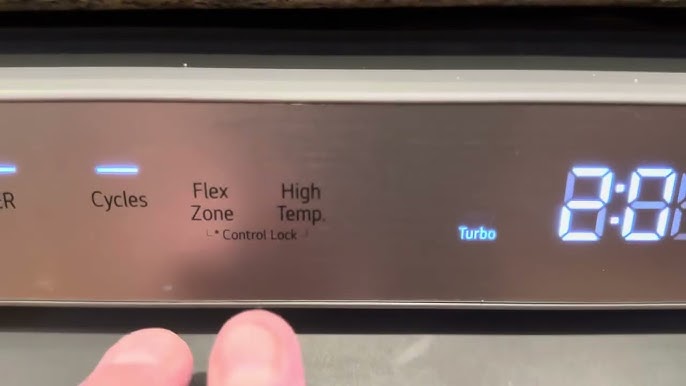
- Dedicated Button: Some models have a button labeled “Child Lock,” “CL,” or a small lock symbol.
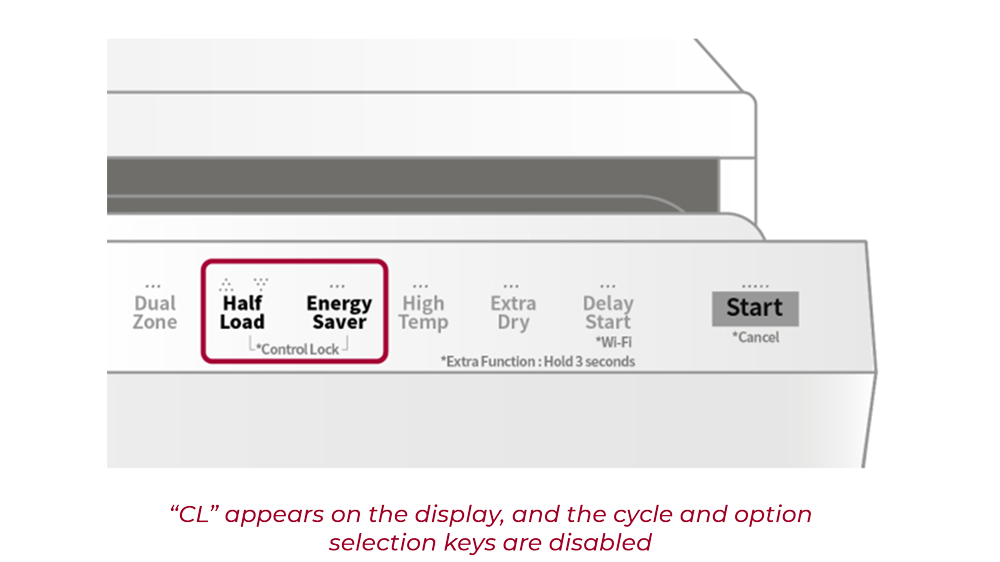
- Two-Button Combination: Many LG dishwashers require you to press and hold two buttons at once, such as “Delay Start” and “Start.”
- Control Panel Label: Look for small writing under or above the buttons. It often tells you which button to hold for Child Lock.
Tip: If you don’t know your model, open the dishwasher door and look for a model number sticker. Then check your user manual for Child Lock instructions.
Step 2: Deactivate The Child Lock
Once you’ve found the correct button(s), follow these steps:
- Press and Hold the Child Lock Button
- Press and hold the “Child Lock” button (or the two required buttons) for 3 to 5 seconds.
- Wait for the “CL” code to disappear from the display.
- Listen for a Beep or Watch for the Display
- The dishwasher should beep, and the display should return to normal.
- On most LG dishwashers, you’ll see the regular cycle options again.
- Test the Buttons
- Try pressing “Start” or another button to see if the panel responds.
- If the buttons work, the Child Lock is off.
Step 3: Restart Your Dishwasher
After removing Child Lock, it’s a good idea to restart your dishwasher:
- Turn the dishwasher off using the main power button.
- Wait 10 seconds.
- Turn it back on.
This reset helps clear any leftover codes or glitches.
Step 4: Start A New Wash Cycle
Now, set your dishwasher as normal. If the CL code does not return, you have successfully removed Child Lock.
Examples For Different Lg Dishwasher Models
LG dishwashers come in many types. Here’s how to remove CL code on popular models:
| Model Series | Child Lock Removal Method | Notes |
|---|---|---|
| LG LDF5545ST | Press & hold “Child Lock” button for 3 seconds | Button has a lock symbol |
| LG LDT7808BD | Press & hold “Dual Zone” + “Spray” for 3 seconds | Look for small label under buttons |
| LG LDF7774ST | Press & hold “Rinse” + “Spray” for 3 seconds | Both must be held together |
| Older LG models | Press & hold “Delay Start” for 3-5 seconds | Check manual for exact button |
If your dishwasher is different, check the manual or search online for your model number and “Child Lock. ”
What To Do If The Cl Code Won’t Clear
Sometimes, the CL code does not go away even after following the steps above. This can happen if:
- The buttons are stuck or dirty.
- There is a problem with the control panel.
- The dishwasher needs a power reset.
Here’s how to solve these issues:
1. Power Cycle The Dishwasher
Unplug your dishwasher from the power outlet. If the plug is hard to reach, turn off the circuit breaker for the dishwasher. Leave it off for 1 minute. Then reconnect the power and try the Child Lock removal steps again.
2. Clean The Control Panel
Sticky fingers, soap, or water can make buttons stick. Gently clean the control panel with a soft, damp cloth. Dry it well, then try again.
3. Check For Button Damage
Sometimes, a broken button can prevent Child Lock from turning off. Press each button and listen for a normal “click. ” If one button feels loose or does not click, it might need repair.
4. Reset The Control Panel
Some LG dishwashers have a reset function. To do this:
- Turn the dishwasher off.
- Press and hold the “Start” button for 5 seconds.
- Turn the dishwasher back on.
This can clear some control panel errors.
5. Contact Lg Support
If nothing works, the control board or panel may have a problem. Contact LG customer service or a qualified appliance repair technician for help.
How To Prevent Child Lock Issues In The Future
After fixing the CL code, you might want to avoid the same problem later. Here are practical tips:
1. Show Everyone How To Use It
Teach all adults in your home how to turn Child Lock on and off. This prevents confusion.
2. Keep The Manual Handy
Store your user manual in a safe place. If you lose it, download a PDF from the LG website.
3. Clean The Control Panel Regularly
Wipe the panel with a soft, dry cloth to avoid sticky buttons.
4. Label The Button
Use a small sticker or marker to highlight which button activates Child Lock.
5. Test The Feature Monthly
Try turning Child Lock on and off once a month. This helps you remember the steps.
Why You Might Want To Keep Child Lock On
While it can be annoying if you don’t know how to turn it off, Child Lock is a good safety feature:
- Prevents children from changing cycles or opening the door during washing.
- Stops pets or accidental bumps from starting the dishwasher.
- Keeps your wash settings safe if you have a busy kitchen.
If you have children or guests, you may want to use Child Lock often.
Common Myths About The Cl Code
Many people misunderstand the CL code. Here are some myths and facts:
1. Myth: Cl Code Means The Dishwasher Is Broken
Fact: It’s just a safety feature, not an error.
2. Myth: You Need A Technician To Fix It
Fact: Most people can turn off Child Lock themselves in seconds.
3. Myth: Removing Power Will Always Clear Cl
Fact: On some models, Child Lock stays on after a power loss. You must use the correct button combination.
How The Cl Code Differs From Other Error Codes
LG dishwashers show many codes. “CL” is not like most error codes. Here’s a comparison:
| Code | Meaning | Action Needed |
|---|---|---|
| CL | Child Lock is ON | Turn off Child Lock |
| OE | Drain error | Check drain hose |
| LE | Motor error | Call for service |
| HE | Heater error | Check heating element |
| FE | Water overflow | Check water valve |
CL is not a technical problem. Other codes like OE or LE mean you need to check or repair something.
Credit: www.youtube.com
Troubleshooting: Why Cl Code Might Return
Sometimes, you turn off Child Lock, but it comes back. Here’s why:
1. Power Fluctuations
If your home has power surges or outages, the dishwasher may reset and reactivate Child Lock. Use a surge protector if possible.
2. Accidentally Pressing Buttons
It’s easy to press the wrong button when cleaning or reaching for something. Double-check which buttons you touch.
3. Faulty Control Board
Rarely, a malfunction in the control board can cause Child Lock to activate without reason. If this happens often, you may need professional repair.
Comparing Child Lock Features In Lg And Other Brands
Wondering if LG is unique? Here’s how Child Lock works on different dishwasher brands:
| Brand | Child Lock Activation | Removal Method |
|---|---|---|
| LG | Button or button combo, 3-5 sec hold | Same as activation |
| Samsung | Press and hold “Child Lock” for 3 sec | Press and hold again |
| Bosch | Press “<” and “>” together for 3 sec | Repeat same combo |
| Whirlpool | Press and hold “Heated Dry” 3 sec | Press and hold again |
Most brands use a similar method, but always check your user manual for details.
Non-obvious Insights To Save Time And Stress
- Many people forget to press BOTH buttons at the same time. On some LG models, you must hold two buttons together, not one after the other. If you do not, the CL code will not clear.
- The Child Lock sometimes resets after a power outage. If you live in an area with frequent outages, you may see the CL code more often—even if you didn’t turn it on.
- Some models keep Child Lock on even when unplugged. This is because of a memory chip inside. You must use the correct button combo to turn it off, even after a reset.
When Should You Call A Professional?
Usually, removing the CL code is easy. But call a professional if:
- The display is frozen and doesn’t respond to any buttons.
- The control panel is cracked or damaged.
- You hear beeping or see flashing lights with the CL code.
- The code returns immediately after you clear it.
A repair technician can check the control board, wiring, or replace broken parts if needed.
Credit: sparkservice.ca
Helpful Resources For Lg Dishwasher Owners
If you lose your manual or need more help, use these resources:
- LG’s official support page: Find manuals, troubleshooting guides, and live chat.
- YouTube: Many appliance repair channels show step-by-step Child Lock removal for LG dishwashers.
- Appliance forums: Other owners share tips and tricks for your exact model.
For more details, see the LG Support Center.
Frequently Asked Questions
How Do I Know If My Lg Dishwasher Has Child Lock?
Most newer LG dishwashers have a Child Lock feature. You’ll see “CL” on the display when it’s active. Check your user manual or look for a button with a lock symbol to be sure.
Does Unplugging The Dishwasher Remove The Cl Code?
Usually, unplugging the dishwasher does not remove the CL code. You must press and hold the correct button or buttons to turn off Child Lock, even after a power reset.
What Do I Do If The Child Lock Button Is Stuck?
If the Child Lock button is stuck, gently clean around it with a soft cloth. If it still doesn’t work, the button or control panel may need repair. Contact LG support for help.
Can The Cl Code Mean A Different Problem?
On LG dishwashers, “CL” only means Child Lock is on. It does not mean a technical fault or error. If you see other codes with CL, check your manual for more details.
Is It Safe To Use The Dishwasher With Cl Code Showing?
No, the dishwasher will not run with the CL code active. You must turn off Child Lock before starting a new wash cycle.
Removing the CL code on an LG dishwasher takes only a few steps when you know what to do. With the right information, you can fix this problem in minutes and keep your kitchen running smoothly. If you ever forget the steps, check your manual, visit LG’s support site, or refer back to this guide. Remember, the CL code is there to keep your family safe—not to frustrate you!