
Resetting your Maytag refrigerator control panel can solve many common problems, like unexpected error codes, cooling issues, or a touchscreen that stops responding. For many homeowners, this process sounds complicated, but with a little guidance, it becomes simple and safe. Understanding the right method is important because a wrong reset can create new problems or erase important settings. This guide will walk you through every step, explain why resets work, and cover what to do if things don’t go as planned. You’ll learn not just the “how,” but the “why”—and how to avoid mistakes that beginners often make.
What Is The Maytag Refrigerator Control Panel?
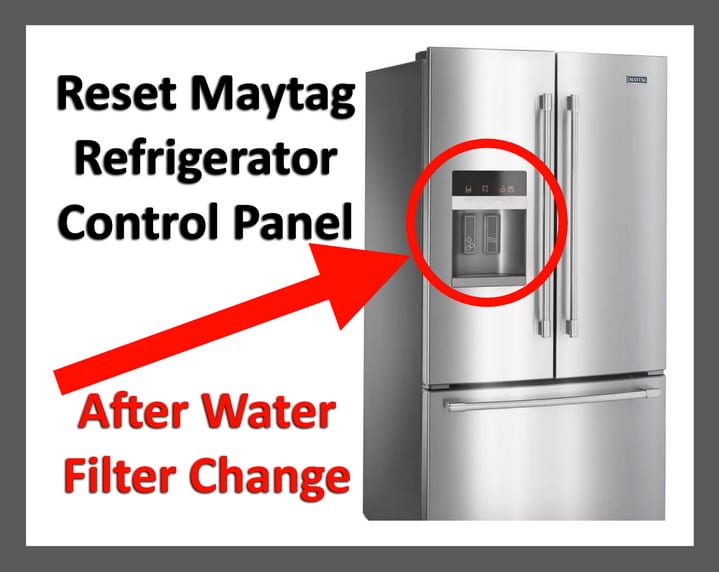
The control panel is the “brain” of your Maytag refrigerator. It’s usually located on the front of the fridge, above the water and ice dispenser or inside the fridge, depending on your model. This panel lets you:
- Adjust the temperature
- Turn on/off ice and water dispensers
- Change modes like vacation or energy saver
- View alert messages or error codes
Modern Maytag refrigerators use electronic control panels because they offer more precise settings and helpful features. But, like all electronics, sometimes they freeze, glitch, or display errors.
Common Reasons To Reset Your Control Panel
Most people only think about resetting their Maytag refrigerator when something goes wrong. Here are the main reasons:
- Unresponsive Buttons: Sometimes, the touch buttons stop working.
- Error Codes: The display shows a code like “PO” or “E1,” which means there’s a problem.
- Temperature Issues: The fridge or freezer is not cooling as expected.
- Power Outages: After a blackout, the panel doesn’t return to normal.
- Water/Ice Problems: The dispenser controls don’t work, or the display is blank.
Resetting the control panel can often clear minor software errors and return the fridge to normal.
Before You Reset: Safety And Preparation
Resetting a refrigerator is usually safe, but it’s smart to prepare:
- Read the manual: Each model is different. If you have the manual, check for model-specific steps.
- Protect your food: Short resets take a few minutes, but if you unplug the fridge, don’t leave the doors open.
- Unplug carefully: Always grip the plug (not the cord) to avoid damage.
- Wait before plugging back in: Wait at least 5 minutes before restoring power. This protects the compressor.
Tip: Some Maytag fridges have memory features. After a reset, you may need to re-enter favorite settings.
Identifying Your Maytag Refrigerator Model
Not all Maytag fridges use the same reset process. First, find your model number. Here’s how:
- Open the fridge door.
- Look for a sticker on the side wall, ceiling, or behind the crisper drawers.
- The model number starts with MFI, MFW, MSD, or similar letters.
Once you have your model, look up the specific instructions in the manual or on the Maytag website.
Credit: removeandreplace.com
Main Methods To Reset The Maytag Refrigerator Control Panel
Most Maytag refrigerators can be reset by one of these methods. Let’s look at each in detail.
Power Cycle Reset (full Reset)
This is the most common and works for almost all models.
Steps:
- Unplug the refrigerator from the wall outlet.
- Wait for 5 to 10 minutes. This lets all electrical charges drain and the system reset.
- Plug the refrigerator back in.
- Wait for the control panel to power up—usually 1-2 minutes.
- If needed, re-enter your temperature or custom settings.
Why It Works: This method cuts power to the motherboard, which clears most minor glitches and software errors.
Beginner Insight: Don’t do a power cycle reset if your fridge has a “Sabbath” or “Showroom” mode enabled. These modes can block normal startup—check your manual.
Control Panel Button Reset
Some Maytag models have a special reset button or a button combination.
Typical Steps:
- Locate the “Power Cool” and “Power Freeze” buttons (names may vary).
- Press and hold both buttons for 8-10 seconds.
- Release the buttons when the control panel beeps or flashes.
- The panel should reset and return to normal.
If your model uses different buttons, check your manual.
Beginner Insight: Many people press the buttons too quickly. Hold them firmly—short taps will not trigger a reset.
Circuit Breaker Reset
If the outlet is hard to reach, you can use your home’s circuit breaker:
- Find the breaker panel.
- Flip the breaker that controls the kitchen or refrigerator outlet to OFF.
- Wait 5 minutes.
- Turn it back ON.
- Check the control panel for normal operation.
Caution: This resets all devices on that circuit, not just your fridge.
Touchscreen Or Display Reset
For models with a touchscreen display:
- Open the fridge door.
- Press and hold the “Options” or “Settings” button.
- Hold for 10 seconds until the screen turns off, then on again.
- If the screen stays blank, unplug the fridge and restart.
Pro Tip: Some touchscreens have a small recessed button labeled “reset.” Use a toothpick to press it gently.
Step-by-step: Resetting Specific Maytag Models
Maytag has several popular models. Here’s how to reset the control panel on the most common ones.
Mfi2568aes (french Door)
- Unplug for 10 minutes.
- Plug back in.
- Press and hold “Lighting” and “Energy Saver” at the same time for 5 seconds.
- The control panel will beep and restart.
Msd2576vew (side-by-side)
- Open the fridge.
- Press and hold “Lock” and “Reset Filter” for 3 seconds.
- The display will flash and reset.
Mfw2055frz (bottom Freezer)
- Unplug for 5 minutes.
- Plug in and wait for the panel to light up.
- Press “Alarm Off” to clear any alerts.
Mfi2269frz (french Door, Touch Controls)
- Press and hold “Options” for 10 seconds.
- Wait for the display to turn off and back on.
- Re-enter your preferred settings.
What To Do If The Reset Doesn’t Work
Sometimes, a reset doesn’t solve the problem. Here’s what to check next:
- Power Supply: Make sure the outlet works. Plug in another device to test.
- Control Lock: Some panels have a lock feature. Hold “Lock” for 3 seconds to unlock.
- Error Code Remains: If the code stays after reset, check the manual for solutions.
- Software Update: For smart fridges, check if a software update is available.
If you still have problems, it may be a hardware issue, like a faulty control board. At this point, contact Maytag support or a certified technician.
How Resetting Affects Your Refrigerator
Resetting clears temporary glitches, but it also:
- Erases custom temperature settings
- Can reset clock/timer functions
- May disconnect from Wi-Fi (on smart models)
- Clears error codes (but not physical problems)
Important: A reset does not fix hardware problems—if there’s a broken part, the error will return.
Credit: www.maytag.com
Troubleshooting Common Issues After Reset
After a reset, you might notice:
1. Display Is Blank
- Check if the fridge is plugged in
- Flip the circuit breaker OFF, then ON
- Hold “Options” or “Settings” for 10 seconds
2. Error Code Reappears
- This means the real problem is not fixed
- Look up the code in your manual
- Call a technician if the code is not listed
3. Beeping Or Flashing Lights
- Door is open or not sealed
- Control panel thinks there’s a problem—double check all doors and settings
4. Water/ice Dispenser Not Working
- Reset again using the button method
- Replace the water filter if it’s old
- Make sure water supply is ON
Comparing Reset Methods
Below is a comparison of the most common reset methods for Maytag refrigerators:
| Reset Method | Ease of Use | Time Needed | Best For |
|---|---|---|---|
| Power Cycle Reset | Very Easy | 10-15 min | General glitches, most models |
| Button Combination | Easy | 2-3 min | Panel freezes, no display |
| Breaker Reset | Moderate | 10-15 min | Hard-to-reach plugs |
| Touchscreen Reset | Easy | 2-5 min | Smart models, display issues |
When To Call A Professional
You should call a licensed technician if:
- The control panel stays blank after reset
- Error codes return immediately
- Fridge is not cooling even after reset
- There’s a burning smell or sparks
Beginner Mistake: Trying to open or repair the control panel without proper training can void your warranty and cause injury.
Tip: Always check if your fridge is under warranty before paying for service.
Resetting Vs. Replacing The Control Board
Sometimes, a reset is not enough. Here’s a quick comparison:
| Action | What It Does | When Needed | Cost |
|---|---|---|---|
| Reset | Clears software errors and glitches | Panel freeze, minor errors | Free |
| Replace Control Board | Fixes hardware failure | Panel unresponsive after reset | $150–$400 (parts & labor) |
Pro Tip: If your fridge is more than 10 years old, consider the cost of repairs vs. a new unit.
Preventing Future Control Panel Problems
You can avoid many control panel problems with these habits:
- Don’t overload outlets: Plug the fridge into its own outlet. Avoid using extension cords.
- Keep the panel clean: Wipe with a soft, dry cloth. Avoid water near buttons.
- Update firmware: For smart models, check for updates twice a year.
- Change filters on time: A clogged filter can cause error codes.
- Check door seals: Poor seals can lead to cooling errors.
- Avoid power surges: Use a surge protector if your area has unstable power.
The Most Overlooked Reset Mistakes
Many first-timers make these errors:
- Forgetting to wait: Not waiting long enough after unplugging can prevent a full reset.
- Ignoring error codes: Resetting without understanding the code can hide bigger problems.
- Not checking the manual: Each Maytag model is a little different.
- Resetting too often: Repeated resets can stress the electronics.
Insider Advice: If you have frequent panel issues, ask your electrician to check your home wiring. Small voltage drops or surges can cause strange fridge behavior.
Smart Refrigerator Features And Resets
Some Maytag models offer Wi-Fi, smart diagnostics, or app controls. Here’s what you should know:
- App Connection: After a reset, you may need to reconnect your fridge to your phone or Wi-Fi.
- Software Updates: Some errors require a software update, not a hardware reset.
- Cloud Settings: If you use custom modes via app, these might need to be set up again after a reset.
Tip: Download the official Maytag app for help with smart features.
Resetting After Power Outages
A power surge or blackout can confuse the control panel.
- After a blackout: Wait 5 minutes before resetting. This protects the compressor.
- If the panel blinks: Do a button reset or power cycle.
- If lights are dim: Your home wiring may need attention.
Beginner Insight: Don’t rush to reset right after a power cut. Give your fridge time to recover.
Understanding Error Codes
Maytag refrigerators use error codes to help diagnose problems. Here are some common ones:
- PO: Power outage detected
- E1/E2: Sensor errors
- F1: Control board fault
- SY EF: Fan error
After a reset, if these codes reappear, check your manual or contact support.
Resource: To understand error codes deeply, visit the official Maytag troubleshooting page.
Saving Your Food During A Reset
Resets are usually quick, but here’s how to keep food safe:
- Close the fridge and freezer doors during the process.
- If a reset takes longer (repair work), use a cooler for sensitive items.
- Avoid repeated resets in a short time—this can raise the internal temperature.
Fact: Modern fridges keep food cold for 4 hours (fridge) and 48 hours (freezer) if unopened.
How Often Should You Reset The Control Panel?
You should only reset when:
- The panel stops working
- You see an error code
- After a power outage
Do not reset as a routine “maintenance” step. If you need to reset often, there’s a deeper issue.
Maytag Refrigerator Reset Myths
Let’s clear up some common myths:
- Myth: Resetting fixes all problems. (Reality: Only software errors and minor glitches.)
- Myth: You must unplug for 24 hours. (Reality: 5–10 minutes is enough.)
- Myth: All models use the same reset. (Reality: Models vary—always check your manual.)
- Myth: Resetting deletes all data. (Reality: Some settings may return to default, but not all.)
Special Cases: Resetting Water Filter Lights
Many Maytag refrigerators have a water filter reminder light. To reset it:
- Find the “Reset Filter” button.
- Press and hold for 3–5 seconds.
- The light should go off.
Beginner Insight: The filter light is separate from the main control panel reset.
What To Do If The Panel Resets By Itself
If your control panel resets or turns off/on by itself:
- Check for loose plugs or outlets
- Inspect for power surges
- Call a technician if the problem repeats
This can be a sign of a failing control board.
Advanced: Diagnostic Mode
Some Maytag models have a hidden “diagnostic mode” for advanced troubleshooting:
- Press and hold “Fridge” and “Energy Saver” for 8 seconds.
- The panel will enter test mode—use the manual to read codes.
Caution: Only use this if you understand the risks. Exiting diagnostic mode incorrectly can lock the panel.
When A Reset Is Not Enough
Sometimes, a reset is just a first step. If you have:
- Flickering display or random beeps
- Changes in cooling after reset
- Frequent power interruptions
…it’s time for a professional diagnosis. A reset is a tool—not a cure-all.
Cost Of Control Panel Repairs
Here’s a look at typical repair costs for Maytag refrigerator control panels:
| Repair Type | Estimated Cost | Time to Repair |
|---|---|---|
| Basic Reset | Free | 5-15 minutes |
| Control Board Replacement | $150–$400 | 1–2 hours |
| Wiring/Outlet Repair | $50–$200 | 1 hour |
If your fridge is under warranty, some or all of these costs may be covered.
How To Find A Reliable Repair Service
- Check reviews: Look for certified Maytag technicians with good ratings.
- Ask for warranty: Make sure repairs include a warranty on parts and labor.
- Get a quote: Ask for a clear price before work begins.
Tip: Use the service locator on the official Maytag website to find trusted repair centers.

Credit: www.youtube.com
Frequently Asked Questions
How Do I Know If My Maytag Refrigerator Needs A Reset?
If your control panel is unresponsive, shows error codes, or the temperature is not as set, a reset is a good first step. After power outages or electrical surges, a reset may also be necessary. If regular use returns to normal after a reset, no further action is needed.
Will Resetting My Maytag Fridge Erase All Custom Settings?
Some custom settings, like temperature or alarm preferences, may return to default after a reset. However, most fridges keep basic settings. Check your manual for details about your model. If you use smart features or Wi-Fi, you may need to reconnect after a reset.
Is It Safe To Reset My Refrigerator Control Panel Myself?
Yes, resetting the control panel is safe if you follow the steps. Always unplug carefully and avoid using sharp tools near the panel. If you see sparks, burning smells, or the display stays blank, call a professional. Never open the control board without training.
What Should I Do If The Reset Doesn’t Fix My Issue?
If a reset does not work, check the power supply, look for error codes, and try the recommended troubleshooting steps. If the panel remains unresponsive or error codes return, contact Maytag support or a licensed technician to check for hardware faults.
How Often Should I Reset The Control Panel?
You should only reset the control panel when there is a clear problem, like freezing, error codes, or after a power issue. Do not reset as routine maintenance. Frequent resets may indicate a deeper problem that needs professional help.
Resetting your Maytag refrigerator control panel can often solve simple issues and get your fridge working again. With this guide, you’re ready to handle the process safely and confidently, keeping your kitchen running smoothly. If you ever feel unsure, don’t hesitate to ask for expert help—your food (and peace of mind) are worth it.