
If you own a Samsung refrigerator with an ice maker, you know how much easier it makes life, especially during hot days or when you have guests. But sometimes, turning on the ice maker can be confusing. Different Samsung models have their own ways to activate the ice maker, and the settings can be hidden in menus or behind panels.
If you’re struggling with this, don’t worry. This article will guide you, step by step, on how to turn on a Samsung ice maker, no matter your refrigerator model. You’ll also learn how to troubleshoot common problems, understand important features, and avoid mistakes that many new users make.
Let’s make sure you never run out of ice again.
Understanding Samsung Ice Makers
Before you start, it’s important to understand the type of ice maker your Samsung refrigerator uses. Samsung offers several styles, and each may have a different control system.
- Automatic in-door ice makers: These are built into the refrigerator door and dispense ice through the front panel.
- Manual tray ice makers: Often found in basic models, these require you to fill a tray with water and turn a knob to release ice.
- Dual ice makers: Some high-end models have two makers—one in the fridge and one in the freezer.
Knowing your model will help you follow the right steps. The user manual lists the model type, but you can also check the control panel and inside the ice compartment for clues.
Locating The Ice Maker And Controls
Most Samsung refrigerators place the ice maker in the upper left of the freezer or inside the refrigerator door. For French door models, look inside the left door. Side-by-side models may have it on the freezer side. The control to turn on the ice maker can be a physical switch, a button, or a digital setting on the display panel.
Common Control Types
- Physical ON/OFF switch: A small lever or switch near the ice maker itself.
- Touch panel button: Found on the front display of newer models.
- Menu setting: You may need to navigate through digital menus to find the ice maker setting.
Check your refrigerator’s manual if you’re unsure, or look for labels near the ice maker.
Preparing Your Refrigerator
Before turning on the ice maker, follow these important steps to ensure everything works smoothly:
- Connect to Water Supply: Samsung ice makers need a steady water connection. Make sure the water line is properly installed and the valve is open.
- Flush the Water System: Run water through the dispenser for at least 5 minutes. This removes air and any impurities.
- Level the Refrigerator: If your fridge isn’t level, ice may not eject correctly. Adjust the leveling legs until the unit is stable.
- Allow Cooling Time: After plugging in a new refrigerator, wait at least 6-12 hours before turning on the ice maker. This lets the freezer reach the right temperature.
Many people skip these steps, leading to poor ice production or strange-tasting ice. Don’t rush—preparation makes a big difference.
How To Turn On Samsung Ice Maker: Step-by-step Guide
Now let’s get practical. The steps below cover the most common Samsung models. If you don’t see your specific model, you’ll still find advice that applies to most Samsung refrigerators.
1. For French Door Models With In-door Ice Maker
- Open the left refrigerator door.
- Locate the ice maker ON/OFF button on the side or bottom of the ice maker housing.
- Press the ON/OFF button. The button might be labeled “Ice On/Off” or just “Power.”
- If your model uses a lever, push the lever up to turn ON, or down to turn OFF.
- Check for indicator lights. Most models will light up or show a symbol on the display when the ice maker is active.
2. For Side-by-side Models
- Open the freezer compartment.
- Look for the ice maker power switch. It’s usually a simple switch or a sliding bar.
- Move the switch to the ON position.
- If there’s a “Test” button, press and hold it for 3 seconds to reset the ice maker.
- Close the freezer and check the display panel—some models show an ice symbol when the maker is on.
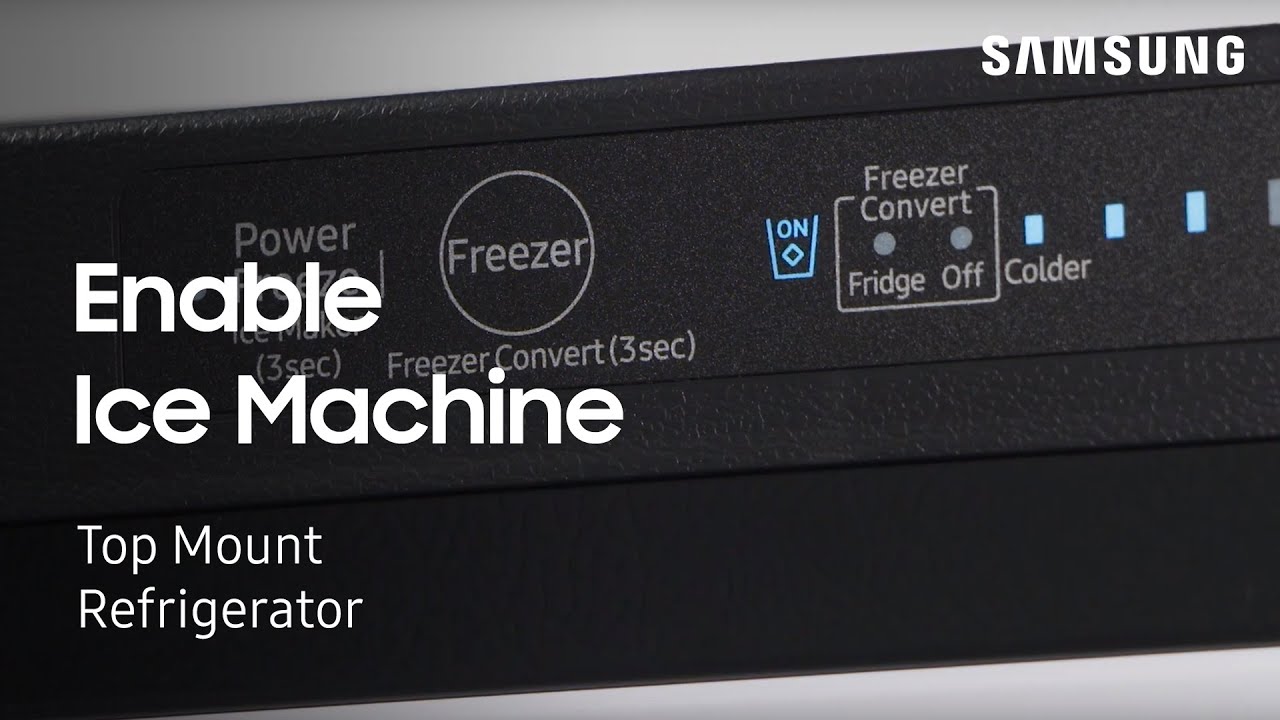
3. For Models With Digital Touch Display
- On the front panel, press the Menu or Settings button.
- Use the arrow or “+” and “-” buttons to scroll to the Ice Maker or Ice On/Off setting.
- Select ON to activate the ice maker.
- Some models require you to press and hold for 3 seconds to confirm.
- Wait for the display to confirm activation.
4. For Manual Tray Ice Makers
- Pull out the ice tray.
- Fill it with clean, filtered water up to the fill line.
- Place the tray back into the freezer.
- After ice forms, turn the knob or twist the tray to release cubes into the bin.
Manual models don’t have an ON/OFF switch, so ice is made whenever you fill the tray.
5. For Dual Ice Maker Models
- Activate each ice maker separately using their respective switches or panel controls.
- For in-door, follow the French door instructions above.
- For the freezer compartment, use the side-by-side model steps.
- Make sure both water lines are connected and the bins are empty.
Dual models offer more ice, but both makers must be turned on separately.
How Long Does It Take To Make Ice?
After turning on the ice maker, you may wonder how long it takes to get the first batch of ice. Here’s what to expect:
- First ice batch: 6 to 12 hours (after initial activation)
- Regular production: 100-150 cubes per 24 hours (varies by model)
- Bin capacity: 1.5 to 3 pounds of ice (check your manual)
It’s normal for the first few batches to be small or irregular. Discard the first 2-3 batches to remove any impurities.
Troubleshooting Common Issues
Sometimes the ice maker doesn’t start making ice, or the ice quality is poor. Here’s how to solve the most frequent problems.
Ice Maker Not Working
- Check the water supply: Make sure the valve is open and the line isn’t kinked.
- Freezer temperature: It should be set to -2°C (28°F) or lower for proper ice production.
- Ice maker switch: Double-check that it’s ON.
- Door seal: A loose seal can keep the freezer from getting cold enough.
- Reset the ice maker: Many models have a small reset button—press and hold it for 10 seconds.
Ice Tastes Bad Or Smells
- Flush the system: Run water for 5 minutes and discard the first few batches of ice.
- Replace the water filter: Old filters can cause taste problems. Change it every 6 months.
- Clean the ice bin: Wash with warm, soapy water and dry thoroughly.
- Check for old food: Strong-smelling items in the freezer can transfer odors to the ice.
Ice Maker Leaks Water
- Level the refrigerator: If it’s tilted, water can spill from the tray.
- Check the fill tube: Make sure it’s not clogged or frozen.
- Inspect the water line: Look for leaks or loose connections.
Ice Maker Is Noisy
- Normal sounds: Popping or clicking is normal as ice ejects.
- Loud knocking: Could mean ice is stuck or the motor is jammed.
- Clean ice buildup: Remove ice that’s stuck together in the bin.
Most problems have simple solutions. For persistent issues, check the user manual or contact Samsung support.
Ice Maker Reset: When And How
Sometimes, resetting the ice maker solves stubborn issues. Here’s how:
- Locate the reset button—usually on the side or bottom of the ice maker.
- Press and hold for 10 seconds. You may hear a chime or the ice tray will rotate.
- Wait 24 hours for ice production to return to normal.
Resetting is helpful if you’ve just changed the filter, moved the fridge, or after a long power outage.
Cleaning And Maintenance Tips
A well-maintained ice maker lasts longer and makes better ice. Here are essential tips:
- Clean the ice bin monthly: Remove, wash with warm water, and dry completely.
- Change the water filter: Every 6 months, or sooner if ice tastes strange.
- Defrost the freezer: If you see frost buildup, turn off the fridge and let it defrost.
- Check for leaks: Inspect the water line and connections regularly.
- Wipe control panels: Use a damp cloth—don’t spray cleaners directly.
Neglecting maintenance can lead to mold, strange smells, or even ice maker breakdowns.
Comparing Samsung Ice Maker Types
Different Samsung models offer unique ice making features. Here’s a quick comparison of the most common types:
| Ice Maker Type | Location | Activation Method | Ice Output (per 24 hrs) |
|---|---|---|---|
| In-Door Automatic | Refrigerator door | Button/Switch | 120-150 cubes |
| Freezer Compartment | Top/Side Freezer | Switch/Lever | 100-130 cubes |
| Manual Tray | Freezer shelf | Manual fill | Up to 70 cubes |
| Dual Ice Maker | Door + Freezer | Separate controls | 180-220 cubes |
This comparison can help you understand your model’s capabilities and choose the right settings.
Energy Usage And Efficiency
Running an ice maker does use extra electricity and water. But Samsung models are designed to be efficient. Here’s what you should know:
- Typical energy use: 60–100 kWh per year for the ice maker (varies by model)
- Water use: About 5 gallons per 100 cubes (including some waste)
- Tips for efficiency:
- Turn off ice maker if not needed for long periods.
- Keep freezer full (helps maintain temperature).
- Use filtered water to prevent mineral buildup.
If you’re concerned about energy bills, check your refrigerator’s Energy Star rating.
Credit: www.youtube.com
Understanding The Control Panel
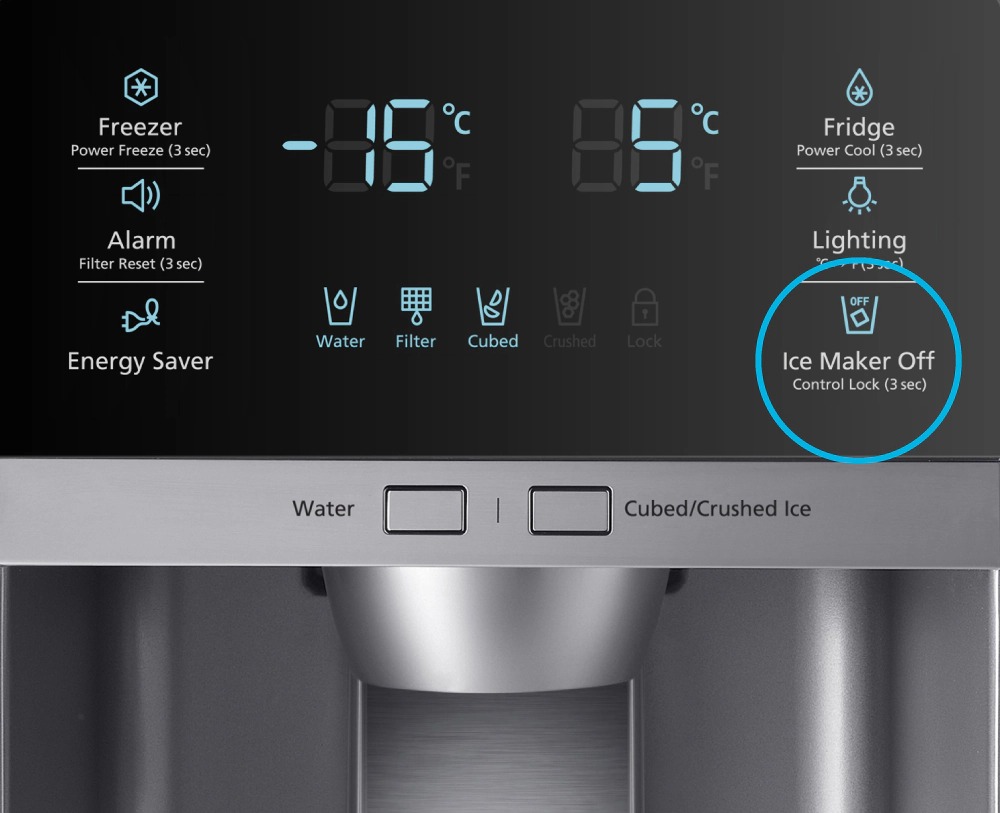
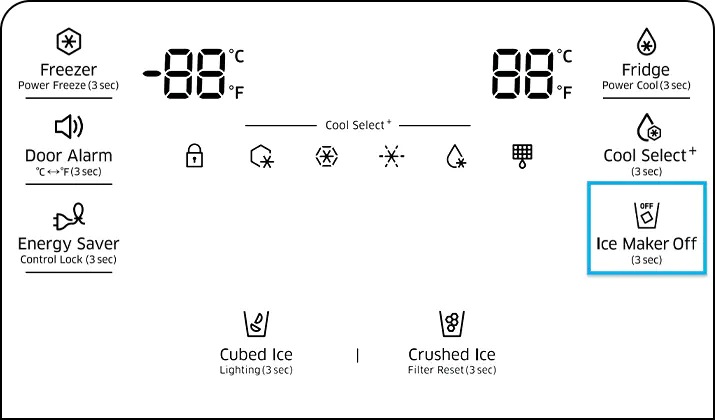
Many Samsung refrigerators have digital panels with several ice-related settings. Here’s a quick reference:
| Button/Setting | Function | When to Use |
|---|---|---|
| Ice Type | Choose cubed or crushed ice | Change ice style for drinks |
| Ice Off | Turns ice maker off | Vacation or long absences |
| Ice Maker Reset | Resets ice making process | After filter change or issues |
| Child Lock | Disables panel buttons | Keep settings safe from kids |
Familiarize yourself with these controls to get the most from your ice maker.
Essential Safety Tips
While using your Samsung ice maker is mostly safe, keep these tips in mind:
- Never use hot water in the ice maker. It can damage components.
- Don’t force the ice bin in or out. Use the handle and avoid tilting.
- Keep hands clear when the ice maker is running. Moving parts can pinch fingers.
- Don’t add foreign objects to the bin—only ice should go inside.
- If you hear unusual sounds or see water pooling, unplug the fridge and check for issues.
Ignoring these tips can result in damage or injury. Always follow the manufacturer’s safety advice.
Common Mistakes To Avoid
Many people make simple errors with their Samsung ice makers. Avoid these to keep things running smoothly:
- Forgetting to connect the water line before turning on the ice maker.
- Not waiting long enough after plugging in a new fridge—the freezer must be cold before ice forms.
- Overfilling the ice bin—this can jam the ejector and stop production.
- Using unfiltered tap water—minerals can build up and damage the unit.
- Turning the ice maker on and off repeatedly—this confuses the cycle and can damage the motor.
Learning from these mistakes can save you time, money, and frustration.
When To Call For Service
Most ice maker issues are easy to fix, but some require professional help:
- No ice after 24 hours and all settings are correct.
- Water leaks continue after tightening connections.
- Strange noises that don’t stop after resetting.
- Error codes on the display panel.
Samsung’s official support site offers guides and contact information. If you’re unsure, it’s safer to get expert help.
Credit: www.samsung.com
Extra Features On Some Samsung Ice Makers
High-end Samsung refrigerators include advanced features:
- Ice Max: Extra-large bins for parties or big families.
- AutoFill Pitcher: Automatically fills a pitcher with ice water.
- SmartThings compatibility: Use your phone to monitor ice production or get alerts.
- Dual ice types: Some models make both cubed and nugget ice.
If your model has these, check your manual for special activation steps. They can make your fridge even more useful.
Why Is My Ice Maker Slow Or Small?
Sometimes, the ice maker produces less ice than expected. Here’s why:
- Room temperature: Hot kitchens make it harder to freeze water.
- Dirty water filter: Reduces water flow.
- Low water pressure: Check your home’s water supply.
- Frequent door openings: Letting warm air in slows production.
A simple fix—like closing the door quickly or replacing the filter—often solves the problem.
Real-world Example: Turning On The Ice Maker For The First Time
Imagine you just bought a Samsung French door refrigerator. After installing and leveling the fridge, you attach the water supply and plug it in. You open the left door, find the ice maker’s ON/OFF button, and press ON. You wait 8 hours, then check the ice bin—there are a few cubes. You discard the first batch and wait overnight. By the next morning, the bin is filling up, and your drinks are cold. This process sounds simple, but skipping steps—like flushing the water or waiting for the freezer to chill—would have led to poor results or no ice at all.
Upgrading Or Replacing Your Ice Maker
If your ice maker is old or broken, you can replace it:
- Buy a compatible unit: Check your model number.
- Turn off the refrigerator and unplug it.
- Disconnect the water line and remove screws holding the ice maker.
- Install the new unit, reconnect water, and secure with screws.
- Plug in and turn on following the steps above.
If you’re not comfortable, hire a technician. Replacing an ice maker is usually cheaper than buying a whole new fridge.
Credit: www.samsung.com
Where To Find More Help
For detailed guides and troubleshooting, visit Samsung Official Support. You’ll find model-specific manuals, video tutorials, and live chat support.
Frequently Asked Questions
Why Is My Samsung Ice Maker Not Making Ice After Turning It On?
This usually happens if the water line isn’t connected, the freezer isn’t cold enough, or the ice maker wasn’t reset after a filter change. Check that the water supply is open, the freezer is set below -2°C (28°F), and try pressing the reset button.
How Do I Reset My Samsung Ice Maker?
Find the small reset button on the side or bottom of the ice maker. Press and hold for 10 seconds. You may hear a chime or see the ice tray move. Wait 24 hours for normal ice production to resume.
Can I Turn Off My Samsung Ice Maker When Not In Use?
Yes. Use the Ice Off button or switch on your control panel or near the ice maker. It’s a good idea to turn it off when you’re away for a long time to save energy and prevent stale ice.
How Often Should I Clean My Ice Maker?
Clean the ice bin every month and wipe down the ice maker itself every 3-6 months. Replace the water filter every 6 months or sooner if you notice a bad taste or smell.
What Do I Do If My Ice Tastes Strange?
Flush the system by running water for several minutes and throwing away the first few ice batches. If the problem continues, replace the water filter and check for old food in the freezer that could transfer odors.
Turning on your Samsung ice maker doesn’t have to be a mystery. With the right steps, you’ll enjoy fresh ice every day, avoid common mistakes, and get the most from your refrigerator. Remember: a little preparation and regular maintenance make all the difference. If you run into trouble, Samsung’s support and community forums are always there to help. Cheers to endless cold drinks and smooth ice production!