
Many homes today have a GE microwave installed above the stove. These microwaves often come with a built-in vent fan. The purpose of this fan is to pull smoke, steam, and odors from your cooktop, making your kitchen more comfortable and clean. However, one common frustration is when the vent fan runs continuously or turns on automatically and refuses to turn off, even after you’re done cooking. If you’ve ever wondered how to turn off the vent fan on your GE microwave, you’re not alone. This guide offers step-by-step advice, troubleshooting tips, and expert insights to help you solve the problem quickly and safely.
Understanding how the vent system works is more than just finding the right button. Sometimes, the issue may be with the microwave settings, sensors, or even a hardware problem. A few simple steps can fix most cases, but in some situations, you may need to do a little more.
In this article, you’ll learn not only the basic process but also what to do if the standard methods don’t work, how to avoid common mistakes, and when to call for professional help. You’ll also get answers to questions most people miss, such as why the fan runs by itself and how to stop it permanently if needed.
Why Does The Vent Fan Turn On?
The vent fan in a GE microwave is designed for two main reasons. First, it helps remove heat, smoke, and steam from your cooking area. Second, it prevents the microwave from overheating by cooling its internal components. In some models, the fan turns on automatically when it senses too much heat, even if you did not press the fan button.
This automatic feature is useful, but it can confuse users. For example, if you boil water or fry food on your stove, the microwave’s sensors may trigger the fan. The fan may stay on until the sensors detect a safe temperature.
Understanding this helps you know why the fan sometimes runs for longer than you expect.
Basic Steps To Turn Off The Vent Fan
For most GE microwaves, turning off the vent fan is simple. Here’s how you can do it:
- Locate the control panel on your microwave. This is usually on the right side, near the door.
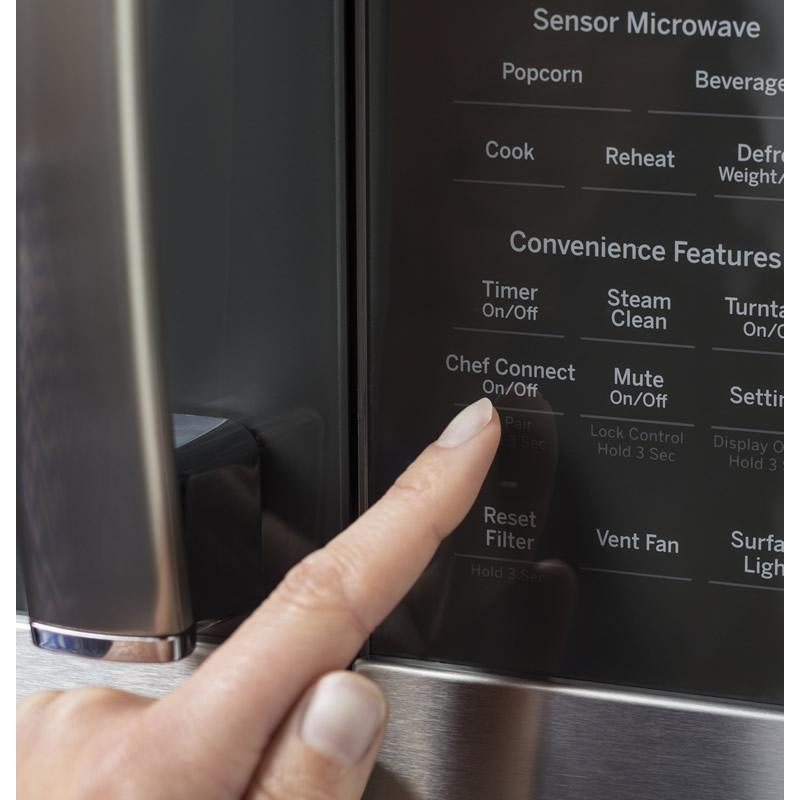
- Find the “Vent Fan” button. It may be labeled as “Fan,” “Vent,” or have a small fan icon.
- Press the button once. In most models, this will turn the fan off if it is running.
- Check the display. The control panel might show a fan icon when the vent is on. If the icon disappears, the fan is off.
Some models have different fan speed settings. You may need to press the button multiple times to cycle through “High,” “Low,” and “Off. ”
Example: Standard Ge Over-the-range Microwave
Suppose you have a popular model like the GE JVM3160. The vent fan button is on the lower right of the keypad. Pressing it once moves from “High” to “Low.” Pressing it a third time turns the fan off. The display will not show “FAN” when it is off.
Credit: aaappliancecenter.com
What If The Fan Won’t Turn Off?
Sometimes, pressing the vent button does not turn the fan off. This is a common issue and usually has a logical reason. Here are the main causes:
- Automatic Thermal Protection: If the microwave or cooktop is hot, the fan may run automatically to cool things down. It will turn off by itself once the temperature drops. This may take several minutes.
- Stuck Button or Control Panel Issue: The button might not work due to a stuck contact or malfunction.
- Sensor Malfunction: The heat sensor may be faulty and always think the area is too hot.
- Software Glitch: Like any electronic device, sometimes the microwave’s control board needs a reset.
Let’s go through solutions for each of these problems.
Waiting For Automatic Fan To Turn Off
If the fan is running automatically due to heat, you usually just need to wait. The fan will stop once the sensors detect a cooler temperature. Here are a few tips:
- Open windows or turn on a kitchen exhaust to help remove heat faster.
- Don’t unplug the microwave while the fan is running automatically. Interrupting power can cause other issues.
Most automatic vent fans turn off within 10-20 minutes after the stove cools down. If the fan runs longer than this, it could be a problem.
How To Reset Your Ge Microwave
A simple reset can solve many control problems or glitches. Here’s how to reset your GE microwave:
- Unplug the microwave from the wall outlet. If you can’t reach the plug, turn off the circuit breaker for that outlet.
- Wait at least 60 seconds. This allows the control board to fully reset.
- Plug the microwave back in or turn the breaker on.
- Check the fan. Try turning it on and off using the control panel.
This method fixes small software errors and is safe for most users.
Troubleshooting A Stuck Button
Sometimes the vent fan button gets stuck or stops working. Here’s how to check:
- Press the button firmly several times. Sometimes dirt or grease causes the contacts to stick.
- Clean the control panel with a slightly damp cloth. Don’t use too much water or harsh cleaners.
- If the button still doesn’t respond, you may need to contact a qualified technician. Internal repairs are not recommended for non-professionals.
A stuck button is one of the most common hardware problems with over-the-range microwaves.
Checking For Sensor Malfunction
The heat sensor inside your microwave might be faulty if the fan always turns on, even when the stove is cool. Here’s how to check:
- Let the microwave and cooktop cool completely (wait at least an hour).
- If the fan starts running as soon as you use the microwave or cooktop for a short time, or if it never stops, the sensor may need replacement.
- Contact GE support or a licensed repair service for sensor replacement.
Trying to replace sensors yourself is not safe unless you have proper training.
How The Automatic Fan Works
Understanding how the automatic vent fan works can save you time and stress. Most GE microwaves use a thermistor sensor to monitor temperature. When it detects high heat (usually above 150°F or 65°C), it turns the fan on. This feature is built for safety and cannot be disabled in most models.
Some users try to cover the sensor to “fool” it, but this is dangerous. Blocking the sensor can cause the microwave to overheat and fail.
How To Stop The Fan Permanently (advanced)
Some users want the fan disabled entirely. This is not recommended, but here’s what you should know:
- There is no safe way to turn off the automatic fan permanently using the control panel.
- Disabling the fan requires opening the microwave and modifying the wiring. This can void your warranty, cause electrical hazards, and is not advised.
- If the fan runs constantly and you must stop it, the only safe way is to unplug the microwave when not in use. This also turns off the clock and other features.
If you believe your fan is running due to a defect, have a professional repair technician check the unit.
Comparing Ge Microwave Models: Fan Control Features
Different GE microwaves have different vent fan controls. Here’s a comparison of common models and their fan features:
| Model | Fan Control | Automatic Fan | Reset Option |
|---|---|---|---|
| JVM3160 | Button (High/Low/Off) | Yes | Yes |
| PVM9005 | Touchpad (Multi-Speed) | Yes | Yes |
| JVM6175 | Button (High/Low/Off) | Yes | Yes |
| JES1145 | No Fan (Countertop) | No | Yes |
If you are shopping for a new microwave and want more control over the fan, consider models with a manual override. However, most over-the-range models use automatic sensors for safety.
Common Mistakes To Avoid
Many users make simple mistakes when trying to turn off the vent fan. Here are the most frequent ones:
- Pressing the wrong button: Some microwaves have several buttons with similar icons. Double-check for the correct “Fan” or “Vent” button.
- Unplugging the microwave too soon: This can disrupt the automatic cooling cycle and may damage internal components.
- Trying to force the fan off: Prying or forcing buttons can break the control panel.
- Ignoring the owner’s manual: Each model is a bit different. Look up your specific microwave’s manual online if you’re unsure.
- Blocking the vent: Placing objects in front of the vent can cause overheating or reduce air flow.
Avoiding these mistakes helps you solve the problem faster and keeps your microwave safe.
Practical Tips For Faster Cooling
If your fan is running automatically and you want it to stop sooner, try these tips:
- Remove hot pots or pans from the stove area under the microwave.
- Open a window or kitchen door to lower the temperature.
- Use an external range hood if you have one.
- Wipe away steam or spills from under the microwave to prevent heat build-up.
Cooling the area around the microwave speeds up the automatic fan’s shut-off.
When To Call For Professional Help
Some problems require an expert. Contact a technician if:
- The fan runs constantly, even when cool.
- The control panel does not respond to button presses.
- The microwave shows error codes or flashes lights.
- You smell burning or see smoke near the fan or control panel.
Professional repair is important for your safety. Do not open the microwave yourself unless you have proper training.
Ge Microwave Vent Fan: Key Features Explained
The vent fan in a GE microwave has several features:
- Multiple speeds: Most models let you choose between high and low settings, depending on how much air you need to move.
- Automatic operation: The fan turns on when sensors detect heat, protecting the microwave and your kitchen.
- Grease and charcoal filters: These help remove particles and odors from the air.
- Exhaust or recirculating options: Some microwaves vent air outside, while others filter and return it to the kitchen.
Understanding these features helps you use the fan correctly and troubleshoot problems.
How To Clean And Maintain The Vent Fan
Proper maintenance keeps your vent fan working well and can prevent some problems. Here’s how to care for it:
- Clean the grease filter every month. Most GE microwaves have a metal mesh filter under the vent. Wash it in warm, soapy water, rinse, and dry.
- Replace the charcoal filter every 6-12 months if your microwave uses one. This filter removes odors and is not washable.
- Wipe the vent area with a damp cloth regularly to remove grease and dust.
- Check the fan operation by running it on each speed for a few seconds. Listen for unusual noises.
Proper cleaning improves air flow and extends the life of your microwave.
Comparing Ventilation Types: Exhaust Vs. Recirculating
GE microwaves usually offer two venting methods:
| Type | How it Works | Maintenance | Best For |
|---|---|---|---|
| Exhaust (Ducted) | Vents air outside through ductwork | Clean grease filter; check ducts yearly | Homes with existing ductwork |
| Recirculating | Pulls air through filters and returns to kitchen | Clean grease filter; replace charcoal filter | Apartments or homes without ducts |
Knowing which type you have helps you maintain your microwave and solve fan problems.
What To Do If The Fan Is Loud Or Vibrating
A loud or vibrating fan can be annoying and may signal a problem. Try these steps:
- Check for loose screws on the vent cover or under the microwave.
- Clean the fan blades if you feel comfortable removing the vent cover (see your manual).
- Make sure the microwave is level. If it’s tilted, the fan can wobble.
- If noise continues, a fan motor may be worn out. Call a repair service for help.
Ignoring strange noises can lead to more serious damage over time.
Understanding Error Codes Related To The Fan
Some GE microwaves show error codes on the display if there is a problem with the fan or vent system. Common codes include:
- F3: Sensor error, often related to the temperature sensor.
- F4: Open or shorted sensor; the fan may run constantly.
- 8888: General control board issue.
If you see an error code, unplug the microwave for one minute. If the code returns, contact GE support for further help.
Safety Tips When Dealing With The Fan
Your safety matters when troubleshooting the microwave fan:
- Never open the microwave cabinet unless you are a trained technician. High voltage parts can be dangerous.
- Don’t bypass or disable safety sensors. They protect you and your kitchen.
- Always unplug the microwave before cleaning the fan or filters.
- Read the owner’s manual for model-specific advice.
Taking shortcuts can void your warranty and put you at risk.
Model-specific Instructions: Ge Microwave Fan Control
While most GE microwaves work in similar ways, some newer models include digital touchpads or smart features. For example:
- On the GE Profile Series, you may have a “My Settings” menu. You can adjust some fan behaviors, but you cannot turn off the automatic safety fan.
- On older models, the fan is controlled only by a physical button.
If you are not sure, look up your model number on the GE Appliances website or check the manual.

Credit: www.toplineac.com
Energy Use: How Much Power Does The Vent Fan Use?
The vent fan in a GE microwave is not a big power user compared to the microwave itself. Here’s a basic comparison:
| Feature | Power Use (Watts) | Typical Run Time | Estimated Cost (per year) |
|---|---|---|---|
| Microwave (cooking) | 900-1200 | 15 min/day | $25-40 |
| Vent Fan | 20-50 | 30 min/day | $2-5 |
Even if the fan runs for 30 minutes each day, it uses very little electricity. The main concern is noise, not energy cost.
How To Find Your Ge Microwave Model Number
If you need to look up instructions or order parts, you’ll need your microwave’s model number. Here’s where to find it:
- Open the microwave door. Look for a small sticker on the frame, usually near the bottom.
- The model number starts with letters like “JVM,” “PVM,” or “JES.”
- Write down the full number before searching online or calling for support.
Having the correct model number saves time and avoids mistakes.

Credit: www.youtube.com
When Replacement Is Better Than Repair
If your microwave is more than 10 years old or has repeated fan problems, consider replacing it. Newer models are more efficient, quieter, and have better controls. Here’s when replacement makes sense:
- Repair costs more than half the price of a new unit
- The fan or control board fails multiple times
- The microwave has other problems (door, light, keypad, etc.)
New models also have improved safety features and better venting options.
Where To Find More Help
If you still have questions or need more details, visit the official GE Appliances Support page. You’ll find manuals, troubleshooting guides, and contact information for customer service.
Frequently Asked Questions
Why Does My Ge Microwave Fan Run By Itself?
Most GE microwaves have an automatic fan that turns on when the temperature under the microwave gets too high. This protects the microwave and your kitchen from overheating. The fan will turn off by itself once things cool down. You cannot disable this safety feature.
How Do I Turn Off The Vent Fan If The Button Doesn’t Work?
If the vent fan button doesn’t respond, first try resetting the microwave by unplugging it for 60 seconds. If the button is still stuck, clean the control panel gently. If the fan runs constantly or the button remains unresponsive, call a professional technician.
Can I Disable The Automatic Fan Feature On My Ge Microwave?
No, there is no safe way to disable the automatic fan feature. This is built into the microwave for safety. Disabling it could cause overheating and void your warranty.
How Often Should I Clean Or Replace The Microwave Filters?
Clean the grease filter every month and replace the charcoal filter every 6-12 months. Regular filter maintenance keeps the fan working properly and reduces odors.
What Should I Do If The Fan Is Making A Loud Noise?
If the fan is loud or vibrating, check for loose screws, clean the filters, and make sure the microwave is level. If the noise continues, the fan motor may need repair. Contact a licensed technician for help.
Turning off the vent fan on your GE microwave is usually easy, but sometimes automatic safety features or hardware problems make it trickier. With the advice in this guide, you now know how to handle both simple and complex situations.
Remember, the fan is there to keep your kitchen safe. If things don’t work as they should, don’t risk your safety—get professional help. Taking care of your microwave and understanding how the vent system works will keep your kitchen comfortable for years to come.