
If you’ve just brought home a GE Profile oven, you probably want to get the most out of its features. This guide will help you use your oven confidently, even if you’re not a native English speaker. GE Profile ovens are popular for their smart technology, easy controls, and reliable performance. But these ovens have more options than a basic stove. Understanding these features can change the way you cook, bake, and clean. Whether you’re preparing a simple meal or experimenting with new recipes, this guide will show you how to use your GE Profile oven step by step, avoid common mistakes, and unlock its full potential.
Getting Started With Your Ge Profile Oven
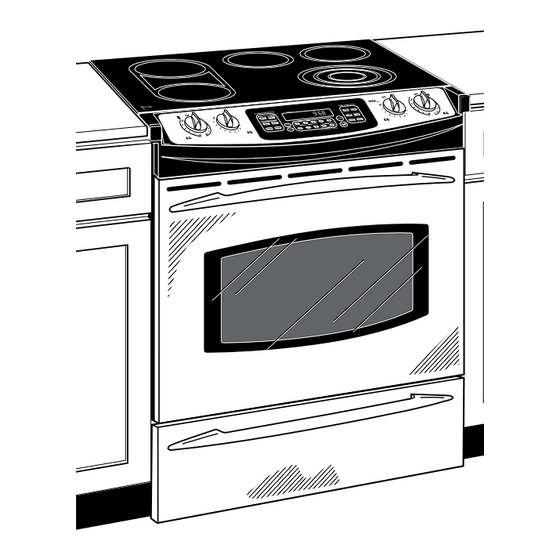
Before you cook anything, you need to know your oven’s parts and controls. GE Profile ovens come in several models, like wall ovens, slide-in ranges, and double ovens. Each model has unique features, but most share similar controls.
Key parts:
- Control panel: Where you set the cooking mode, temperature, timer, and other functions.
- Oven racks: Adjustable metal shelves for placing food.
- Door: Usually with a large window, so you can check food without opening.
- Interior light: Lets you see inside during cooking.
- Heating elements: Located at the top and bottom, for baking and broiling.
- Vent: Releases hot air and steam.
If you’re unsure about a feature, check your oven’s manual. For most GE Profile ovens, the manual is available online.
Setting Up The Oven Before Cooking
Some people skip setup, but it’s important for safety and performance.
1. Remove Packing Materials
Take out all plastic, cardboard, and tape inside and outside the oven. Leaving these can cause smoke or fire.
2. Clean The Interior
Wipe the inside with a damp cloth to remove dust or residue from manufacturing. Do not use harsh chemicals.
3. Install Oven Racks
Place racks in the right position. For most recipes, use the middle rack. For broiling, use the top rack.
4. Plug In And Check Power
Make sure the oven is properly plugged into a grounded outlet. If you have a wall oven, check the circuit breaker.
5. Set The Clock
Use the control panel to set the correct time. This helps with timed baking and automatic features.
Understanding The Ge Profile Oven Control Panel
The control panel is where you select cooking modes, set temperatures, timers, and use special features. Modern GE Profile ovens often have touchscreens, while older models use buttons and dials.
Common controls:
- Bake: Standard cooking mode for cakes, breads, casseroles.
- Broil: High heat from the top for meats, fish, and browning.
- Convection: Uses a fan for even heat, faster cooking.
- Self-clean: Cleans the oven automatically.
- Timer: Sets cooking time and alarms.
- Delay Start: Starts cooking later, useful for meal planning.
- Wi-Fi Connect: Lets you control your oven from your phone (in newer models).
Here’s a comparison of common GE Profile oven control features:
| Control Feature | Touchscreen Models | Button/Dial Models |
|---|---|---|
| Bake | Touch & swipe | Press button or turn dial |
| Broil | Touch & select level | Press button, choose high/low |
| Convection | Touch convection icon | Press convection button |
| Timer | Touch, enter time | Press timer button, enter time |
| Self-clean | Touch self-clean icon | Press self-clean button |
| Wi-Fi Connect | Touch Wi-Fi icon, follow prompts | Not available |
If you’re new to touchscreens, take a few minutes to try each button. You’ll get used to the menu quickly.
Using Basic Cooking Modes
Baking
Baking is the most common oven use. To bake:
- Press the Bake button.
- Set the temperature, usually between 325°F and 450°F (160°C to 230°C).
- Press Start.
- Wait for the oven to preheat. Most ovens beep or display a message when ready.
- Place your food on the middle rack.
- Close the door and set the timer.
Tip: For even baking, avoid opening the door often. Each time you open, heat escapes.
Broiling
Broiling uses high heat from the top. It’s ideal for steaks, fish, and browning cheese.
- Press Broil.
- Choose High or Low. High is about 500°F (260°C), Low is about 400°F (205°C).
- Place food on the top rack.
- Keep the oven door slightly open (for most models) to prevent overheating.
- Watch closely. Broiling is fast—meats can burn in minutes.
Non-obvious insight: Many people forget to use a broiler pan. A broiler pan lets fat drip away, preventing smoke and improving flavor.
Convection Cooking
Convection mode uses a fan to move hot air. Food cooks faster and more evenly.
- Press Convection Bake or Convection Roast.
- Set the temperature (usually lower than regular bake by 25°F or 15°C).
- Place food on the rack, leaving space around for air flow.
- Start cooking.
Example: Cookies baked with convection have crisp edges and soft centers. Roasted vegetables cook faster.
Common mistake: Not reducing the temperature. If you use convection mode but don’t lower the temperature, food can dry out.
Using Advanced Features
GE Profile ovens offer more than basic cooking. These features save time, improve results, and make cleaning easier.
Self-cleaning
Self-clean mode heats the oven to high temperatures to burn away food residue.
Steps:
- Remove racks and anything inside the oven.
- Press Self-Clean.
- Choose cleaning time (usually 2, 3, or 4 hours).
- Close the door. The oven locks automatically.
- When finished, let the oven cool. Wipe away ash with a damp cloth.
Data: Self-clean mode reaches about 880°F (470°C). It’s normal to see some smoke—open windows if needed.
Tip: Do not use self-clean if you have heavy buildup. Clean large spills first.
Steam Clean
Some GE Profile ovens offer Steam Clean mode for light cleaning. It uses water and low heat.
Steps:
- Pour 1 cup (240 ml) of water into the oven bottom.
- Press Steam Clean.
- Wait for cycle (about 30 minutes).
- Wipe away softened residue.
Advantage: No harsh chemicals, less heat than self-clean.
Wi-fi And Smart Features
Newer GE Profile ovens connect to Wi-Fi. You can control settings from your phone using the SmartHQ app.
Features:
- Start preheating remotely
- Change temperature from your phone
- Get alerts when food is ready
- Download new cooking modes
Non-obvious insight: Smart ovens can update their software. This means new features may appear after you buy.
Common mistake: Not setting up Wi-Fi. Many users skip this step, missing helpful functions.
Cooking Tips For Best Results
Even with a smart oven, good cooking requires practice. Here are practical tips:
- Preheat fully: Wait for the oven to beep or show “ready.”
- Rack position matters: Top rack for broiling, middle for baking, bottom for roasting.
- Use correct cookware: Glass and metal pans heat differently.
- Don’t overcrowd: Leave space around food for air circulation.
- Check doneness: Use a thermometer for meats.
- Rotate pans: For even baking, turn pans halfway through.
Example: When baking two trays of cookies, switch their positions after 10 minutes.
Adjusting Temperature And Time
Most GE Profile ovens let you adjust temperature and time while cooking.
To change temperature:
- Press Temp or Bake again.
- Enter new number.
- Press Start.
To change time:
- Press Timer.
- Enter new time.
- Press Start.
Tip: If your recipe calls for a range (e.g., 20–25 minutes), check food early. Ovens heat differently.
Using Delay Start And Timed Cooking
Delay Start lets you begin cooking later. Timed Cooking automatically turns the oven off after a set time.
To use Delay Start:
- Press Bake.
- Set temperature.
- Press Delay Start.
- Enter start time.
- Press Start.
To use Timed Cooking:
- Press Bake.
- Set temperature.
- Press Cook Time.
- Enter cooking time.
- Press Start.
Practical example: You can set the oven to bake a casserole while you’re at work. It will start and stop automatically.
Common mistake: Not setting the clock. Delay Start only works if the oven clock is accurate.
Using The Probe Feature
Some GE Profile ovens have a meat probe. This tool measures internal temperature of meat as it cooks.
Steps:
- Insert probe into meat (not touching bone).
- Plug probe into oven port.
- Set desired temperature (e.g., 145°F for medium beef).
- Start cooking. Oven will beep when meat is ready.
Advantage: No guesswork. Perfect for roast beef, turkey, or pork.
Non-obvious insight: The probe also works for bread. It can help you avoid undercooked centers.
Comparison: Ge Profile Oven Vs. Standard Oven
If you’re wondering what makes GE Profile ovens different, see the comparison below:
| Feature | GE Profile Oven | Standard Oven |
|---|---|---|
| Convection Cooking | Yes, with fan | No or optional |
| Smart Controls | Wi-Fi, app, voice | No |
| Self-Clean | Yes | Optional or manual only |
| Meat Probe | Yes | No |
| Steam Clean | Yes | No |
| Multiple Cooking Modes | Bake, broil, convection, air fry | Usually bake, broil only |
| Touchscreen | Yes (new models) | No |
Cleaning And Maintenance
Keeping your GE Profile oven clean helps it last longer and cook better.
Cleaning The Exterior
Wipe the outside with a damp cloth and mild soap. Avoid abrasive cleaners—they scratch surfaces.
Tip: Stainless steel finishes look best if cleaned with a special stainless steel cleaner.
Cleaning The Interior
- For regular cleaning, use steam clean or wipe after each use.
- For heavy spills, clean before using self-clean.
- Racks can be washed in the sink with warm, soapy water.
Non-obvious insight: Do not leave racks inside during self-clean. The high heat can damage them.
Maintaining Heating Elements
Heating elements rarely need cleaning. If you see burnt food on them, wipe gently when cool.
Common mistake: Scrubbing heating elements hard. This can cause damage.
Troubleshooting Common Problems
Even the best ovens sometimes have issues. Here’s how to solve the most frequent problems.
Oven Won’t Turn On
- Check power connection.
- Check circuit breaker.
- Try resetting by unplugging for a minute.
Oven Won’t Heat Properly
- Make sure you set the right mode and temperature.
- Check if the door is fully closed.
- If still not working, call customer service.
Error Codes
GE Profile ovens display codes like F1, F2, etc.
Example:
- F1: Keypad problem
- F2: Overheating
- F3: Temperature sensor error
Solution: Look up code in manual or online. Most issues can be fixed by resetting.
Wi-fi Won’t Connect
- Make sure your phone is on the same network.
- Restart both oven and router.
- Update the SmartHQ app.
Food Burns Or Doesn’t Cook Evenly
- Check rack position.
- Don’t overcrowd pans.
- Use convection mode for even results.
Non-obvious insight: If food burns on one side, your oven may need calibration. Most GE Profile ovens let you adjust temperature offset in the settings.

Credit: www.absoluteappliances.com
Using Special Cooking Modes
Many GE Profile ovens have extra modes:
Air Fry
Air Fry mode cooks crispy foods with less oil.
Steps:
- Place food in a single layer on a special air fry tray.
- Press Air Fry.
- Set temperature (usually 400°F/205°C).
- Start cooking.
Example: French fries and chicken wings come out crispy.
Common mistake: Overfilling the tray. Air fry works best with space between pieces.
Proof
Proof mode is for rising dough. It keeps the oven warm but not hot.
Steps:
- Place dough in oven.
- Press Proof.
- Oven heats to about 85°F (30°C).
- Wait for dough to double in size.
Advantage: No need for a warm corner or special equipment.
Warm
Warm mode keeps food hot without cooking further.
Steps:
- After cooking, press Warm.
- Oven holds food at about 170°F (75°C).
Tip: Use warm mode for serving food later or keeping dishes hot for guests.
Safety Tips
Ovens get very hot. Always use care.
- Use oven mitts to protect your hands.
- Keep children away when cooking.
- Don’t use foil on oven bottom—it can damage heating elements.
- If you smell gas (in gas models), turn off oven and open windows.
Non-obvious insight: Leaving plastic items on top of the oven can cause melting, even if not directly heated.
Cooking Examples: Step-by-step
Baking A Cake
- Preheat oven to 350°F (175°C).
- Place cake batter in a pan, put on middle rack.
- Set timer for 30–35 minutes.
- Check with toothpick—if it comes out clean, cake is ready.
- Let cool before removing.
Roasting Chicken
- Preheat oven to 375°F (190°C).
- Place chicken in a roasting pan, insert meat probe if available.
- Place on lower rack.
- Set timer for 60–75 minutes.
- Check temperature—should reach 165°F (74°C).
- Rest before serving.
Broiling Steak
- Set oven to Broil High.
- Place steak on broiler pan, top rack.
- Broil 3–5 minutes per side.
- Watch closely to prevent burning.
Practical Mistakes To Avoid
- Not reading the manual: Every oven model is a little different.
- Using the wrong rack: Broiling on a lower rack won’t brown food well.
- Opening the door too often: Heat escapes, food cooks unevenly.
- Skipping preheat: Food can be undercooked or have poor texture.
- Overcrowding pans: Air can’t circulate, food steams instead of bakes.
Credit: www.manualslib.com
Energy Efficiency And Cost
GE Profile ovens are designed to be efficient. Convection mode uses less energy because food cooks faster. Self-clean uses a lot of energy; use it only when needed.
Data: According to GE, convection saves about 25% cooking time and up to 15% energy compared to standard baking.
Tip: Bake multiple dishes at once to save energy.
Using The Ge Profile Oven For Different Cuisines
You can cook a wide range of foods, from American to Asian dishes.
- Pizza: Use convection for crispy crust.
- Bread: Use proof mode for rising, bake mode for cooking.
- Roast vegetables: Convection mode for even browning.
- Fish: Broil for quick, high-heat cooking.
Example: For naan or flatbread, bake at high temperature (450°F/230°C) for a quick result.
Non-obvious insight: The oven’s rapid preheat is great for busy cooks, letting you start baking faster.
Comparing Cooking Modes
Here’s a look at how different modes affect your food:
| Mode | Best For | Heat Source | Speed |
|---|---|---|---|
| Bake | Cakes, bread, casseroles | Bottom & top elements | Standard |
| Broil | Steak, fish, browning | Top element | Fast |
| Convection | Roast meats, cookies | Elements + fan | Faster |
| Air Fry | Fries, chicken wings | Fan, high heat | Fastest |
| Proof | Dough rising | Gentle heat | Slow |
Where To Find More Help
If you need more support or have unique questions, visit the official GE Appliances website. They offer manuals, videos, and customer service. For advanced troubleshooting, see GE Appliances Official Site.

Credit: www.designerappliances.com
Frequently Asked Questions
How Do I Set The Oven Temperature?
Press the Bake or Broil button, use the keypad or dial to enter the temperature, then press Start. For convection, set temperature 25°F (15°C) lower than recipe suggests.
Can I Use Aluminum Foil In My Ge Profile Oven?
Use foil only on pans, not on the oven floor or racks. Placing foil on the bottom can block air flow and damage heating elements.
How Do I Clean The Oven Racks?
Remove racks and wash in warm, soapy water. For tough stains, soak racks for 30 minutes before scrubbing. Never leave racks in during self-clean mode.
What Should I Do If My Oven Shows An Error Code?
Check the manual or the GE Appliances website for code meanings. Try resetting the oven. If the error continues, contact customer service.
Is It Safe To Use The Self-clean Mode?
Yes, but remove racks and anything inside first. Open windows if smoke appears. Wait for the oven to cool before wiping out ash.
Using your GE Profile oven is easy once you know the basics and explore its smart features. Practice with simple recipes, keep your oven clean, and try new modes like convection and air fry. With care and attention, your oven will help you cook delicious meals for years.