
If you own a pool, you may know the name Maytronics. They make some of the most reliable robotic pool cleaners in the world. But even the best machines can have problems, especially when water goes where it should not. When your Maytronics power supply gets wet, it’s not just a small issue. Water and electricity do not mix. This situation can be stressful, especially if you do not know what to do or if the device stops working.
Many pool owners think the power supply box is waterproof. It is not. Even a little water can cause serious trouble. You might see strange lights, hear odd noises, or the robot may not start at all. Sometimes, the problem is easy to fix.
Other times, it can mean expensive repairs or buying a new unit. Knowing how to handle this can save you money, time, and maybe even keep you safe.
This guide will explain everything you need to know when your Maytronics power supply gets wet. We’ll cover why it happens, what to do right away, how to check for damage, and when to call a professional. You will also learn how to avoid this problem in the future. Let’s get started with what actually happens when water enters the power supply.
Why Water Gets Inside A Maytronics Power Supply
Many people assume that pool equipment like robotic cleaners is made to handle water everywhere. The truth is, Maytronics power supplies are only water-resistant, not fully waterproof. This means they can handle a few splashes, but not rain, submersion, or heavy spray.
There are a few common ways water gets inside:
- Rain or Sprinklers: Leaving the power supply outside without cover. Even light showers can seep through seams or vents. Sprinklers directed near the unit can create a mist that slowly enters over time.
- Pool Splashing: Placing the box too close to the pool edge means it’s within reach of big splashes, especially if kids are playing or someone is using a hose to rinse pool toys.
- Condensation: Rapid temperature changes cause moisture inside the box. For example, warm afternoons followed by cool nights often result in dew forming inside.
- Improper Storage: Storing the supply in damp sheds or garages. Humid environments can slowly let moisture creep inside, even if the unit is not exposed to direct water.
- Faulty Seals: Rubber gaskets or seals may wear out over time. Even a small crack can let rainwater in, especially if the unit sits in one place for months.
Beginner insight: Many users do not realize that even morning dew can cause slow moisture build-up inside the box, especially if it is left outside overnight. Dew forms on surfaces, and over weeks, this can lead to unexpected internal moisture.
Another insight: Pool cleaning sessions often include hosing down the robot. Sometimes, people forget to disconnect the power supply before cleaning, leading to accidental splashes. Water can travel along the cable and drip into the connector, which is a weak point for moisture entry.
Some owners may also leave the power supply on grass or soil, which can be damp after watering or rain. This practice increases the risk of water vapor entering through the base or cable entry points.
What Happens When The Power Supply Gets Wet
When water enters the Maytronics power supply, several things can go wrong. These include:
- Short circuits: Water allows electricity to flow where it should not. Even a drop can bridge a gap between components.
- Corrosion: Metal parts like connectors and circuit boards start to rust. This weakens connections, leading to intermittent problems.
- Component damage: Chips and wires burn out. Sensitive electronics can be destroyed in seconds.
- Error codes or warning lights: The device may flash or beep. Sometimes, these codes can be confusing if you don’t have the manual handy.
Even if the power supply seems to work after drying, there may be hidden damage. Moisture can slowly destroy electronic parts, causing the device to fail weeks or months later. Residual humidity can create an environment where corrosion spreads, especially in warm climates.
Common Symptoms Of Water Damage
Watch for these warning signs:
- The power supply does not turn on.
- Strange smells (burnt or musty).
- Flickering lights or error codes.
- Robot works for a few seconds then stops.
- Unusual sounds from the box.
You may also notice the box feels warmer than normal, which means the internal components are working harder or overheating. A musty smell points to mold growth, which can be a sign of long-term moisture.
Non-obvious tip: Sometimes, the problem is intermittent. The power supply may work when dry, then fail as humidity rises. This can be confusing and lead you to think the problem is fixed, when it’s only hiding.
Another subtle symptom is the robot behaving oddly—making jerky movements, not following cleaning patterns, or resetting by itself. These behaviors often indicate low-level electrical faults caused by water.
Immediate Steps To Take If Your Maytronics Power Supply Got Wet
Acting quickly can often prevent permanent damage. Here is what you should do:
- Unplug everything: Remove the power supply from the wall and the robot. Do not touch with wet hands. Water on your skin can increase the risk of shock.
- Move to a dry area: Place the box somewhere safe, away from water. Ideally, pick a location with good air flow.
- Do not try to turn it on: Powering up while wet can cause more damage. Even if you’re curious, wait until it’s fully dry.
- Open if possible: If you are comfortable and the warranty allows, open the casing to let air flow inside. (Some units are sealed or have a warranty sticker.) Removing panels helps the drying process, but only do this if you know how.
- Dry thoroughly: Use a fan or dry cloth. Do not use heat guns or hair dryers—they can melt parts. A fan is best because it moves air gently and prevents overheating.
- Wait: Let it dry for at least 48 hours, more if the inside looks wet. Sometimes, it takes longer for hidden moisture to evaporate.
Safety warning: Never try to operate or test a wet power supply. Water and electricity can be deadly. If you’re unsure, always ask for help from someone with experience.
When To Use Silica Gel Or Rice
Some people suggest putting electronics in rice or with silica gel packs. This method can help with small moisture problems but is not enough for real water exposure. Rice is less effective than people think—it does not pull water out of hidden areas quickly.
If you use this method, place the open power supply in a sealed bag with many silica gel packs for 24-48 hours. This works best for mild condensation, not for water that has pooled inside. Silica gel is more effective because it absorbs moisture faster, but it still cannot fix severe water damage.
Extra tip: After drying, gently shake the unit to check for water trapped in corners. If you hear sloshing or see droplets, repeat the drying process.
How To Check For Damage In Your Maytronics Power Supply
Once the unit is dry, you need to check for signs of damage before trying to use it. Here’s how:
Visual Inspection
- Look at the casing: Are there cracks or water stains? Stains can indicate where water entered.
- Check the connectors: Any green or white powder (corrosion)? If you see this, clean gently with a soft brush and alcohol.
- Inspect the circuit board (if open): Are there burn marks or rust? Look for areas where the surface is rough or discolored.
If you spot any droplets or condensation inside, wait longer before testing. Even tiny drops can cause big problems once power is applied.
Smell Test
A burnt smell means a short circuit happened. Musty or moldy smells mean moisture was inside for a while. If the smell persists after drying, it’s a sign of deeper damage.
Testing The Unit (safely)
- Plug the power supply into a GFCI outlet (one with a test/reset button).
- Do not connect the robot yet.
- Turn the unit on. Look for normal lights or error codes.
- If everything seems fine, connect the robot and try a short test run.
If you see sparks, smoke, or hear popping, turn it off and unplug immediately. GFCI outlets are designed to cut power quickly in unsafe conditions, so always use them for testing.
Insight: Sometimes, the power supply seems fine, but the robot does not respond. This can mean a low-level failure in the output circuit that is not obvious at first. If you notice the robot acting strangely, test with another robot if possible.
If the unit powers up but the fan or internal components are silent, there may be hidden damage not visible to the eye.

Credit: www.reddit.com
Common Error Codes And What They Mean
Maytronics power supplies often show error codes with lights or numbers. Here are some you might see after water exposure:
- Flashing power light: General fault, often caused by short circuit. This is a warning that something inside is not working right.
- No lights: Power supply may be dead or fuse blown. Try checking and replacing the fuse if you know how.
- Beeping or alarm: Internal fault detected. Some models have a speaker that alerts you to a serious issue.
- Error code “3”: Output overload, possibly from a wet connector. Disconnect and clean the cable ends.
Check your manual for the full list, as codes can change by model. If you don’t have the manual, search online for your specific model’s error codes.
Sometimes, the unit will show a sequence of lights rather than a single error code. This can be confusing, so refer to the manual or contact support for clarification.
Can You Fix A Wet Maytronics Power Supply Yourself?
Many people ask if they can fix the unit at home. The answer depends on the damage.
When Home Repair Might Work
- If only the outside got wet and there are no signs of damage inside.
- If connectors are only slightly corroded (clean with alcohol).
- If the fuse blew and you can replace it.
If you’re comfortable with basic electronics and have the right tools, you may be able to fix minor problems. Always wear gloves and use proper tools to avoid further damage.
Important: Opening the power supply may void your warranty. Only do this if you are out of warranty or confident in your skills.
When To Call A Professional
- If you see burnt parts or melted wires.
- If the unit smells burnt or has visible rust inside.
- If you are not sure how to safely test electronics.
- If the power supply is under warranty (let the service center handle it).
Pro tip: Maytronics repair centers have special tools to clean and test the unit. They can sometimes save a wet power supply that would be too risky for a home fix. Professionals have access to replacement parts and can diagnose issues that aren’t obvious visually.
If you have insurance for your pool equipment, check if water damage is covered. Sometimes, a professional repair can be claimed.

Credit: www.reddit.com
Comparing Repair, Replacement, And Professional Service
It’s natural to wonder if you should repair, replace, or call for service. Here’s a simple comparison:
| Option | Cost Estimate | Time Needed | Success Rate | Warranty Risk |
|---|---|---|---|---|
| Home Repair | $0–$50 | 1–2 days | Low–Medium | Voids warranty |
| Professional Service | $60–$180 | 3–14 days | High | Preserves warranty |
| Replacement | $150–$350 | 1–3 days (shipping) | Guaranteed | New warranty |
Hidden cost: If you try to repair and fail, you may end up buying a new unit anyway. Weigh the risk before starting. Sometimes, failed repairs can also damage the robot itself.
If your robot is still under warranty, professional service is almost always the best option.
What To Expect From Maytronics Warranty And Service
Maytronics offers a limited warranty on their power supplies, usually 1 to 2 years. But the warranty does not cover water damage from misuse or accidents. If your unit got wet because of rain or a spill, you may have to pay for repairs or a replacement.
How to check: Contact your dealer or look on the Maytronics website for details. Have your serial number and proof of purchase ready. Some dealers offer extra coverage or extended warranties, so check your purchase agreement.
What A Service Center Will Do
- Open and inspect the unit.
- Dry and clean the inside with special tools.
- Replace damaged parts.
- Test for safe operation.
If the power supply is too damaged, they may offer a replacement at a discount. In some cases, repairs may take a week or more, especially if parts need to be ordered.
If you are unsure about your warranty status, ask the service center to check for you. They can often tell you right away if your issue is covered.
How To Prevent Your Power Supply From Getting Wet
Prevention is the best approach. Here are some smart habits:
- Always use the power supply away from the pool edge. Keep it at least 2 meters from water.
- Cover the unit with a weatherproof box or bin if left outside. Make sure the cover is ventilated to prevent condensation.
- Bring it indoors after each use—never leave it out overnight. This habit protects against dew, rain, and sprinklers.
- Check for cracks or worn seals every few months. Replace seals if they look brittle or cracked.
- Do not use near sprinklers or hoses. Plan your cleaning routine so water cannot reach the unit.
- Store in a dry, cool place when not in use. Avoid storing on the floor where moisture collects.
Diy Protection Tips
- Use a plastic storage bin with holes for cables as a cheap weather shield. Make sure air can circulate.
- Place the power supply on a brick or stand, not directly on wet ground. This helps keep the bottom dry.
- Add a small silica gel pack inside the case if you store it outdoors (but still bring it in during rain). Silica absorbs humidity, but is not a substitute for proper storage.
Insider advice: Many pool owners ignore the manual’s warnings about water exposure. Taking a few minutes to protect your unit can add years to its life.
Also, create a habit checklist. For example, after each pool session, unplug, dry, cover, and store the power supply. Simple routines can prevent most accidents.
How To Tell If Your Power Supply Is Still Safe To Use
After drying and inspection, you may still worry about safety. Here’s how to decide:
- Test with a GFCI outlet. If the breaker trips, stop using it.
- Watch for heat. If the box gets hot, unplug it.
- Listen for buzzing or popping. These are bad signs.
- Trust your nose. Any burnt smell means stop.
If in doubt, it is always safer to replace or get a professional checkup. Safety should always come first, especially with electricity near water.
If you notice the unit is working but the robot cleans poorly or stops early, check the power supply again. Sometimes, the problem is not obvious right away.
Real-life Examples And Case Studies
Case Study 1: Rainstorm Incident
A pool owner left their Maytronics power supply outside during a heavy rain. The next day, the robot would not start. They unplugged the unit, opened the case, and found water droplets inside. After drying with a fan for three days, the unit worked again—but stopped after a week. The service center found corrosion on the board. The owner had to buy a new power supply.
This shows that even if the unit works for a short time after drying, hidden corrosion can cause later failure. Always check for signs of rust and do not rely on short-term fixes.
Case Study 2: Accidental Splash
During cleaning, another user splashed pool water onto the supply. The unit flashed an error code and turned off. After disconnecting, they dried the connectors and wiped the casing. The problem was only at the plug, and after cleaning, the unit worked fine.
This case proves that quick response and careful inspection can prevent bigger issues. Always check plugs for moisture after cleaning sessions.
Lesson
Quick action and checking for real internal water make a big difference. Small splashes may not cause lasting harm, but full soaking often does. If unsure, always let a professional inspect it.
Frequently Asked Questions
What Should I Do First If My Maytronics Power Supply Got Wet?
Unplug it from both the wall and the robot immediately. Move it to a dry place, open the case if possible, and let it air dry for at least 48 hours. Do not try to use it until you are sure it is dry and safe.
Can A Wet Power Supply Be Dangerous?
Yes, a wet Maytronics power supply can cause electric shock, short circuits, and even fire. Never plug in or test a wet unit. Always make sure it is completely dry and, if unsure, get it checked by a professional.
Is Water Damage Covered Under Warranty?
Most of the time, water damage is not covered by the standard warranty. Maytronics considers this “misuse.” You can check your specific warranty by contacting your dealer or visiting the Maytronics official site.
How Can I Protect My Power Supply From Getting Wet In The Future?
Keep it away from the pool, cover it with a weatherproof box, and store it indoors after each use. Regularly inspect for cracks or worn seals. Avoid using it near sprinklers or in the rain.
What Are Signs Of Hidden Water Damage?
Look for strange smells, blinking lights, or the unit turning off by itself. Corrosion around plugs or inside the case is a clear warning. Sometimes, problems show up weeks after the incident, so keep checking for changes.
If you notice the robot is not cleaning well or stops early, check the power supply for signs of water damage.
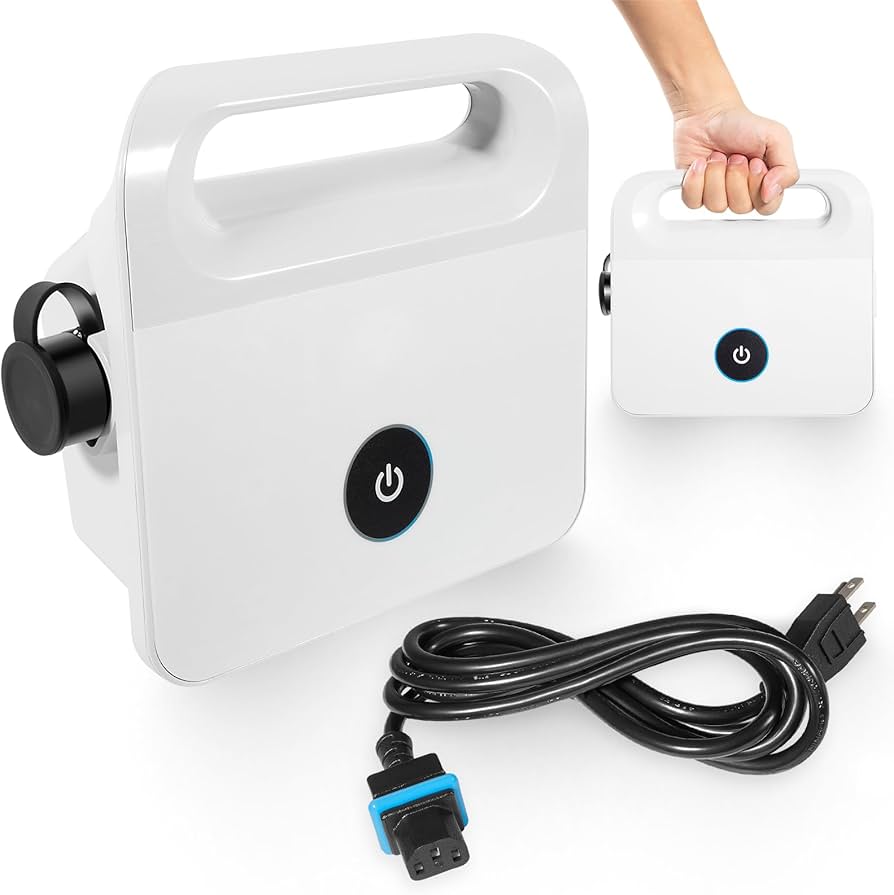
Credit: www.amazon.com
The Bottom Line
Having your Maytronics power supply get wet can be a frustrating and expensive problem. But with fast action, careful drying, and smart prevention, you can often limit the damage. If you are ever in doubt about safety or repair, choose the safe path—get professional help or invest in a new unit. Your pool robot is a great tool, but only if you keep its power supply dry and well cared for. Take the time to protect your investment, and you’ll enjoy a clean pool for years to come.
By following these steps, checking for signs, and creating good storage habits, you can avoid common mistakes that cost money and time. Remember, prevention is always easier than repair. Stay safe, and keep your pool robot running smoothly.