
If you own or maintain a pool, a Pentair pump is likely a key part of your system. These pumps are known for their reliability and smart features, including digital displays that help you monitor and control performance. But what happens when you see the message: “Address 1 Display Not Active”? For many pool owners, this message is confusing and frustrating. You might wonder if your pump is broken, if your pool is at risk, or if you need to call an expensive technician. This article explains what this error means, why it happens, and how to fix it. We will explore the technical side in simple language, provide step-by-step solutions, and share real-world tips to help you get your Pentair pump working normally again.
Understanding The “address 1 Display Not Active” Message
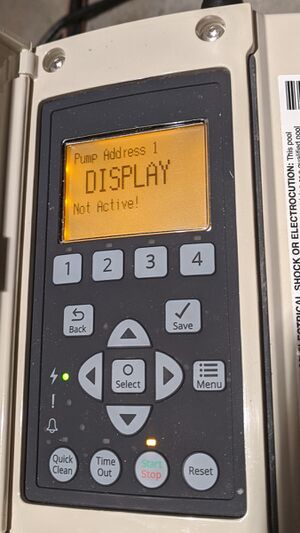
The message “Address 1 Display Not Active” appears on the digital control panel of some Pentair pool pumps, especially on models with automation features. It can show up suddenly, even when the pump seemed to be working fine before.
This message means the pump’s control panel is not communicating with the main control system. Address 1 refers to the main pump or the primary device on your pool’s automation network. “Not Active” signals that the control panel cannot receive or send information as expected.
This error is not just a warning; it means you might not be able to control the pump using the usual buttons or automation settings. The pump might continue running with the last settings, but you lose the ability to change speed, schedule, or turn it off remotely.
If you ignore this error, you could risk energy waste, water quality issues, or even pump damage.
Why Does This Error Occur?
Several issues can trigger the Address 1 Display Not Active message. Understanding these causes helps you fix the problem faster and avoid it in the future.
1. Communication Failure
Pentair pumps with digital displays often connect to a central automation system, such as Pentair IntelliTouch, EasyTouch, or SunTouch. If the communication wiring is loose, broken, or disconnected, the control panel cannot “see” the main system. This is the most common cause of the error.
2. Address Conflict
Each device on the automation network has an address (like a street address). If two devices accidentally share the same address (e. g. , Address 1), the system gets confused, and the display may go inactive.
3. Power Supply Issues
If the pump or control system loses power or experiences a voltage drop, the display may lose connection. Sometimes, a brief power outage or a surge can cause a temporary loss of communication.
4. Software Or Firmware Glitch
Modern Pentair pumps use software to operate. If the software “hangs” or encounters a bug, it may stop communicating, even if the hardware is fine.
5. Faulty Hardware
Rarely, a damaged control panel, circuit board, or communication port can cause this message. Age, moisture, or electrical surges can damage these components.
6. Incorrect Wiring During Installation
If the pump was recently installed or serviced, incorrect wiring (especially in the communication cable) can trigger this error.
How To Diagnose The Problem
Finding the real cause of the Address 1 Display Not Active message is important before trying any fix. Follow these steps to diagnose:
- Check the Display Panel
- Look for other error messages or blinking LEDs.
- Try pressing buttons; note if the pump responds at all.
- Test Manual Control
- Switch the pump to manual mode, if possible. If you can control speed or turn the pump on/off, the problem is likely with automation, not the pump itself.
- Inspect Communication Wiring
- Open the control panel (power off first).
- Check that all communication wires are firmly connected and not damaged.
- Check Address Settings
- Review the pump’s address setting in the menu.
- Ensure no other device shares the same address.
- Verify Power Supply
- Use a multimeter to check voltage at the pump and control panel.
- Look for loose breakers or GFCI outlets that may have tripped.
- Restart the System
- Turn off power to the pump and automation system for at least 60 seconds.
- Restore power and check if the message clears.
- Inspect for Signs of Damage
- Look for burnt marks, corrosion, or water inside the panel.
- Review Recent Changes
- Consider if any work was done on the pool system recently. Mistakes during repairs or upgrades can trigger errors.
Step-by-step Fixes For “address 1 Display Not Active”
Once you’ve identified the likely cause, use these solutions. Start with the simplest and move to more advanced steps.
1. Secure All Wiring Connections
Loose or corroded wires are often to blame. With power off, unplug and replug all communication wires on both the pump and the automation panel. Clean any corroded terminals with electrical contact cleaner. Make sure wires are in the correct slots (often labeled “COM”, “AUX”, or “DATA”).
2. Reset Pump And Control System
A simple reset often solves temporary glitches. Switch off power at the main breaker for both the pump and the control panel. Wait at least a minute, then power on. If the message disappears, it was likely a software hang.
3. Change Device Address
Access the address menu on the pump’s display (check your Pentair manual for steps). Set the pump to a unique address, usually “1” for the main pump. If another device is also on “1”, change it to “2” or another number.
Save changes and reboot the system.
4. Check And Replace Communication Cable
If the cable is visibly damaged, replace it with a new shielded, low-voltage cable (usually 2 or 4 wires). Route the cable away from high-voltage wires to avoid interference.
5. Update Firmware
Sometimes, outdated firmware causes bugs. Visit the official Pentair website to see if there are updates for your model. Follow instructions to update, or ask a technician if you’re unsure.
6. Test For Power Issues
If the pump loses power or gets low voltage, the display may not work. Use a multimeter to check for 120V or 240V (depending on your model) at the terminals. Fix any loose connections or bad breakers.
7. Replace Faulty Components
If all else fails, the control panel, circuit board, or communication port may be faulty. Replacing these parts is complex and may require a certified Pentair technician.
Preventing Future “display Not Active” Errors
Fixing the error is good, but preventing it is even better. Here are ways to reduce the risk of seeing this message again.
- Secure Wiring: After every service, check and tighten all connections.
- Label Device Addresses: Use stickers or a log to track addresses of all devices.
- Install Surge Protection: This helps prevent damage from electrical spikes.
- Keep Panels Dry: Water and electronics do not mix. Ensure all panels are sealed.
- Regular Firmware Updates: Keep pump software up-to-date for best reliability.
- Schedule Routine Maintenance: Inspect your system every few months.
When To Call A Professional
Some problems require expert help. Call a Pentair-certified technician if:
- You see burnt or melted components.
- The error returns immediately after a reset.
- You’re uncomfortable working with electricity.
- The pump is under warranty (DIY repairs may void it).
- You suspect a firmware or software issue you cannot resolve.
Pentair Pump Models Most Affected
Not all Pentair pumps show the same error messages. The “Address 1 Display Not Active” alert is most common in models with digital automation features. Below is a comparison of how different Pentair pump models handle communication errors.
| Pump Model | Automation Compatible | Shows ‘Address 1 Display Not Active’ | Manual Override Option |
|---|---|---|---|
| IntelliFlo VSF | Yes | Yes | Yes |
| IntelliPro VS | Yes | Yes | Yes |
| SuperFlo VS | Limited | No | Yes |
| WhisperFlo XF | Yes | Yes | Yes |
| Dynamo | No | No | No |
If you have an older or basic model, you might see a different warning or none at all. Always check your pump’s manual for the exact messages and troubleshooting steps.
Deeper Dive: The Role Of Communication Protocols
Pentair pumps use a digital communication protocol to talk to automation systems. This is like a language that lets the pump and control panel share commands and status.
- RS-485 Protocol: Most Pentair automation uses this protocol, which allows multiple devices to share data on two wires. Each device needs a unique address.
- Why Addresses Matter: If two devices use the same address, neither can communicate properly. The pump may go “inactive” to prevent errors.
One non-obvious detail: Cable length matters. If your communication cable is too long, or runs next to high-voltage lines, signals can get weak or noisy. Always use shielded cable, and keep runs as short as possible.
Example: Real-world Scenario
Imagine you just installed a new IntelliFlo pump and connected it to your Pentair EasyTouch system. After setup, you see “Address 1 Display Not Active” on the pump display. Here’s how you might solve it:
- You check the communication wire and see it’s not plugged in securely at the panel.
- After tightening the connection, you reset the system. The message disappears.
- But a week later, the error returns. You realize the cable runs alongside the main power line, causing interference.
- You reroute the cable away from the power line and the issue resolves for good.
This example shows that sometimes, small installation details can cause big headaches.
The Cost Of Ignoring The Problem
Some pool owners ignore the “Address 1 Display Not Active” message, thinking the pump still works. This is risky for several reasons:
- You lose control: You cannot adjust speed, schedule, or turn the pump off remotely.
- Higher energy bills: The pump may run at full speed all day, using more power.
- Water quality drops: Inconsistent flow can affect filtration and chemical mixing.
- Possible equipment damage: Some errors can cause the pump to overheat or run dry.
Addressing the problem quickly saves money and keeps your pool safe.

Credit: www.troublefreepool.com
Practical Tips For Troubleshooting
Here are some lesser-known strategies that can help:
- Use a Test Cable: If you suspect the main cable, run a short temporary cable between the pump and panel to see if the problem is wiring-related.
- Check Panel Settings: Sometimes, the automation panel is set to “standalone” or “service” mode, which disables communication. Switch back to “auto” mode.
- Look for Firmware Clues: If other pool owners with your pump model have similar issues, a firmware update may be needed. Check Pentair’s support forums.
- Document Changes: Keep a log of any changes or fixes. This helps if you need professional help later.
- Don’t Mix Brands: Using Pentair pumps with non-Pentair automation can cause address conflicts.
Comparing Pentair To Other Brands
How does Pentair handle communication errors compared to other pool pump brands? Here’s a quick comparison.
| Brand | Error Message Type | Manual Control Available? | Firmware Upgradable? |
|---|---|---|---|
| Pentair | Clear Text (e.g., ‘Address Not Active’) | Yes | Yes |
| Hayward | Code/Number Only | Yes | Yes |
| Jandy | LED Blinks | Sometimes | No |
| Sta-Rite | Basic LED | No | No |
Pentair’s clear error messages make troubleshooting easier for most pool owners.
Common Mistakes When Troubleshooting
Beginners often make these mistakes:
- Ignoring Power Off: Always cut power before touching wires.
- Skipping Address Check: They forget to check for address conflicts.
- Not Labeling Wires: This makes reassembly confusing.
- Forgetting to Reset: After a fix, you must reset the system.
- Overlooking Firmware: Software is just as important as hardware.
Taking your time and double-checking each step prevents repeat errors.
How Long Should A Fix Take?
Most “Address 1 Display Not Active” errors can be diagnosed and fixed in 30–60 minutes, especially if it’s a wiring or reset issue. More complex cases (damaged boards or firmware bugs) might take several hours, or require an expert visit.
Warranty And Support
If your Pentair pump is still under warranty, you have extra protection. DIY repairs may void the warranty, so always check with Pentair support before opening the case or replacing parts. Registering your product on the Pentair website also gives you access to software updates and support resources.
For more details, see the official Pentair Support page.
Frequently Asked Questions
What Does “address 1 Display Not Active” Actually Mean?
This means your Pentair pump’s control panel cannot communicate with the main automation system. Usually, the control panel is “offline” and cannot send or receive commands.
Can I Keep Using The Pump If I See This Message?
The pump may keep running with its last settings, but you lose remote control and scheduling. It’s best to fix the error quickly to avoid higher energy costs and water quality problems.

Credit: www.youtube.com
Will Resetting The Pump Always Fix This Error?
A reset often solves temporary glitches, but not deeper issues like wiring faults or address conflicts. If the error returns after a reset, check wiring, address settings, and power supply.
Can I Fix This Error Myself, Or Do I Need A Technician?
Many owners can fix basic problems like loose wires or address conflicts. For complex issues (like firmware bugs or damaged boards), a Pentair-certified technician is recommended.
Credit: www.troublefreepool.com
How Can I Prevent This Problem In The Future?
Regularly check and secure all wiring, keep addresses unique, install surge protection, and update firmware. Keeping the control panel dry and scheduling routine maintenance also helps prevent communication errors.
Ensuring your Pentair pump runs smoothly means understanding both the technical and practical sides of pool automation. By following these steps, you’ll minimize downtime, save money, and enjoy a cleaner, healthier pool all season long.