
Pools are a great way to relax, exercise, and have fun, but nothing ruins the experience faster than cloudy water or strange patches on the surface or floor. One of the most common and frustrating issues for pool owners is algae growth. After treating an algae problem, many people find themselves with a new mystery: dead algae lingering in the pool. These leftovers can look unpleasant, affect water quality, and signal deeper maintenance issues. If you’ve ever wondered what dead algae really looks like, how to spot it, why it’s there, and how to get rid of it, you are not alone. This article will give you a clear, detailed look at pictures of dead algae in pool situations, explain what those photos really mean, and offer practical advice for handling this unsightly problem.
What Does Dead Algae In A Pool Look Like?
Understanding what dead algae looks like is the first step to keeping your pool clean. Algae are tiny plants that thrive in water, but after treatment with chemicals, they die and break apart. The remains, called dead algae, are often mistaken for dirt or dust. Let’s look at the typical signs:
Colors And Patterns
Dead algae usually appear as:
- Gray or white dust
- Cloudy patches on the pool floor
- Small piles in corners or near drains
Sometimes, dead algae can also look slightly yellow or green, depending on the type of algae that was killed. But mostly, it turns a pale, grayish color once it’s dead.
Texture And Location
If you touch it, dead algae feel like a soft powder, not slimy. It often gathers:
- On the bottom of the pool, especially in low-flow areas
- Along steps or in corners
- Around pool drains or lights
You might also see it floating in the water, making the pool look cloudy even after you’ve shocked it.
Comparing Dead And Live Algae
It’s easy to confuse dead algae with live algae or even dirt. Here’s a quick way to tell:
| Type | Color | Texture | Location |
|---|---|---|---|
| Live Algae | Green, yellow, black | Slippery, slimy | Walls, floor, water surface |
| Dead Algae | Gray, white, pale yellow | Powdery, dusty | Pool floor, corners, cloudy water |
| Dirt/Debris | Brown, tan | Gritty, sandy | Near steps, bottom, sometimes floating |
Key Insight: If you brush a patch and it disappears into a cloud, it’s likely dead algae, not dirt.
Common Pictures And Visual Signs Of Dead Algae
Many pool owners search for pictures to compare with their own pool. While you may not have a photo gallery here, you can learn the main visual clues from expert descriptions and real-world cases.
1. Dusty Pool Floor
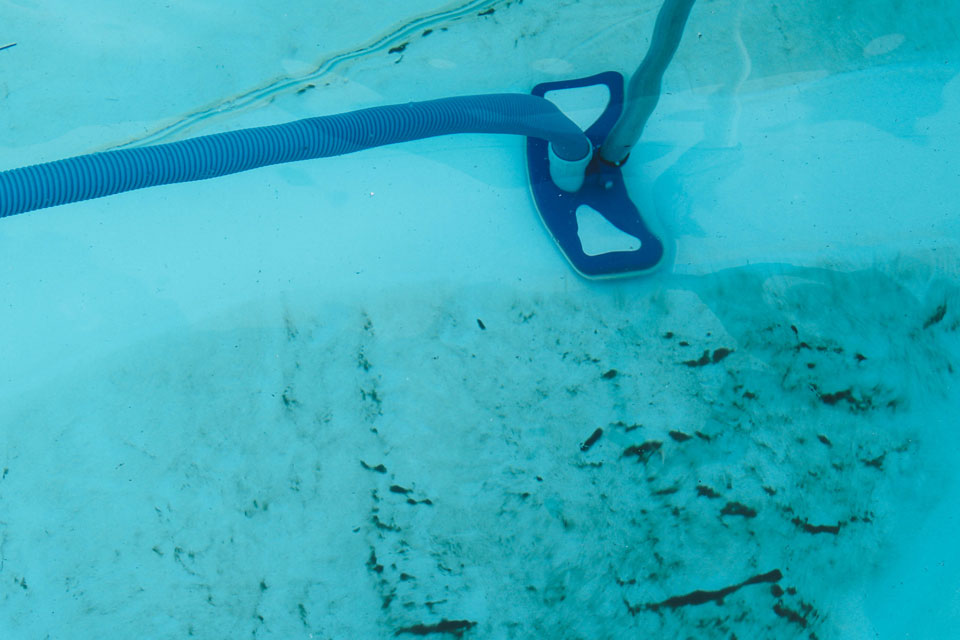
The most common image is a light dust covering the pool floor. This dust is usually gray or white. It might look like someone sprinkled flour across the bottom. In photos, the dust gathers in uneven patches, often in areas where water flow is weakest.
2. Cloudy Water After Treatment
After shocking the pool or adding algaecide, the water sometimes turns milky or cloudy. Pictures show pools where you can’t see the bottom clearly, even if the water is technically safe. This cloudiness is mostly dead algae suspended in the water.
3. Streaks And Piles In Corners
Dead algae do not always spread evenly. In many photos, you’ll see streaks or piles in the corners, near steps, or around drains. These areas have less circulation, so the dead matter settles there.
4. Fine Particles Around Drains And Lights
Another common photo shows a ring of fine, pale particles around pool drains or underwater lights. These particles are often dead algae attracted to areas with slight suction or less movement.
5. Filter And Skimmer Baskets Filled With White-grey Muck
When you clean your filter or skimmer baskets, you might see a grayish, slimy buildup. This is often dead algae that got trapped as the system was running.
Non-Obvious Insight: Sometimes, dead algae can cling to pool tiles or grout lines, giving a shadowy or faded appearance that’s easy to miss if you only look at the pool floor.
Why Does Dead Algae Stay In The Pool?
You’ve treated the algae, but now you’re left with these unsightly remains. Why doesn’t it all just disappear? There are a few main reasons:
Inadequate Filtration
Most home pool filters struggle to catch particles as small as dead algae. Sand filters, for example, typically filter out particles bigger than 20–40 microns, while dead algae can be as small as 5 microns. This means much of it passes through and stays in the pool.
Poor Circulation
Dead algae tend to settle in areas with low water flow, like corners or behind ladders. If your pump or jets aren’t circulating water properly, more algae will collect and stay visible.
Not Enough Vacuuming Or Brushing
Dead algae are light and easily disturbed. If you don’t brush the surfaces and vacuum the pool floor thoroughly, the algae will keep resettling.
Filter Problems
A dirty or damaged filter can’t remove dead algae effectively. If the pressure is too high, or the filter media is old, much of the dead algae will cycle back into the pool.
Expert Tip: Sometimes, even after several cleaning attempts, a small amount of dead algae remains. This is a sign your pool system needs extra help, like a clarifier or filter upgrade.
How To Remove Dead Algae From Your Pool
Dead algae are not just ugly—they can affect your pool’s clarity and safety. Removing them completely requires a careful, step-by-step approach.
1. Brush All Pool Surfaces
Use a stiff pool brush to loosen dead algae from the floor, walls, steps, and corners. Brush towards the main drain to help your filter catch the particles.
2. Vacuum The Pool
Manual vacuuming is best. Set your system to “waste” (if possible) to send the dirty water out of the pool, not back through the filter. Go slowly so you don’t stir up the dead algae.
3. Run The Filter Longer
After brushing and vacuuming, run your pool filter for at least 24 hours. This gives it more chances to catch fine particles.
4. Use A Pool Clarifier
A pool clarifier helps by clumping tiny particles together, making them easier for the filter to catch. Add the clarifier according to the label, then run the filter as directed.
5. Clean Or Backwash The Filter
If your filter is clogged, it can’t work properly. After dealing with algae, always backwash (for sand or DE filters) or clean the cartridges.
6. Repeat As Needed
Sometimes, you’ll need to repeat the brushing, vacuuming, and filtering process several times. Be patient—dead algae are stubborn!
7. Consider A Pool Flocculant
If you need fast results, a flocculant can help. This chemical binds dead algae into larger clumps, which sink to the bottom for easy vacuuming. Flocculants work fast but require manual vacuuming to waste.
Advanced Tip: If you have a cartridge filter, you might need to clean it more often during this process, as it can clog quickly with dead algae.
Types Of Algae And What Their Dead Forms Look Like
Not all algae are the same. Knowing which type you had can help you recognize its dead form and choose the best removal method.
Green Algae
- Live Form: Bright green, slimy, spreads quickly
- Dead Form: Pale gray or white dust, sometimes greenish tint
Yellow (mustard) Algae
- Live Form: Yellow or brown patches, clings to walls and shady spots
- Dead Form: Yellow or light brown dust, often settles on steps and corners
Black Algae
- Live Form: Dark black or blue-green spots, tough and slimy, grows in cracks
- Dead Form: Faded gray or dark dust, sometimes leaves behind stains
Pink Algae (actually A Bacteria)
- Live Form: Reddish or pink slimy layer, found around water lines
- Dead Form: Faint pink or off-white residue, often sticky
Comparison Table: Algae Types And Dead Appearance
| Algae Type | Live Color | Dead Color | Common Location |
|---|---|---|---|
| Green | Bright green | Pale gray/white | Floor, walls |
| Yellow | Yellow/mustard | Yellow/light brown | Steps, shady spots |
| Black | Black/dark blue-green | Gray/dark dust | Cracks, grout lines |
| Pink (bacteria) | Pink/red | Pink/off-white | Water line, tile |
Practical Example: If your pool had mustard algae, and now you see yellow dust on the steps, you’re likely looking at dead yellow algae that needs vacuuming.
Why Dead Algae Should Not Be Ignored
It may seem harmless, but leaving dead algae in your pool can cause several problems:
- Water Cloudiness: Even a small amount can keep water looking cloudy.
- Filter Clogging: Dead algae can quickly clog filters, reducing their efficiency.
- Algae Return: Dead algae can provide food for bacteria or serve as a starting point for new growth.
- Unpleasant Swimming: It can make the pool look dirty and feel gritty underfoot.
Non-Obvious Insight: If you swim in a pool with a lot of dead algae, you might notice skin irritation or eye discomfort, even though the algae are not alive.
Credit: www.pioneerfamilypools.ca
How To Prevent Dead Algae From Building Up
Prevention is always easier than cleanup. Here’s how to keep dead algae from becoming a recurring problem:
1. Maintain Proper Pool Chemistry
Keep your chlorine levels, pH, and alkalinity in the recommended ranges. Algae are less likely to thrive, and dead algae are easier to filter out.
2. Regularly Brush And Vacuum
Even if your pool looks clean, brush the walls and floor weekly. Vacuum at least once a week, especially after storms or heavy use.
3. Upgrade Filtration If Needed
If your filter can’t catch fine particles, consider upgrading to a finer filter or adding a clarifier during cleaning.
4. Improve Water Circulation
Check your pump and jets to make sure water is moving evenly throughout the pool. Adjust angles or add extra returns if needed.
5. Shock After Heavy Use Or Rain
Shocking the pool with extra chlorine after parties, storms, or high temperatures helps prevent both live and dead algae buildup.
Real-world Examples: Pictures Of Dead Algae In Pool Situations
To help you visualize, let’s discuss some real-life scenarios from pool owners:
Example 1: The Milky Blue Pool
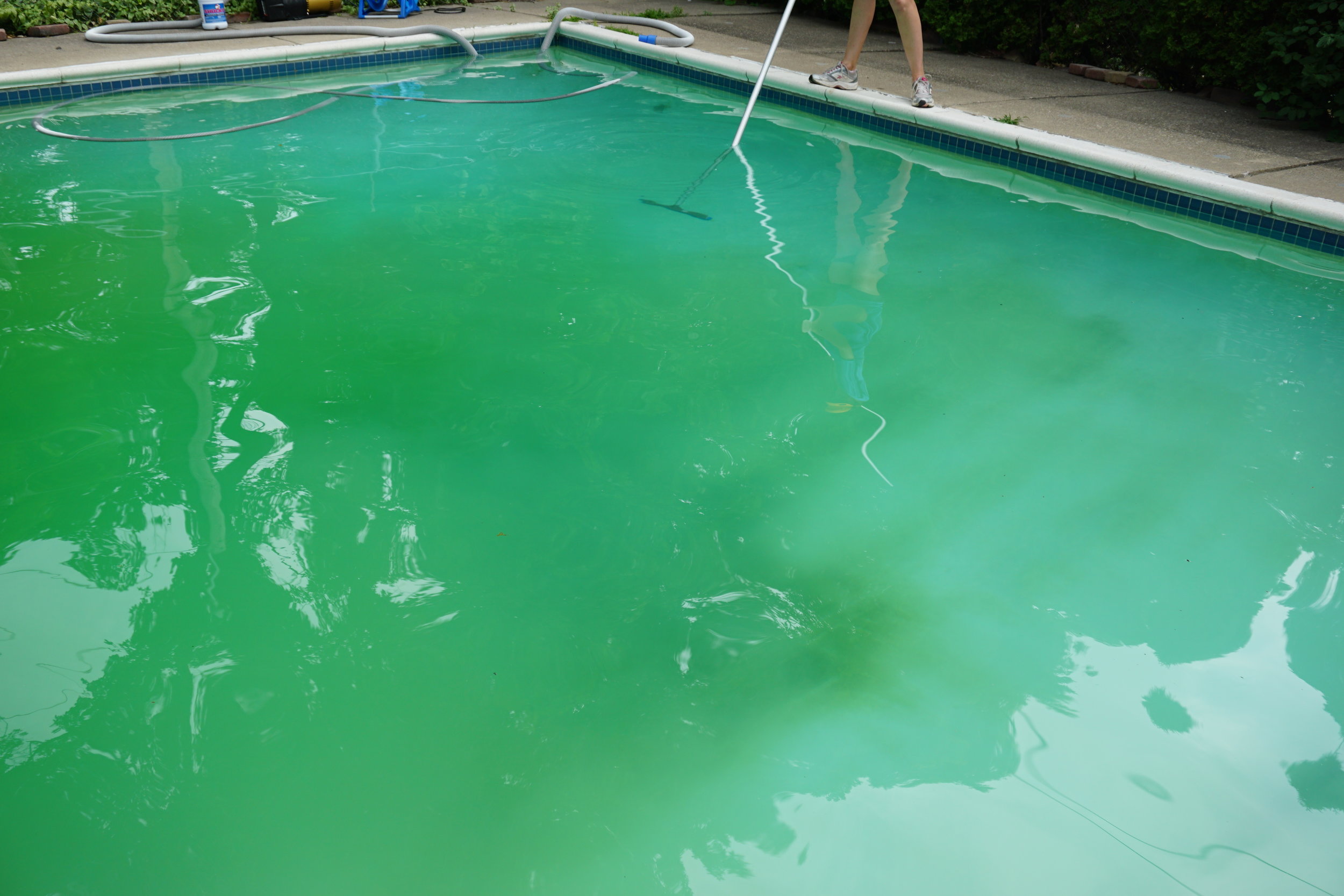
After treating a green algae bloom, a pool owner noticed the water turned milky blue. The pool looked clean but not clear. After closer inspection, fine dust covered the steps and floor. Brushing caused a cloud to rise. This is classic dead algae, and it took three rounds of vacuuming and filtering to remove it.
Example 2: Persistent Yellow Dust
A swimmer complained about yellow stains on their feet after using the pool. Upon inspection, a faint yellow powder was found on the steps and shallow end. The owner realized it was dead mustard algae, still present even after chemical treatment.
Example 3: Filter Troubles
One pool with a sand filter kept returning dead algae to the water, causing endless cloudiness. The solution was to use a clarifier, then vacuum to waste, and finally change the sand in the filter.
Example 4: Dead Algae In Saltwater Pools
A saltwater pool owner noticed gray dust settling after running the generator. The dead algae were lighter than dirt and moved easily when brushed. Upgrading to a cartridge filter solved the problem.
Key Lesson: Every situation is slightly different, but dead algae always need a combination of brushing, vacuuming, and good filtration to remove completely.
Credit: www.thehandyfamilyinc.com
The Difference Between Dead Algae And Other Pool Debris
It’s easy to confuse dead algae with other pool problems. Here’s a quick guide to help you tell the difference:
| Problem | Appearance | Test | Removal |
|---|---|---|---|
| Dead Algae | Gray/white/yellow dust | Brush: becomes cloudy | Vacuum, filter, clarify |
| Dirt/Sand | Brown/tan grit | Brush: mostly stays put | Vacuum |
| Pollen | Yellow film, floats on top | Skim: comes off surface | Skim, filter |
| Scale/Calcium | White hard spots | Scrape: feels hard | Acid wash, scrub |
Pool Maintenance Myths About Dead Algae
Many pool owners fall for common myths. Here are the facts:
- Myth: “If I shock my pool, dead algae will disappear by itself.”
- Reality: Shocking kills algae but does not remove the dead remains. They must be vacuumed and filtered out.
- Myth: “Dead algae are harmless, so I can leave them.”
- Reality: Dead algae can cause cloudiness, filter clogs, and even help new algae grow.
- Myth: “Any pool filter will remove dead algae.”
- Reality: Many filters can’t catch fine particles unless helped by a clarifier or flocculant.
- Myth: “If I can’t see it, it’s gone.”
- Reality: Dead algae can be suspended in the water, making it look cloudy even if you don’t see obvious dust.
When To Call A Professional
If you have tried all the steps but still see dead algae, it may be time to call a pool professional. Persistent dead algae can signal:
- Filter damage or the wrong filter type
- Circulation issues needing new pumps or jets
- Severe algae blooms leaving behind stubborn residue
A professional can test your water, check your equipment, and recommend upgrades or deep cleaning.
Pro Tip: Don’t wait too long—letting dead algae linger can make the problem worse and cost more to fix later.
Trusted Resources For Learning More
For more details on pool algae, maintenance, and solutions, visit this in-depth guide from the Swimming Pool Association. Their expert advice can help you handle even the toughest algae problems.

Credit: www.reddit.com
Frequently Asked Questions
What Is The Fastest Way To Get Rid Of Dead Algae In My Pool?
The fastest way is to brush the pool, use a flocculant to clump the particles, then vacuum to waste. Run your filter for 24 hours, clean it, and repeat if needed.
Can Dead Algae Come Back To Life?
No, once algae are dead, they can’t come back to life. However, if you don’t remove them, leftover nutrients can help new algae grow.
Why Does My Pool Stay Cloudy After Treating Algae?
Cloudiness after algae treatment is usually due to suspended dead algae particles. They are too small for some filters to catch. Use a clarifier and run the filter longer.
Is It Safe To Swim With Dead Algae In The Pool?
Swimming with a small amount of dead algae is not dangerous, but it can make the water look and feel unpleasant. Large amounts can also irritate skin or eyes.
How Can I Stop Dead Algae From Coming Back?
Keep your pool chemistry balanced, clean your filter often, brush and vacuum weekly, and improve circulation. Preventing algae growth is the best way to avoid dead algae.
If you pay attention to these signs, understand what dead algae really look like, and use the right cleaning and prevention steps, your pool will stay clear, clean, and ready for swimming. With the right care, dead algae will be just a memory—and not a regular problem.