
A Farberware coffee maker can be the heart of your morning routine. When it stops working, it can feel like your whole day is off track. The good news is that most problems with a Farberware coffee maker are easy to fix at home.
You don’t need special tools or advanced skills—just some patience and the right guidance. This article will walk you step by step through the most common problems, troubleshooting tips, cleaning advice, and how to keep your coffee maker running smoothly for years.
If you’re tired of bland repair guides or confusing instructions, you’re in the right place. I’ll show you how to fix a Farberware coffee maker in simple, clear steps. You’ll learn not only how to solve the issue but also why it happens, so you can avoid future problems.
Let’s get started and bring back that perfect cup of coffee.
Understanding Your Farberware Coffee Maker
Before you start fixing, it’s important to know the basic parts and how your Farberware coffee maker works. Each part plays a role in brewing coffee. Knowing them helps you spot problems faster.
Main Components
- Water reservoir – Holds water before brewing.
- Filter basket – Where ground coffee sits.
- Heating element – Heats the water.
- Spray head – Distributes hot water over grounds.
- Carafe – Collects brewed coffee.
- Control panel – Buttons and display for settings.
Most Farberware models also include a warming plate to keep coffee hot, and some have a clock and programmable timer. Understanding these parts helps you identify whether a problem is mechanical (like a broken carafe), electrical (like a dead display), or related to cleaning (like a clogged spray head).
How It Works
When you press the brew button, water from the reservoir moves to the heating element. It heats up and moves through the spray head, pouring over coffee grounds. The brewed coffee drips into the carafe. Any problem in this process can stop your coffee maker from working right.
For example, if the water doesn’t flow from the reservoir, the machine won’t brew. If the heating element fails, water won’t get hot enough for extraction. A clogged spray head can cause uneven brewing or slow drips. Knowing each stage helps you troubleshoot issues logically rather than guessing.
Common Problems And How To Fix Them
Let’s look at the most frequent issues people have with Farberware coffee makers, and how you can repair each one.
1. Coffee Maker Won’t Turn On
If your machine stays silent and the lights don’t work, try these steps:
- Check the power source. Plug another device into the outlet to make sure it works. Sometimes, outlets stop working due to a tripped circuit or faulty wiring.
- Inspect the power cord. Look for cuts, fraying, or loose connections. Even a small break in the cord can stop power from reaching the machine.
- Press the power button firmly. Sometimes buttons get stuck or need extra pressure to activate.
- Look for a tripped circuit breaker. Reset it if needed. In older kitchens, small appliances often trip breakers, especially if several devices are used at once.
If none of these solve it, the internal fuse or wiring may be damaged. Repairing internal electronics is best left to professionals for safety. Attempting to fix electrical faults without the right skills can cause injury or make the problem worse.
Extra tip: If your kitchen tends to have power surges, consider using a surge protector for your coffee maker. Power surges can damage the internal board over time.
2. Coffee Maker Is Leaking
Leaking water or coffee is messy and can damage your counter. Here’s what to do:
- Check the water reservoir. Make sure it’s seated correctly and not cracked. A small crack can cause slow leaks that are hard to spot at first.
- Inspect the carafe. Is it lined up with the drip area? A misaligned carafe often causes leaks. Some models have a sensor that won’t let water flow unless the carafe is in place.
- Look at the filter basket. If it’s overflowing, you may be using too much coffee or the wrong grind size. Finer grinds can block water flow, causing overflow.
- Examine the gasket and seals. These rubber parts can dry out over time. Replace if they look worn. Sometimes, simply cleaning the gasket and seating it properly will stop a leak.
Extra insight: Many people overlook cleaning the area under the water reservoir. If coffee or water spills here, it can create sticky build-up that prevents parts from sealing correctly, leading to leaks.
3. Coffee Tastes Bad
A bitter or weak taste can ruin your cup. Fix it by checking:
- Coffee grind size. Too fine or coarse affects flavor. For drip coffee makers, a medium grind works best. Too fine (espresso grind) can cause bitterness and slow brewing, while too coarse can make coffee weak.
- Water-to-coffee ratio. Follow the recommended amounts. Most machines suggest one tablespoon of ground coffee per six ounces of water, but adjust to taste.
- Cleanliness. Old coffee oils build up and affect taste. Clean your machine regularly (see cleaning section below).
Other causes of bad taste include stale coffee beans and using unfiltered tap water with strong odors. Sometimes, the water quality changes seasonally, which can affect taste.
Hidden detail: If you recently descaled your machine but forgot to rinse thoroughly, leftover vinegar or cleaning solution can make coffee taste sour or chemical-like. Always run several cycles of clean water after deep cleaning.
4. Slow Brewing Or Not Brewing At All
If your Farberware coffee maker is brewing slowly or not at all, follow these steps:
- Descale the machine. Mineral build-up is a common cause. Hard water can leave calcium or lime deposits in the tubes.
- Check for clogs in the spray head. Remove and clean it. Some spray heads unscrew easily; others may need a gentle wiggle to remove.
- Inspect the water reservoir. Make sure nothing blocks the water flow. Occasionally, small pieces of coffee grounds or debris fall into the reservoir.
If it still doesn’t brew, the heating element might be failing. To check, feel the bottom of the machine after a brew cycle—if it’s cold, the heater is likely the problem.
Practical tip: If you use flavored coffees, these often have added oils that can build up faster than plain coffee. Clean more often if you notice slow brewing.
5. Coffee Maker Won’t Heat
If water passes through but stays cold:
- Heating element failure. This part may need replacing. Some Farberware models let you access it from the bottom panel.
- Thermal fuse issue. If the heating element is fine, the thermal fuse may be blown. Replacing this requires opening the machine, so consider a professional unless you are comfortable with small appliances.
Sometimes, a thermal fuse blows after a power surge or if the machine is left on for too long. If your coffee maker suddenly stops heating after a storm or electrical event, this is a likely cause.
Example: A user noticed their coffee maker brewed cold water after a lightning storm. Replacing the thermal fuse fixed the problem without needing a new machine.
6. Display Or Buttons Not Working
If the screen or buttons stop responding:
- Unplug and replug. Reset the coffee maker. Some models need a few minutes unplugged to reset fully.
- Clean the control panel. Dirt or moisture can cause buttons to stick. Use a slightly damp cloth, not a wet one, to prevent moisture from getting inside.
- Check for moisture inside. Let the machine dry out completely. If you spilled water near the display, let it sit unplugged for several hours.
If the display remains dead, the circuit board may be faulty. In some cases, replacing the small button circuit board is possible, but usually, this repair costs more than a new machine unless it’s under warranty.
Non-obvious insight: On some models, a weak or dying internal battery (for the clock/timer memory) can cause display glitches. This isn’t common, but if your display fades or loses time often, it may be the cause.
7. Overflowing Coffee Grounds
Messy overflows usually mean:
- Too much coffee in the basket. Use the correct amount. Overfilling causes water to back up and overflow.
- Wrong coffee filter. Make sure it fits your model. Some filters are taller or shorter than others and can let grounds spill over the sides.
- Clogged filter. Rinse or replace it. Permanent filters should be cleaned with a brush to remove old grounds.
If you notice grounds in your carafe, double-check that the basket is fully seated and the filter is not folded over at the edge.
Extra detail: Using very oily coffee beans (like dark roasts or some specialty blends) can clog mesh filters faster. Clean the filter more often if you use these coffees.
8. Auto-shutoff Not Working
This safety feature is important. If your coffee maker doesn’t turn off after brewing:
- Reset the machine. Unplug for 10 minutes, then plug back in.
- Check for stuck buttons. Clean and press each button.
- Factory reset. Some models have a reset button or sequence (see your manual).
If the feature still fails, contact Farberware support.
Pro tip: If you’re leaving the house, always unplug the coffee maker if you’re not sure the auto-shutoff is working. This prevents fire risk and gives peace of mind.

Credit: www.greggio.com
Cleaning And Maintenance For Farberware Coffee Makers
Regular cleaning is one of the best ways to prevent problems. Many issues come from mineral deposits, coffee oil build-up, or clogged parts. Here’s how to keep your coffee maker in top shape.
Daily Cleaning
- Rinse the carafe and filter basket after every use to prevent old coffee residue. Even a quick rinse removes oils that build up over time.
- Wipe the exterior with a damp cloth. Pay special attention to the area around the buttons, as spills can make them sticky.
Weekly Cleaning
- Wash all removable parts (carafe, reservoir, filter basket) with warm, soapy water. Dry thoroughly before reassembling to avoid mold.
- Clean the spray head if your model allows it. Use a toothpick or small brush to remove stubborn build-up.
Deep Cleaning / Descaling
Minerals in water build up over time and can block your coffee maker. Descale every 4-6 weeks, or more often if you have hard water.
Step-by-step Descaling Guide
- Mix a solution: 1 part white vinegar to 2 parts water. Fill the reservoir.
- Run a brew cycle: Let half the solution go through, then turn off and let it sit for 30 minutes. This soaking step helps loosen stubborn deposits.
- Finish the cycle: Turn the coffee maker on to finish the brew.
- Rinse: Run 2-3 cycles with clean water to remove any vinegar smell.
Example: If your machine has a strong vinegar smell after cleaning, leave the lid open and let it air out overnight.
Table: Cleaning Frequency For Farberware Coffee Makers
| Part | Recommended Cleaning Interval | Why Clean? |
|---|---|---|
| Carafe & Filter Basket | Daily | Removes coffee oils, prevents mold |
| Spray Head | Weekly | Prevents clogs |
| Water Reservoir | Weekly | Removes mineral build-up |
| Descale (Internal) | Monthly | Ensures proper water flow |
Non-obvious Cleaning Tips
- Use filtered water to reduce mineral deposits. This small change can add years to your coffee maker’s life.
- Leave the lid open after brewing. It helps the machine dry out and prevents mold.
- Dry removable parts thoroughly before putting them back. Hidden moisture encourages bacteria and mold.
Step-by-step Troubleshooting Guide
If you’re not sure what’s wrong, follow this troubleshooting sequence. It covers the most common situations.
Step 1: Check Power And Display
- Is the coffee maker plugged in and does the display light up?
- Yes: Go to Step 2.
- No: Try another outlet or check your circuit breaker.
If your display flashes but doesn’t stay on, the power cord or internal wiring may have a loose connection.
Step 2: Inspect Removable Parts
- Are all parts (carafe, filter basket, reservoir) seated properly?
- Yes: Go to Step 3.
- No: Adjust them and try again.
Sometimes, the machine won’t start unless all parts are in the right place. Some models have sensors that detect missing parts.
Step 3: Run A Cleaning Cycle
- Fill with vinegar solution and run a cycle. Does the machine work?
- Yes: Problem was likely mineral build-up.
- No: Go to Step 4.
If cleaning improves performance but doesn’t solve it completely, repeat the process or let the vinegar sit longer.
Step 4: Check For Clogs And Leaks
- Remove and clean spray head, filter basket, and reservoir.
- Look for leaks under or around the machine.
If you find water under the machine, unplug it immediately and let it dry before further inspection.
Step 5: Test Brewing
- Use fresh water and coffee.
- If the machine still doesn’t brew, the issue is likely electrical or mechanical.
If you hear a clicking sound but no water flows, the pump or heating element may need repair.
Step 6: Seek Professional Help
- If the heating element, fuse, or circuit board is damaged, contact customer service or a repair technician.
Extra advice: If your coffee maker is still under warranty, don’t open it yourself. Attempting repairs can void the warranty.
When To Replace Vs. Repair
Sometimes, fixing isn’t worth the effort or cost. Here’s how to decide:
- Repair if: The problem is with a removable part (carafe, basket, reservoir), cleaning solves the issue, or a simple seal/gasket needs replacing.
- Replace if: The heating element, circuit board, or display is broken (unless under warranty), or the machine is over 5 years old and has frequent problems.
If your coffee maker is making loud noises, gives off a burning smell, or trips breakers repeatedly, replacement is often safer than repair.
Table: Repair Vs. Replace Decision Guide
| Problem | Repair? | Replace? |
|---|---|---|
| Leaking carafe or reservoir | Yes | No |
| Broken heating element | No | Yes |
| Clogged spray head | Yes | No |
| Unresponsive display | If under warranty | Yes |
| Frequent electrical issues | No | Yes |
Replacement Parts And Where To Find Them
Getting the right parts is key to a successful fix. Farberware parts are often available online or at appliance stores.
Common Replacement Parts
- Carafe
- Filter basket
- Water reservoir
- Gasket/seals
- Spray head
Some specialty parts, like control boards or heating elements, are harder to find and may require contacting the manufacturer directly.
Where To Buy
- Farberware official website for genuine parts.
- Amazon and other online retailers for a wider selection.
- Local appliance stores may have universal parts.
Tip: Always check your coffee maker’s model number before ordering parts. Many Farberware models look similar but use different parts.
Pro insight: If you can’t find a replacement part, search for your model number plus “spare parts” or “replacement” in online forums. Sometimes, other owners share sources or compatible alternatives.
Preventing Future Problems
A little care goes a long way. Here’s how to keep your Farberware coffee maker in top condition:
- Use filtered water to slow mineral build-up.
- Clean all parts regularly—don’t let coffee sit overnight.
- Descale monthly if you have hard water.
- Store in a dry place to avoid moisture damage.
- Don’t overfill the reservoir—follow the max line.
Advanced tip: If you notice your machine brewing slower over weeks, descale it right away. Don’t wait for a complete blockage.
Example: One user avoided expensive repairs for years by simply descaling every month and wiping down all rubber seals weekly.
Quick Reference: Farberware Error Messages
Some Farberware models have digital displays with error codes. Here are the most common ones and what they mean.
| Error Code | Meaning | Solution |
|---|---|---|
| E1 | Water reservoir empty | Add water and restart |
| E2 | Heater not working | Contact support |
| E3 | Sensor error | Unplug, wait, replug |
| E4 | Overheating | Let cool, then restart |
If you see an error not listed here, check your user manual or visit the Farberware Support Site.
Extra detail: Sometimes, error codes appear after a power outage. Reset the machine by unplugging for several minutes, then plugging back in.
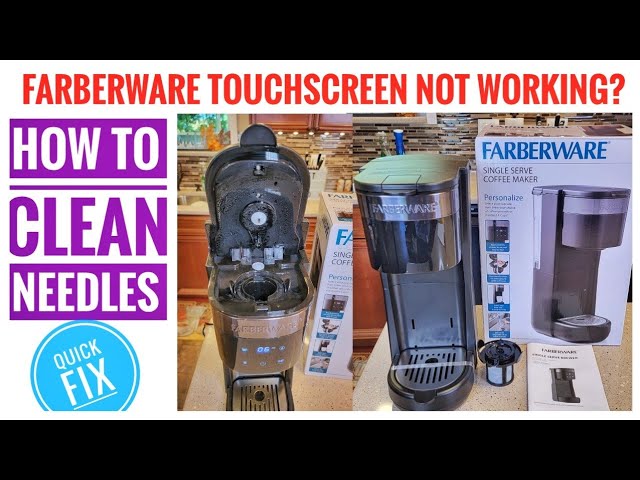
Credit: www.youtube.com
Real-life Example: Fixing A Slow-brewing Farberware Coffee Maker
Let’s say your coffee maker is brewing a full pot in 40 minutes instead of 10. Here’s what one user did:
- Checked for clogs: Removed the spray head and found hard water deposits.
- Ran a vinegar cleaning cycle: Used 1 part vinegar, 2 parts water. Let it sit, finished the cycle, then rinsed twice.
- Result: Brewing time returned to normal.
Insight: Even if water flows, slow brewing usually means internal build-up. Regular cleaning prevents this.
Another tip: If your coffee maker starts and stops during brewing, it can also be a sign of mineral build-up or a failing heating element. Start with cleaning, and if that fails, consider a replacement.
Advanced Repairs: For Diy Enthusiasts
If you’re comfortable opening small appliances, you can attempt more advanced repairs. Always unplug first!
Replacing A Thermal Fuse
- Remove bottom screws and panel.
- Locate the thermal fuse near the heating element.
- Unscrew and replace with a matching fuse (rating is on the old one).
- Reassemble and test.
Note: Thermal fuses are cheap and available online, but you must match the specifications exactly.
Repairing A Loose Power Cord
- Open the bottom panel.
- Check the cord’s connection to the control board.
- Tighten or re-solder if needed.
Warning: If you’re not experienced with electronics, consult a professional.
Pro tip: After any repair, test with water only before brewing coffee to make sure there are no leaks or electrical issues.
What Most People Miss When Fixing Their Coffee Maker
Many guides miss two important things:
- Small leaks can be fixed by replacing just the seal or gasket. You don’t need to buy a new machine for minor drips.
- Coffee oils left in the spray head affect taste and flow. Many people forget to clean this part, but it makes a big difference.
Additional insight: If your coffee maker is making strange noises or smells, check for hidden mold or scale inside the reservoir or tubing. Regular deep cleaning prevents these issues.
Frequently Asked Questions
Why Does My Farberware Coffee Maker Keep Shutting Off?
The auto-shutoff feature is designed to save energy and prevent overheating. If your machine shuts off before brewing is done, check for power interruptions, loose plugs, or overheating. Also, descale the machine; mineral build-up can cause sensors to trigger auto-shutoff early.
If auto-shutoff happens only sometimes, inspect the power button and make sure it isn’t sticking or being pressed accidentally.
How Often Should I Descale My Farberware Coffee Maker?
It’s best to descale every 4 to 6 weeks. If you have hard water, do it more often. Regular descaling prevents slow brewing and extends the life of your machine.
My Coffee Tastes Metallic. How Can I Fix This?
A metallic taste usually means mineral build-up or leftover cleaning solution. Run several cycles with clean water after descaling. Also, use filtered water and clean all parts that touch coffee or water.
If the problem persists, check the water source for changes—municipal water sometimes adds new chemicals seasonally.
Can I Use Paper Filters Instead Of The Permanent Filter?
Yes, you can use paper filters if you prefer. Make sure they fit your model. Paper filters can produce a cleaner cup and make clean-up easier, but don’t use both filters at the same time.
Some users prefer the taste and convenience of paper filters, while others like the reusable option. Try both and see which you prefer.
Where Can I Find Genuine Farberware Replacement Parts?
The best place is the Farberware official website or their authorized retailers. You can also check online stores like Amazon, but always match the part to your model number to avoid compatibility issues. For more support, visit the Farberware Support Site.
Final tip: Keep your coffee maker manual somewhere safe. It has troubleshooting charts and part numbers that make finding solutions even easier.
Fixing your Farberware coffee maker doesn’t have to be difficult or expensive. With careful cleaning, smart troubleshooting, and the right replacement parts, you can keep your coffee maker brewing great coffee for years. Remember, a little maintenance goes a long way—and your morning cup will thank you.

Credit: www.greggio.com