
Every Breville espresso machine owner knows the satisfaction of making café-style coffee at home. But even the best machines sometimes get stuck, act strangely, or lose their magic. When strange lights blink or your espresso just doesn’t taste right, a reset often solves the problem. Resetting brings your Breville back to its original settings, clears software glitches, and can even help with stubborn cleaning cycles. Whether you’re facing a minor glitch or your machine won’t cooperate at all, understanding how to reset your Breville espresso machine is a skill every home barista needs.
This guide covers every step, tip, and common mistake about resetting Breville espresso machines. You’ll learn not only the how, but also the why—plus get help for different models, troubleshooting after a reset, and even tips most beginners miss. By the end, you’ll feel confident tackling any reset, and your machine will be ready for many more cups of rich, delicious espresso.
Why Reset Your Breville Espresso Machine?
Most people only think about resetting when something goes wrong. But a reset isn’t just for emergencies. Here’s why it matters:
- Restores factory settings: Over time, you might change water temperature, shot volume, grind size, or pre-infusion. If the coffee tastes off, a reset quickly brings everything back to default settings.
- Fixes glitches: Machines can freeze, skip cycles, or show error lights. A reset often clears these software bugs.
- Helps after repairs or cleaning: If you replaced parts or ran a deep clean, your machine might act strangely until reset.
- Solves water flow issues: Sometimes, water won’t flow or the cleaning cycle gets stuck. Resetting often fixes this.
- Prepares for resale: Before selling or gifting your machine, a reset erases your custom settings and personal data.
Many beginners don’t realize that even minor changes (like adjusting shot size) can build up over time and affect taste. Resetting is a fast, safe way to troubleshoot before calling for service.
Understanding Different Breville Espresso Machine Models
Not all Breville machines reset the same way. Some have simple button combos, while others use digital menus. Here’s a quick breakdown of common Breville models and their reset types.
| Model | Reset Method | Main Features |
|---|---|---|
| Barista Express (BES870XL) | Button Combination | Manual controls, built-in grinder |
| Barista Pro (BES878) | Menu Settings | Digital display, fast heat-up |
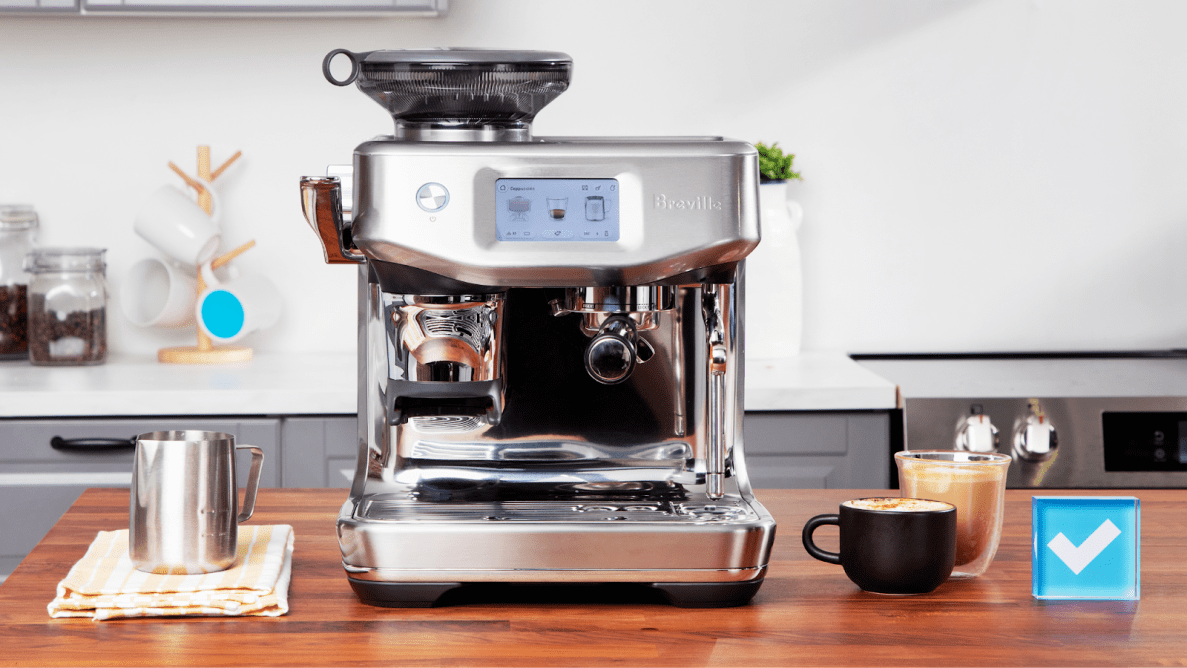
| Barista Touch (BES880) | Touchscreen Menu | Touchscreen, user profiles |
| Bambino Plus (BES500) | Button Combination | Compact, automatic milk frothing |
| Duo-Temp Pro (BES810) | Simple Reset | Basic, manual operation |
Even within the same series, there can be small differences. Always check your user manual, but the steps below cover the most common reset methods for each category.
How To Reset Breville Espresso Machines: Step-by-step
This section covers the most popular models. If your machine isn’t listed, the general process will still help.
Resetting The Barista Express (bes870xl)
The Barista Express is one of the most popular home machines. Resetting it is straightforward:
- Turn off the machine.
- Press and hold the ‘PROGRAM’ button.
- While holding ‘PROGRAM’, turn the machine back on.
- Continue holding ‘PROGRAM’ until all lights on the front panel illuminate.
- Release the button. The machine will beep, and settings return to default.
All custom shot volumes, water temperature, and cleaning reminders reset. You’ll need to reprogram your preferred settings if you want them back.
Non-obvious tip: Many users forget to empty the water tank before resetting. If you have hard water or scale build-up, resetting with a clean tank helps avoid carrying issues into your new setup.
Resetting The Barista Pro (bes878)
The Barista Pro uses a digital menu. Here’s how to reset:
- Turn on the machine and let it heat up.
- Press the ‘MENU’ button to open settings.
- Use the dial to scroll to ‘Factory Reset’.
- Press the dial to select.
- The screen will ask for confirmation—press again to confirm.
The machine resets all options: shot volume, temperature, cleaning, and even language. When it restarts, it will guide you through basic setup (like when it was new).
Insight: The Barista Pro stores your cleaning cycle history. After a reset, the reminder for next cleaning will be based on new usage—so keep track if you’re overdue for a clean.
Resetting The Barista Touch (bes880)
If you have the Barista Touch:
- Tap the ‘Settings’ icon on the touchscreen.
- Scroll to ‘Factory Reset’.
- Tap to select, then tap ‘Confirm’.
This resets everything: user profiles, drinks, milk texture, shot sizes, water temp, and reminders.
Non-obvious tip: Back up your favorite drink settings (if you have custom profiles), since a reset will erase them. Many users don’t realize this until it’s too late.
Resetting The Bambino Plus (bes500)
For the compact Bambino Plus:
- With the machine off, press and hold both the ‘1 CUP’ and ‘STEAM’ buttons.
- While holding, turn the machine on.
- Continue holding until the lights on the panel flash.
- Release the buttons. The machine resets to factory settings.
This clears shot volumes and milk froth settings.
Helpful detail: Some users accidentally enter ‘descale mode’ instead of reset by holding the wrong buttons. If you see a descale light, turn off and start again.
Resetting Duo-temp Pro (bes810)
The Duo-Temp Pro has a basic reset:
- Turn off the machine.
- Hold down the ‘1 CUP’ button.
- Turn the machine on while holding.
- Lights will flash, then release the button.
The shot volume and temperature return to default.
Extra tip: If your machine won’t reset, unplug for one minute, then repeat. Sometimes a power cycle helps.
What Gets Reset? (settings And Data)
Resetting your Breville espresso machine doesn’t just clear taste settings. Here’s what usually gets reset:
- Shot volume: Espresso size returns to factory default (usually 1 oz for single, 2 oz for double).
- Water temperature: Any temperature adjustments are lost.
- Pre-infusion: Custom pre-infusion times are reset.
- User profiles: For touchscreen models, all saved drinks and profiles are deleted.
- Cleaning reminders: The cleaning and descale timers start over.
- Language/settings: Any custom language or menu settings revert to English/default.
Here’s a quick comparison of what resets on common models:
| Setting | Barista Express | Barista Pro | Barista Touch | Bambino Plus |
|---|---|---|---|---|
| Shot Volume | Yes | Yes | Yes | Yes |
| Temperature | Yes | Yes | Yes | No |
| User Profiles | No | No | Yes | No |
| Cleaning Timers | Yes | Yes | Yes | Yes |
| Language/Menu | No | Yes | Yes | No |
Key point: Resetting does NOT usually remove firmware updates or fix hardware problems. If your machine has a broken part or old software, resetting only helps with settings—not physical repairs.
When Should You Reset? (common Scenarios)
Many people wait too long to try a reset. Here are common times when a reset is the right move:
- After accidental programming: If you accidentally set a strange shot size or temperature and can’t get it back to normal.
- Strange lights or error codes: When warning lights won’t go away after cleaning or descaling.
- Machine not responding: Buttons don’t work, or the display is frozen.
- Poor coffee taste: After trying lots of adjustments, a reset gives you a fresh start.
- Before selling/gifting: You don’t want your settings or personal data left for the next user.
- After a power surge: Sometimes, electrical problems can scramble settings.
- Stuck cleaning or descale cycle: If the machine won’t exit cleaning mode.
Pro insight: If you use very hard water or descale often, strange behavior is more common. Regular resets keep the machine running smoothly.
What To Do After Resetting
Resetting is just the start. Here’s what you should do next:
- Re-prime the machine: Run water through the group head without coffee to clear any old water or debris.
- Reprogram preferred settings: Set your shot volume, temperature, and milk froth how you like.
- Run a cleaning cycle: Even after a reset, running a cleaning cycle helps avoid leftover residue.
- Check for updates: If your model has firmware updates, check the manufacturer’s site.
- Test with a blank shot: Run an espresso shot without coffee to make sure water flows smoothly.
Hidden mistake: Many people forget to re-prime, which can make the first espresso after a reset taste strange. Always flush water through before making coffee again.

Credit: www.youtube.com
Troubleshooting If Reset Doesn’t Work
What if you try all the steps and your Breville still isn’t right? Here’s what to check:
- Buttons not responding: Unplug the machine for one minute, then try again.
- Reset process won’t start: Make sure you’re pressing the right buttons, in the correct order. Double-check the manual.
- Machine still shows errors: Some errors are hardware-related (like pump failure) and can’t be fixed with a reset.
- Cleaning light won’t go out: Try running a full cleaning cycle. Sometimes the reset only clears software, not cleaning reminders.
- No water flow: The water tank may not be seated properly, or the filter is clogged. Remove and reseat the tank, clean the filter, and try again.
If all else fails, contact Breville support or visit their official support page for further help.
Tips To Avoid Needing Frequent Resets
While resets are helpful, you shouldn’t need to do them often. Here’s how to keep your machine running smoothly:
- Use filtered water: Hard water causes scale and clogs, leading to more resets.
- Regular cleaning: Follow the cleaning schedule for your model—don’t wait for lights to remind you.
- Avoid rapid button pressing: Press buttons firmly and wait for responses. Rapid or random pressing can confuse the software.
- Update firmware: If your machine supports updates, keep it current.
- Store in a dry place: Moisture in the electronics can cause glitches.
Extra insight: The most common beginner mistake is ignoring descaling. Neglecting this leads to more software errors and resets. Set a calendar reminder for regular descaling.

Credit: assets.breville.com
Resetting Breville Machines: Myths Vs. Facts
Some common myths can lead you astray. Let’s clear them up:
- Myth: Resetting will fix any problem.
- Fact: Resets only fix software/settings issues, not hardware faults.
- Myth: You’ll lose your warranty by resetting.
- Fact: Resetting is a normal part of use; it won’t affect your warranty.
- Myth: You must reset after every cleaning.
- Fact: Reset only if you notice problems; cleaning cycles don’t require it.
Special Cases: Advanced Reset Options
Some newer Breville models (like the Oracle Touch) have extra reset options:
- Partial Reset: Only resets certain settings (like shot size).
- Full Factory Reset: Resets everything, including advanced user profiles.
- Descale Mode Reset: Exits a stuck descale cycle.
Check your manual for these options. Using a partial reset can save your custom profiles if you only want to fix one problem.
Real-world Example: Solving A Stuck Cleaning Cycle
Jane’s Barista Pro started flashing the cleaning light after she ran a cleaning cycle. She tried cleaning again, but the light stayed on. Here’s how she solved it:
- She turned off the machine and unplugged it for 2 minutes.
- She held the ‘MENU’ button, turned it back on, and selected ‘Factory Reset’.
- After the reset, she ran a blank shot with just water.
- The cleaning light finally turned off.
Lesson: Sometimes, only a full reset will clear a stuck reminder or software glitch. If you’ve tried everything, don’t be afraid to reset.
Data Table: Common Reset Problems And Solutions
Here’s a quick reference for frequent reset issues:
| Problem | Possible Cause | Solution |
|---|---|---|
| Buttons unresponsive | Software freeze, electrical issue | Unplug for 1 minute, reset again |
| Cleaning light won’t clear | Cycle not completed, software glitch | Full reset, run cycle again |
| No water flow after reset | Air lock, tank not seated | Re-prime, reseat tank, flush water |
| Lost custom drinks | Factory reset erases profiles | Reprogram favorites after reset |
| Machine won’t turn on | Power surge, blown fuse | Check outlet, inspect fuse, contact support |
Credit: www.cloudambiance.com
Resetting Vs. Power Cycling: What’s The Difference?
Many people confuse resetting with power cycling. Here’s how they differ:
- Resetting clears saved settings and returns the machine to factory defaults.
- Power cycling (simply unplugging and plugging back in) just restarts the machine but keeps your settings.
If your machine is frozen or not responding, try power cycling first. If problems continue, then do a full reset.
Frequently Asked Questions
How Often Should I Reset My Breville Espresso Machine?
You should only reset when you notice problems—like strange lights, programming errors, or after major cleaning. Most users reset once or twice a year, if at all. Frequent resets mean you might have a deeper problem that needs service.
Will Resetting Delete My Saved Drink Recipes And Preferences?
Yes, a full reset deletes all custom recipes, shot volumes, and profiles. If you want to keep your favorites, write them down before resetting so you can reprogram them later.
Can I Reset My Breville Machine If It’s In Descale Or Cleaning Mode?
In most cases, yes. Resetting can help if the machine is stuck in cleaning or descale mode. However, make sure you complete any cycles in progress first, or you may have to start them over after the reset.
What Should I Do If My Machine Doesn’t Respond After A Reset?
First, unplug the machine for at least one minute. Plug back in and try the reset again. If it’s still not responding, check the power outlet and ensure the water tank and drip tray are properly seated. If nothing works, contact Breville support.
Is It Safe To Reset My Machine Often?
Occasional resets are safe and part of regular use. However, if you need to reset frequently (every week or more), this can be a sign of a larger issue—like electrical problems, scale build-up, or faulty parts. In that case, contact a technician.
Every Breville espresso machine is designed for easy home use, but even the best devices need a little help now and then. A factory reset can bring your espresso maker back to life, clear confusing settings, and fix many common problems. Just remember: always note your favorite settings before you reset, and flush the machine after. Most issues are solved with a simple reset, but if your machine keeps acting up, don’t hesitate to reach out to Breville’s expert support. With these steps, you’ll spend less time troubleshooting and more time enjoying perfect espresso at home.