
Resetting a Bosch oven can seem complicated, especially if you are not familiar with modern appliances. Many people feel anxious when their oven stops working or shows error codes. But you don’t need to worry. With clear steps and practical advice, you can reset your Bosch oven and solve common issues.
This article explains everything you need to know, from simple power resets to dealing with advanced error codes. You will learn how to reset different Bosch oven models, what to do if the reset does not work, and how to avoid mistakes.
If you follow these instructions, your oven will be ready to cook again.
Understanding Bosch Oven Reset: Why And When
Before you start, it’s important to know why a reset is sometimes necessary. Bosch ovens have electronic controls and safety features. If something goes wrong, the oven may stop working or show an error code. Common reasons to reset include:
- Error codes appearing on the display
- Oven not heating or responding to controls
- Power outage or electrical surge
- Problems after cleaning or maintenance
A reset can clear temporary faults and restore normal operation. However, not all problems can be fixed with a simple reset. If your oven has a serious hardware problem, you may need professional help.
Sometimes, errors are triggered by things you might not expect. For example, if the oven is left open for too long or if there’s a sudden change in power supply, the electronics can get confused. Even a quick cleaning, if moisture gets into the control panel, can lead to strange behavior and require a reset.
Non-obvious Insight: Resetting Is Different From Restarting
Many people confuse resetting with restarting. Restarting means turning the oven off and on. Resetting involves clearing error codes or returning settings to default. Make sure you understand which process your oven needs.
For example, if you only restart your oven when it displays a specific error, the code may return right away because the underlying problem is not cleared. A full reset helps to erase stored faults and gives the system a fresh start.
When A Reset Is Not Enough
If your oven keeps showing errors after a reset, there might be a deeper issue, such as a broken sensor or faulty wiring. In these cases, resetting will not help, and continuing to use the oven could be unsafe.
It’s also important to notice if problems happen repeatedly. If you have to reset your oven every week, this is a sign that something needs fixing. Persistent issues can be related to failing parts, such as a heating element, a stuck relay, or a malfunctioning fan.
For safety and to avoid expensive repairs, call a qualified technician if the same error keeps coming back.
How To Reset Bosch Oven: Step-by-step Guide
Resetting a Bosch oven usually follows a clear process. The steps may vary slightly depending on the model and the problem. Here’s a practical guide for most Bosch ovens.
1. Basic Power Reset
This is the first step you should try. It solves many simple issues.
- Turn off the oven using the main power button or switch.
- Unplug the oven from the wall socket. If the oven is hardwired, switch off the circuit breaker.
- Wait 5-10 minutes. This gives time for the electronic components to reset.
- Plug the oven back in or turn the circuit breaker back on.
- Turn the oven on and check if the issue is gone.
This simple reset can clear minor glitches or temporary errors caused by power surges.
If your oven is built-in and you can’t reach the plug, use the home’s breaker box. Flip the switch that controls the oven’s power. Mark it with tape if needed, so you remember which one it is.
Extra Tip: When unplugging or switching off the oven, also check other appliances on the same circuit. Sometimes, a tripped breaker affects multiple devices.
2. Resetting Error Codes
If your Bosch oven shows an error code, you may need to reset it specifically.
- E01, E02, E03: These codes often point to sensor or control board problems. Try the power reset first. If the error remains, consult the user manual or contact Bosch support.
- E05, E06: These codes relate to temperature issues. Reset the oven and check for blocked vents or dirty sensors.
- E30, E33: Door lock errors. Turn off the oven, wait, and turn it back on. If the error stays, check the door mechanism.
Each error code has a different meaning. Sometimes, a reset will clear the code. Other times, you must fix the underlying issue.
Don’t ignore strange error codes or ones that don’t appear in your manual. Sometimes a code is new or specific to your oven’s software version. When in doubt, write down the code and look it up on the Bosch website or ask support.
3. Factory Reset (restoring Default Settings)
Some Bosch ovens have a factory reset option. This is useful if you changed settings and want to return to the original setup.
To perform a factory reset:
- Access the settings menu on the oven’s control panel.
- Look for an option like “Factory Reset” or “Restore Defaults”.
- Confirm the reset. The oven will clear custom settings and return to default.
If your oven does not have this option, unplugging for 10 minutes can sometimes act as a basic reset.
A factory reset also helps if you’ve changed many settings (like language, sound, or display) and want to start over. Just remember, this will remove your saved preferences, so note any important settings before resetting.
4. Resetting After Power Outage
Power failures can cause Bosch ovens to freeze or display strange behavior.
- Unplug the oven for at least 10 minutes after the outage.
- Plug it back in and check if the display returns to normal.
- If the oven still has issues, try the factory reset.
Sometimes, after a power outage, the oven’s internal clock will reset to 00:00. The oven may not work until you set the correct time. Always check the display and reset the clock if needed.
5. Resetting Touchscreen Models
Some newer Bosch ovens have touchscreens. Resetting these models requires extra steps:
- Hold the “Home” button for 10 seconds.
- If a menu appears, select “Settings” and look for “Reset”.
- Confirm the reset. The touchscreen will restart.
If the screen is frozen, use the power reset method.
Touchscreen models sometimes have extra safety locks or hidden menus. If you can’t find the reset option, try searching for your model’s user guide online. Sometimes, a combination of holding two buttons will reveal extra options, but always use official instructions to avoid mistakes.
6. Resetting Oven Clocks And Timers
After a reset, the oven clock or timer may be wrong. Set the clock using these steps:
- Press the “Clock” or “Timer” button.
- Use the “+” and “-” buttons to set the correct time.
- Press “Start” or “Confirm”.
Setting the clock is important, as some Bosch ovens will not work until the time is set.
If your oven has a 24-hour and 12-hour option, choose the format you prefer. Some models will blink or show an error until the clock is set properly.
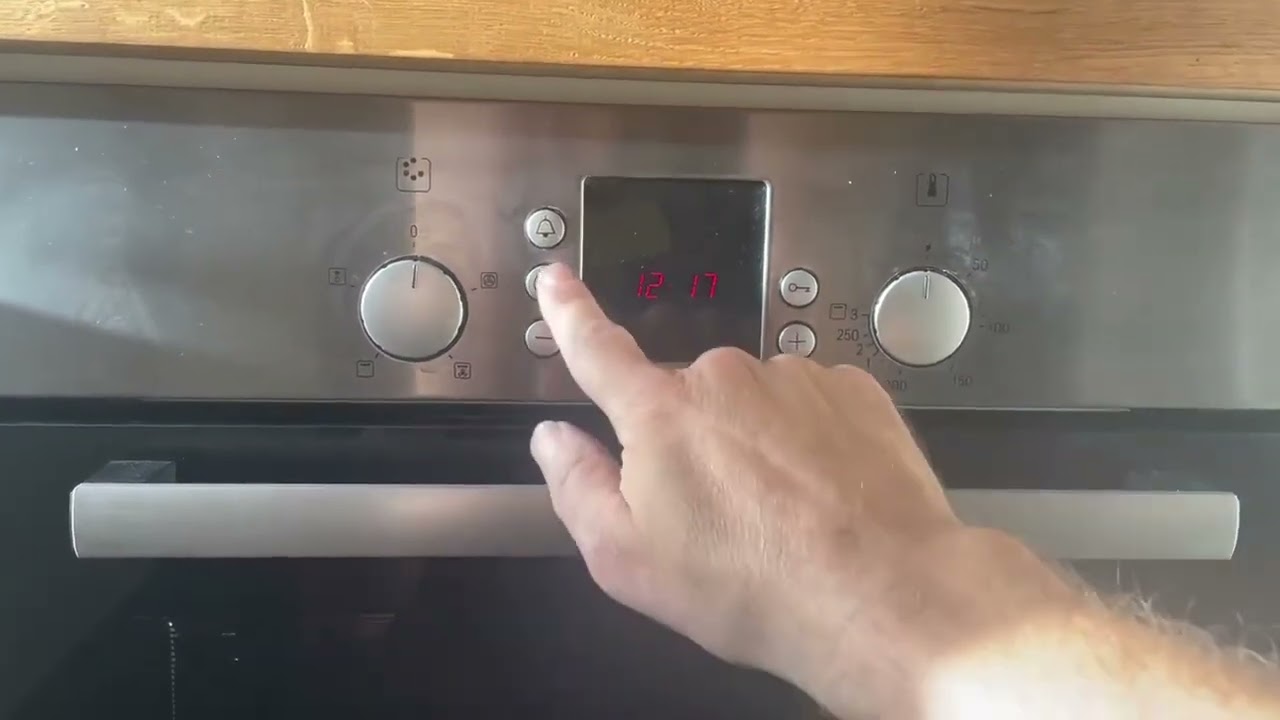
Practical Example: Resetting A Bosch Hbl8451uc
Let’s look at a real-world example. The Bosch HBL8451UC is a popular model.
- Turn the oven off.
- Unplug or switch off at the breaker.
- Wait 10 minutes.
- Plug in and turn the oven on.
- If there is an error code, check the manual for code meaning.
- If the oven is unresponsive, try holding the “Home” button to access settings.
This method works for most similar Bosch ovens.
Another helpful tip: If the oven becomes unresponsive after a self-clean cycle, a power reset nearly always helps. The high heat can sometimes trigger safety sensors. After the reset, make sure the door unlocks and the display returns to normal.
Credit: www.youtube.com
Understanding Bosch Oven Error Codes
Bosch ovens display error codes to help diagnose problems. Some codes can be cleared with a reset, others need repairs. Here are common codes and their meanings:
| Error Code | Meaning | Reset Solution |
|---|---|---|
| E01 | Sensor Fault | Power reset; check sensor |
| E02 | Control Board | Power reset; may need replacement |
| E05 | Temperature Error | Power reset; clean sensor |
| E30 | Door Lock | Power reset; check door |
| E33 | Door Sensor | Power reset; inspect mechanism |
If your oven displays an unfamiliar code, check the user manual. Bosch’s website also lists codes and solutions.
Error codes are useful tools for troubleshooting, so don’t clear them too quickly. Take a photo of the code before resetting, in case you need to discuss the problem with a technician later.
Non-obvious Insight: Error Codes Can Be Model-specific
Some codes only appear on certain models. Always check your oven’s manual for specific guidance.
Codes may look similar across brands, but their meanings can be different. For example, “E01” on one Bosch model could mean a sensor issue, but on another, it might point to a door problem. Always use your specific manual.
Resetting Different Bosch Oven Models
Bosch offers several oven types: single wall ovens, double wall ovens, slide-in ranges, and built-in ovens. Reset steps may differ slightly. Here’s a comparison of typical reset processes:
| Model Type | Reset Method | Special Notes |
|---|---|---|
| Single Wall Oven | Power reset; set clock | Check for touchscreen |
| Double Wall Oven | Power reset both units | Reset each oven separately |
| Slide-in Range | Power reset; check controls | Factory reset may be available |
| Built-in Oven | Power reset; access breaker | Some models need professional help |
Always follow your model’s instructions. Double wall ovens often require resetting both sections.
Some built-in models are connected to a central control panel. If only one oven has a problem, try resetting just that unit. If both are affected, reset the entire system.

Credit: www.reddit.com
Common Problems Solved By Resetting
Resetting your Bosch oven can solve several issues. Here are the most common:
- Unresponsive controls: The oven does not respond to button presses.
- Frozen display: The screen or clock is stuck.
- Error codes: Temporary faults show codes.
- Heating problems: Oven does not heat or heats unevenly.
- Door lock issues: Oven door will not open or close.
Some problems may return if the root cause is not fixed. For example, a dirty temperature sensor can cause repeated errors.
Resetting also helps after software glitches, like when the oven forgets Wi-Fi settings or when the timer won’t start. If you use smart home features (like app control), resets can resolve lost connections or app sync errors.
Non-obvious Insight: Resetting May Fix Wi-fi And Smart Features
If your Bosch oven is connected to Wi-Fi, a reset can solve network issues. After resetting, you may need to reconnect the oven to your home network.
Go to the oven’s settings and search for the Wi-Fi or network setup menu. Follow your manual’s instructions to reconnect. If you use the Home Connect app, a fresh reset often solves pairing or command delay problems.
What To Do If Reset Does Not Work
Sometimes, a reset will not fix your oven. Here’s what you should do next:
- Check power supply: Make sure the oven is plugged in and the circuit breaker is on.
- Inspect for physical damage: Look for broken buttons, loose wires, or burnt smells.
- Read the user manual: Manuals offer troubleshooting steps.
- Contact Bosch support: If the oven still has issues, call Bosch service.
You can find Bosch’s customer support contact at Bosch Home Support.
If you see sparks, smell burning, or hear unusual noises, turn off the oven immediately and do not try to reset it again. Safety should always come first.
Resetting Safety Features
Bosch ovens have built-in safety features, such as child locks and automatic shut-off. Sometimes, these features must be reset.
Resetting The Child Lock
- Press and hold the “Child Lock” button for 5 seconds.
- The lock icon should disappear from the display.
- If the lock remains, reset the oven with the power method.
Some models use a combination of buttons (for example, “Clock” + “Minus”) to unlock. Check your manual if you’re unsure.
Resetting Automatic Shut-off
If your oven turns off after long use, this is normal. Reset the oven to clear any faults. If it keeps shutting off early, check for overheating or blocked vents.
Overheating protection is a common safety feature. Clean the fans and air vents regularly to avoid false shut-offs. If the problem continues, a service visit may be needed.
Tips For Successful Reset
Resetting is easy if you follow these tips:
- Always unplug the oven or switch off the breaker before resetting.
- Wait at least 5 minutes for a full reset.
- Set the oven clock after resetting.
- Keep your user manual nearby.
- Avoid forcing buttons or controls.
Common Mistakes To Avoid
- Resetting while oven is hot: Always let the oven cool before resetting.
- Ignoring error codes: Some codes point to serious problems.
- Not waiting long enough: Electronics need time to reset.
- Using wrong reset method: Check your model’s instructions.
- Forgetting to set the clock: Oven may not work until the time is set.
Another mistake is pressing too many buttons at once. This can confuse the control panel. Always press one button at a time, and wait for the oven to react.
Credit: www.bosch-home.com
Comparing Bosch Oven Reset With Other Brands
Bosch is not the only brand with reset features. Here’s a comparison of how Bosch resets compare to others:
| Brand | Reset Process | Typical Issues Fixed |
|---|---|---|
| Bosch | Power reset; menu reset | Error codes, frozen controls |
| Samsung | Power cycle; factory reset | Display errors, network issues |
| GE | Breaker reset; control panel reset | Heating, display faults |
| Whirlpool | Power reset; settings reset | Clock, timer, error codes |
Bosch ovens are similar to other brands, but sometimes have more advanced error codes and safety features.
Some brands use app-based resets or require special tools for factory resets. Bosch usually allows manual resets without extra equipment, which is helpful for most users.
Advanced Reset: Software And Firmware Updates
Some Bosch ovens can update their software. If your oven has Wi-Fi or smart features, updating the firmware may solve issues.
- Check the settings menu for “Software Update”.
- Follow instructions to update.
- After updating, the oven may restart or reset automatically.
Always use official Bosch updates. Do not try to install unauthorized software.
If an update fails or the oven freezes during installation, unplug the oven for 10 minutes before trying again. Make sure your Wi-Fi is stable, as interruptions can cause update errors.
Preventing Future Problems
Resetting is a solution, but preventing problems is better. Here are ways to keep your Bosch oven running smoothly:
- Clean regularly: Dirt and grease can cause errors.
- Check vents: Blocked vents lead to overheating.
- Use surge protectors: Power surges damage electronics.
- Avoid changing settings too often: Stick to recommended settings.
- Inspect after storms: Power outages may need a reset.
A well-maintained oven needs fewer resets.
Also, keep the oven’s software updated and inspect door seals for damage. A poor seal can cause heat loss and sensor errors.
Real Data: Bosch Oven Reliability
Bosch ovens are known for reliability. According to a 2023 appliance survey, Bosch wall ovens had a failure rate of only 6% in the first five years. Most problems were minor and solved with a reset.
- Bosch ovens: 6% failure rate (first five years)
- GE ovens: 8% failure rate
- Samsung ovens: 7% failure rate
This shows that Bosch ovens are dependable, but even the best appliances can need a reset.
Most reported failures were not serious. Common complaints included unresponsive controls after a power cut or display errors—both usually fixed by a simple reset.
When To Call A Professional
If your oven has serious issues, do not try to fix it yourself. Call a professional if:
- Error codes will not clear after reset.
- Oven smells burnt or shows smoke.
- Wiring or circuit breaker is damaged.
- Oven will not turn on at all.
Trying to fix electrical appliances without training can be dangerous.
Professionals have the right tools to test sensors and replace parts safely. If your oven is under warranty, repairs may be free, so keep your purchase documents and warranty card.
Frequently Asked Questions
How Often Should I Reset My Bosch Oven?
You should only reset your oven when needed. For example, after a power outage or when you see an error code. Frequent resets are not necessary and may point to a deeper problem.
Can I Reset My Bosch Oven Without Unplugging It?
Most resets require unplugging or turning off the circuit breaker. Some models have menu options for factory reset, but unplugging is the safest way to clear faults.
Will Resetting My Oven Erase Custom Settings?
If you do a factory reset, custom settings and timers will be erased. A simple power reset usually keeps your settings.
What Should I Do If My Oven Keeps Showing The Same Error Code?
Repeated error codes mean a deeper problem. Try resetting, but if the code returns, read the manual or contact Bosch support. Do not keep using the oven if it has serious errors.
Is It Safe To Reset The Oven If It Is Still Hot?
No. Always let the oven cool before resetting. Resetting a hot oven can cause burns or damage the electronics.
Final Thoughts
Learning how to reset a Bosch oven is useful for every home cook. Resetting solves many common problems and keeps your appliance working well. Always follow safe steps, check the manual, and know when to call for help. With these tips, you can handle most issues confidently and enjoy reliable cooking.
If you need more information, Bosch’s official site offers guides and support. Remember, prevention is better than cure—maintain your oven, avoid unnecessary resets, and enjoy your Bosch oven for years to come.