
Setting up your GE oven’s Sabbath Mode can feel confusing if you’ve never used it before. Many people buy ovens with this feature but aren’t sure how or when to use it. If you want to keep your kitchen kosher, or you need to follow Sabbath or holiday rules, understanding Sabbath Mode is important. This guide explains everything you need to know, from what Sabbath Mode does, which GE ovens support it, and—most importantly—how to set it up step-by-step. Along the way, you’ll also learn practical tips, common mistakes to avoid, and answers to questions that most manuals skip.
What Is Sabbath Mode And Why Do People Need It?
Sabbath Mode is a special setting on many modern ovens. It helps people who observe Shabbat (the Jewish Sabbath) or certain Jewish holidays to follow religious rules. On these days, traditional Jewish law does not allow activities like turning appliances on or off, adjusting cooking temperatures, or pressing buttons that cause electric signals.
Sabbath Mode changes how your oven works. When this setting is active, the oven ignores button presses, disables sounds and lights, and keeps the temperature steady. You can keep food warm without breaking Sabbath rules. It’s not only for Jewish users—some people use it for other reasons, like keeping food ready during busy family gatherings.
Many new ovens have this feature, but GE ovens are known for making Sabbath Mode easy and reliable. However, each model works a bit differently, so understanding the basics will help you avoid mistakes.
Which Ge Ovens Have Sabbath Mode?
Not every GE oven includes Sabbath Mode. Most newer models—especially the ones with digital controls—support it. If you’re not sure, check your user manual or the official GE Appliances website. Here are some popular GE oven types that often include Sabbath Mode:
- GE Profile Series (wall ovens and ranges)
- GE Café Series (premium ranges and wall ovens)
- GE Monogram Series (luxury built-ins)
- Standard GE electric and gas ranges (select models from recent years)
If your model has a digital display and a control pad, there’s a good chance it has Sabbath Mode. Older ovens with only manual dials usually do not.
How To Check If Your Oven Has Sabbath Mode
- Look for a “Sabbath Mode” button or option on your oven’s display.
- Check the user manual index for “Sabbath Mode.”
- Visit the official GE Appliances website and search your oven’s model number.
- If you see the letters “SAB” on the display or control panel, Sabbath Mode is supported.
How Sabbath Mode Works On A Ge Oven
Sabbath Mode changes how your oven responds to you. Here’s what typically happens:
- All beeps, tones, and display changes are turned off or hidden.
- The oven keeps heating at the set temperature, even if you open the door.
- The oven will not turn off automatically after a set time (this helps for long Sabbath meals).
- You can open the door, but the oven light will not turn on or off automatically.
- All safety features (like oven lock) still work.
This mode does not actually cook food differently, but it helps you avoid actions that would break Sabbath rules. Remember: you must set the temperature and put your food in the oven before the Sabbath or holiday begins.
Preparing To Use Sabbath Mode
Before you set Sabbath Mode, some planning is needed.
Steps To Prepare
- Read your oven’s manual. Each model is slightly different. Find the Sabbath Mode section.
- Set the oven clock. Sabbath Mode depends on the correct time.
- Decide what you want to cook or keep warm. Place your food in oven-safe containers.
- Preheat the oven. Most Sabbath rules do not allow changing the temperature during Sabbath.
- Set your desired temperature. Do this before enabling Sabbath Mode.
- Place the food in the oven. Once Sabbath starts, you should not add or remove food (for strict observance).
Items To Have Ready
- Oven-safe cookware
- Aluminum foil (to cover food if needed)
- Hot pads or mitts (so you don’t need to search for them later)
Step-by-step: How To Set Sabbath Mode On A Ge Oven
Setting Sabbath Mode is usually simple, but the process can change depending on your model. Here’s a detailed guide that covers the most common GE ovens:
For Most Ge Ovens With Digital Controls
- Press the Bake button. Enter your desired temperature.
- Press Start. Wait for the oven to preheat.
- Open the oven door and place your food inside. Close the door.
- Activate Sabbath Mode. Usually, you must:
- Press and hold the “Bake” and “Broil” buttons together for 3 seconds.
- Or, press and hold the “Bake” and “Timer” buttons.
- Some models have a dedicated “Sabbath Mode” or “SAB” button.
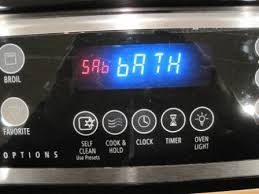
- A “SAb” message will appear on the display.
- Do not press any other buttons. The oven is now in Sabbath Mode.
Example Process (ge Profile Oven):
- Press “Bake.”
- Enter temperature (e.g., 350°F).
- Press “Start.”
- Once preheated, press and hold “Bake” and “Broil” for 3 seconds.
- The display will show “SAb.”
- Oven stays on until you manually turn it off after Sabbath.
For Ge Ovens With Touchscreen Controls
- Select “Menu” or “Options” on the screen.
- Look for “Sabbath Mode” or “SAb.”
- Tap Sabbath Mode to activate.
- Set your temperature, then tap “Start.”
- The oven display may dim or show “SAb.”
For Ge Gas Ranges (with Sabbath Feature)
The process is similar, but you must light the oven before Sabbath. Some models require you to turn the knob to a specific position, then press and hold a button combination.
How To Exit Sabbath Mode
After the Sabbath or holiday ends, you must turn off Sabbath Mode manually.
- Press and hold the same button combination you used to activate Sabbath Mode.
- The display should return to normal.
- Press “Cancel” or “Off” to turn off the oven.
If you forget to exit Sabbath Mode, the oven will keep running until you do.
Comparison: Sabbath Mode Vs. Regular Bake Mode
Here’s how Sabbath Mode compares with regular bake mode:
| Feature | Sabbath Mode | Regular Bake Mode |
|---|---|---|
| Display Changes | Hidden or static | Shows temperature, timer |
| Beeps & Sounds | Disabled | Active |
| Oven Light | Stays off/on (no auto change) | Turns on/off with door |
| Auto-Off Feature | Disabled | Enabled (after set time) |
| Temperature Adjustment | Not allowed during Sabbath | Adjust anytime |
Common Mistakes When Using Sabbath Mode
Even experienced users sometimes make mistakes. Here are some pitfalls to watch for:
- Forgetting to set the temperature before Sabbath. Once Sabbath Mode is active, you should not change it.
- Not preheating the oven. Some foods need a hot oven from the start.
- Leaving the oven light set to “auto.” If your oven has a manual light switch, set it to “on” or “off” before Sabbath.
- Not checking if Sabbath Mode is active. Make sure you see “SAb” or the Sabbath Mode indicator.
- Accidentally turning off the oven. If you press “Cancel” or “Off,” the oven stops heating.
- Not reading the manual. Each model is different—button combinations vary.
Two Non-obvious Insights
- On some GE ovens, Sabbath Mode will override the “12-hour auto-off” safety. This means your oven can run for over 24 hours. Always double-check your model’s safety instructions.
- For ovens with Wi-Fi features, remote control is disabled in Sabbath Mode. You cannot use your phone or smart home system to control the oven during Sabbath Mode.
Credit: www.handlerappliance.com
Advanced Tips For Using Sabbath Mode Safely
Keeping your kitchen safe is always important, especially when the oven is on for long periods.
Safety Suggestions
- Always use oven-safe dishes and avoid plastic or paper.
- Make sure nothing flammable (like kitchen towels) is near the oven.
- Set a reminder or timer (on a separate device) to check the oven after Sabbath ends.
- If your oven has child lock, use it to prevent accidental changes.
When To Call Customer Support
If you’re not sure whether your oven has Sabbath Mode, or something doesn’t work, call GE customer support. They can check your model number and guide you step by step.
How To Set Sabbath Mode On Different Ge Oven Models
While the general steps are similar, different GE ovens have unique button layouts and menus. Here are detailed examples for three popular lines:
Ge Profile Series
- Press “Bake” and set your temperature.
- Press “Start.”
- After preheat, press and hold “Bake” and “Broil” for three seconds.
- “SAb” will show on the display.
Ge Café Series
- Tap “Menu” on the touchscreen.
- Select “Sabbath Mode.”
- Set your temperature and tap “Start.”
- The display will dim or show “SAb.”
Ge Monogram Series
- Press “Bake” and enter your temperature.
- Press “Start.”
- Press and hold “Bake” and “Timer” for three seconds.
- “SAb” appears on the display.
If your oven uses knobs instead of a digital display, Sabbath Mode is usually not supported.
Setting Sabbath Mode With Timed Bake
Some GE ovens allow you to set a Timed Bake before the Sabbath. This means the oven will cook for a certain number of hours, then either hold temperature or turn off. Here’s how to use it with Sabbath Mode:
- Press “Bake” and enter your temperature.
- Press “Cook Time” and set the time (e.g., 4 hours).
- Press “Start.”
- Activate Sabbath Mode as above.
When the cook time ends, the oven may stay on (if Sabbath Mode disables auto-off) or turn off automatically. Check your manual to be sure.
How To Use Sabbath Mode For Warming Food
Some families use Sabbath Mode to keep food warm, not just for baking. Here are practical steps:
- Preheat the oven to a low temperature (170°F–200°F).
- Place cooked food in oven-safe dishes.
- Activate Sabbath Mode.
- The oven will hold the temperature without turning off or changing lights/sounds.
This is a common way to keep challah, kugel, or other dishes warm for many hours.
Sabbath Mode And Food Safety
Food safety is critical when using Sabbath Mode, since ovens may run for 24 hours or more. Here’s what you should know:
- Keep hot foods above 140°F to prevent bacteria growth.
- Use a food thermometer if you’re not sure.
- Do not leave perishable foods (like chicken or dairy) at low heat for many hours unless you’re sure it’s safe.
- If you’re keeping food warm overnight, double-check your oven’s lowest temperature setting.
A useful rule: “When in doubt, throw it out.” Don’t risk eating food that may not have stayed hot enough.
Special Features Of Ge Sabbath Mode
GE ovens sometimes include extra features to make Sabbath Mode easier:
- Manual oven light control: Some models let you set the light “on” or “off” before Sabbath, so it does not change when the door opens.
- No display changes: The oven will not show temperature changes, timers, or other signals.
- Extended bake time: Ovens can stay on for over 24 hours.
Credit: www.star-k.org
A Deeper Look: Why Is Sabbath Mode Necessary?
This feature isn’t just about convenience—it’s about respecting religious traditions. On Sabbath and some Jewish holidays, religious law forbids “work,” which includes changing electrical circuits. Pressing buttons, changing temperatures, or even turning a light on can break these rules.
Appliance companies like GE work with religious authorities to design Sabbath Mode. The goal is to let people enjoy hot meals and family gatherings without worrying about breaking their faith’s laws. It’s a small detail that makes a big difference in the lives of observant families.
What To Do If Sabbath Mode Doesn’t Work
If you follow the steps but your oven doesn’t enter Sabbath Mode:
- Double-check the button combination.
- Make sure the oven clock is set.
- Confirm your model supports Sabbath Mode (see your manual).
- Unplug the oven for one minute, then try again.
- Call GE support with your model number.
Some older GE ovens may need a special sequence to unlock Sabbath Mode. If you have a rare or older model, the manual is your best friend.
Comparing Ge Sabbath Mode To Other Brands
How does GE’s Sabbath Mode compare to other popular oven brands? Here’s a quick comparison:
| Brand | Sabbath Mode Activation | Manual Light Control | Display Behavior |
|---|---|---|---|
| GE | Button combo or menu | Yes (on select models) | “SAb” shown, display dimmed |
| Whirlpool | Menu selection | Yes | “SAb” or static display |
| KitchenAid | Button combo | Some models | “SAb” message |
| Samsung | Menu or app | Yes | “SAb” or “Sabbath” text |
While all major brands now offer Sabbath Mode, GE is known for clear instructions and reliable operation.
Practical Examples: Real-life Sabbath Mode Use
Let’s look at two real examples:
Example 1: Friday Night Dinner
Rachel prepares a roast chicken and kugel for Friday night. At 4:00 PM, she:
- Preheats her GE oven to 350°F.
- Places the food inside.
- Activates Sabbath Mode (presses “Bake” and “Broil” for 3 seconds).
- The oven stays at 350°F all evening. No beeps, no light changes.
- After sunset, she does not open the oven until dinner.
Example 2: Keeping Food Warm For Lunch
David wants to keep soup hot for Saturday lunch.
- He cooks the soup before Sabbath.
- At 6: 00 PM, he places the pot in the oven at 180°F.
- Activates Sabbath Mode.
- The soup stays hot overnight, safe and ready for lunch.
These examples show how planning and correct use of Sabbath Mode make Sabbath meals easier.
Frequently Asked Questions
What Does “sab” Mean On My Ge Oven Display?
“SAb” stands for Sabbath Mode. When you see this, it means the oven is running in a way that follows Sabbath rules—no display changes, no beeps, no automatic shutoff. The oven keeps heating at the set temperature until you turn it off.
Can I Use Sabbath Mode For Passover Or Other Jewish Holidays?
Yes. Sabbath Mode is designed for Shabbat and also works for most Jewish holidays with similar rules, like Passover or Yom Kippur. Just remember to set everything before the holiday starts.
What Should I Do If My Oven Doesn’t Exit Sabbath Mode?
Try pressing and holding the same buttons you used to activate Sabbath Mode. If that doesn’t work, unplug the oven for one minute, then plug it back in. If the problem continues, contact GE support.
Is Sabbath Mode Safe To Use For 24 Hours?
Yes, as long as you follow food safety rules and keep flammable items away. Use oven-safe cookware, and make sure food stays above 140°F if you plan to eat it later. Never leave the oven unattended for more than 24 hours.
Does Sabbath Mode Affect The Oven’s Self-clean Feature?
No. Sabbath Mode only changes how the oven works while baking or keeping food warm. The self-clean cycle is not available during Sabbath Mode. Do not use self-clean during Sabbath or holidays.
Final Thoughts
Learning how to set Sabbath Mode on your GE oven isn’t just a technical trick—it’s a way to honor tradition and make your home more welcoming. By understanding how this feature works, you can cook and serve meals for your family without worry. Always check your oven’s manual for model-specific steps, and plan ahead for the Sabbath or holidays. With a bit of practice, Sabbath Mode will become a helpful tool in your kitchen, making special days less stressful and more joyful.

Credit: www.youtube.com