
If you own a pool with a saltwater chlorination system, you might have seen the Intellichlor cell light flashing green at some point. Many pool owners feel confused or worried when this happens. Is your pool safe? Is the system working? Could there be a bigger issue hiding behind that tiny blinking light? The answer is not always simple, but understanding what this signal means can save you time, money, and stress.
Let’s break down what a flashing green light on your Intellichlor salt cell really means, why it happens, how you should respond, and what you can do to prevent problems in the future. Whether you are a new pool owner or someone with years of experience, you will find practical steps and expert tips here to help you handle the situation with confidence.
What Is The Intellichlor Salt Cell?
The Intellichlor cell is a part of the Pentair salt chlorine generator system. It uses dissolved salt in your pool water to make chlorine, which helps keep your pool clean and safe. Instead of adding chlorine tablets or liquid, the system does the work for you. The cell itself is a special unit that sits in your pool’s plumbing. It has metal plates, sensors, and electronic controls.
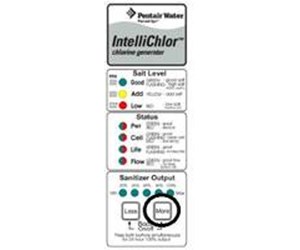
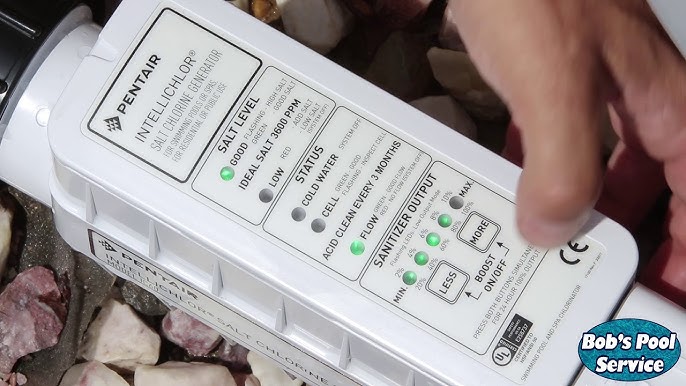
When your system is running, you will see a row of lights on the cell. Each light has a specific meaning. The green cell light is especially important because it shows if the cell is producing chlorine or if there’s a possible issue.
What Does A Flashing Green Cell Light Mean?
A solid green cell light means that the Intellichlor is working normally and producing chlorine. However, when the green light flashes, it is a signal from the system. This blinking light usually means the cell is in a “startup” or “priming” mode, or it could signal a possible issue. The Intellichlor is built to check the water flow, temperature, and salt levels before it starts making chlorine.
But, the same flashing light can also mean other things depending on the pattern and which other lights are on. For example:
- Flashing green only: Usually startup or normal priming.
- Flashing green with other lights: Could mean low salt, low temperature, or a flow problem.
- Flashing fast vs. slow: Fast flashing can mean a different issue than slow flashing.
Knowing the exact pattern helps you understand what to do next. This is why it’s important to learn what your specific light pattern means, not just guess.
Common Causes Of A Flashing Green Light
Let’s look at the main reasons the Intellichlor cell light flashes green and what each one means for your pool:
1. System Startup
When you first turn on your pool pump or the salt cell, the green light will often flash for a few minutes. This is normal. The cell is checking that water is flowing, that the water is not too cold, and that there is enough salt. This startup check usually takes 2–5 minutes. If the light turns solid green after this, your system is fine.
2. Low Water Flow
Low water flow is a common reason for a flashing green light. The cell needs water moving through it to work safely. If the flow is weak, the cell will not produce chlorine. Causes of low flow include:
- Dirty pool filter
- Closed or blocked valves
- Pump running at too low a speed (for variable speed pumps)
- Clogged skimmer or pump basket
When the cell does not get enough flow, it flashes green to warn you.
3. Low Salt Level
If your pool’s salt level is too low, the Intellichlor cannot make chlorine. The system needs a certain amount of salt (usually around 3000–3500 ppm). If the salt is low, the green cell light may flash, often with the “Low Salt” light. This helps prevent damage to the cell.
4. Cold Water Temperature
The Intellichlor cell will not work if the water is too cold, often below 52°F (11°C). In cold temperatures, you may see the green light flashing together with the “Cold Water” or “Low Temperature” indicator. This is a safety feature to protect the cell.
5. Dirty Or Scaled Cell
Over time, minerals and debris can build up on the metal plates inside the cell. This is called scaling. A dirty cell may not work well, and the green light can start flashing to warn you. Cleaning the cell is important for proper performance.
6. Electrical Or System Error
Sometimes, the flashing green light can signal a wiring or circuit issue. This is less common but can happen if there is a loose connection or if the control board is failing.
How To Diagnose The Problem
When you see the Intellichlor cell light flashing green, don’t panic. You can use a step-by-step process to find the real cause. Here’s how to check:
- Wait a few minutes after turning on the system. If it’s just startup, the light should stop flashing soon.
- Check other lights on the cell. Are any other warning lights on (like “Low Salt” or “Flow”)?
- Feel the water temperature. If it’s very cold, that may be the reason.
- Check the pool pump and filter. Is water moving strongly through the system?
- Test the salt level. Use a salt test strip or digital tester.
- Inspect the cell for scaling. Look through the clear window for white buildup.
- Check all wiring and connections. Look for loose or corroded wires.
By moving through these checks, you can often find the problem quickly.
Credit: www.inyopools.com
What To Do When The Green Light Flashes
Now that you know the possible causes, let’s look at the actions you should take for each case.
If It’s Startup
If the light is only flashing when you first turn the system on, just wait a few minutes. As long as the light goes solid green, there’s nothing to worry about.
If It’s Low Flow
- Clean your pool filter.
- Empty the skimmer and pump baskets.
- Open all valves fully.
- Increase pump speed if using a variable speed pump.
- Check for blocked return lines or leaks.
When water flow returns to normal, the green light should stop flashing.
If It’s Low Salt
- Test the salt level with a reliable tester.
- Add pool salt if needed, following your manufacturer’s guide.
- Run the pump for several hours to help the salt dissolve.
- Retest before adjusting more.
Adding too much salt can cause other problems. Always add salt slowly and retest.
If It’s Cold Water
- Wait for warmer weather.
- Consider a pool heater if you need to run the system in cold months.
- Don’t force the system to run if water is below 52°F (11°C).
If It’s A Dirty Or Scaled Cell
- Turn off the power to the cell.
- Remove the cell following manufacturer instructions.
- Soak in a 4: 1 water to acid solution for several minutes, then rinse.
- Reinstall and restart.
Clean the cell every 3–6 months, or as needed.
If It’s An Electrical Error
- Turn off all power before checking wires.
- Tighten any loose connections.
- Replace damaged wires.
- Call a qualified pool technician if you’re not comfortable with electrical work.
Advanced Troubleshooting: When Basic Steps Don’t Work
Sometimes, even after the usual checks, the green light keeps flashing. This can mean a deeper issue. Let’s look at some advanced steps.
Inspect The Flow Switch
The Intellichlor uses a flow switch inside the cell to sense water movement. If this part fails, the system thinks there is no flow even if water is moving well.
- Look for error messages on the pool control panel.
- Test the flow switch with a multimeter if you have one.
- Replace the flow switch if it’s faulty.
Check For Firmware Or Software Issues
Modern pool systems sometimes have software updates. If the cell is not communicating well with the main system:
- Restart the pool controller (turn off, then on).
- Check for updates on the manufacturer’s website.
- Reset to factory settings if suggested by support.
Look For Power Supply Problems
A failing power supply can cause the cell to act strangely, including flashing lights.
- Test voltage output with a meter if possible.
- Replace the power supply if it’s not giving correct voltage.
Internal Cell Failure
If none of the above solves the problem, the cell itself may be failing. Cells usually last 3–7 years, depending on use and maintenance.
- Check the cell’s age.
- Look for warranty coverage.
- Replace the cell if it’s old or out of warranty.
How The Intellichlor Cell Communicates Problems
One thing many pool owners miss is that the Intellichlor cell uses light patterns to “talk” to you. Understanding these patterns saves time and worry.
Here’s a quick reference:
| Light Pattern | Meaning | Action Needed |
|---|---|---|
| Flashing green (startup, 2–5 min) | System priming/checking | Wait, normal operation |
| Flashing green + Flow light | Low water flow | Check pump, filter, baskets |
| Flashing green + Low Salt light | Low salt level | Test and add salt |
| Flashing green + Cold Water light | Water too cold | Wait for warm weather |
| Flashing green (continuous) | Possible error or dirty cell | Clean cell, check wiring |
Knowing these combinations helps you react quickly instead of guessing.
How To Prevent Future Flashing Green Light Issues
Prevention is always better than fixing problems. Here’s how to keep your Intellichlor cell running smoothly and avoid the flashing green light:
Regular Maintenance
- Clean the cell every 3–6 months or as needed. Build-up of scale is a top cause of poor performance.
- Check salt levels monthly with a test kit. Don’t rely only on the cell’s reading.
- Keep the filter clean. A dirty filter reduces flow, which can trigger the green light.
- Inspect wiring and connections at least once a season.
- Watch for leaks around plumbing and cell housing.
Smart Operation Tips
- Run the pump long enough each day for your pool size and bather load.
- Don’t add too much salt at once. It’s easier to add more than to remove excess.
- Winterize properly if you live in a cold climate. Don’t run the cell below 52°F (11°C).
Upgrade When Needed
If your cell is older than 5 years, start planning for a replacement. Older cells are more likely to fail or give false warnings.
Monitor With Technology
Some pool owners add automation systems that alert them by phone or email if there’s a problem. This can help you react faster and avoid surprises.
Credit: www.youtube.com
The Cost Of Ignoring A Flashing Green Light
Some pool owners ignore the Intellichlor cell light flashing green if the water looks clear. This is a mistake. Failing to fix the cause can lead to:
- Unsafe chlorine levels (which can cause algae or bacteria growth)
- Shorter cell life
- Costly repairs if a small problem becomes bigger
- Warranty issues if maintenance is not done
It’s always better to solve a small issue before it becomes a pool emergency.
Real-world Examples
Let’s look at two real-world cases that show why understanding the green light matters.
Case 1: Low Flow Hidden By Old Filter
A pool owner saw the flashing green light but thought the pump was fine because water was moving. After basic checks, the problem was still there. It turned out the filter was so old that it blocked enough flow to trigger the warning, even though the pump was strong. Replacing the filter fixed the problem.
Insight: Sometimes the issue is not obvious. Even parts that “seem” fine can be the cause.
Case 2: Salt Reading Error
Another owner kept adding salt because the cell said “Low Salt. ” But the true salt level was high—over 4000 ppm—because the cell’s sensor was dirty. This can damage the cell or pool equipment over time. Cleaning the cell and testing with a separate kit solved the problem.
Insight: Always confirm with a separate test if you get a salt warning.
Credit: www.reddit.com
Comparing The Intellichlor To Other Salt Cells
How does the Intellichlor cell compare to other brands when it comes to alerts and ease of troubleshooting? Here’s a quick comparison:
| Salt Cell Brand | Alert System | Common Flashing Light Issues | Ease of Diagnosis |
|---|---|---|---|
| Pentair Intellichlor | Multiple lights, color-coded | Startup, low flow, low salt, cold water | Easy with manual, some codes can be confusing |
| Hayward AquaRite | LED display, simple indicators | Low salt, check cell, no flow | Easy, digital display helps |
| Jandy AquaPure | LEDs, error codes | No flow, service cell | Moderate, error codes helpful |
Non-obvious tip: Always keep your cell’s manual handy. Each brand uses different light codes, so guessing can lead to mistakes.
How To Extend The Life Of Your Intellichlor Cell
Most salt cells last 3–7 years, but you can maximize your investment with smart care:
- Keep water balanced: High calcium or metals can cause fast scaling.
- Clean gently: Never use sharp tools or brushes.
- Don’t run the cell dry: Always make sure the pump is moving water before turning on the cell.
- Use the right salt: Only use salt designed for pools—food or rock salt can damage the cell.
Signs It’s Time To Replace Your Intellichlor Cell
Even with good care, every cell will eventually wear out. Watch for these signs:
- Frequent flashing green light even after cleaning and troubleshooting
- Reduced chlorine output
- Cell age over 5 years
- Visible wear or damage to the cell plates
If you see these, plan for a replacement soon.
How To Reset The Intellichlor Cell
After fixing a problem, you may need to reset the cell to clear the warning lights:
- Turn off the pool system.
- Wait 1–2 minutes.
- Turn the system back on.
- Check the lights.
If the green light is still flashing, repeat your troubleshooting steps.
Expert Tips For Smooth Operation
- Label your valves and pipes. This helps you quickly check flow problems.
- Keep a maintenance log of cleaning, salt additions, and repairs.
- Check after storms or power outages, as these can cause unexpected issues.
- Teach family members what the lights mean and when to call for help.
Non-obvious insight: Many pool owners miss the link between water chemistry and cell performance. High pH or calcium can cause scaling much faster, even if your salt level is perfect.
Where To Find More Information
The best source for your specific Intellichlor model is the official Pentair support page. You can also find detailed manuals, troubleshooting guides, and updates on their site. For deeper technical questions, the Pool & Spa Forum community is a good place to ask experienced pool owners and technicians.
For a scientific explanation of saltwater chlorination, see this Wikipedia article on salt water chlorination.
Frequently Asked Questions
Why Does The Intellichlor Cell Light Flash Green Even When My Pool Looks Clear?
The flashing green light is not about water clarity. It shows a system status, like startup, low flow, or low salt. Even if your pool is clear, the system may not be making enough chlorine to keep it safe. Always check and fix the cause.
How Often Should I Clean My Intellichlor Cell?
You should clean the cell every 3–6 months, or whenever you see scale buildup. In areas with hard water, more frequent cleaning may be needed. Always follow the manufacturer’s instructions.
Can I Use Regular Table Salt In My Intellichlor System?
No. Only use salt labeled for pool use. Table salt has additives that can harm your system and water balance. Pool salt is pure sodium chloride.
What Happens If I Add Too Much Salt To My Pool?
Too much salt can damage the cell and other pool equipment. It can also make the water taste salty and feel uncomfortable. If you add too much, the only way to lower it is to partially drain and refill the pool.
Is It Safe To Swim If The Intellichlor Cell Light Is Flashing Green?
It depends on the reason. If it’s a brief startup flash, yes. But if the light stays flashing, your pool may not have enough chlorine. Test the water before swimming and fix any issues first.
When you see your Intellichlor cell light flashing green, use the guidance above to check, diagnose, and fix the issue quickly. This will keep your pool clean, safe, and enjoyable all season long.