
If you own a pool with stunning color-changing lights, you know how much they add to your swimming experience. The Pentair Globrite pool light is one of the most popular LED lights for in-ground pools, especially with modern automation systems. But like all pool equipment, even the best lights can fail after years of use. If your Globrite has stopped working, you might wonder, “How hard is it to replace it myself?” The good news: with patience, the right steps, and a few tools, you can replace your Pentair Globrite pool light without hiring a professional.
This guide walks you through everything you need to know—preparation, tools, safety, step-by-step instructions, troubleshooting, and tips that pool owners often miss. Whether you’re a hands-on homeowner or a curious beginner, you’ll find practical advice and clear explanations. Let’s dive in and get your pool shining again.
Understanding The Pentair Globrite Pool Light
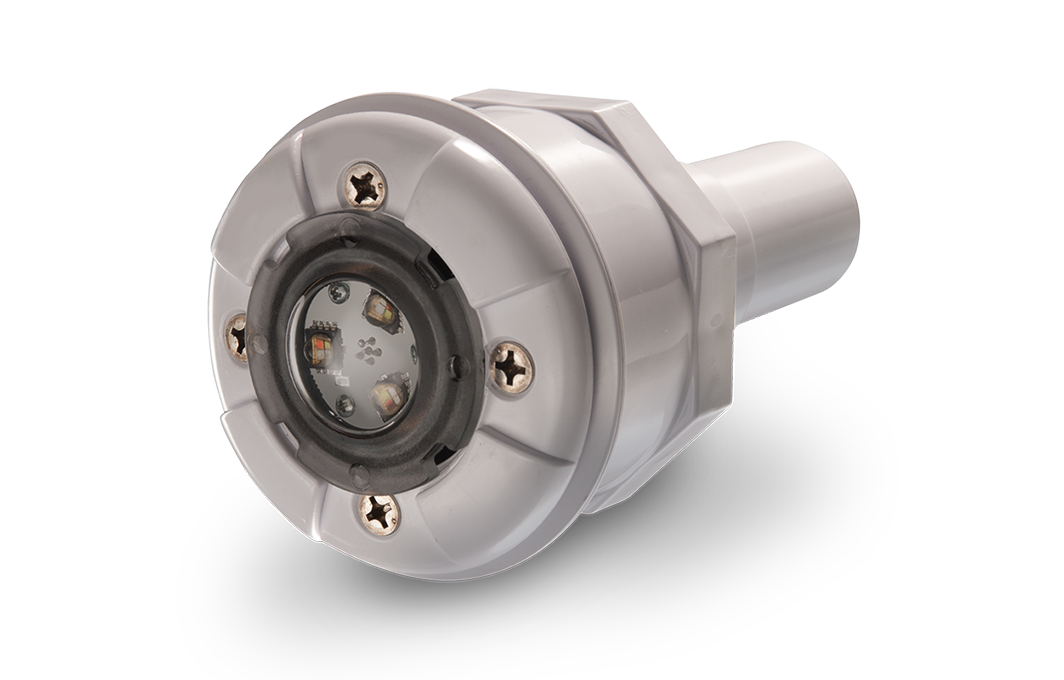
Before you start, it helps to know what makes the Pentair Globrite unique. This LED light is designed for shallow water, steps, and even spas. Its low profile means it fits into narrow niches, and it connects to Pentair’s automation systems for color shows and syncing with other pool features. Globrite is known for energy savings, long life, and bright, even light.
But, LEDs do wear out over time. Common signs your Globrite needs replacement include:
- Complete failure (no light at all)
- Only some colors work (not all color modes available)
- Flickering or dimming
- Water inside the lens
If you notice any of these, it’s time for a replacement. Don’t ignore electrical or water issues—these can be safety hazards.
Tools And Materials You’ll Need
Gather all your supplies before you begin. This saves time and avoids frustration mid-project. Here’s what you’ll need for a successful replacement:
- Replacement Globrite LED light (make sure it matches the wattage and voltage of your old light)
- Screwdrivers (Phillips and flat-head, depending on your niche cover)
- Allen wrench (for some niche screws)
- Needle-nose pliers
- Electrical tape
- Pool light cord lubricant (optional, but helps with pulling wires)
- Fish tape or pulling tool (for guiding the new cord through conduit)
- Towels or rags
- Bucket (for holding screws, small parts)
- Rubber gloves (for grip and safety)
- Multimeter (for checking voltage)
- GFCI breaker tester (to ensure your circuit is safe)
- Silicone pool lube (for sealing O-rings if needed)
- Zip ties
Having the right tools at hand makes the process safer and more efficient. If you don’t have a fish tape, you can improvise with a stiff wire.
Safety Precautions You Must Not Skip
Working with electricity near water requires caution. Many accidents happen because people skip safety steps. Here’s what you must do:
- Turn off all power to the pool at the breaker panel, not just the switch.
- Test the circuit with a GFCI tester or multimeter to confirm no voltage.
- Never work alone. Have someone nearby in case of emergency.
- Check for water leaks near the light before touching any wires.
- Wear rubber-soled shoes and stay dry.
Remember, even low-voltage pool lights can be dangerous if handled incorrectly. If you’re not comfortable, call a licensed electrician.
Step-by-step Guide: How To Replace Pentair Globrite Pool Light
Replacing a pool light might seem daunting, but if you follow each step carefully, it’s manageable for most DIYers. Here’s the process, explained in detail.
1. Shut Off Power And Confirm
First, locate your pool’s electrical breaker panel. Flip the switch that powers your pool lights (often labeled “Pool Light” or “Aux”). For double safety, lock the breaker or put a note so nobody turns it back on.
Use a multimeter to test the light’s wires at the junction box—there should be zero voltage. If you have a GFCI outlet, press the “Test” and “Reset” buttons to confirm it’s working.
Never rely on just the switch at the pool pad. Always cut power at the main breaker.
2. Remove The Light From The Niche
Globrite lights are mounted in a special niche in your pool wall, usually held by a single screw or set screw. You do not need to drain the pool for this step.
- Put on rubber gloves.
- Use the correct screwdriver or Allen wrench to remove the mounting screw.
- Gently pull the light fixture and some of its cord out from the niche.
- Place the fixture on a towel at the pool’s edge.
The cable should have enough length for you to rest the light above water. If not, you may need to work carefully at the pool wall.
3. Disconnect The Old Light At The Junction Box
Follow the light’s cord to the junction box (often near the pool equipment or deck). Open the box—inside, you’ll see where the pool light wires join the main power supply.
- Take a photo of the wire connections for reference.
- Use a screwdriver to loosen the wire nuts or terminal screws.
- Carefully disconnect the wires.
- Note the path the cord takes through the conduit.
If you see corrosion or water inside the box, dry it out and inspect for damage before installing the new light.
4. Remove The Old Light Cable
Now you need to pull the old cable out from the conduit. This step can be tricky. If the cord is stuck, do not force it—this may damage the conduit.
- Untangle the cable and pull gently from the pool side.
- If it resists, go back and forth between the junction box and pool side, working slowly.
- Attach a pull string or fish tape to the end of the old cord before pulling it out completely. This string will help you pull the new cable through later.
If the conduit is clogged or the cable will not move, you may need to call a professional. Never use excessive force.
5. Prepare The New Light For Installation
Unpack your new Pentair Globrite light. Compare it with your old one to confirm it’s the correct model—check the voltage, color options, and cord length. Inspect the O-ring (gasket) for cracks; lubricate with silicone lube if needed.
Attach the pull string from the old cable to the new cable using electrical tape. Make the connection smooth so it doesn’t catch inside the conduit.
Apply a small amount of cord lubricant if desired—this makes pulling easier and reduces the risk of damage.
6. Pull The New Cable Through The Conduit
With your helper on one end, gently pull the new cable through the conduit from the junction box to the pool. Patience is key.
- Feed the cable slowly, guiding it around bends.
- If it snags, pull back slightly, then try again.
- Use zip ties to keep the cable organized.
Once the cord appears at the pool side, pull through enough slack (usually 4–6 feet) to allow the light to be removed for future servicing.
7. Connect The Light At The Junction Box
Match the new light’s wires to the original connections. Most Globrite lights have color-coded wires (usually black for common, red for power, and green for ground).
- Strip wire ends if necessary (about ½ inch).
- Twist wires together and secure with wire nuts.
- Wrap with electrical tape for extra safety.
- Place all connections above water level in the junction box.
Double-check your photo to ensure all connections match. Close the junction box lid tightly.
8. Mount The New Light In The Niche
Back at the pool, feed the extra cable into the niche so it forms a gentle loop behind the light—this is important for future removal.
- Insert the light into the niche, aligning the mounting hole.
- Secure with the screw or set screw.
- Check that the gasket is seated and the light is flush with the pool wall.
Do not overtighten—the niche or light could crack.
9. Restore Power And Test
With everyone out of the pool, turn the breaker back on. Use your pool automation system or switch to turn on the new Globrite light.
- Cycle through all color modes to confirm full function.
- Check for leaks or air bubbles around the light.
- If the light doesn’t work, turn off power and check connections.
If you see water inside the lens or the GFCI trips, shut down immediately and re-inspect your work.
Common Mistakes And How To Avoid Them
Even experienced pool owners can make errors. Here are mistakes to watch for:
- Forgetting to pull a string with the old cord—this makes it very hard to fish the new cable.
- Insufficient cable slack—if you don’t leave enough, future service is impossible.
- Wrong replacement model—voltage or cord length mismatch can damage your system.
- Loose wire connections—can cause flickering or total failure.
- Skipping gasket lube—increases chance of leaks.
- Not testing the GFCI—puts safety at risk.
- Forcing cable through conduit—may break the wire or conduit.
Double-check every step, and don’t rush—this saves time and money in the long run.
Choosing The Right Replacement Globrite Model
Before purchasing, compare your current light’s specs with available replacements. Here’s a quick reference:
| Feature | Old Light | New Light (Globrite) |
|---|---|---|
| Voltage | 12V or 24V | Must match |
| Cord Length | 25 ft, 50 ft, or 100 ft | Equal or longer |
| Color Options | Single or Multi-color | Multi-color preferred |
| Automation | Manual or Automated | Compatible with IntelliBrite/ScreenLogic |
If you’re unsure, write down your light’s model number and consult your pool store or Pentair’s support page.
Troubleshooting: If Your New Globrite Won’t Work
Sometimes, even after careful installation, the light may not work as expected. Here’s how to solve common problems:
Light Does Not Turn On
- Confirm power at breaker is ON.
- Test voltage at the junction box.
- Double-check wire connections.
- Inspect GFCI outlet—reset if needed.
Only Some Colors Work
- Make sure the automation system is programmed for the new light.
- Cycle power OFF, then ON, to reset color modes.
Light Flickers Or Dims
- Check for loose connections at the junction box.
- Inspect for water in the niche or junction box.
- Ensure power supply matches light’s voltage.
Gfci Trips
- Inspect for water intrusion in the cable or connections.
- Replace any damaged wire nuts or seals.
Cable Won’t Pull Through
- Use a cable lubricant.
- Try pulling from both ends with a helper.
- If stuck, consult a pool electrician.
How Long Does The Replacement Take?
For most homeowners, replacing a Pentair Globrite light takes 2–4 hours. If you’ve replaced a pool light before, you might finish in less than two hours. For first-timers or if conduit is difficult, plan for a half-day. The process is much easier if the pool was built with service in mind.
Credit: www.pentair.com
Cost Breakdown: Diy Vs. Professional
You might wonder whether it’s worth hiring a pro. Here’s a quick comparison:
| Task | DIY Cost (USD) | Pro Cost (USD) |
|---|---|---|
| Globrite Light (25 ft cord) | $300–$500 | $300–$500 |
| Tools/Supplies | $20–$50 | Included |
| Labor | $0 | $200–$400 |
| Total | $320–$550 | $500–$900 |
Doing it yourself saves money but only if you are comfortable with electrical work and can work safely. For peace of mind, many pool owners hire a licensed technician.
Tips For A Long-lasting Installation
A few extra steps can make your new Pentair Globrite last longer and reduce future headaches:
- Use silicone lube on all gaskets and O-rings.
- Keep the cable loosely coiled, not tight, behind the light.
- Check the junction box for water every season.
- Test your GFCI every month—this protects you and your family.
- Avoid harsh pool chemicals near the light.
- Record your new light’s model and install date for warranty.
Many owners miss the importance of cable slack and junction box checks. These small actions prevent major problems down the road.
When To Call A Professional
While most pool owners can replace a Globrite with patience, call a pro if:
- The conduit is blocked or damaged
- There’s water in the junction box or niche
- You see signs of electrical shorts (burn marks, tripped breakers)
- You’re unsure about any step
Better to spend a little extra than risk injury or pool damage.
Real-world Example: Diy Replacement
Jack, a pool owner in Texas, noticed his Globrite stopped cycling through colors. After reading guides and gathering tools, he followed the steps above. The biggest surprise? The old cable was stuck in the conduit due to a sharp bend.
Jack used silicone lube and a helper, pulling gently from both sides. The rest went smoothly, and his pool is now brighter than ever.
His tip: “Take photos at every step and label wires. It saved me a lot of frustration.”

Credit: www.amazon.com
Environmental Considerations
LED pool lights like Globrite are energy-efficient and last longer than old incandescent types. When replacing, recycle your old light properly. Many pool stores or local recycling centers accept electronics. Don’t toss it in regular trash—the metals and plastics can pollute the environment.
Where To Learn More
For technical details, wiring diagrams, and troubleshooting tips, the official Pentair website offers manuals, guides, and customer support. See their resources at Pentair Pool Support.

Credit: www.youtube.com
Frequently Asked Questions
How Do I Know Which Pentair Globrite Replacement To Buy?
Check your old light’s model number, voltage, and cord length. Most pools use 12V, but some older systems are 24V. Buy a replacement with at least the same cord length. If unsure, bring your old light to a pool store or contact Pentair support.
Do I Have To Drain My Pool To Replace The Globrite Light?
No, you do not need to drain your pool. The light is designed to be serviced underwater. Just make sure the power is off and you have enough slack to pull the light out of the water for work.
Can I Splice The New Globrite Wire To The Old One?
Splicing underwater or inside the conduit is not recommended and may void your warranty. Always pull the full new cable through the conduit to the junction box for a safe, watertight installation.
Why Does My New Globrite Light Flicker Or Show The Wrong Colors?
This could be due to a loose wire, wrong voltage, or an automation system not programmed correctly. Double-check all connections and refer to your pool controller’s manual to sync the new light.
Is It Safe To Use The Pool Right After Installing A New Light?
Wait until you’ve restored power, tested all functions, and checked for leaks or electrical issues. Never swim while electrical work is in progress or if the GFCI does not test correctly.
Replacing a Pentair Globrite pool light is a manageable DIY project for many owners. The steps above cover everything you need—from tools and safety to installation and troubleshooting. With care and attention to detail, your pool will shine bright again, bringing you years of enjoyment and peace of mind.