
If you own a swimming pool with LED lighting, you probably enjoy the glow of your Pentair Globrite pool light during evening swims. These compact, energy-saving lights are a favorite for many pool owners. But what happens when your Globrite light stops working? Unlike changing a regular bulb, replacing a Pentair Globrite pool light is more complex. Many pool owners feel nervous about this process, but with the right guidance, you can do it safely and correctly.
This guide will show you how to replace a Pentair Globrite pool light step by step. You’ll learn which tools you need, how to prepare, important safety tips, and how to avoid common mistakes. Whether you want to save money on repairs, or simply like doing things yourself, you’ll find everything you need to know here.
Let’s get started and bring your pool back to life with new, vibrant lighting.
Understanding Pentair Globrite Pool Lights
Before you start replacing your pool light, it helps to know what makes the Pentair Globrite special. These lights use LED technology, which means they use less energy and last longer than old-fashioned incandescent bulbs. Globrite lights are designed for small spaces and shallow areas, making them popular for steps, tanning shelves, and tight corners.
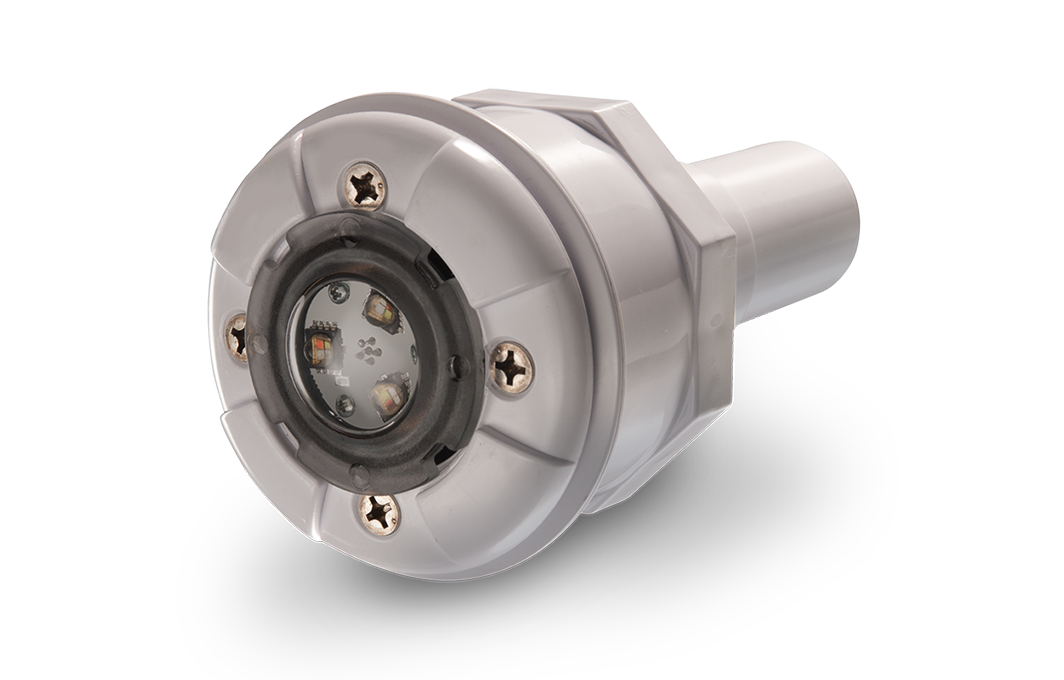
One unique feature of the Globrite is its sealed, water-tight housing. This protects the electrical parts from water, but also means you can’t just change a bulb – you must replace the whole light fixture. The light connects to a power cable that runs through a special conduit, keeping everything safe and tidy.
Most Globrite lights can last up to 50,000 hours, but sometimes water can get inside, or the LEDs stop working. When this happens, you’ll notice the light is dim, flickers, changes color unexpectedly, or fails to turn on at all.
When To Replace Your Pentair Globrite Light
How do you know it’s time to replace your Globrite pool light? Here are some clear signs:
- No light at all: The light does not turn on, even when you check the breaker or pool light switch.
- Flickering or dimming: The light sometimes works but is much weaker or blinks.
- Color problems: The light is stuck on one color or changes colors randomly.
- Water inside the lens: You see fog, condensation, or actual water inside the light cover.
Sometimes, the problem can be with the transformer, wiring, or a remote control. Always check these first before replacing the whole light. If you see water inside the lens, it is important to replace the light immediately, as water and electricity are dangerous together.
Tools And Supplies You Will Need
To replace your Pentair Globrite pool light, gather these tools and supplies before you start:
- New Pentair Globrite light fixture (make sure it matches your pool’s voltage and color options)
- Screwdrivers (usually a Phillips or flat-head)
- Needle-nose pliers
- Pool light cord stopper (often rubber or plastic, may come with the new light)
- Pool light niche gaskets (these prevent leaks and should be replaced if old)
- Silicone lubricant (for waterproofing connections)
- Electrical tape
- Circuit tester (to confirm power is off)
- Bucket or small container
- Clean towel or rag
Optional but helpful:
- Garden hose (to flush the conduit if needed)
- Cord pulling lubricant (makes it easier to pull the new cord)
- Plastic fish tape (for guiding the new cable through the conduit)
Having everything ready will save you time and prevent frustration during the project.
Safety First: Important Precautions
Working with electricity and water is dangerous if you are not careful. Always follow these safety steps:
- Turn off power at the breaker: Never trust just the pool switch. Go to your circuit breaker panel and turn off the power for the pool light circuit.
- Double-check with a tester: Use a circuit tester to make sure no power is flowing to the light.
- Never work on a wet deck: Make sure the pool deck is dry to avoid slipping or accidental shocks.
- Work during daylight: Good light helps you see what you’re doing and reduces mistakes.
- Do not touch water and wires together: Keep all wires dry until everything is sealed.
If you feel unsure at any step, do not take risks. Call a licensed pool electrician for help.
Removing The Old Globrite Light
Now that you are prepared, let’s start removing the old Pentair Globrite light from your pool.
1. Turn Off All Power
Go to your home’s breaker panel and shut off the circuit that powers the pool lights. Flip the breaker switch to OFF. Double-check with a non-contact voltage tester at the pool light switch and at the junction box (if accessible).
2. Locate The Light And Remove The Faceplate
Find the Globrite light in your pool. Most Globrite lights are installed in a special niche (a small opening in the pool wall) and covered by a faceplate.
Use your screwdriver to remove the screw(s) holding the faceplate. Place screws in a safe spot (like a small bucket) so they don’t fall in the pool.
Gently remove the faceplate. You may need to wiggle it if it’s stuck. If there is a gasket, set it aside for inspection.
3. Free The Light Fixture
Carefully pull the Globrite light out of the niche. The power cable will let you pull the light a short distance (usually 1-3 feet) out of the pool wall.
Lay the old fixture on a towel on the pool deck to keep it clean and dry.
4. Trace The Power Cable
The cable runs from the back of the light, through a conduit, to a junction box (usually outside the pool, sometimes in a nearby yard box). You may need to lift a plastic cover or unscrew a box lid to find where the cable ends.
Take a photo or make a note of how the cable is connected inside the box. This will help you connect the new light correctly.
5. Disconnect The Old Cable
Use your screwdriver and pliers to disconnect the old wires. Usually, you’ll see three wires: black (hot), white (neutral), and green (ground). Some systems may use different colors, so double-check.
Loosen the wire nuts or connectors and remove the old cable. If there is electrical tape or putty, remove this as well.
6. Remove The Old Light Fixture And Cable
You now need to pull the old cable out through the pool wall. Usually, you can pull gently from the pool side, feeding the cable into the water and out through the niche.
If the cable is stuck, do not force it. Try moving gently back and forth. Sometimes, debris inside the conduit can block the cable. You can flush the conduit with water from a hose or use a plastic fish tape.
Once the old cable is free, set the old light fixture aside for proper disposal.
Preparing The New Globrite Light
Now it’s time to get your new Pentair Globrite light ready for installation.
1. Inspect The New Light
Check the new fixture for damage, missing parts, or problems. Make sure you have the right voltage (12V or 120V), the right cord length (it must be long enough to reach from the pool wall to the junction box with extra slack), and the right color features.
2. Prepare The Niche And Gasket
Clean the light niche in your pool wall. Remove old gasket material, dirt, or algae. A clean surface helps prevent leaks.
Place the new gasket (or reuse a good condition one) in the groove around the faceplate.
3. Lubricate The Cable
Lightly coat the new cable with silicone lubricant or cord pulling lubricant. This will help the cable slide through the conduit smoothly and prevent damage.
Pro tip: Beginners often skip this step, but a sticky cable can get stuck and make installation much harder.

Credit: www.youtube.com
Pulling The New Cable Through The Conduit
This part can be tricky, especially if your conduit bends or is old.
- Attach the new cable to the old cable: If you haven’t already removed the old cable, you can tie the new cable to the old one using electrical tape. As you pull out the old cable from the junction box side, it will pull the new cable in. If the old cable is already out, you may need to use fish tape to guide the new cable through.
- Pull gently and steadily: Never yank or force the cable. If you feel resistance, pull back a little, twist, and try again.
- Leave extra slack: Leave about 3 feet of extra cable at the pool light end. This allows you to remove the light for future repairs without having to pull the whole cable again.
- Check for smooth movement: Make sure the cable moves freely and does not pinch or scrape.
Wiring The New Light
Now, let’s connect your new Globrite light to the pool’s electrical system.
1. Connect Wires At The Junction Box
At the junction box, strip about half an inch of insulation from the ends of each wire. Match the colors carefully:
- Black to black (hot)
- White to white (neutral)
- Green to green or bare copper (ground)
Use new wire nuts and wrap each connection with electrical tape for extra safety.
2. Seal The Box
Make sure all wires are tucked neatly into the box. Close the cover tightly to keep out water and insects.
Non-obvious insight: Some pool junction boxes have a small drain hole. Make sure this is clear, so if water does get in, it can drain out.
Installing The New Globrite Light In The Pool
The final steps will place your new Globrite light safely in the pool wall.
1. Feed The Cable Into The Niche
Pull the cable gently into the niche, coiling extra slack behind the light. This is important for future maintenance.
2. Install The Cord Stopper
Place the rubber or plastic cord stopper around the cable where it enters the conduit. Press the stopper into the conduit opening to seal out water. Some stoppers need a bit of silicone lubricant to slide in smoothly.
3. Position The Light
Carefully fit the new light into the niche. Align the holes for the screws.
4. Attach The Faceplate
Place the faceplate over the light, with the gasket in place. Secure it with screws. Do not overtighten, as this can crack the faceplate or strip the holes.
5. Final Checks
Wipe away any water or debris from the area. Double-check that the light is snug and the faceplate is sealed all around.
Testing And Final Steps
You’re almost done! Here’s how to finish the job safely.
1. Restore Power
Go back to the breaker panel and turn the power back ON.
2. Test The Light
Use the pool light switch or remote control to turn on the light. Cycle through color modes (if your model supports this) to check for correct operation.
If the light does not work, turn off the power and check all connections again.
3. Inspect For Leaks
Look at the faceplate and cable entry for bubbles or leaks. If you see water entering, turn off power and reseal the gasket or cord stopper.
4. Clean Up
Put away tools, throw out old parts, and wipe down the pool deck.
Common Mistakes To Avoid
Replacing a Pentair Globrite pool light can go wrong if you’re not careful. Watch out for these common errors:
- Forgetting to turn off the power: This is dangerous. Always double-check.
- Using the wrong voltage light: A 120V light on a 12V system won’t work and can be unsafe.
- Pulling too hard on the cable: This can damage the cable or conduit.
- Skipping the gasket or cord stopper: Water leaks can ruin your new light.
- Not leaving enough slack: Makes future repairs much harder.
- Mixing up wire colors: Can cause short circuits or damage.
Comparing Globrite To Other Pool Lights
Choosing the right pool light is important. Here is a comparison of Pentair Globrite with other popular pool lights:
| Feature | Pentair Globrite | Pentair Intellibrite | Hayward ColorLogic |
|---|---|---|---|
| Light Type | LED, Small Niche | LED, Large Niche | LED, Standard Niche |
| Energy Use | Low | Low | Low |
| Color Options | 5-12 Colors | 5-12 Colors | 7-10 Colors |
| Lifespan (hours) | Up to 50,000 | Up to 50,000 | Up to 50,000 |
| Best For | Shallow, Steps, Ledges | Main Pool | Main Pool |

Credit: www.amazon.com
Troubleshooting After Installation
Sometimes, even after careful installation, the light might not work as expected. Here’s how to troubleshoot:
If The Light Does Not Turn On
- Check the breaker and pool light switch.
- Inspect wire connections at the junction box.
- Test with a voltage tester to confirm power is reaching the light.
- Make sure you installed the correct voltage model.
If The Light Flickers Or Changes Colors
- Make sure wire connections are tight and insulated.
- Check for water in the niche or faceplate.
- Try resetting the pool light controller.
If You See Water Leaks
- Inspect the gasket for damage or poor fit.
- Re-seat the cord stopper and use a bit more lubricant.
- Tighten the faceplate screws evenly.
If you still have problems, contact Pentair support or a licensed electrician.
Cost Breakdown: Diy Vs. Professional Replacement
Pool owners often ask if they should replace their own Globrite light or hire a pro. Here’s a look at the costs:
| Option | Parts Cost | Labor Cost | Total Cost |
|---|---|---|---|
| DIY Replacement | $250–$400 | $0 | $250–$400 |
| Professional Replacement | $250–$400 | $150–$350 | $400–$750 |
Non-obvious insight: If your conduit is blocked or damaged, a pro may need to use special tools, which raises the cost.
How To Extend The Life Of Your New Globrite Light
A little care goes a long way. Here’s how to keep your Pentair Globrite light working longer:
- Check for leaks each season: Look for condensation in the lens or around the cable.
- Keep chemicals balanced: Too much chlorine or low pH can damage seals and LEDs.
- Clean the faceplate: Wipe off algae or scale with a soft cloth – do not use abrasive cleaners.
- Inspect wiring during pool maintenance: Look for loose wires in the junction box.
- Turn off lights during storms: Lightning can damage LED drivers.
Upgrading: Should You Switch To A Different Model?
Sometimes, pool owners wonder if they should upgrade instead of just replacing the old light with another Globrite. Here’s what to consider:
- If you want brighter, larger-area lighting, consider the Intellibrite or ColorLogic.
- If you want smart control with your phone, some new LED lights offer WiFi or app-based control.
- Older pools may need a niche adapter to fit different models.
Upgrading can cost more but may add value and enjoyment to your pool.
Real-world Example: Step-by-step Experience
Let’s look at a real example. Sarah, a pool owner in Texas, replaced her Pentair Globrite on her own.
Sarah noticed her pool light was flickering and had water droplets inside. She turned off the breaker, unscrewed the faceplate, and found the old cable was stuck. She used a garden hose to flush debris from the conduit, which freed the cable.
Using the old cable to pull the new one through, she installed the new light, added a fresh gasket, and double-checked all connections.
Her main advice: “Don’t rush. Take photos of every wire connection. Use lots of silicone on the cord stopper. My pool now glows better than ever!”
When To Call A Professional
While many handy pool owners can replace a Globrite light themselves, you should call a pro if:
- You are unsure about any electrical connection
- The cable is stuck or the conduit is damaged
- You see sparks, smoke, or water in the junction box
- Your pool uses high-voltage lights (120V) and you are not experienced
Licensed electricians have the tools and know-how to do the job safely and quickly.
Credit: www.pentair.com
Recycling And Disposal Of Old Pool Lights
Don’t just throw your old LED pool light in the trash. Many contain electronics and metals that should be recycled. Check with your local recycling center or pool supply store for safe disposal.
Some regions have special programs for old pool equipment. Proper recycling helps protect the environment and may even be required by law.
Frequently Asked Questions
How Long Does A Pentair Globrite Pool Light Usually Last?
Most Pentair Globrite LED pool lights last up to 50,000 hours if installed and maintained correctly. This means you can enjoy many years of bright lighting. However, harsh chemicals or water leaks can shorten their life.
Can I Change Just The Bulb In A Globrite Pool Light?
No, you cannot change just the bulb. The Globrite is a sealed unit. If the light fails, you must replace the entire fixture, including the cable.
Do I Need To Drain My Pool To Replace A Globrite Light?
Usually, you do not need to drain your pool. The fixture is designed for “wet niche” installation, so you can remove and install the light with water in the pool. Only drain if the manufacturer or your electrician recommends it for a special problem.
What Should I Do If The New Light Does Not Turn On?
First, double-check all wire connections and make sure the power is on at the breaker. Test with a voltage tester. If everything looks correct, contact Pentair support or your pool electrician. Sometimes, a faulty transformer or remote can be the cause.
Where Can I Learn More About Pool Lighting And Safety?
For more details on pool lighting, safety codes, and best practices, visit the Pool & Hot Tub Alliance website.
Replacing a Pentair Globrite pool light may seem hard at first, but with the right steps, you can do it safely and confidently. Take your time, follow safety rules, and enjoy a brightly lit pool for years to come.