
If you own a robotic pool cleaner, you know how important its power supply is. The Maytronics power supply is the heart of your Dolphin cleaner, providing the energy and control needed for smooth operation. But what happens when this essential device gets wet? Water and electricity are a dangerous combination. A wet power supply can cause your pool cleaner to stop working, create a safety hazard, or even permanently damage the unit. Many pool owners face this stressful situation, often with questions and concerns about what to do next.
This article will guide you through every aspect of dealing with a wet Maytronics power supply. You’ll learn how to assess the situation, what steps to take immediately, potential risks, and how to prevent future problems. We’ll break down the technical details in simple language, provide practical advice, and share insights that even experienced users might overlook. Whether you’re a new pool owner or have years of experience with Dolphin robots, you’ll find useful information to keep your equipment safe and your pool sparkling.
Understanding The Maytronics Power Supply
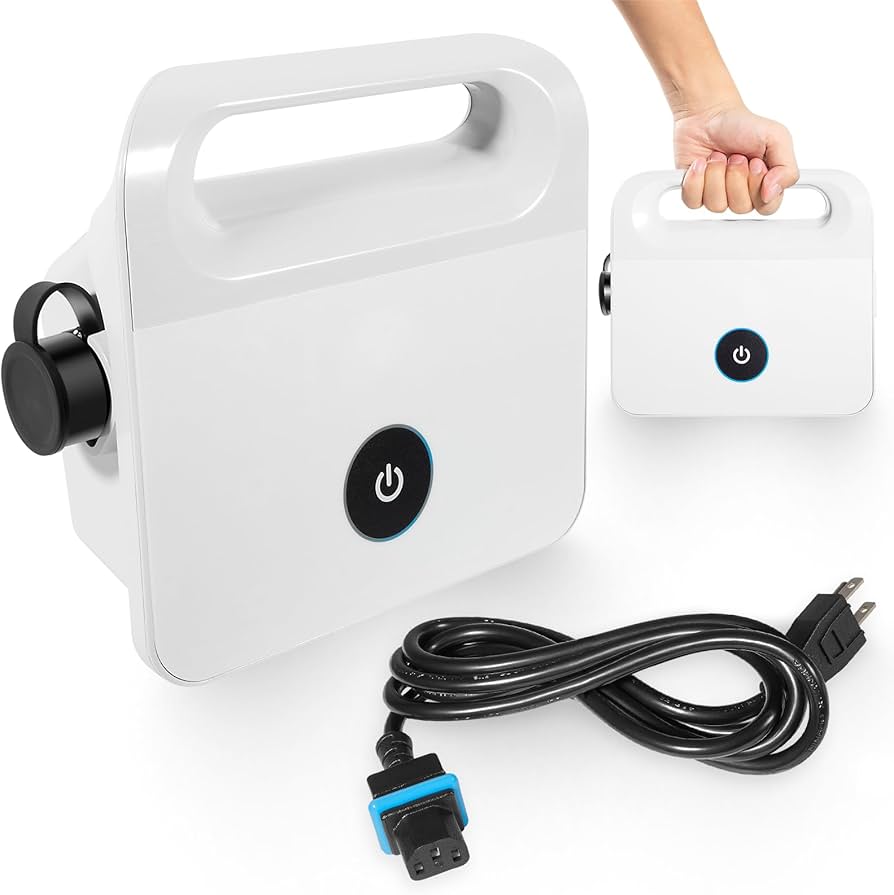
Before tackling water damage, it helps to know what the Maytronics power supply does. This device sits outside your pool and connects to your robotic cleaner with a long cable. Its main jobs are:
- Converting electricity from your wall outlet to the correct voltage for the robot
- Supplying power safely and consistently
- Controlling the cleaner’s cycles (start, stop, timing)
Most Maytronics power supplies are not waterproof. They are rated as water-resistant, which means they can handle splashes or light rain, but not full submersion or heavy soaking. The casing is designed to protect the electronics inside, but seals and gaskets can wear out over time.
Knowing this, you can see why moisture is a real threat. Even small amounts of water inside the unit can cause big problems.
Common Ways Water Gets In
Many pool owners are surprised when their power supply gets wet. Some common causes include:
- Leaving the power supply outdoors during rain
- Splashing water from pool cleaning or play
- Placing the power supply too close to the pool edge
- Using a hose to rinse the power supply (never recommended)
- Setting the unit on wet grass or pavement
Sometimes, condensation can also form inside the unit, especially in humid climates.
What Happens When The Power Supply Gets Wet?
A wet power supply can lead to several problems. Understanding the dangers and likely outcomes helps you react quickly and avoid further damage.
Immediate Electrical Risks
The main risk is a short circuit. Water is a conductor, so if it gets inside, it can connect electrical parts that shouldn’t touch. This may cause:
- Sparks or popping sounds
- Tripped circuit breakers or blown fuses
- The unit not powering on
Never try to turn on a wet power supply, as this increases the risk of shock or fire.
Damage To Electronics
Even if there’s no immediate short, water can corrode the delicate circuits inside. This damage might not show right away but can cause:
- Intermittent operation (works sometimes, then stops)
- Error messages or blinking lights
- Permanent failure weeks or months later
Safety Hazards
A wet power supply is a shock hazard. Touching it while plugged in can lead to injury. This is especially dangerous around pools, where wet skin and bare feet increase the risk.
Warranty Concerns
Most Maytronics warranties do not cover water damage caused by misuse or exposure. If the unit was left in the rain or submerged, repairs might not be covered. It’s vital to check your warranty terms before attempting repairs.
Credit: www.amazon.com
Immediate Steps To Take If Your Power Supply Gets Wet
If you discover your Maytronics power supply got wet, quick and careful action can make a big difference. Here’s what to do:
1. Unplug Immediately
Disconnect the power supply from the wall outlet and from the pool cleaner. Do not touch the plugs with wet hands.
2. Move To A Dry Location
Place the power supply in a dry, well-ventilated area, away from the pool and any standing water.
3. Do Not Turn It On
Resist the urge to test if it still works. Powering on a wet unit can cause more damage.
4. Remove Excess Water
Gently blot any visible water on the outside with a towel. Do not shake or open the unit yet.
5. Wait And Dry
Allow the unit to air-dry for at least 24-48 hours. If possible, use a fan to increase airflow. Do not use a hairdryer or heat gun, as high heat can warp parts.
6. Check For Water Inside
If you feel comfortable, and your warranty allows, you can open the casing to inspect for moisture. Only do this if you’re sure the unit is unplugged and you have basic electronics knowledge.
7. Consult The Manual
Some models have specific instructions for water exposure. Always check the user manual for guidance before continuing.
8. Contact Support
If you’re unsure, or the unit was fully submerged, contact Maytronics customer support or a certified repair center.
Why Rushing Can Make Things Worse
Trying to use or test a wet power supply is a common mistake. Many users think, “Maybe it’s okay if I plug it in for just a second. ” This almost always causes bigger problems. Water may not show visible signs, but even tiny droplets on a circuit can cause failure when power is applied.
Drying And Testing: Step-by-step Guidance
Proper drying is crucial. Here’s a step-by-step approach for those who want to try rescuing their power supply after minor water exposure.
Safe Drying Process
1. Open The Casing (if Allowed)
If your warranty is already expired, and you feel confident, open the casing carefully. Take photos as you go to help with reassembly.
2. Inspect For Water
Look for droplets, foggy spots, or water lines inside. Pay special attention to the circuit board and connectors.
3. Remove Moisture
Use a lint-free cloth or paper towel to dab (not rub) any moisture. Avoid pressing on electronic parts.
4. Desiccant Method
Place the open unit in a large container with silica gel packets or uncooked rice. These materials absorb moisture from the air.
5. Air Out For 48 Hours
Leave the unit open in a dry place, ideally with a fan blowing gently. Humidity slows drying, so a dehumidifier can help.
6. Reassemble And Visual Check
Once you’re sure the inside is dry, reassemble the unit. Inspect for corrosion (green or white residue), burnt areas, or damaged parts.
7. Test With Caution
Plug the power supply into a GFCI-protected outlet (Ground Fault Circuit Interrupter) to minimize shock risk. Do not connect the cleaner yet. Watch for any unusual smells, sounds, or lights.
8. Connect Cleaner
If the unit powers on with no problems, connect the cleaner and observe operation. If you see any signs of malfunction, unplug and seek professional help.
When To Seek Professional Help
If you notice any of the following, do not attempt further repair:
- Burnt or melted areas
- Strong odor of burning
- Persistent error lights
- No power after thorough drying
In these cases, the internal components may be damaged beyond safe home repair.

Credit: www.reddit.com
Common Symptoms After Water Exposure
Not all water damage is obvious. Sometimes, issues appear days or weeks after the incident. Look for these symptoms:
- Unit does not power on even after drying
- Flashing error lights (check manual for codes)
- Cleaner starts, then stops
- Strange noises from the power supply
- Intermittent operation
These are signs of hidden moisture, corrosion, or electrical shorts. If you experience these, stop using the power supply and consult a technician.
Prevention: How To Keep Your Power Supply Dry
Prevention is always better than repair. Taking steps to protect your Maytronics power supply from water can save time, money, and frustration.
Best Placement Practices
- Keep off the ground: Place the unit on a dry, elevated surface. Use a plastic crate or a dedicated stand.
- Distance from pool: Keep at least 10 feet from the pool edge to avoid splashing.
- Avoid low spots: Do not set the unit where rainwater collects.
Weather Protection
- Use a cover: Many third-party companies sell waterproof covers designed for power supplies. Even a large plastic storage box (with holes for cables) can help.
- Bring indoors during storms: If heavy rain is expected, unplug and store the power supply inside.
- Shade from sun: Direct sunlight can weaken seals over time, making water entry more likely.
Cable And Connector Care
- Check gaskets and seals: Inspect rubber gaskets on connectors regularly. Replace if cracked or missing.
- Dry hands before plugging/unplugging: Water on connectors can be just as dangerous as water inside the unit.
- Coil cables off the ground: Keep wires away from puddles.
Seasonal Storage
If you close your pool for the winter:
- Store power supply indoors in a dry, temperature-controlled space.
- Remove batteries (if your model uses them) to prevent leakage.
- Inspect for damage before first use each season.
Hidden Risks Most People Miss
Many pool owners believe that a “weather-resistant” label means waterproof. In reality, few consumer pool products can handle heavy rain or full soaking. Even condensation inside a storage shed can cause damage over time. Regularly checking for moisture, and not trusting outdoor covers completely, can prevent surprise failures.
Maytronics Power Supply Models: Water Resistance Comparison
Different Maytronics power supplies offer varying levels of water resistance. Here’s a comparison of some popular models:
| Model | Water Resistance Rating | Recommended Use |
|---|---|---|
| Maytronics Classic Power Supply | IP24 (Splash-resistant) | Outdoor use, protected from rain |
| Maytronics Advanced Power Supply | IP44 (Rain-resistant) | Short outdoor exposure, covered if possible |
| Maytronics PowerStream | IP54 (Dust and splash) | Outdoor use, avoid direct rain |
Insight: Even the most advanced models should not be left in heavy rain or submerged. Always check your specific unit’s rating in the manual.
Repair Vs. Replace: What’s The Right Choice?
After water damage, many owners wonder if the power supply can be fixed, or if buying a new one is better.
When Repair Makes Sense
- Minor water exposure, quick action, and no visible damage
- Unit under warranty and covered by terms (rare for water damage)
- Cost of repair is less than half the price of a new unit
When Replacement Is Better
- Significant corrosion or burnt areas inside
- Persistent malfunctions after drying
- Older units where parts are hard to find
- Safety concerns (strange smells, heat, or shocks)
Average Costs
A typical Maytronics power supply costs between $100 and $250, depending on the model. Repair by a professional can range from $75 to $200. If your unit is several years old, replacement may be more cost-effective.
Comparing Repair And Replacement
Here’s a quick comparison:
| Option | Pros | Cons |
|---|---|---|
| Repair | Lower cost, keeps existing unit, less waste | May not fix deep damage, voids warranty, time-consuming |
| Replace | Brand new, full warranty, peace of mind | Higher upfront cost, disposal of old unit |
If in doubt, consult a Maytronics service center. They can diagnose the problem and estimate costs.
Professional Repair: What To Expect
If you choose professional repair, here’s what typically happens:
1. Diagnostic Fee
Most repair shops charge a fee ($20-$50) to open and check the unit.
2. Cleaning And Drying
Technicians will remove moisture, clean corrosion, and test components.
3. Parts Replacement
Damaged capacitors, resistors, or connectors are replaced. Some units need new circuit boards.
4. Testing
The unit is tested for safe operation before return.
5. Warranty
Most repairs come with a short warranty (30-90 days) on the fix.
Always use a certified Maytronics technician. Unqualified repair can cause more damage or void your warranty.
Real-life Example: What Can Go Wrong
Imagine a pool owner leaves their power supply outdoors during a summer storm. They find it the next day, soaked but seemingly fine. They plug it in and the cleaner starts, but after 20 minutes, it stops and won’t restart.
Weeks later, the unit smells burnt and won’t power up at all.
In this case, the owner’s mistake was using the unit before it was fully dry. The water caused a slow short, slowly damaging the board. Had they dried and inspected it first, expensive repairs could have been avoided.
Insurance And Water Damage
Most standard home insurance policies do not cover damage to pool equipment from rain, flooding, or misuse. Some policies may offer coverage for sudden, accidental damage if you can prove you took reasonable precautions. It’s wise to check with your insurer if you have high-value pool equipment.
Environmental Factors: What Owners Often Miss
Many people overlook the role of humidity and temperature changes. If you live in a humid area, moisture can build up inside the unit even without direct splashing. Storing your power supply in a dry, climate-controlled area is the safest option.
Another hidden risk is pest entry. Small insects can crawl inside and block vents or damage seals, letting in water during rain. Regular inspection and cleaning help prevent these problems.
Long-term Effects Of Water Exposure
Even if your power supply seems to survive a soaking, hidden damage can cause:
- Reduced lifespan: Corrosion slowly weakens metal parts.
- Random shutdowns: Small shorts cause the unit to fail unpredictably.
- Weakened seals: Makes future water entry more likely.
It’s best to consider any water-exposed unit as “at risk” and take extra care in the future.
Cleaning And Maintenance Tips
Keeping your Maytronics power supply in good shape reduces the chance of water damage.
- Wipe down the unit weekly with a dry cloth.
- Inspect seals and replace if worn.
- Keep vents clear of dust and debris.
- Store properly after each use, especially in wet seasons.
A little maintenance goes a long way toward preventing expensive failures.
When To Upgrade Your Power Supply
If your power supply is several years old, upgrading may bring:
- Better water resistance: Newer models have improved seals.
- Advanced features: Like digital timers and remote control.
- Energy efficiency: Reduces electricity use.
- Stronger warranties: New units are covered for longer.
Compare your current unit to the latest models to see if an upgrade makes sense.
Here’s a snapshot of features in newer models:
| Feature | Older Models | Newer Models |
|---|---|---|
| Water Resistance | IP24–IP44 | IP54–IP65 |
| Digital Controls | No | Yes |
| Remote/App Control | No | Some models |
| Warranty | 1–2 years | 2–3 years |
If you want more features or better protection, an upgrade is worth considering.
Where To Buy Replacement Parts Or Power Supplies
Always buy from authorized dealers or the official Maytronics site. Avoid used units from online marketplaces, as water damage may not be obvious. If you need parts like seals or cables, use the correct model number to ensure compatibility.
For reliable information, you can visit the Maytronics official website.

Credit: www.reddit.com
Frequently Asked Questions
What Should I Do First If My Maytronics Power Supply Gets Wet?
First, unplug the unit from all power sources and move it to a dry place. Do not try to turn it on or test it. Allow it to dry for at least 24-48 hours before further inspection or use.
Is A Wet Power Supply Covered Under Warranty?
Most Maytronics warranties do not cover water damage caused by misuse, rain, or submersion. Check your warranty terms and contact customer support for specific cases.
How Can I Tell If My Power Supply Is Safe To Use Again?
If the unit is completely dry, shows no signs of corrosion or damage, and powers on without error, it is likely safe. However, if you notice any burning smell, heat, or unusual behavior, stop using it and seek professional help.
Can I Repair A Water-damaged Power Supply Myself?
Minor drying and cleaning are sometimes possible if you have basic electronics knowledge and the warranty is expired. For any significant damage, professional repair is recommended for safety reasons.
How Can I Prevent My Maytronics Power Supply From Getting Wet In The Future?
Keep the unit elevated, away from the pool edge, and covered during rain. Store indoors when not in use, especially during storms or off-season. Regularly inspect seals and connectors for wear.
—
Dealing with a wet Maytronics power supply can be stressful, but knowing the right steps and precautions makes all the difference. By acting quickly, understanding the risks, and practicing good maintenance, you can protect your investment and ensure your pool cleaner works for years to come. Stay vigilant, and your pool equipment will reward you with reliable performance all season long.