
If you own an Intex Saltwater System, you already know it’s a smart way to keep your pool clean and safe without using heavy chemicals. But even the best pool systems need regular care. One of the most important features on your Intex Saltwater System is the self-clean function. This feature helps remove mineral build-up and extends the life of your equipment, keeping your pool water sparkling and your system running efficiently.
Many pool owners don’t use self-clean regularly, or they aren’t sure how it works. If you’re new to saltwater pools or want to make sure you’re doing things right, this guide will help. You’ll learn exactly how the self-clean function works, why it matters, and step-by-step instructions to use it safely.
Plus, you’ll get practical tips for troubleshooting, maintenance, and avoiding mistakes that can damage your system. With the right knowledge, you can enjoy a cleaner pool and less stress all summer long.
What Is The Self Clean Function On Intex Saltwater System?
The self-clean function is a built-in feature in many Intex Saltwater Systems, especially the popular Krystal Clear models. Its main job is to remove calcium and mineral deposits that collect inside the electrolytic cell. These deposits can reduce the system’s efficiency, shorten its lifespan, and make your pool water cloudy.
When you activate self-clean, the system reverses the electrical polarity inside the cell. This process loosens mineral buildup so it can be washed away. The function is automatic but can also be started manually, depending on your model.
Key Benefits Of Using Self Clean
- Longer system life: Regular self-clean keeps the cell free from deposits, reducing wear and tear.
- Cleaner water: Removing buildup ensures the system produces chlorine efficiently, leading to better pool water.
- Lower maintenance: You won’t need to clean the cell manually as often, saving time and effort.
- Reduced chemical use: Efficient chlorine generation means you need fewer chemicals overall.
Common Models With Self Clean
Most Intex saltwater systems from the last ten years include a self-clean function. Notable models:
- Krystal Clear Saltwater System CG-26601
- Krystal Clear Saltwater System CG-26669
- Krystal Clear Saltwater System CG-26673
Older models may not have this feature, so always check your manual.
How Does The Self Clean Feature Work?
The science behind self-clean is simple but effective. The cell in your saltwater system is made of titanium plates. Over time, calcium from pool water sticks to these plates. If too much builds up, chlorine production drops.
Self-clean works by reversing the electrical flow. This change causes calcium to loosen and drop off the plates. The system then flushes the deposits away, usually during normal operation.
Automatic Vs. Manual Self Clean
Some Intex systems run self-clean automatically every few hours. Others let you set a schedule or start the process manually.
- Automatic: The system self-cleans after a set number of hours (usually every 10, 14, or 24 hours).
- Manual: You press a button or follow instructions to start self-clean anytime.
Check your user manual to see which type you have.
Why Is Self Clean Important?
If you skip self-clean, deposits build up fast—especially in areas with hard water. This can cause:
- Low chlorine levels
- Cloudy or green water
- Error messages
- Damage to the cell
Regular use keeps your pool system working at its best.
Credit: intexcorp.com
Preparing Your Pool And Saltwater System For Self Clean
Before you use the self-clean function, it’s important to get your pool and system ready. This step helps the process work better and prevents unexpected problems.
Check Water Chemistry
Your pool water should be balanced before starting self-clean. Here’s what to check:
- Salt level: Use a test strip or meter. Ideal is 2,700–3,400 ppm (parts per million).
- PH: Aim for 7.2–7.6.
- Calcium hardness: Keep between 200–400 ppm.
- Alkalinity: 80–120 ppm.
If levels are off, adjust them before running self-clean.
Inspect The Cell
Look for visible deposits, discoloration, or damage. If the cell is heavily clogged, manual cleaning may be needed first.
Ensure Proper Water Flow
The self-clean function needs good water circulation. Make sure:
- The filter is clean.
- The pump is running well.
- Valves are open.
If water flow is weak, the self-clean process may not work properly.
Step-by-step Guide: Using Self Clean On Intex Saltwater System
Here’s a clear process to activate and use self-clean on most Intex systems. Always check your specific model’s manual, but these steps work for most Krystal Clear units.
1. Switch Off The System
Before starting, turn off the saltwater system and pump. This prevents electrical issues and lets you check the cell safely.
2. Inspect And Clear The Cell
Remove the cell and look for deposits. If it’s heavily blocked, clean it manually:
- Rinse with fresh water.
- Use a mild acid solution (like diluted muriatic acid) if needed.
Dry the cell and reinstall it.
3. Power On And Access Self Clean
Turn the system back on. Find the self-clean button or menu on the control panel. On most models, it’s labeled “Self Clean” or “SC.”
4. Set Self Clean Duration
You’ll see options for self-clean intervals—often 6, 10, or 14 hours. Choose the interval based on your pool size and water hardness.
- 6-hour: Good for soft water or smaller pools.
- 10-hour: Average for most pools.
- 14-hour: Best for hard water or larger pools.
Press the button to select your interval.
5. Start Self Clean
After setting the interval, press “Start” or “Enter. ” The system will begin the self-clean cycle. You may hear a click or see a light indicating the process is active.
6. Monitor During Cleaning
Let the system run. Watch for:
- Error codes or warning lights
- Unusual noises
- Changes in water flow
Most self-clean cycles run for 15–30 minutes, then return to normal operation.
7. Finish And Check Results
When the cycle ends, check the cell again. It should look cleaner. Test your pool water for chlorine levels—production should improve.
8. Repeat As Needed
For best results, set self-clean to run automatically or use it manually every 1–2 weeks.
Credit: www.walmart.com
Comparing Self Clean Intervals
Choosing the right self-clean interval is important. Here’s a comparison for typical pool sizes and water hardness:
| Interval | Best For | Water Hardness | Cell Longevity |
|---|---|---|---|
| 6 Hours | Small pools, soft water | <200 ppm | High |
| 10 Hours | Medium pools, average water | 200–300 ppm | Medium |
| 14 Hours | Large pools, hard water | >300 ppm | Medium |
For hard water, shorter intervals (6 or 10 hours) are better because deposits build up faster.
Troubleshooting Common Problems With Self Clean
Even with self-clean, you may run into issues. Here are practical solutions for the most frequent problems.
Error Codes
If you see error codes like “Low Salt” or “Check Cell,” try these steps:
- Test salt level and add more if needed.
- Remove and rinse the cell.
- Restart the system.
Weak Chlorine Production
If chlorine stays low after self-clean:
- Check for hidden deposits inside the cell.
- Make sure water flow is strong.
- Test pH and adjust if needed.
System Shuts Off During Self Clean
If your Intex system stops mid-cycle:
- Check for power surges or loose connections.
- Make sure the pump is running.
- Inspect for clogs in the filter.
Unusual Noises
Humming or buzzing may mean deposits are breaking loose. If noises continue after self-clean, inspect the cell and pump.
Manual Cleaning Vs. Self Clean: Which Is Better?
Self-clean is a convenient way to maintain your saltwater system. But sometimes, manual cleaning is needed, especially if deposits are thick.
Here’s a comparison of manual and self-clean methods:
| Cleaning Method | Best For | Effort Required | Frequency | Risks |
|---|---|---|---|---|
| Self Clean | Light to moderate deposits | Low | Weekly or biweekly | Minimal |
| Manual Clean | Heavy deposits, hard water | Medium to high | Monthly or as needed | Possible cell damage if harsh chemicals used |
Manual cleaning is more thorough but takes time and care. If you use self-clean regularly, you’ll rarely need to clean manually.
Practical Tips For Using Self Clean Effectively
Many pool owners miss these simple but important tips. Use them to get the most from your Intex Saltwater System.
Tip 1: Use Self Clean Before Heavy Swimming
Run self-clean before pool parties or after storms. This ensures chlorine production is strong when you need it most.
Tip 2: Adjust For Hard Water
If your area has hard water, use shorter self-clean intervals. Test water hardness every month and adjust as needed.
Tip 3: Keep The Filter Clean
A dirty filter reduces water flow and weakens self-clean. Clean or replace filters every 1–2 weeks.
Tip 4: Watch For Cell Wear
Older cells can lose efficiency even with self-clean. If chlorine production drops and self-clean doesn’t help, it may be time for a replacement.
Tip 5: Log Maintenance
Keep a notebook or app to track self-clean cycles, manual cleanings, and water chemistry. This helps spot patterns and prevent problems.
Non-obvious Insights Beginners Often Miss
- Cell Placement Matters: The position of the cell affects self-clean. Place it upright and in the recommended spot for best water flow.
- Salt Quality: Poor-quality salt can leave extra deposits. Use pure, pool-grade salt to reduce buildup.
- Temperature Effects: Cold water slows self-clean. If your pool is below 60°F (16°C), wait for warmer weather to run self-clean.
- Air Bubbles: Air trapped in the cell can block self-clean. Bleed air from the system after maintenance.
Maintaining Your Intex Saltwater System Long-term
Using self-clean is only part of keeping your pool system healthy. Here are long-term maintenance steps to follow:
Seasonal Maintenance
- Deep clean the cell at the start and end of each season.
- Store the system in a dry place if not used year-round.
Routine Checks
- Test salt and water chemistry weekly.
- Inspect the cell monthly.
- Run self-clean on schedule.
Replace Parts As Needed
Electrolytic cells usually last 2–5 years. Replace when chlorine production drops or the cell shows heavy wear.
Protect Against Power Surges
Use a surge protector to avoid electrical damage during storms.

Credit: www.amazon.com
Safety Precautions When Using Self Clean
Safety is important when using self-clean. Here are simple precautions:
- Always turn off the system before inspecting the cell.
- Wear gloves if manually cleaning with acid.
- Never mix chemicals near the system.
- Keep children and pets away from the equipment.
If you notice unusual smells, smoke, or sparks, turn off the system and call a technician.
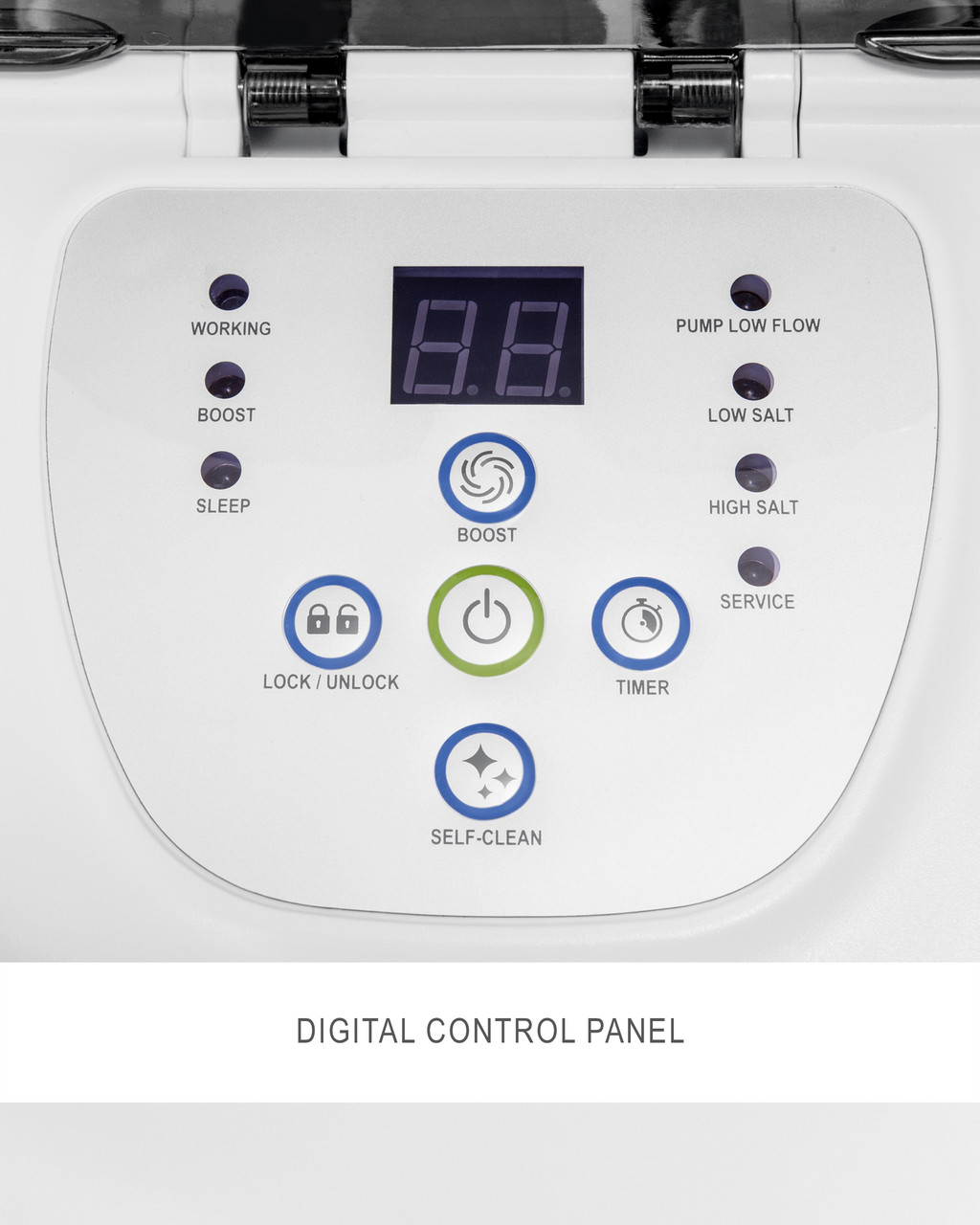
Understanding Your Control Panel And Display
Every Intex Saltwater System has a control panel with buttons and indicator lights. Knowing what these mean helps you use self-clean properly.
Common Buttons
- Power: Turns the system on/off.
- Self Clean/SC: Starts the self-clean function.
- Timer: Sets run time for system and self-clean.
- Boost: Increases chlorine production for emergencies.
Indicator Lights
- Self Clean Active: Shows when self-clean is running.
- Error: Warns of low salt, water flow, or cell issues.
- Ready: Indicates normal operation.
If you see warning lights, check the manual for solutions.
Data: How Self Clean Affects Pool Water Quality
Many pool owners wonder if self-clean really improves water quality. Here’s data from pool tests before and after self-clean cycles:
| Test | Before Self Clean | After Self Clean | Recommended Range |
|---|---|---|---|
| Chlorine (ppm) | 0.8 | 2.5 | 1–3 |
| pH | 7.4 | 7.5 | 7.2–7.6 |
| Calcium Hardness (ppm) | 450 | 390 | 200–400 |
| Salt Level (ppm) | 2,800 | 2,800 | 2,700–3,400 |
As you can see, chlorine levels rise and calcium hardness drops, showing how self-clean improves water quality.
Common Mistakes To Avoid When Using Self Clean
Even experienced pool owners make mistakes. Here are the most frequent errors and how to avoid them:
- Ignoring Water Chemistry: Don’t run self-clean if salt, pH, or calcium are off. Fix levels first.
- Skipping Manual Cleaning: Self-clean can’t fix heavy deposits. Clean manually when needed.
- Using Wrong Salt: Cheap salt increases deposits. Always use pool-grade salt.
- Not Cleaning Filters: Dirty filters block water flow and reduce self-clean effectiveness.
- Setting Wrong Interval: Too long between self-clean cycles lets deposits build up. Adjust intervals for your pool.
Saving Money With Self Clean
Regular use of self-clean can save money in several ways:
- Extends cell life, reducing replacement costs.
- Cuts down on chemical expenses.
- Prevents expensive repairs from neglect.
A well-maintained system can save hundreds of dollars over a few years.
Real-world Example: Using Self Clean In A Family Pool
Let’s look at a practical example. The Smith family has a 15,000-gallon above-ground pool with an Intex Krystal Clear Saltwater System. They live in an area with hard water.
When they first installed the system, they noticed chlorine levels dropped after a few weeks. The cell was covered in white deposits. By using self-clean every 10 hours and cleaning the filter weekly, their pool stayed clear. They only had to manually clean the cell twice a season.
Their chlorine levels stayed at 2–3 ppm, and they saved about $200 in chemicals each summer.
This example shows how regular self-clean can make pool care easier and cheaper.
Expert Advice For Pool Owners
If you want your Intex Saltwater System to last, follow these expert tips:
- Set self-clean intervals based on your water hardness and pool size.
- Use pool-grade salt and check water chemistry often.
- Clean filters and inspect the cell regularly.
- Keep a log of maintenance and changes in water quality.
- Don’t ignore error messages—fix problems right away.
If you need more detailed information or troubleshooting guides, visit the official Intex website or trusted pool care resources such as Intex Saltwater Systems.
Frequently Asked Questions
How Often Should I Use Self Clean On My Intex Saltwater System?
For most pools, run self-clean every 1–2 weeks. In hard water areas, use shorter intervals (every 6–10 hours). If you notice deposits or low chlorine, increase frequency.
What Happens If I Don’t Use Self Clean?
Skipping self-clean lets calcium and minerals build up. This reduces chlorine production, can cause cloudy water, and may damage the cell. Regular self-clean prevents these issues.
Can Self Clean Fix Heavy Mineral Deposits?
Self-clean is designed for light to moderate buildup. If deposits are thick, manual cleaning with water or diluted acid is needed first. Then use self-clean regularly to prevent future buildup.
Is Self Clean Safe For All Intex Saltwater Systems?
Most newer Intex systems have self-clean and it’s safe to use. If your model is older or doesn’t have this feature, check your manual or contact Intex support before trying.
Why Does My System Show Error Codes After Self Clean?
Error codes usually mean water chemistry is off, or the cell still has deposits. Check salt, pH, and calcium levels. Inspect and clean the cell manually if needed. Restart the system after fixing any issues.
When you use the self-clean feature correctly, your Intex Saltwater System will keep your pool water fresh, clear, and safe. With regular care and smart maintenance, you’ll spend less time worrying and more time enjoying your pool.