
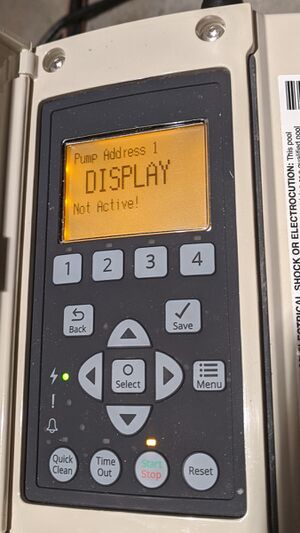
When you walk out to your pool on a warm day, ready for a relaxing swim, but find your Pentair pool pump display not active, it can be frustrating. The display is crucial—it tells you if the pump is working, lets you adjust settings, and helps diagnose issues. Without it, you’re left guessing. This problem can stop your pool system, affect water quality, and even lead to expensive repairs if not handled correctly. Luckily, most display problems aren’t as bad as they seem. If you know what to look for and how to respond, you can often fix the issue yourself or decide when it’s time to call a pro.
This article will guide you through everything you need to know about a non-responsive Pentair pool pump display. You’ll learn the common reasons for this problem, how to troubleshoot step by step, and when expert help is needed. You’ll also find practical maintenance tips to avoid future display issues and answers to the most common questions pool owners ask.
Why The Pentair Pool Pump Display Matters
The display panel on your Pentair pool pump is more than just a screen. It’s the main communication tool between you and the pump. Here’s why it’s so important:
- Shows pump status: You can see if the pump is running, paused, or has an error.
- Lets you change settings: Speed, timer, and other functions are adjusted here.
- Displays error codes: When something is wrong, the display often shows a code that helps identify the problem.
If the display is dead or blank, you lose all these features. You can’t tell if the pump is running, and you can’t change any settings. In some cases, the pump will not operate at all if the display is not working.
Common Reasons The Pentair Pool Pump Display Is Not Active
Understanding why the display is blank or non-responsive is the first step. Several issues can cause this. Here are the most frequent causes:
- Power supply problems: The pump might not be getting electricity due to a tripped breaker, blown fuse, or loose wire.
- Faulty wiring: Damaged or corroded wires can stop the display from receiving power.
- Control board failure: The main circuit board inside the pump could be damaged by water, heat, or electrical surges.
- Display panel defects: Sometimes, the display itself goes bad after years of use or exposure to sunlight and moisture.
- Software glitches: Like any electronic device, the pump’s software can freeze or malfunction.
- Environmental factors: Extreme temperatures, lightning, or flooding can harm the display or its electronics.
- User error: Settings could be accidentally changed, or the display could be locked or dimmed.
Let’s look deeper into each cause and how to check for them.
Power Supply Problems
The most basic cause is a lack of power. Even if the rest of your pool equipment seems fine, the pump may not be getting power due to a tripped breaker, a blown GFCI outlet, or a disconnected plug. Sometimes, wiring to the pump can come loose, especially if animals or weather have damaged your electrical box.
A quick check with a multimeter at the pump’s terminals can confirm if power is present. Remember, working with electricity is dangerous—if you’re not sure, call a licensed electrician.
Faulty Wiring
Wiring issues aren’t always visible. Mice can chew through wires, connections can corrode, and vibration can loosen terminals. Even a single broken wire can stop the display from lighting up. Always check for visible damage, and if you suspect wiring problems, have a pro inspect the system.
Control Board Failure
The control board is the brain of the pump. If it fails, the display may not work even if power is present. Water leaks, insects, or electrical surges can damage the board. This type of problem often requires replacing the board or the entire panel.
Display Panel Defects
The display screen itself can fail, especially after years outdoors. UV light, moisture, and general wear can cause blank spots, flickering, or total failure. Sometimes, replacing just the display is possible if the rest of the pump is in good condition.
Software Glitches
Electronic equipment sometimes needs a reset. If the display stopped working after a storm or power outage, a simple reset—unplugging the pump for a few minutes—can fix the issue. Software bugs are less common, but they do happen.
Environmental Factors
Lightning strikes, heavy rain, or freezing weather can cause problems even if the rest of the system is working. Water inside the control box or on the circuit board can short out electronics. Always check for signs of water damage or corrosion around the display.
User Error
It’s easier than you might think to accidentally lock the display, dim the brightness, or switch it off. Always check your owner’s manual for display lock or sleep settings before assuming the worst.
Step-by-step Troubleshooting Guide
When your Pentair pool pump display is not active, follow these steps to find the cause. Many issues can be fixed without special tools or training.
1. Check The Power Source
- Is the pump plugged in securely?
- Are the circuit breaker and GFCI outlet on?
- Test the outlet with another device (like a lamp) to confirm power is available.
- If comfortable, use a multimeter to check voltage at the pump terminals.
Pro insight: Sometimes a breaker seems “on” but isn’t supplying power. Flip it fully off, then back on.
2. Inspect For Visible Damage
- Look for signs of water, rust, or insects in the control box.
- Check wires for bite marks, fraying, or loose terminals.
- Smell for burnt or electrical odors—this can signal a short.
3. Reset The Pump
- Turn off the power at the breaker or unplug the pump.
- Wait at least five minutes. This allows any stored charge to clear.
- Restore power and check the display again.
4. Review Display Settings
- If the display lights but is blank, check for brightness or contrast controls.
- Look for a lock symbol—some models let you “lock” the display.
- Press buttons to see if the display responds.
5. Test With Manual Override
- If your Pentair pump has a manual override or “service” mode, activate it.
- See if the pump runs or the display wakes up.
- If so, the issue may be with automation or remote controls.
6. Examine The Control Board
- Remove the panel (after turning off power!) And look at the circuit board.
- Are there black spots, melted parts, or corrosion?
- Is there water inside the housing?
Beginner’s tip: Take a photo of the wiring before you disconnect anything. This helps with reassembly.
7. Try A Different Display (if Available)
- If you have another compatible Pentair display, swap it in.
- If the new display works, your old screen is likely defective.
8. Call For Professional Help
If none of the above restores the display, or if you’re unsure, call a certified Pentair technician. Electrical repairs can be dangerous. A pro has tools and experience to test boards, wiring, and displays safely.
Example Problem Scenarios
Let’s look at a few real-life examples to make troubleshooting clearer.
Scenario 1: After A Storm, Display Is Dead
After a thunderstorm, you notice your pool pump display is blank. The breaker is on, but there’s no response.
- Check: Is there power at the outlet? Use a lamp to verify.
- Inspect: Look for signs of a lightning strike—burn marks, melted wires.
- Reset: Turn off power for 10 minutes, then try again.
- Result: If still dead, the surge may have damaged the control board. Replacement is likely.
Scenario 2: Display Flickers, Then Goes Blank
You see the display flicker and fade. Sometimes it returns, sometimes not.
- Check: Is the display covered in condensation? Moisture can cause short circuits.
- Inspect: Look for corrosion on the board.
- Test: Try pressing gently on the display—if it comes back, a loose connector may be the problem.
- Result: Dry out the panel and check connections. If it continues, the display or board needs replacement.
Scenario 3: Pump Runs, But Display Does Not Work
The pump is running, but the screen is blank.
- Check: Are you able to control the pump from a remote or app? If yes, the display itself is likely faulty.
- Test: Swap display if possible.
- Result: Replace the screen if the rest of the pump works.
Key Differences: Pentair Pump Display Problems Vs. Other Brands
While many pool pumps share similar technology, Pentair uses specific designs. Here’s a comparison of common display problems between Pentair and other popular brands.
| Feature | Pentair | Hayward | Jandy |
|---|---|---|---|
| Display Location | On pump or remote panel | On pump only | On pump and remote |
| Common Failures | Control board, screen, wiring | Screen fade, keypad wear | Board, communication cable |
| Typical Solution | Board/display replacement | Screen replacement | Board/cable replacement |
Non-obvious insight: Pentair pumps often allow for remote display panels. Sometimes, the remote is at fault, not the pump. Always test both if your system includes a remote.
When To Repair, Replace, Or Call A Technician
Not every display problem means you need a new pump. But knowing when to repair, replace, or get expert help saves time and money.
Repair
- Minor wiring issues
- Loose connectors
- Display lock or settings problem
- Water condensation (if caught early)
Replace
- Burnt or corroded control board
- Cracked or non-responsive display screen
- Repeated failures after repair
Call A Technician
- Electrical shorts or sparks
- Water inside electrical parts
- Unclear or complex wiring diagrams
- Problems after lightning or power surge
A certified Pentair technician can often repair or replace just the faulty part, saving you the cost of a full pump replacement.

Credit: www.youtube.com
How To Prevent Display Problems
Many display issues can be avoided with good maintenance and smart habits.
- Keep electronics dry: Make sure the pump’s control box is sealed and protected from rain.
- Check for pests: Mice and insects can cause wiring damage. Inspect regularly.
- Clean the screen: Gently wipe the display with a soft, dry cloth. Avoid harsh cleaners.
- Shade the pump: Direct sun can damage screens over time. A small roof or cover helps.
- Surge protection: Install a surge protector to guard against lightning or power spikes.
- Regular inspections: Open the control box every few months to check for corrosion or loose wires.
- Follow manufacturer’s instructions: Don’t force buttons or open sealed parts.
Beginner tip: Write the installation date on the pump or in your records. This helps track when parts may need replacing.
Costs Associated With Pentair Pool Pump Display Repair
Repair costs can range widely depending on the problem. Here’s a simple breakdown:
| Problem | Estimated Cost (USD) | DIY or Pro? |
|---|---|---|
| Reset/Settings Fix | $0 | DIY |
| Replace Display Panel | $100–$300 | Both |
| Replace Control Board | $250–$600 | Pro |
| Full Pump Replacement | $700–$1500 | Pro |
| Surge Protector Install | $50–$150 | Both |
Non-obvious insight: Many pool owners replace the pump when only the display or board is bad. Most Pentair models allow you to swap just the faulty part, saving hundreds of dollars.

Credit: www.troublefreepool.com
How Long Should A Pentair Pool Pump Display Last?
The expected life of a Pentair pool pump display depends on use and environment, but most last 5–10 years. Pumps in hot, sunny, or wet locations may fail sooner. Keeping your pump shaded, dry, and protected from surges extends its life.
Expert tip: If your display has lasted over 7 years, plan for replacement soon. This prevents sudden failures during the peak swimming season.
What To Do While Waiting For Repair
If your display is down but the pump still runs:
- Use manual pump controls, if available.
- Check water clarity daily.
- Adjust chlorinator and chemicals by hand.
- Run the pump on a timer switch until repairs are made.
If the pump is completely off:
- Keep pool covered to prevent algae.
- Test water every 2–3 days.
- Call for service as soon as possible.
Credit: www.troublefreepool.com
Dealing With Warranty And Support
Pentair pumps often come with a warranty of 1–3 years. If your pump is still under warranty:
- Contact Pentair customer support or your dealer.
- Have your model and serial number ready.
- Do not open the pump or attempt repairs, as this can void the warranty.
For out-of-warranty pumps, you may find replacement displays or boards online or through pool supply stores. Always buy genuine Pentair parts for best results.
Should You Upgrade To A Newer Model?
If your display has failed and the pump is more than 8–10 years old, consider upgrading. Newer Pentair models use LED or LCD screens that resist sun and moisture better. They also offer features like energy-saving variable speeds and smartphone control.
A new pump can cost more upfront but save money on power and repairs. Compare the cost of repair versus new installation before deciding.
Environmental And Safety Considerations
Electronic waste is a concern for all pool owners. If you replace a display or board:
- Recycle old parts at an electronics center.
- Never throw electrical parts in household trash.
- Dispose of damaged or corroded boards safely.
For safety, always turn off power before opening the pump or display panel. If you see water inside the panel, do not touch anything—call a professional.
When Is A Blank Display Actually Normal?
Some Pentair models enter sleep mode when not in use, dimming the display to save power. Press any button to wake the screen. If nothing happens, or the screen stays black, follow the troubleshooting steps above.
Non-obvious insight: Some remote controls and automation systems can turn off the display or change brightness. Always check remote settings before assuming a failure.
Real-world Tips From Pool Owners
Experienced pool owners often share these tips:
- Take a photo of the display before making changes. This helps if you need to reset or explain the problem to a technician.
- Label wires with tape before unplugging anything.
- Keep a notebook with your pump’s model, serial number, and service history.
- Invest in a small dehumidifier for your pool equipment room if you live in a humid area.
Resources For Further Help
For official guidance, check the Pentair support website or your pump’s user manual. Online forums and pool owner groups are also helpful for sharing experiences.
If you want to learn more about pool pump maintenance and troubleshooting, the U.S. Department of Energy offers a helpful overview at energy.gov.
Frequently Asked Questions
Why Is My Pentair Pool Pump Display Completely Blank?
A blank display usually means the pump is not getting power, the display is faulty, or there’s a problem with the control board. Start by checking the power source, breaker, and any visible wiring damage. If the pump runs but the display doesn’t light up, the screen itself may need replacement.
Can I Reset My Pentair Pool Pump If The Display Is Not Working?
Yes, you can try a basic reset by turning off the pump at the breaker or unplugging it for five minutes. Restore power and see if the display returns. If not, follow the troubleshooting steps in this article or call for service.
Is It Safe To Open The Pentair Pump Control Panel Myself?
Opening the control panel involves exposure to electrical parts. If you are comfortable and power is off, you can check for obvious damage or loose wires. If you see water, corrosion, or burnt parts, or if you are unsure, call a licensed technician.
Safety comes first.
How Do I Know If The Problem Is The Display Or The Control Board?
If the pump still runs (manually or with a remote), but the display is blank, the problem is likely the display screen. If nothing works, and there is power, the control board could be at fault. Swapping in a known-good display can help confirm the cause.
Are Pentair Pool Pump Displays Covered By Warranty?
Most Pentair pumps come with a 1–3 year warranty covering parts like the display and control board. Check your purchase date and warranty terms. Attempting DIY repairs can sometimes void the warranty, so contact Pentair support first if your pump is still covered.
A non-active Pentair pool pump display can be stressful, but with a clear approach, you can often find and fix the problem quickly. Remember, regular checks and good maintenance go a long way in preventing display issues and keeping your pool running smoothly.