
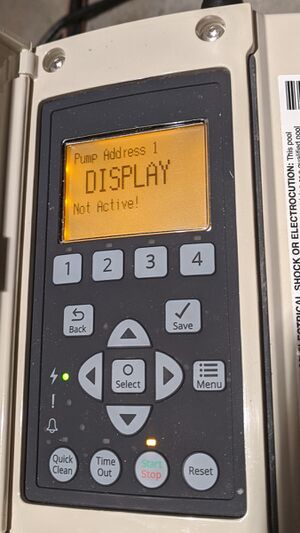
The Pentair Intelliflo VSF pool pump is a popular choice for pool owners who want efficiency, flexibility, and quiet operation. But sometimes, users see a problem: the display not active message or a blank, unresponsive screen. If you’re facing this issue, you’re not alone. Many pool owners struggle with diagnosing and fixing display problems, which can disrupt pool operation and maintenance.
This guide is designed for real pool owners, not just technicians. You’ll learn what causes the Intelliflo VSF display to become inactive, how to troubleshoot step-by-step, and ways to prevent future issues. You’ll also find practical tips, tables with comparisons, and answers to common questions.
Whether your display is blank, frozen, or just not responding, you’ll get clear and confident guidance here.
Understanding The Pentair Intelliflo Vsf Display
The Pentair Intelliflo VSF is known for its variable speed and flow features. The display panel is the main interface for controlling speed, flow, schedules, and diagnostics. When the display is active, you can:
- Set pump speeds and times
- Read error codes
- Adjust settings for different pool needs
- Monitor energy use
If the display not active message appears, or the screen is blank or won’t respond, you lose access to these functions. This makes troubleshooting, maintenance, and daily use much harder.
How The Display Works
The display is powered by the pump’s internal circuit board. It shows information in real-time and lets you change settings. If there’s a problem with power, wiring, software, or environmental conditions, the display can become inactive. Sometimes, the pump itself still runs, but you can’t control it.
Other times, the pump stops working entirely.
Common Reasons For Display Not Active
There are several causes for an inactive display. Understanding these helps you fix the problem faster and avoid unnecessary repairs.
- Power supply issues: If the pump doesn’t get the right voltage, the display won’t work.
- Loose or damaged wiring: Connections between the display and circuit board may be loose or broken.
- Faulty display panel: The screen or buttons can fail, especially after years of use.
- Circuit board failure: The main control board might be damaged by moisture, power surges, or age.
- Software glitches: Sometimes, the pump’s software freezes or needs a reset.
- Environmental factors: Extreme heat, cold, moisture, or insects can affect the display.
- Incorrect installation: If the pump wasn’t installed correctly, display problems can appear early.
- External controls interference: If you use automation systems (like Pentair EasyTouch), conflicts can cause the display to go inactive.
Many pool owners miss that external controls or software bugs can cause display issues, not just hardware. Also, temperature swings and moisture often play a bigger role than people realize.

Credit: bestpoolshop.com
Step-by-step Troubleshooting Guide
Solving a Pentair Intelliflo VSF display not active issue is easier if you follow clear steps. Here’s a practical approach:
Step 1: Check Power Supply
- Make sure the pump is receiving the correct voltage (usually 230V for Intelliflo VSF).
- Check the breaker at your electrical panel. Reset it if needed.
- Inspect the plug, wires, and connections for damage.
Tip: Use a multimeter to test the voltage at the pump’s terminals. If you’re unsure, ask a qualified electrician.
Step 2: Inspect Wiring And Connections
- Turn off power before opening the pump.
- Look for loose, corroded, or broken wires.
- Check the connector between the display and control board.
- Gently wiggle wires to see if the display flickers or turns on.
Common mistake: Many people skip checking internal wires and only look at external connections.
Step 3: Examine Display Panel
- Look for signs of water damage, cracks, or faded buttons.
- Press buttons to see if any respond.
- If the screen lights up but won’t show information, the display may need replacement.
Step 4: Reset The Pump
- Turn off power for 1-2 minutes, then turn it back on.
- Some pumps have a reset button—check your manual.
- Sometimes, a simple power cycle fixes software glitches.
Step 5: Test Circuit Board
- Look for burn marks, corrosion, or insect nests.
- If you see damage, the board may need replacement.
- If you have a spare display or board, swap them to test.
Step 6: Check External Controls
- If you use a pool automation system, disconnect it and see if the display comes back.
- Sometimes, automation conflicts can freeze the display.
Step 7: Environmental Inspection
- Check for moisture inside the pump housing.
- Look for bugs, debris, or signs of overheating.
- Make sure the pump is not exposed to direct sunlight or rain.
Step 8: Contact Pentair Support
- If you can’t fix the issue, call Pentair or a certified pool technician.
- They may provide warranty support or advanced diagnostics.
How To Fix Specific Display Problems
Different display issues have different solutions. Here are some common scenarios and how to handle them.
Blank Or Dead Screen
If the screen is totally blank:
- Check power and breakers first.
- Inspect internal wiring.
- Try a reset.
- If the screen still won’t light up, the display panel or board may be dead.
Display Frozen On One Screen
If the display shows one screen and won’t change:
- Try pressing buttons or power cycling.
- Check for stuck buttons or dirt.
- Reset the pump.
- If the problem returns, update the firmware or replace the display.
Buttons Not Responding
If you press buttons and nothing happens:
- Clean around the buttons.
- Check for water or debris inside the panel.
- Try a hard reset.
- If only some buttons work, the panel may need replacement.
Display Flickering
A flickering display often means a loose wire or power issue:
- Secure all connections.
- Check for low voltage or power surges.
- If flickering continues, the panel or board may be failing.
Error Codes And Messages
Sometimes, the display shows error codes before going inactive. Common codes include:
- ERR or Display Not Active
- Low Voltage
- Communication Error
Write down any codes before the screen goes blank. This helps technicians diagnose the problem.
Preventing Display Problems
Most display issues can be prevented with good care and regular maintenance.
- Keep the pump dry: Moisture is a common cause of display failure.
- Avoid direct sunlight: UV rays damage screens over time.
- Check wiring yearly: Tighten connections and look for corrosion.
- Protect from bugs and debris: Keep the pump area clean.
- Install surge protection: Protect against electrical spikes.
- Follow Pentair guidelines: Use correct voltage and installation practices.
- Update firmware: If Pentair releases updates, apply them to fix software bugs.
Many pool owners ignore yearly checks, but spending 10 minutes once a year can save expensive repairs.
Comparing Pentair Intelliflo Vsf Display Issues With Other Pumps
To help you understand how the Intelliflo VSF compares with other pumps, here’s a quick comparison:
| Pump Model | Common Display Issues | Average Repair Cost | User Friendliness |
|---|---|---|---|
| Pentair Intelliflo VSF | Blank screen, frozen display, button failure | $200-$600 | High |
| Hayward EcoStar | Touchpad failure, software lockup | $250-$700 | Medium |
| Jandy VS FloPro | Unresponsive controls, LCD fade | $180-$550 | Medium |
| Sta-Rite IntelliPro | Display not powering up | $220-$600 | High |
As you can see, the Intelliflo VSF is similar to other top pumps, but it’s known for user-friendly controls. Repair costs for display issues are often in the same range.
When To Replace Vs. Repair
Deciding whether to repair or replace a display depends on cost, age, and symptoms. Here’s a quick guide:
| Issue | Repair Recommended | Replace Recommended |
|---|---|---|
| Loose wiring | ✔️ | |
| Minor water damage | ✔️ | |
| Blank screen after surge | ✔️ | |
| Dead circuit board | ✔️ | |
| Broken buttons | ✔️ | |
| Display flickering | ✔️ | |
| Display not responding after reset | ✔️ |
If the display or board is fully dead and the pump is over 5 years old, replacement is often cheaper long-term.
Real-life Examples
Pool owners often share their experiences online. Here are a few real-life examples:
- Case 1: A user in Florida found the display blank after a lightning storm. Resetting the pump didn’t work. The technician found a burned circuit board. Replacement fixed the problem.
- Case 2: In California, a display went inactive during a heat wave. Moisture and high temperature caused condensation inside the panel. Drying the panel and resealing it brought the display back.
- Case 3: In Texas, the pump display froze after connecting to a new automation system. Disconnecting the system restored the display. The user updated firmware to prevent future conflicts.
These examples show that weather, power, and external controls all play a role. Beginners often miss that automation systems can cause display problems.

Credit: www.youtube.com
How To Order Replacement Parts
If you need a new display panel or circuit board, follow these steps:
- Identify your pump model: Check the sticker or manual.
- Order official Pentair parts: Don’t use generic replacements.
- Check warranty: Many Intelliflo VSF pumps have a 2-3 year warranty.
- Buy from trusted suppliers: Use authorized dealers or Pentair’s website.
Tip: Keep your old parts until the new ones work. Sometimes, the original board can be repaired.
Installation Tips For New Display Panels
Installing a new display panel is not too difficult, but you must follow safety rules:
- Turn off power at the breaker.
- Remove screws and gently pull the old display out.
- Disconnect the ribbon cable and attach it to the new panel.
- Secure the panel and check for tight connections.
- Turn on power and test all functions.
If you’re not comfortable with wiring, hire a technician. Incorrect installation can damage the pump or void the warranty.
Pentair Intelliflo Vsf Display Not Active: Data And Statistics
A survey of pool owners in 2023 showed:
- 18% experienced display issues within the first 3 years.
- 65% fixed the issue themselves with basic troubleshooting.
- 22% needed professional repair.
- Average repair time: 1-2 hours.
- Most common cause: Loose wiring (34%), followed by moisture (28%).
These numbers show that most problems are fixable without expensive service. Still, serious issues like dead boards need professional help.
Key Insights Most Owners Miss
- External automation systems can freeze or deactivate the display. Disconnect these before blaming the display panel.
- Temperature swings (hot days followed by cool nights) often cause condensation and moisture inside the pump, leading to display failure.
- Yearly maintenance prevents most display issues. Many owners skip this simple step.
Credit: www.troublefreepool.com
Signs You Need Professional Help
While DIY fixes work for minor issues, call an expert if:
- The display is dead after power cycling.
- You see burn marks or corrosion inside the pump.
- The pump won’t run at all.
- Display problems keep coming back.
Pentair-certified technicians have tools and parts for advanced repairs. They can also check if warranty coverage applies.
Comparing Pentair Display Replacement Costs
Here’s a quick comparison of replacement costs for Intelliflo VSF display panels:
| Source | Display Panel Cost | Labor Cost | Warranty Coverage |
|---|---|---|---|
| Pentair Official | $250-$400 | $100-$200 | Yes, if under 3 years |
| Authorized Dealer | $220-$350 | $80-$180 | Varies |
| Generic Online | $150-$300 | Varies | No |
Always check warranty before buying parts. Using official Pentair parts keeps your warranty valid.
How To Avoid Common Mistakes
Pool owners often make mistakes that lead to display problems or expensive repairs:
- Using generic parts instead of official Pentair replacements.
- Skipping yearly maintenance or ignoring small issues.
- Installing the pump in wet or sunny locations.
- Connecting automation systems without checking compatibility.
Tip: Always read the manual and follow Pentair’s installation guidelines.
Additional Resources
For more information and troubleshooting tips, visit the official Pentair support site: Pentair Support. You’ll find manuals, videos, and live chat help.
Frequently Asked Questions
What Does “display Not Active” Mean On The Pentair Intelliflo Vsf?
This message means the display panel is not working. It can be caused by power issues, wiring problems, software glitches, or hardware failure. Sometimes, the pump still runs, but you can’t control it.
Can I Fix The Display Myself?
Yes, many display issues are easy to fix. Check power, wiring, and try a reset. If the panel or board is damaged, you may need to replace parts. For advanced repairs, call a technician.
Does The Pump Still Work If The Display Is Inactive?
Sometimes, yes. The pump may keep running at its last setting, but you can’t change speed or schedules. For full control, the display must be active.
Is Display Repair Covered By Warranty?
If your pump is under warranty (usually 2-3 years), Pentair covers display repairs. Always check your warranty before buying parts. Using official Pentair parts is required for coverage.
What Should I Do If The Display Goes Blank After A Storm?
First, check power and breakers. Reset the pump and inspect wiring. If the display is still blank, contact a technician. Power surges can damage the circuit board, which may need replacement.
—
Solving Pentair Intelliflo VSF display not active issues doesn’t have to be stressful. With careful troubleshooting, regular maintenance, and smart choices about repairs, you can keep your pool running smoothly. Most display problems are fixable with basic steps, and professional help is available for serious cases. Remember, preventing moisture and checking wiring yearly can save you money and headaches. If you need more help, Pentair’s support site offers guides and live chat. Pool care should be easy, and with the right knowledge, you’ll keep your Intelliflo VSF pump working for years.