
If you see a red flow light on your Pentair salt cell, it can feel confusing or even stressful. The red light means something is wrong with the water flow in your salt chlorinator system. If you don’t fix it, your pool may not get enough chlorine, and you could face cloudy water, algae, or even damage to the salt cell. Many pool owners panic when they see this warning. But if you understand what the red flow light means and know how to solve it, you can keep your pool safe and clear.
This article will explain everything about the Pentair salt cell flow light being red. You’ll learn the causes, solutions, and how to prevent it in the future. Whether you’re a new pool owner or someone with years of experience, you’ll find practical guidance here. Each step is explained simply, with examples and tips, so you can fix the problem and avoid common mistakes. Let’s dive in and make your pool care easier.
What Does The Red Flow Light Mean?
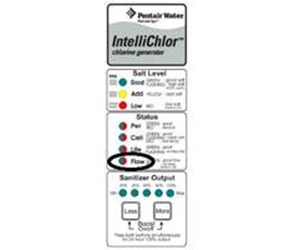
When the flow light on your Pentair salt cell turns red, it signals a problem with water flow. The salt cell needs a steady stream of water to produce chlorine. If the water flow is too low or blocked, the system stops making chlorine, and the light turns red. This is a safety feature that protects the cell and your pool.
Most Pentair salt cells have three flow light colors:
- Green light: Good flow. The cell is working normally.
- Yellow or blinking light: Low flow or warning. Something may be wrong, but the cell still works.
- Red light: No flow or serious problem. The cell is not producing chlorine.
Ignoring the red flow light can cause bigger problems. Your pool might lose its chlorine protection, and bacteria or algae can grow fast. The salt cell may also be damaged by running dry or overheating.
Common Causes Of Red Flow Light On Pentair Salt Cell
Understanding the causes helps you fix the problem quickly. Here are the most frequent reasons for a red flow light:
1. Dirty Or Clogged Filter
If your pool filter is dirty, water can’t move easily through the system. This lowers the flow and triggers the red light.
2. Low Water Level In Pool
When your pool water drops below the skimmer, air enters the system and reduces flow.
3. Pump Speed Too Low
Many Pentair salt cells need a certain pump speed to work. If your pump is set too slow, the cell won’t get enough water.
4. Closed Or Blocked Valves
Valves control water direction. If a valve is closed or partially blocked, flow drops.
5. Flow Switch Failure
The flow switch is a sensor that detects water movement. If it’s broken or stuck, the cell thinks there is no flow.
6. Air In The System
Air bubbles can form if there’s a leak or the pump isn’t primed. Air disrupts water movement.
7. Salt Cell Clogged Or Dirty
Calcium, debris, or algae can build up inside the cell, blocking water flow.
8. Plumbing Or Pipe Blockage
Debris, leaves, or small objects can get stuck in pipes, lowering flow.
9. Pump Problems
If your pump is old, has a worn impeller, or a motor issue, it may not push water strongly enough.
These causes are often missed by beginners. Many people only check the filter, but forget about valves, air leaks, or pump speed. Checking all these areas can save time and money.

Credit: www.reddit.com
How To Troubleshoot A Red Flow Light
Fixing the red flow light starts with finding the cause. Here’s a step-by-step guide to troubleshoot the issue:
Step 1: Check Pool Water Level
Look at your pool’s water line. It should be halfway up the skimmer opening. If it’s too low, fill the pool to the correct level. Low water is a simple but common cause.
Step 2: Inspect And Clean The Filter
Turn off the pump. Open the filter and check for dirt or debris. Clean or replace the filter cartridge, or backwash the sand filter if needed. A clean filter restores proper flow.
Step 3: Examine Pump Speed And Settings
If you have a variable speed pump, check the settings. Pentair salt cells usually need at least 1,800–2,500 RPM (revolutions per minute). If the speed is too low, increase it and see if the red light turns green.
Step 4: Check Valves And Plumbing
Look at all pool valves. Make sure they are open and not blocked. If you see any debris or blockage, clear it out. Also check for leaks or damaged pipes.
Step 5: Inspect Flow Switch
Find the flow switch (usually attached to the salt cell). Check for loose wires, corrosion, or dirt. Clean the switch gently. If it’s broken, you may need to replace it.
Step 6: Remove Air From System
Look for air bubbles in the pump basket or return jets. If you see them, prime the pump by turning it off, opening the lid, filling with water, and restarting. Check for leaks in suction lines.
Step 7: Clean Salt Cell
Turn off the system and remove the salt cell. Inspect for calcium buildup or debris. Clean it with a mild acid solution (follow Pentair’s instructions). Rinse well and reinstall.
Step 8: Check Pump Health
Listen for strange noises or vibrations. If your pump is old, it may need servicing. Check the impeller for wear.
If you follow these steps, you can often solve the red flow light problem yourself. Many pool owners skip steps or rush, but careful troubleshooting prevents bigger issues.
Pentair Salt Cell Models And Flow Light Differences
Pentair makes several salt cell models, each with its own flow light design. Understanding your model helps you find the cause faster. Here are some main models:
- Pentair IntelliChlor
Uses LED lights to show flow status. Green is normal, red means no flow.
- Pentair iChlor
Similar to IntelliChlor, but with a smaller cell and digital display.
- Pentair EasyTouch
Works with IntelliChlor and other cells. The flow light is shown on the control panel.
- Pentair PowerClean Salt
Has a flow sensor and indicator lights.
Each model has its own troubleshooting steps, but the red flow light always means poor water flow.
| Salt Cell Model | Flow Light Color | Action Needed |
|---|---|---|
| IntelliChlor | Red | Check water flow, clean filter, inspect flow switch |
| iChlor | Red | Increase pump speed, check water level |
| EasyTouch | Red | Check valves, prime pump |
| PowerClean Salt | Red | Clean cell, check plumbing |
Knowing your model helps you use the right solution. Some older models need higher flow, while newer ones are more flexible.
How The Flow Switch Works
The flow switch is a small sensor that tells the salt cell if water is moving. It usually has a paddle or pressure sensor. When water flows fast enough, the switch closes and lets the cell work. If flow drops, the switch opens and triggers the red light.
Flow switches can fail for several reasons:
- Corrosion from salty water
- Broken paddle from debris
- Loose wiring or bad electrical connections
If the switch fails, the salt cell thinks there’s no flow even if water is moving. Replacing the flow switch is simple, but using the wrong part can cause problems.
Flow Switch Placement
The switch must be installed in the correct direction. If it’s backward, it won’t sense flow. Also, it must be in a straight pipe section, not near elbows or bends.
| Switch Placement | Result |
|---|---|
| Correct direction | Accurate flow reading |
| Backward installation | Red light stays on |
| Near pipe bend | Unstable flow reading |
Many pool owners miss this detail. Always check the installation manual for your model.
Fixing The Red Flow Light: Detailed Solutions
Here’s how to fix each common cause of the red flow light, with practical examples and tips.
Dirty Or Clogged Filter
If your pool filter is clogged, water flow drops. Clean or replace the filter cartridge. For sand filters, backwash until the water runs clear. For DE filters, rinse and recharge with fresh powder.
Example:
Sarah noticed her IntelliChlor salt cell’s flow light was red. She checked her cartridge filter and saw thick dirt. After cleaning, the light turned green and chlorine production resumed.
Tip:
Clean your filter every 2–4 weeks, or sooner in heavy use.
Low Pool Water Level
If the water level drops, air enters the pipes. Fill your pool to the correct level (halfway up the skimmer).
Example:
John’s iChlor system stopped producing chlorine. He found the water level was below the skimmer. After adding water, the red light disappeared.
Tip:
Check water level weekly, especially in hot weather.
Pump Speed Too Low
Variable speed pumps save energy but can cause low flow. Increase pump speed to at least 1,800 RPM for salt cells.
Example:
Maria set her pump to 1,200 RPM to save power. Her EasyTouch system showed a red flow light. Raising speed to 2,000 RPM fixed the issue.
Tip:
Use the manufacturer’s recommended speed for your salt cell.
Closed Or Blocked Valves
Valves control water direction. Open all valves fully, and check for debris.
Example:
Tom closed a valve to clean his skimmer, but forgot to reopen it. His PowerClean Salt system showed a red light. Opening the valve restored flow.
Tip:
After any maintenance, double-check all valves.
Flow Switch Failure
The switch may be dirty or broken. Clean it gently with water and a soft brush. If it’s damaged, order a replacement from Pentair.
Example:
Lisa’s IntelliChlor always showed red, even with good flow. The technician found a broken flow switch paddle. Replacing the switch fixed the problem.
Tip:
Do not bend or force the paddle when cleaning.
Air In The System
Air bubbles mean there’s a leak or poor priming. Prime the pump by filling the basket with water and restarting.
Example:
A loose pump lid caused air to enter Bob’s system. Tightening the lid and priming removed air, and the red light turned green.
Tip:
Check pump seals regularly.
Clogged Salt Cell
Calcium or debris can block water flow. Clean the cell with a mild acid solution.
Example:
Anna saw heavy calcium buildup inside her salt cell. After cleaning with acid, her iChlor worked normally.
Tip:
Clean the cell every 3–6 months.
Pipe Blockage
Leaves, sticks, or small toys can block pipes. Remove debris and flush the pipes.
Example:
A child’s toy blocked the return pipe, causing a red flow light. Removing the toy fixed the problem.
Tip:
Install a skimmer basket to catch debris.
Pump Problems
If your pump is old or noisy, it may not push water strongly. Repair or replace worn parts.
Example:
Mike’s pump motor was weak after years of use. A new impeller increased flow and solved the red light issue.
Tip:
Service your pump yearly.
Credit: www.inyopools.com
Preventing Red Flow Light Problems
Prevention is easier than fixing problems. Here’s how to keep your Pentair salt cell working smoothly:
1. Clean Filters Regularly
Don’t wait for the red light. Clean filters every few weeks.
2. Maintain Proper Water Level
Check water levels weekly, especially after rain or heat.
3. Set Correct Pump Speed
Use recommended RPM for your salt cell. Higher speeds for cleaning cycles.
4. Inspect Valves And Plumbing
Look for leaks, blockage, or closed valves after maintenance.
5. Clean Salt Cell And Flow Switch
Remove calcium and debris every 3–6 months.
6. Prime The Pump After Any Maintenance
Always remove air before starting the system.
7. Schedule Yearly Pump Service
Keep your pump in top condition.
Many pool owners overlook regular maintenance. Small steps can prevent big problems and keep your pool healthy.
Professional Help And Warranty
Sometimes, the red flow light won’t go away even after troubleshooting. In these cases, call a certified Pentair technician. They have tools and experience to diagnose deeper issues.
Pentair salt cells usually have a 3-year warranty. If your cell or flow switch fails under warranty, Pentair will replace it. Keep your purchase records and contact Pentair support if needed.
For official guidance, check the Pentair website or your product manual. You can also find reliable information at Pentair’s official site.

Credit: www.youtube.com
Comparing Pentair Salt Cells To Other Brands
Pentair salt cells are popular, but other brands also use flow lights and sensors. Here’s a comparison to help you understand the differences.
| Brand | Flow Light System | Typical Causes of Red Light | Unique Features |
|---|---|---|---|
| Pentair | LED indicator | Low flow, dirty filter, switch failure | Easy digital controls |
| Hayward | Digital display | Low flow, pump speed, cell blockage | Auto-clean cycles |
| Jandy | Light and beep | Low flow, valve problems | Remote monitoring |
| CircuPool | LED bar | Low flow, air in system | Large cell size |
Pentair stands out for its simple LED lights and easy troubleshooting. Other brands may have more features, but the basics are similar.
Real-life Examples And Data
Pool owners often share their experiences online. These stories show how different problems can trigger the red flow light.
Example 1:
A pool owner in Florida found that after a storm, his filter was clogged with leaves. The IntelliChlor salt cell showed a red flow light. Cleaning the filter fixed the issue.
Example 2:
A family in Texas had low water in their pool due to evaporation. Their iChlor system stopped making chlorine. Adding water restored normal flow.
Example 3:
A technician in California replaced a corroded flow switch on an EasyTouch system. The red light turned green, and chlorine production resumed.
Data:
According to Pentair support, over 60% of red flow light calls are caused by dirty filters or low water levels. Only 15% are due to flow switch failure. The rest are caused by pump speed, air in system, or valve problems.
These examples show that most problems are simple and can be fixed at home.
Common Mistakes To Avoid
Many pool owners make mistakes when troubleshooting the red flow light. Here’s how to avoid them:
1. Skipping Steps
Don’t just clean the filter. Check all possible causes.
2. Using The Wrong Pump Speed
Too low RPM can cause flow issues, even with a clean filter.
3. Ignoring Valve Positions
Forgetting to reopen valves after maintenance is a common error.
4. Cleaning Flow Switch Too Harshly
Using rough tools can damage the switch.
5. Not Priming The Pump
Starting the system with air in pipes leads to poor flow.
6. Delaying Professional Help
If the red light stays on after troubleshooting, call a technician.
These mistakes are easy to avoid if you follow the steps carefully.
Advanced Troubleshooting Tips
For stubborn problems, try these advanced tips:
- Check electrical connections
Loose wires or corroded terminals can cause false red lights.
- Inspect salt level
Low salt in the pool can affect cell function, but usually doesn’t trigger the flow light.
- Test flow switch with a multimeter
If you’re comfortable, you can check the switch’s continuity.
- Look for hidden pipe leaks
Small leaks in suction lines can cause air and flow loss.
- Use a pressure gauge
Low pressure means poor flow. Compare to normal readings.
These steps are more technical, but can solve rare problems.
Frequently Asked Questions
What Does The Red Flow Light Mean On A Pentair Salt Cell?
The red flow light means the salt cell is not getting enough water flow. It stops producing chlorine to protect itself and your pool. Check for dirty filters, low water, pump speed, closed valves, or flow switch issues.
How Do I Reset The Pentair Salt Cell After Fixing The Flow?
After fixing the cause, turn off the system for 1–2 minutes, then restart. The cell will check flow and usually reset itself. If the red light stays on, check all troubleshooting steps again.
Can I Use My Pool If The Salt Cell Flow Light Is Red?
It’s not safe to swim if the flow light is red for long. Your pool may not have enough chlorine to kill bacteria or algae. Fix the problem before using the pool.
How Often Should I Clean The Salt Cell To Prevent Red Flow Lights?
Clean your salt cell every 3–6 months, or sooner if you see calcium buildup. Regular cleaning keeps water flow strong and prevents red lights.
Do I Need A Professional For Flow Switch Replacement?
If you’re comfortable with basic pool repairs, you can replace the flow switch yourself. Follow Pentair’s instructions and use the correct part. If you’re unsure, call a certified technician.
Final Thoughts
Seeing a Pentair salt cell flow light red is a warning, but not a disaster. Most causes are simple—dirty filters, low water, pump speed, valve positions, or flow switch issues. With careful troubleshooting and regular maintenance, you can solve the problem and keep your pool water safe and clear. Remember to check every step, avoid common mistakes, and use the right settings for your model. If problems persist, professional help is available and warranty support can save money. Don’t let a red light ruin your pool experience. Knowledge and simple actions are your best tools for a healthy, sparkling pool.