
When you manage a pool, water system, or industrial process, you want things to run smoothly. Pentair is a well-known name in water management, trusted by millions worldwide. But sometimes, even advanced systems can show a message like “Searching for System Controller.” This simple phrase can cause confusion, concern, or even panic—especially if you depend on your Pentair system every day.
What does “Pentair Searching for System Controller” really mean? Why does it appear? Is your equipment failing, or is it just a minor connection hiccup? Understanding this message and knowing what to do next can save you time, money, and stress.
This article will walk you through the causes, solutions, and best practices for dealing with this message. You’ll also learn tips that most beginners miss, and how to keep your Pentair system running efficiently in the future.
What Does “searching For System Controller” Mean?
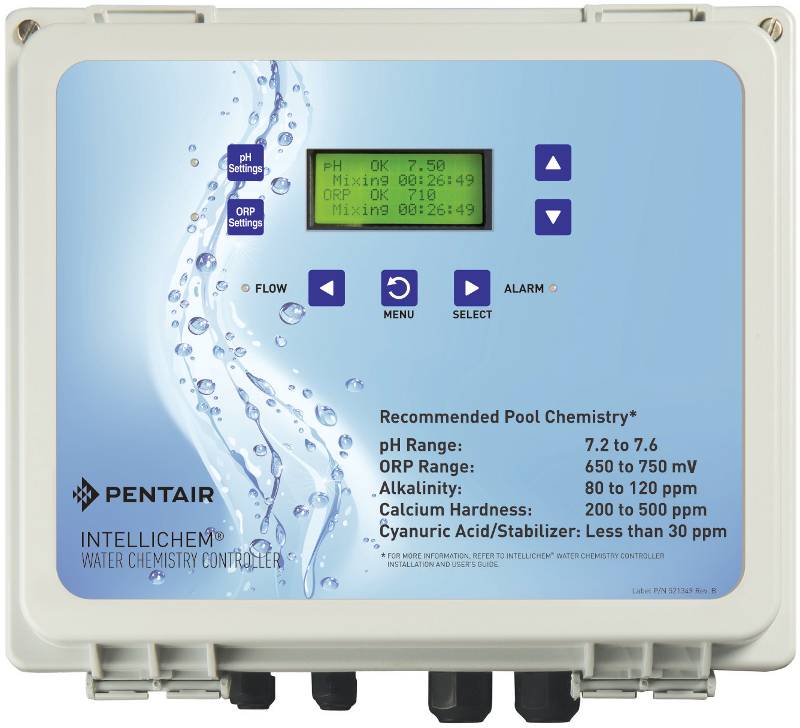
When a Pentair device displays Searching for System Controller, it means the control panel or interface is not communicating with the central controller (the “brain” of your system). This could happen with Pentair pool automation systems, filtration setups, or even complex industrial solutions. The controller could be a board inside your equipment, a remote box, or a digital interface.
This message signals a loss of communication. It does not always mean the controller is broken, but rather that the control panel can’t “find” it. This could happen for several reasons, some simple, some more complex.
It’s important to note that the “Searching for System Controller” message is a protective feature. Instead of simply stopping or misbehaving, the system warns you that it cannot control pumps, lights, or other equipment. So, while it’s a problem, it also keeps you informed that your system is not running as intended.
In most cases, this message appears before any real damage occurs to your pool equipment or water system.
For example, if you have a scheduled cleaning cycle, it might not start, or your heater might not turn on, because the system isn’t sure of the controller’s status. That’s why acting quickly but calmly is the best approach.
Main Causes Of The Message
Several factors can make your Pentair system display this warning. Here are the most common:
1. Power Issues
If the system controller loses power—even for a moment—the panel may lose connection. Power surges, tripped breakers, or loose plugs are often the culprits.
In some cases, the power supply unit inside the controller box can degrade over time, causing intermittent failures rather than a complete shutdown. For pools in older homes, outdated wiring can cause voltage drops that confuse the system, even if the rest of your house seems fine.
2. Wiring And Cable Problems
Damaged, corroded, or disconnected wires can break the line between the control panel and the controller. Rodents, weather, or even simple wear and tear can cause issues.
Outdoor installations are more exposed to these problems. Sometimes, wires inside conduits get pinched or crushed during landscaping or repairs. Even a single broken strand in a multi-wire cable can disrupt communication.
3. Loose Connectors
Connectors might work loose over time, especially in outdoor environments with vibration or temperature changes. A slightly loose plug can break the communication.
You might not see visible damage, but even a connector that “looks” okay can have an internal fault. Sometimes, repeated plugging and unplugging wears out the connection points, making them unreliable.
4. Software Or Firmware Glitches
Sometimes, a system update or glitch can interrupt communication. Outdated firmware is a common cause.
Not all updates are automatic. If you haven’t checked for updates in years, your Pentair system may not “speak the same language” as a newer app or remote panel. Also, power loss during a firmware update can corrupt the system, leading to communication errors.
5. Environmental Factors
High humidity, heavy rain, or extreme temperatures can interfere with connections or cause condensation inside sensitive electronics.
For example, in coastal areas, salty air can speed up corrosion inside boxes. In cold climates, freeze-thaw cycles can crack seals and allow moisture in, causing problems that only show up during certain seasons.
6. Interference
Strong radio signals, electrical noise, or nearby devices can disrupt wireless communication, especially in Wi-Fi-connected Pentair systems.
This is often overlooked. New devices in your home, like smart speakers or wireless cameras, can create interference. Even nearby cell towers or airport radar can cause brief disruptions in some rare cases.
7. Controller Failure
Rarely, the controller itself can fail due to old age, water ingress, or electrical faults.
Controller boards have a lifespan, and issues like lightning strikes or repeated power surges can cause unseen internal damage. When this happens, you may see other strange behaviors (random restarts, blank screens) in addition to the “Searching” message.
Credit: www.pentair.com
Identifying Your Pentair System
Before you troubleshoot, it’s important to know exactly which Pentair system you have. Pentair manufactures several automation and control systems, including:
- IntelliTouch® Pool and Spa Control Systems
- EasyTouch® Pool and Spa Control Systems
- ScreenLogic® Interface Systems
- IntelliCenter® Control System
- SunTouch® Pool Control
Each of these has different wiring, user interfaces, and troubleshooting steps. Check your manual or look for labels on your equipment to confirm the exact model.
If you’re not sure, look for a sticker or plate inside the main control box—this usually lists the model number. Taking a photo of this label can help when you contact support. If you use a Pentair mobile app, the app may also show your system type in the settings menu.
Example:
Some pool owners confuse EasyTouch and IntelliTouch because the control panels look similar. However, IntelliTouch can handle more devices and often has a larger display. If you plan to buy replacement parts, this detail is critical.
Step-by-step Troubleshooting Guide
Let’s walk through the practical steps to resolve the “Searching for System Controller” message. You don’t need to be an expert—just careful, methodical, and patient.
1. Check Power First
- Look at all breakers and switches for your Pentair equipment.
- Make sure the controller and control panel have power.
- Unplug and plug back in any power adapters.
Non-obvious insight: Sometimes, a GFCI outlet (the kind with reset/test buttons) may have tripped, even if it looks normal. Always check and reset these outlets.
If your system is connected to multiple power sources, check each one. For example, your control panel might be on a different breaker than your pumps or heater.
Example:
Some users spend hours checking cables, only to discover a simple power interruption from a garage freezer tripping the same GFCI outlet as the pool system.
2. Inspect Cables And Connections
- Follow the cables from the control panel to the controller.
- Look for loose, frayed, or damaged wires.
- Gently press connectors into their sockets to ensure a firm connection.
Tip: Use a flashlight to check for corrosion inside plugs, especially if the system is outdoors.
If you find corrosion, clean it with contact cleaner and a small brush. If the connector is badly corroded, it’s often better to replace it than try to repair it.
Example:
In some older installations, wires may run underground. If you notice wet soil or see water pooling near cable entry points, moisture may have seeped into the cables, causing intermittent connection failures.
3. Restart The System
- Turn off power to the system for at least 1 minute.
- Turn it back on and watch for the message.
- Some systems may take several minutes to reboot.
Be patient during the reboot. If the message appears immediately, something is still wrong. If it takes a few minutes to return, the problem may be intermittent—a sign of a failing component.
Extra tip:
After restarting, test all functions (pumps, lights, heater) to confirm the system is responding. Sometimes, only part of the system comes back online, which helps you pinpoint the affected area.
4. Check For Firmware Updates
- Use the Pentair app or website to see if updates are available.
- Update both the controller and remote panels if possible.
- Follow update instructions exactly—interrupted updates can cause more problems.
If you’re not comfortable updating firmware, ask a pool professional. Always back up your system settings if your model allows, so you can restore them if something goes wrong.
Non-obvious insight:
Sometimes, a panel and controller on different firmware versions won’t “talk” to each other. Matching versions is important for stable operation.
5. Test For Interference
- Move any new wireless devices, speakers, or electronics away from the controller.
- If your system uses Wi-Fi, try connecting with an Ethernet cable temporarily.
If the issue disappears with a wired connection, you know interference is the problem. You may need to change your Wi-Fi channel or move your router for a permanent fix.
Example:
A user added a wireless baby monitor near the pool equipment, which caused daily dropouts in Pentair Wi-Fi communication. Moving the monitor fixed the issue instantly.
6. Replace Suspect Parts
- If you have a spare control panel or cable, swap it in to see if the problem disappears.
- For persistent issues, you may need to replace the main controller board.
Non-obvious insight: If you see the message after a lightning storm, a surge may have damaged the controller. Consider surge protection for the future.
When replacing parts, label every wire and take photos before disconnecting anything. This saves time and prevents mistakes during reassembly.
Pentair System Controller Types
Knowing which controller you have helps target your troubleshooting. Here is a quick comparison of the most popular Pentair controllers:
| Model | Common Use | Display Type | Communication | Notable Features |
|---|---|---|---|---|
| IntelliTouch | Large pools & spas | LCD Panel | Wired & Wireless | Advanced automation, expandable |
| EasyTouch | Residential pools | Simple LCD/LED | Wired | Affordable, user-friendly |
| IntelliCenter | Premium pools | Color Touchscreen | Wi-Fi, wired, app | Modern, remote access |
| SunTouch | Basic pools | Basic LCD | Wired | Entry-level, simple |
Each model offers different levels of automation and control. For example, IntelliTouch can manage complex lighting scenes and water features, while SunTouch is often used just for basic pump scheduling.
Key Differences Between Pentair System Controllers
If you are considering a replacement or upgrade, it helps to understand the real-world differences. Here’s a practical look at how these systems vary:
| Feature | IntelliTouch | EasyTouch | IntelliCenter | SunTouch |
|---|---|---|---|---|
| Remote Control | Yes | Limited | Yes (App/Wi-Fi) | No |
| Number of Devices Controlled | Many (expandable) | Moderate | Many (expandable) | Few |
| Mobile App Support | With extra hardware | No | Yes | No |
| Price Range (USD) | $2,000–$4,000 | $1,000–$2,000 | $3,000–$5,000 | $500–$1,000 |
When choosing a controller, consider your future needs. If you might add a spa, water feature, or extra pumps, an expandable system like IntelliTouch or IntelliCenter is a smarter investment. If you only need basic pump control, SunTouch may be enough.
Extra insight:
Older systems often lack mobile app support. If remote control from your phone is important, make sure your chosen model and panel support this feature out-of-the-box.
When To Call A Professional
Some issues are easy to fix yourself, but some require an expert. Call a Pentair professional if:
- You smell burning or see smoke from the controller.
- Water has entered the control box.
- Wires look melted, charred, or badly corroded.
- You have replaced parts, but the message remains.
- You are not comfortable working with electricity.
Safety first: Electrical repairs near water are dangerous. If in doubt, always contact a licensed pool technician.
Also, if your pool is part of a commercial or public facility, some repairs may require a certified technician for legal or insurance reasons.
Example:
In some regions, opening a control box yourself can void insurance coverage on public pools. Always check your local regulations before doing advanced repairs.
Preventing Future Communication Issues
After resolving the “Searching for System Controller” message, you want to keep your system running smoothly. Here are smart habits to reduce future problems:
- Inspect cables and connectors every 6 months for wear or corrosion.
- Keep the control box dry and well-ventilated; install covers if outdoors.
- Install a surge protector to shield electronics from power spikes.
- Update firmware at least once a year for security and stability.
- Label all wires during repairs to avoid confusion later.
Pro tip: Take a photo of your wiring before disconnecting anything. This makes reassembly much easier.
Also, clean around the control box regularly. Leaves, dust, and bugs can block vents and cause overheating. Make sure drain holes (if present) are clear to prevent water buildup.
Extra tip:
After heavy rain or storms, do a quick check of your system—even if everything seems fine. Early detection prevents bigger issues.
Credit: nomoregreen.com
Common Mistakes People Make
Even experienced users make these errors:
- Ignoring small corrosion on connectors, which can get worse quickly.
- Replacing control panels without checking cables first.
- Resetting the system too many times, which can cause more harm.
- Forgetting to check for tripped GFCI outlets.
- Not updating firmware after a major power outage.
Some people also overlook the importance of matching replacement parts. Using a cable or panel from a different Pentair model can cause confusion and more errors.
Non-obvious insight:
Over-tightening connectors can damage pins inside sockets, leading to hidden faults. Always make connections snug, not forced.
System Controller Replacement: What To Know
If your controller is truly faulty, replacement might be the only option. Here’s what you should keep in mind:
- Compatibility: Not all Pentair panels work with every controller model. Always check your system’s manual or call Pentair support.
- Programming: New controllers may need to be programmed to match your pool’s equipment (pumps, heaters, lights).
- Warranty: If your system is under warranty, contact Pentair before opening the control box. Unauthorized repairs can void coverage.
- Cost: Controller boards can cost from $400 to $2,000 depending on the system.
Important: After replacement, always test the system fully. Check every pump, light, and valve for normal operation.
Ask for a backup of your system settings before replacing the controller if your installer supports it. This can save hours of reprogramming time.
Upgrading To A Modern Pentair Controller
Technology moves fast. Many pool owners upgrade from old EasyTouch or SunTouch panels to the latest IntelliCenter. Here’s why:
- Remote Access: Control your pool from your smartphone, even miles away.
- Energy Savings: Newer controllers optimize pump and heater usage.
- Smart Home Integration: Some systems connect with Alexa, Google, or Apple HomeKit.
- Better Reliability: Modern systems have improved surge protection and error detection.
Upgrading can be expensive, but often pays off in convenience and energy savings.
Extra insight:
Some utilities offer rebates for upgrading to energy-efficient pool equipment. Check with your energy provider before you buy.
If you plan to upgrade, keep your old controller for a few weeks as a backup until you’re sure the new system is working perfectly.
Real-world Examples
Case 1:
A homeowner in Florida with a Pentair EasyTouch system saw the “Searching for System Controller” message after a thunderstorm. The problem was traced to a tripped GFCI outlet in the garage. Resetting it restored communication instantly.
Case 2:
A hotel in Texas lost connection to its IntelliTouch controller after new landscaping lights were installed. Investigation found that the new lights’ transformer was creating electrical noise on the same circuit. Moving the pool controller to a separate breaker fixed the issue.
Case 3:
A pool service company found that a client’s SunTouch controller was not responding. The control panel cable had been chewed by mice, breaking the connection. Replacing the cable solved the problem.
Case 4:
A residential customer upgraded from EasyTouch to IntelliCenter. After installation, they forgot to update the app, causing repeated “Searching” messages. Updating the app and syncing firmware versions immediately fixed the problem.
Data: How Common Are Controller Communication Errors?
Studies and service data show that communication errors are among the top three service calls for pool automation systems. According to Pentair technicians:
- 40% of issues are caused by power problems (outlets, breakers, surges)
- 30% are due to cabling or connector issues
- 20% are from firmware/software problems
- 10% are actual hardware failures
This means most problems can be fixed without expensive parts.
Extra insight:
In regions with frequent lightning, power and communication errors are even more common. Installing surge protection can dramatically reduce service calls.
Pentair Support And Resources
For more detailed help, Pentair offers:
- Official Manuals: Always consult your specific model’s manual.
- Online Forums: Pool owners share real-world experiences and fixes.
- Pentair Customer Support: Phone, email, and live chat options.
- Certified Service Providers: Find local experts via Pentair’s website.
If you want to dive deeper into Pentair’s product range, visit the official Pentair Automation page.
If you need step-by-step videos, YouTube is also a good resource. Many pool professionals share repair and maintenance tutorials that follow Pentair’s official guidance.

Credit: www.amazon.com
Frequently Asked Questions
What Should I Do First When I See “searching For System Controller”?
Start by checking that both the controller and control panel have power. Look for tripped breakers or GFCI outlets, then inspect all cables and connectors for damage or looseness. Most issues are simple connection problems.
Can I Fix Controller Communication Errors Myself?
Many problems—like loose cables or tripped outlets—can be fixed by homeowners with basic tools. However, if you see water damage, burned wires, or the message stays after simple fixes, call a professional.
How Can I Prevent This Issue In The Future?
Regularly inspect and clean your system’s connectors, keep the control box dry, and install a surge protector. Also, update your firmware yearly. These steps prevent most communication errors.
Are All Pentair Controllers Compatible With Each Other?
No. Each Pentair controller has specific panels and accessories. Always check compatibility before buying new parts or upgrading. Mixing parts from different systems often causes more problems.
What If My System Still Shows The Message After Trying Everything?
If all basic steps fail, the controller board may be damaged. Contact Pentair support or a certified technician for diagnosis and replacement. Avoid further resets to prevent more damage.
When your Pentair system says “Searching for System Controller,” it’s not the end of the world. With a calm, step-by-step approach, you can usually find the cause and fix it yourself. If you run into trouble, experts are always available to help.
Taking good care of your system now will keep your water clear, your equipment running smoothly, and your stress level low for years to come.