
Many pool owners today want more control and convenience when it comes to maintaining their pools. Pool automation systems, like iAquaLink, have become popular for this reason. These systems let you manage your pool’s cleaning, heating, lighting, and more, all from your smartphone or tablet. But one feature that often raises questions is Clean Mode on iAquaLink. What does it do? Why is it important? And how can it make pool care easier for you? Let’s explore everything you need to know about Clean Mode on iAquaLink, including how it works, when to use it, and some tips for getting the most out of this powerful feature.
Understanding Iaqualink: Pool Automation Made Easy
Before diving into Clean Mode, it helps to understand what iAquaLink is and why so many pool owners choose it. iAquaLink is an advanced pool automation system made by Zodiac. It connects to your pool equipment and allows you to control almost every function remotely. Using the iAquaLink app or a web browser, you can turn on pumps, set schedules, adjust the heater, and manage cleaning cycles—even if you are not at home.
Many pool professionals recommend iAquaLink because:
- It reduces manual work
- It helps save energy and water
- It gives you real-time alerts if something is wrong
- It is compatible with a wide range of pool equipment
iAquaLink also supports multiple users, so everyone in your family can access the pool controls if needed. Over 400,000 pools worldwide use this system, showing its reliability and popularity.
What Is Clean Mode On Iaqualink?
Clean Mode is a special function designed to give your pool a deep, thorough cleaning for a set period. When you activate Clean Mode, the system temporarily increases the pump speed and/or runs your pool cleaner at maximum power. This ensures that dirt, leaves, and debris are removed quickly, especially after heavy use or when the pool is particularly dirty.
Clean Mode can be activated through the iAquaLink app, web interface, or from some physical controllers. Depending on your pool setup, Clean Mode may:
- Run the main circulation pump at higher speed
- Activate a dedicated pressure or suction cleaner
- Turn on other cleaning equipment (like in-floor systems)
- Override normal schedules to focus only on cleaning
After the cleaning cycle finishes, your pool returns to its regular schedule and settings. This means Clean Mode does not permanently change your system—it’s a temporary boost for when you need it most.
Why Clean Mode Matters For Pool Owners
Having a swimming pool is fun, but keeping it clean can feel like a full-time job. Clean Mode offers several benefits that make pool care easier and more effective.
Faster And More Effective Cleaning
Instead of waiting for the regular cleaning cycle, Clean Mode allows you to deep-clean your pool right away. For example, after a pool party or a storm, you can activate Clean Mode to remove all the extra debris quickly. This prevents dirt from settling and helps keep the water healthy.
Saving Time And Effort
Many pool owners say that Clean Mode saves them hours each month. With just a tap on your phone, you get professional-level cleaning without the need to drag out hoses or manually scrub the pool.
Protecting Pool Equipment
Running your pool cleaner and pump at the right times extends their life. Clean Mode makes sure that cleaning happens efficiently, so you don’t overwork your equipment or waste energy.
Reducing Chemical Use
A clean pool needs fewer chemicals. By removing debris more often, you reduce the amount of chlorine or other sanitizers needed. This is better for your health and your wallet.
Example
Imagine you just finished mowing your lawn, and grass clippings accidentally blow into the pool. Instead of waiting for the next scheduled clean, activating Clean Mode right away prevents those clippings from sinking and creating algae problems.
How Clean Mode Works On Iaqualink
Clean Mode uses a combination of hardware and software to deliver targeted, high-power cleaning. Here’s a closer look at how it works and what happens when you activate it.
Activation
You can activate Clean Mode using:
- The iAquaLink app (available for iOS and Android)
- The iAquaLink web portal from any web browser
- Some on-site controllers (like AquaLink touch panels)
What Happens During Clean Mode
When Clean Mode is turned on:
- Pump Speed Increases: The main pool pump runs at a higher speed (if you have a variable-speed pump). This creates more water flow, which helps move debris toward the skimmers and main drain.
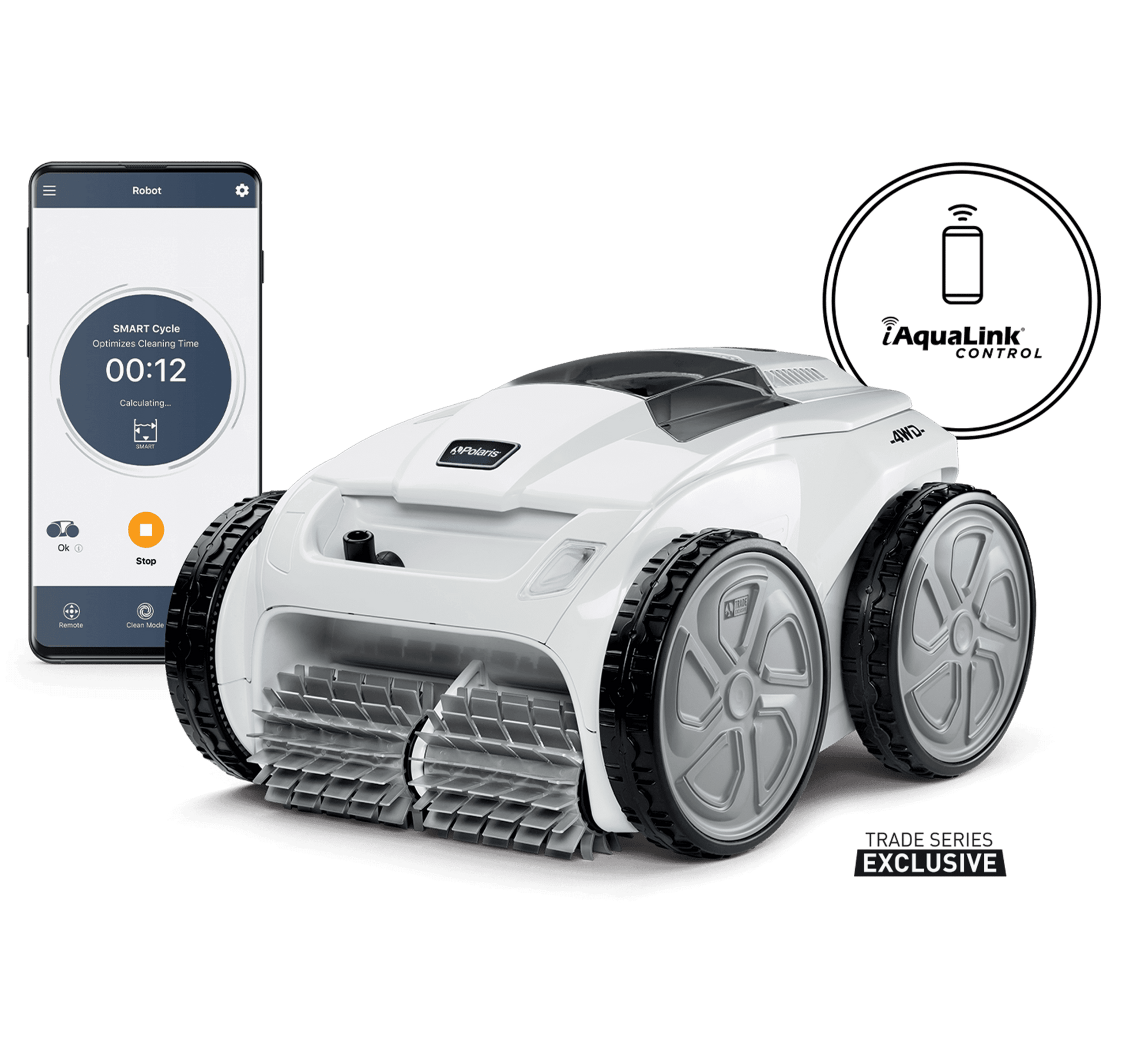
- Cleaner Activates: If your pool has an automatic cleaner (suction-side, pressure-side, or robotic), it starts running for the Clean Mode cycle.
- Dedicated Lines: Pools with in-floor cleaning systems or booster pumps will activate these lines for maximum cleaning.
- Skimmers and Drains: Stronger water flow helps your skimmers and drains capture more debris.
Clean Mode Duration
Most systems allow you to set the Clean Mode duration. Common options are 30, 60, or 90 minutes. Some pools may have a default time set by your installer, but you can usually adjust this in the app.
Automatic Return To Schedule
After Clean Mode finishes, the system automatically returns to your normal pump and cleaner schedule. You don’t have to remember to turn anything off.
Compatibility
Clean Mode works with:
- Variable-speed pumps
- Single-speed pumps (with some limitations)
- Booster pumps
- Most popular pool cleaners (Zodiac, Polaris, etc.)
However, not every pool setup supports every feature. Your pool professional can help you set up Clean Mode for your specific equipment.
Setting Up And Customizing Clean Mode
To get the most out of Clean Mode, you should set it up correctly in your iAquaLink system. The process is straightforward, but there are some options and tips that can help you optimize your cleaning cycles.
Step-by-step Setup
- Connect Your Devices: Make sure your pool pump, cleaner, and other equipment are connected to the iAquaLink control box.
- Download the App: Install the iAquaLink app on your phone or tablet.
- Log In and Pair Devices: Follow the instructions to link your system to your Wi-Fi and create an account.
- Access Clean Mode: In the app, find the Clean Mode option (usually on the main dashboard or under the cleaner/pump controls).
- Set Duration: Choose how long you want Clean Mode to run. Most users select 60 minutes, but you can adjust based on your pool’s needs.
- Save Your Settings: Make sure to save your preferences so you can activate Clean Mode quickly in the future.
Advanced Options
- Custom Schedules: Some iAquaLink systems let you create custom schedules that include Clean Mode at specific times (for example, after peak pool usage).
- Remote Activation: If you’re traveling or away from home, you can activate Clean Mode from anywhere with internet access.
- Integration with Other Devices: Clean Mode can often be linked with pool covers, heaters, and lights for even more control.
Common Mistakes To Avoid
- Forgetting to Check Filters: Clean Mode works best when your pool filters are clean. A clogged filter reduces cleaning effectiveness.
- Overusing Clean Mode: Using Clean Mode too often can increase wear on your equipment. Only use it when the pool needs extra cleaning.
- Ignoring Equipment Compatibility: Not all pumps and cleaners work with Clean Mode. Make sure your setup supports this feature.
Clean Mode Vs. Regular Cleaning: Key Differences
Many pool owners wonder how Clean Mode is different from regular cleaning cycles. Here’s a comparison to make things clear:
| Feature | Clean Mode | Regular Cleaning |
|---|---|---|
| Purpose | Deep, fast cleaning after heavy use or debris events | Scheduled, everyday cleaning for maintenance |
| Pump Speed | High (for maximum debris removal) | Low/Medium (to save energy) |
| Manual Activation | Yes (user must start Clean Mode) | No (automatically follows schedule) |
| Cleaner Usage | Runs at max power | Runs at standard power |
| Duration | Set by user (usually 30-90 mins) | Set by schedule (daily/weekly) |
The main takeaway: Clean Mode is for special situations, while regular cleaning is for everyday pool care.
When Should You Use Clean Mode?
Knowing the best times to use Clean Mode can help you maintain a sparkling pool without wasting energy or overusing your equipment. Here are the most common situations when Clean Mode is especially useful:
- After a Pool Party: When many people use the pool, oils, dirt, and debris increase.
- After Storms or High Winds: Leaves, twigs, and dirt often end up in the pool after bad weather.
- Following Lawn or Garden Work: Grass clippings and soil can blow into the water.
- When Opening the Pool for the Season: The first clean after winter storage often needs extra power.
- Before Important Events: Use Clean Mode before guests arrive to make the pool look its best.
- Visible Debris: If you see many leaves, bugs, or dirt on the pool floor or surface.
Remember, Clean Mode is not needed every day. Using it only when necessary will extend your equipment’s life and save on power.
How To Activate Clean Mode: A Step-by-step Example
Let’s walk through an example of how to activate Clean Mode using the iAquaLink app.
- Open the App: Tap the iAquaLink icon on your phone.
- Log In: Enter your username and password.
- Select Your Pool System: If you have more than one, choose the correct pool.
- Find Clean Mode: Usually on the main dashboard, tap the Clean Mode button.
- Set Duration: Choose how long you want Clean Mode to run (e.g., 60 minutes).
- Start Clean Mode: Tap “Activate” or “Start.” The app will confirm Clean Mode is running.
- Monitor Progress: You can watch pump and cleaner status in real time.
- End of Cycle: After the set time, the pool will return to its normal schedule.
This process usually takes less than one minute and can be done from anywhere.

Credit: www.amazon.com
Customizing Clean Mode To Match Your Pool
Every pool is different, and Clean Mode is designed to be flexible. Here are some ways you can customize Clean Mode for your unique setup:
Adjusting Pump Speeds
If you have a variable-speed pump, you can set how fast the pump runs during Clean Mode. Higher speeds clean faster but use more energy. Some users choose a medium speed for light debris and a maximum speed for heavy cleaning.
Selecting Which Cleaners To Run
If your pool has more than one cleaner (e. g. , a robotic vacuum and an in-floor system), you can choose which one Clean Mode will activate. This helps target different types of debris.
Creating Special Clean Mode Schedules
Some users set Clean Mode to run automatically after certain events—like every Saturday afternoon after family swim time. This ensures the pool is always ready for use.
Integration With Other Features
Advanced iAquaLink systems let you link Clean Mode with pool covers, lights, or even water features. For example, you can set Clean Mode to start when you uncover the pool, ensuring it is clean before you swim.
Example Customization
Suppose your pool is under a tree and often gets leaves on the surface. You might set Clean Mode to run the main pump at 80% speed with the surface skimmer active for 60 minutes. For heavy storms, you could increase it to 100% for 90 minutes.
Common Issues With Clean Mode And How To Solve Them
Even with the best systems, things can sometimes go wrong. Here are some common problems users face with Clean Mode and solutions to fix them.
Clean Mode Not Activating
If you tap Clean Mode and nothing happens, check these areas:
- App Not Connected: Make sure your phone is connected to Wi-Fi or mobile data.
- Equipment Offline: Sometimes, your pool equipment loses connection. Restart your control box.
- Compatibility Issue: Not all pumps/cleaners support Clean Mode. Verify with your installer.
Cleaner Not Running During Clean Mode
If the pump runs but the cleaner does not:
- Check Cleaner Settings: In the app, ensure your cleaner is set to activate during Clean Mode.
- Inspect Valves: Some pools have valves that direct water to the cleaner. Make sure they are open.
- Look for Blockages: Hoses and filters can get clogged—clean them regularly.
Pool Not Clean After Clean Mode
If your pool still looks dirty:
- Increase Duration: Try running Clean Mode for a longer time.
- Check Filters: Dirty filters reduce cleaning power.
- Manual Brush: Sometimes, stubborn dirt needs brushing before Clean Mode will remove it.
App Glitches
If the app crashes or freezes:
- Update the App: Make sure you are using the latest version.
- Restart Your Device: Simple, but often effective.
- Contact Support: IAquaLink has a support team to help with persistent app issues.
How Clean Mode Can Save Money
Many pool owners are concerned about energy costs. Clean Mode, when used correctly, can actually save you money over time.
More Efficient Cleaning
A short, high-power cleaning session uses less energy than running your pump and cleaner at low speed all day. According to Zodiac’s studies, using Clean Mode just once per week can reduce total pump runtime by up to 20%.
Fewer Chemicals Needed
When your pool is cleaner, you use fewer chemicals. Clean Mode reduces organic debris, which means less chlorine or shock is needed. Over a season, this can save hundreds of dollars.
Extending Equipment Life
Proper use of Clean Mode prevents overuse of your pump and cleaner. Well-maintained equipment lasts longer, reducing repair and replacement costs.
Real-life Example
One homeowner with a 30,000-gallon pool reported saving $150 per year on electricity and $75 per year on chemicals by using Clean Mode strategically, compared to always running their pump at low speed.
Real-world Comparison: Clean Mode Vs. Manual Cleaning
How does Clean Mode on iAquaLink compare to doing everything by hand? Here’s a quick comparison:
| Aspect | Clean Mode (iAquaLink) | Manual Cleaning |
|---|---|---|
| Time Required | 1-2 minutes to activate | 30-60 minutes per session |
| Cleaning Quality | Consistent, thorough | Varies (depends on effort) |
| Convenience | Can be done remotely | Must be done in person |
| Equipment Wear | Optimized for best use | Risk of overuse or missed spots |
| Cost | Lower over time | Potentially higher (more chemicals, repairs) |
This comparison shows that Clean Mode is a major time-saver and helps maintain a cleaner, healthier pool with less effort.
Advanced Tips For Getting The Most Out Of Clean Mode
Most pool owners use Clean Mode as a simple one-button clean. But there are ways to get even better results:
- Pair with Manual Brushing: Brush the walls and steps before activating Clean Mode. This loosens dirt for the cleaner to pick up.
- Schedule After Known Events: If you know there will be a storm or party, schedule Clean Mode to run right after.
- Monitor Water Level: Low water can affect pump performance during Clean Mode. Make sure your pool is properly filled.
- Regular Maintenance: Keep your skimmer baskets and filters clean for the best results.
- Check App Updates: New versions of the iAquaLink app sometimes add features or fix bugs related to Clean Mode.
A non-obvious insight: If you have a saltwater pool, using Clean Mode after adding salt helps mix the salt evenly, preventing buildup in one area.
Environmental Impact Of Using Clean Mode
Using Clean Mode is not just good for your pool—it can also benefit the environment when used wisely.
Lower Water Waste
By removing debris quickly, you reduce the need for backwashing your filter or draining your pool. This saves thousands of gallons of water every year.
Energy Efficiency
High-speed cleaning for a short time uses less energy than running pumps at low speed for many hours. According to the U. S. Department of Energy, optimized cleaning cycles can cut pool energy costs by up to 50%.
Fewer Chemicals
A cleaner pool needs fewer chemicals, which reduces the risk of chemical runoff into the environment.
Credit: interpools.com
Clean Mode And Pool Safety
A clean pool is a safe pool. Clean Mode plays a role in keeping your pool safe for swimmers:
- Reduces Algae Growth: By removing debris quickly, Clean Mode helps prevent algae, which can make surfaces slippery and dangerous.
- Improves Water Clarity: Clear water makes it easier to spot hazards or people in need of help.
- Prevents Equipment Malfunctions: Regular cleaning reduces the chance of equipment failures that could pose safety risks.
How Clean Mode Integrates With Other Smart Features
iAquaLink is part of the growing smart home trend. Here’s how Clean Mode fits in:
- Voice Control: Some setups let you activate Clean Mode with voice commands (e.g., through Amazon Alexa).
- Notifications: Get alerts when Clean Mode finishes or if there’s an issue.
- Smart Scheduling: Combine Clean Mode with other smart schedules for heating, lighting, or pool covers.
This integration makes it easier to manage your pool alongside other smart devices in your home.
What Makes Clean Mode On Iaqualink Unique?
Not all pool automation systems offer something like Clean Mode. Here’s why iAquaLink’s Clean Mode stands out:
- User-Friendly Interface: Easy to activate and customize, even for beginners.
- Wide Compatibility: Works with many types of pumps and cleaners.
- Remote Control: Use it from anywhere in the world.
- Energy and Cost Savings: Designed to optimize cleaning while saving money.
- Regular Updates: Software improvements add new features and fix issues.
Most users find that Clean Mode is one of the most valuable features of the iAquaLink system, especially when compared to older, manual pool cleaning methods.
Frequently Asked Questions
What Does Clean Mode Actually Do On Iaqualink?
Clean Mode temporarily increases your pool pump’s speed and activates the cleaner for a deep, thorough cleaning. It is designed for situations when your pool has extra debris or needs a fast cleanup. After the cycle, your pool returns to its regular schedule.
Can I Change How Long Clean Mode Runs?
Yes, you can set the Clean Mode duration in the iAquaLink app or web portal. Common options are 30, 60, or 90 minutes. Choose a time based on how dirty your pool is or the recommendations of your pool installer.
Will Clean Mode Work With My Older Pool Equipment?
Clean Mode works best with variable-speed pumps and compatible automatic cleaners. Some older, single-speed pumps may have limited Clean Mode features. Check your equipment’s compatibility or ask a professional for help.
Is Using Clean Mode Often Bad For My Pool Equipment?
Using Clean Mode as needed is not harmful. However, running it too often or for long periods can cause extra wear. It’s best to use Clean Mode only when your pool needs extra cleaning, not as a daily routine.
Where Can I Get More Information About Iaqualink And Clean Mode?
You can learn more from the official iAquaLink website or ask your pool professional. For technical details and support, visit iAquaLink Official Site.
Whether you are a new pool owner or an experienced one, Clean Mode on iAquaLink makes pool care easier, faster, and smarter. By understanding how it works and using it wisely, you can enjoy a sparkling clean pool with less effort—and more time for fun in the water.

Credit: discountpoolsupply.com