
The CMP Powerclean Ultra Inline Chlorinator is a popular choice for pool owners who want an easy way to keep their water clean and safe. When it works, it quietly adds chlorine to your pool, taking away the hassle of manual dosing. But sometimes, you notice problems: chlorine levels drop, the pool looks cloudy, or nothing seems to flow through the chlorinator. If your CMP Powerclean Ultra Inline Chlorinator is not working, it can be frustrating and confusing. The good news is, most issues are fixable with the right approach, and you do not always need a professional.
This article will guide you through everything you need to know to get your chlorinator working again. We’ll explain how the device operates, what can go wrong, and step-by-step instructions to diagnose and fix each problem. Along the way, you’ll find practical tips, common mistakes to avoid, and two detailed tables to help you compare symptoms and solutions.
By the end, you’ll feel confident handling almost any issue with your CMP Powerclean Ultra Inline Chlorinator.
How The Cmp Powerclean Ultra Inline Chlorinator Works
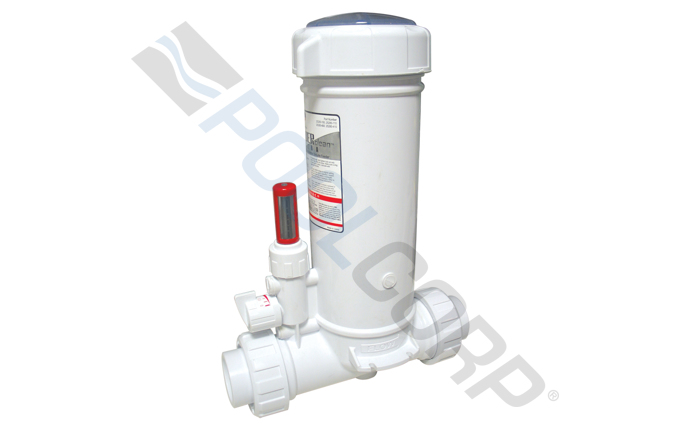
Before you can fix a problem, you need to understand how the chlorinator functions. This device connects directly to your pool’s plumbing system, usually after the filter and heater. Water flows through the unit, picking up dissolved chlorine from tablets placed inside. This chlorinated water then returns to the pool, keeping it sanitized.
The key parts include:
- Lid and canister: Where you place chlorine tablets.
- Control dial: Adjusts how much water flows through the chlorinator.
- Check valve: Prevents backflow, keeping the pool’s circulation system safe.
- Inlet and outlet ports: Connect to the pool’s plumbing.
- O-rings: Seal the lid and other parts to prevent leaks.
If any of these parts fail, the chlorinator may stop working or become less effective. Understanding this basic operation will make troubleshooting much easier.
Common Signs Your Chlorinator Is Not Working
Sometimes, problems are obvious. At other times, issues develop slowly and are harder to spot. Here are the most common signs your CMP Powerclean Ultra Inline Chlorinator is not working as it should:
- Low or no chlorine in pool water: The pool test shows little or no chlorine, even though you added tablets.
- Cloudy or green water: Poor chlorination lets algae or bacteria grow.
- Chlorine tablets not dissolving: You open the canister and see the tablets look almost the same as when you put them in.
- Strong chlorine smell: Paradoxically, a strong smell often means not enough free chlorine.
- Wet area around chlorinator: Leaking or cracked parts can cause water to pool below.
- Air bubbles in the pool return jets: May suggest air leaks in the chlorinator or plumbing.
- Visible cracks or broken fittings: Physical damage can stop the unit from working correctly.
If you notice one or more of these symptoms, it’s time to take a closer look.
Quick Troubleshooting Guide
You do not always need to open the chlorinator or call a technician immediately. Sometimes, a simple check can reveal the cause. Use this guide to quickly narrow down the problem.
Visual Inspection
- Check for leaks around the lid or fittings.
- Look for cracks or damage on the canister.
- Make sure the lid is tightly sealed.
Tablet Check
- Open the unit (turn off the pump first).
- Are the tablets wet and slowly dissolving? If they’re dry, water is not flowing through.
- Are they used up too quickly? Flow may be too high.
Water Flow Test
- Turn the control dial from low to high.
- Listen for water movement inside.
- Check if the return jet flow changes.
Chlorine Test
- Use a pool test kit to check chlorine levels.
- Test both before and after the chlorinator in the plumbing line if possible.
Dial And Valve Settings
- Make sure the control dial is not set to zero.
- Verify all valves in the pool system are open and set correctly.
If you still don’t find the cause, move on to a deeper step-by-step diagnosis.
Main Reasons The Cmp Powerclean Ultra Inline Chlorinator Stops Working
There are several common causes when the chlorinator fails. Some are simple to fix, while others may need replacement parts. Below, you’ll find a detailed explanation of each issue, why it happens, and how to address it.
1. Clogged Or Blocked Chlorinator
Over time, small bits of debris, scale, or even pieces of old chlorine tablets can clog the water path inside the chlorinator. When this happens, water cannot flow properly, and chlorine is not delivered to the pool.
How to Fix:
- Turn off the pool pump.
- Remove the chlorinator lid.
- Carefully take out any remaining tablets.
- Use a long brush or hose to clean the inside.
- Check the inlet and outlet for blockages.
- Reassemble and restart the pump.
Tip: Never use metal tools inside the canister, as they can damage the plastic.
2. Air Lock Or Air Leak
If air gets trapped in the chlorinator or leaks into the system, water flow will slow or stop. This is a common cause of tablets not dissolving.
How to Fix:
- Check all O-rings and seals for cracks or dryness.
- Lubricate O-rings with pool-safe silicone lubricant.
- Make sure the lid is tightly closed.
- Bleed air from the system by opening the lid slightly (with the pump off) and then closing it.
Insight: Many pool owners forget to lubricate O-rings regularly, which leads to slow leaks that are hard to spot.
3. Faulty Control Dial Or Internal Valve
The control dial may become stuck, broken, or detached inside. If it does not rotate smoothly or feels loose, it may not control water flow at all.
How to Fix:
- Gently turn the dial from lowest to highest setting.
- If it sticks or turns freely without effect, the internal valve may be broken.
- Open the unit as per the manual and check for loose or damaged parts.
- Replace the control valve if needed.
4. Chemical Scale Build-up
Hard water and pool chemicals can create white, chalky scale inside the chlorinator. This narrows the water path and stops the tablets from dissolving.
How to Fix:
- Remove all tablets and rinse the canister.
- Soak the inside in a 1: 1 mixture of white vinegar and water for 1 hour.
- Scrub gently with a plastic brush.
- Rinse thoroughly before using again.
Tip: Regular cleaning every 1-2 months prevents scale buildup.
5. Incorrect Installation
Sometimes, the chlorinator is installed backward or after the wrong equipment (e. g. , before the heater, not after). This can block flow or damage the unit.
How to Fix:
- Check the direction of water flow marked on the canister.
- Make sure it is installed after the filter and heater.
- If unsure, consult the manual or a pool professional.
Non-Obvious Insight: Many problems start after pool equipment is changed or replaced, not when first installed.
6. Worn Out Or Damaged Parts
O-rings, seals, and check valves wear out over time. Cracks or splits allow leaks or stop the system from pressurizing.
How to Fix:
- Inspect all O-rings and seals for wear.
- Replace with genuine CMP parts.
- Check the check valve for cracks or debris.
Tip: Keep a spare O-ring kit on hand to avoid downtime.
7. Using The Wrong Chlorine Tablets
Not all chlorine tablets are the same. Some dissolve too slowly or are not designed for inline feeders, which can leave you with undissolved tablets and poor chlorination.
How to Fix:
- Use only trichlor tablets (not cal-hypo or dichlor).
- Avoid large “jumbo” tabs unless recommended by CMP.
- Do not overfill the canister.
8. Low Pump Pressure Or Flow
If your pool pump is weak or running at low speed, not enough water passes through the chlorinator to dissolve the tablets.
How to Fix:
- Check the pool filter for clogs or dirty media.
- Make sure the pump basket is clean.
- Run the pump longer or at a higher speed if you have a variable speed pump.
Pro Tip: Many owners reduce pump run time to save energy but do not realize the chlorinator also needs enough flow to work.
9. High Pool Water Ph Or Cyanuric Acid
If your pool’s pH is very high (above 7. 8), chlorine becomes less effective. If cyanuric acid (stabilizer) is too high, chlorine can be “locked up” and not work.
How to Fix:
- Test pH and adjust to 7.2–7.6.
- Test cyanuric acid and keep below 80 ppm.
- Partial drain and refill if stabilizer is too high.
10. Cracked Canister Or Lid
Physical damage, often from freezing water, dropping the unit, or overtightening the lid, can cause leaks and poor performance.
How to Fix:
- Inspect for visible cracks.
- Replace the canister or lid if damaged.
- Never overtighten – use only hand pressure.
11. Incorrect Dial Settings
Sometimes, the dial is set too low, especially after winterizing or cleaning. If chlorine use is high (hot weather, heavy pool use), a low setting will not keep up.
How to Fix:
- Turn the dial to a higher setting and monitor chlorine levels over several days.
- Adjust as needed to maintain 1–3 ppm chlorine.
12. Old Or Expired Chlorine Tablets
Chlorine tablets lose strength over time, especially if stored in humid conditions. Old tablets may look fine but do not release enough chlorine.
How to Fix:
- Check the date on the tablet packaging.
- Store in a cool, dry place.
- Replace old tablets with fresh ones.
Non-Obvious Insight: Even if tablets are not expired, if they smell faint or have lost their strong chlorine scent, their power is reduced.
Credit: www.pool360.com
Step-by-step Diagnostic Flow
To make troubleshooting easier, here is a flow you can follow each time your CMP Powerclean Ultra Inline Chlorinator is not working:
- Turn off pool pump and open chlorinator.
- Check if tablets are wet and dissolving.
- If dry: Check for blockages, air lock, or pump flow.
- If mushy or gone: Check for too much flow or wrong tablets.
- Inspect O-rings and seals for leaks.
- Look for cracks or damage on all parts.
- Clean out debris and scale.
- Test chlorine before and after the chlorinator.
- Adjust dial and retest after 24–48 hours.
- If still not working, consult the manual or a pool professional.
Comparison Table: Symptoms And Likely Causes
To help you quickly match symptoms to causes, use the following table:
| Symptom | Likely Cause | Recommended Action |
|---|---|---|
| Chlorine tablets stay dry | Blockage, air lock, pump issue | Check for clogs, air leaks, pump flow |
| Tablets dissolve too fast | Dial too high, wrong tablets | Lower dial, use correct tablets |
| Chlorine smell but low reading | High organics, low free chlorine | Shock pool, retest |
| Wet area around chlorinator | Damaged O-rings, cracked lid | Replace O-rings, inspect lid/canister |
| Cloudy or green water | Low chlorine, high pH | Increase dial, adjust pH, clean filter |
Table: Correct And Incorrect Chlorinator Installation
Proper installation is key for the CMP Powerclean Ultra Inline Chlorinator to work. This table highlights the most important do’s and don’ts.
| Correct Installation | Incorrect Installation |
|---|---|
| After filter and heater in plumbing | Before filter or heater |
| Flow direction matches arrow on canister | Flow opposite to arrow |
| All connections tight and sealed | Loose fittings, missing O-rings |
| Control dial accessible and not obstructed | Dial hidden or blocked |
Avoiding Common Mistakes
Even experienced pool owners sometimes make simple mistakes that cause the chlorinator to stop working. Here are the most common ones, and how to avoid them:
- Forgetting to check the control dial: Always verify the setting before blaming the device.
- Using the wrong type of chlorine: Only use tablets designed for inline feeders.
- Skipping regular cleaning: Monthly inspection and cleaning prevents most issues.
- Ignoring leaks: Small drips can become big problems if not fixed early.
- Trying to force the lid open or closed: Only use hand pressure, and always release system pressure first.
When To Call A Professional
While most chlorinator problems are easy for a handy pool owner to fix, there are times when you need expert help. Call a technician if:
- You see large cracks in the canister or lid.
- The unit leaks badly even after replacing O-rings.
- There is evidence of electrical or automation issues.
- You are unsure about correct installation or plumbing changes.
Professional help can also save time if you have tried several solutions without success.
Preventative Maintenance For Long-term Performance
To avoid problems and extend the life of your CMP Powerclean Ultra Inline Chlorinator, follow these best practices:
- Check and clean the unit monthly, especially during heavy use.
- Replace O-rings every season or at the first sign of wear.
- Lubricate all seals with pool-safe lubricant.
- Store chlorine tablets in a cool, dry place.
- Winterize by draining and removing the chlorinator before freezing weather.
- Keep a maintenance log to track tablet use and water tests.
Routine care is easier and much cheaper than emergency repairs.

Credit: waterlinetechnologies.com
Upgrading Or Replacing Your Chlorinator
If your chlorinator is old, cracked, or simply does not keep up with your pool’s needs, it may be time to replace or upgrade. Newer models often have:
- Improved flow paths to prevent clogging.
- Stronger, chemical-resistant plastics.
- Easier dial controls.
- Better sealing and fewer leaks.
When choosing a replacement, always match the unit’s size and flow rating to your pool’s volume and pump output. If you want to compare different models, you can find reliable reviews at the SwimmingPool.com website.
Real-world Example: Diagnosing A “dead” Chlorinator
Let’s take a practical scenario. A pool owner notices algae growth and tests the water. Chlorine is near zero, but the chlorinator is full of tablets that look dry. The owner:
- Turns off the pump and opens the lid (carefully, as pressure can build up).
- Finds dry tablets and a faint chlorine smell.
- Checks the control dial—set to medium.
- Inspects the O-ring—cracked and dry.
- Removes the tablets and finds a small twig stuck in the inlet.
- Cleans out the debris, replaces the O-ring, lubricates it, and reassembles.
- Runs the pump and checks water flow—normal.
- After 24 hours, chlorine levels rise back to normal.
Insight: The small twig had blocked water, and the cracked O-ring allowed air in, causing poor flow and dry tablets. Both were fixed without needing new parts except for a cheap O-ring.

Credit: www.thepoolsupplywarehouse.com
Table: Maintenance Schedule For Cmp Powerclean Ultra Inline Chlorinator
Keeping to a regular schedule prevents most issues. Here’s a suggested plan:
| Task | Frequency | Notes |
|---|---|---|
| Check chlorine tablet level | Weekly | Refill as needed |
| Clean and inspect canister | Monthly | Remove debris and scale |
| Lubricate O-rings | Monthly | Use silicone lubricant |
| Replace O-rings | Yearly | Replace sooner if cracked |
| Winterize (drain and store) | Annually (before freezing) | Prevents cracking |
Frequently Asked Questions
Why Are My Chlorine Tablets Not Dissolving In The Cmp Powerclean Ultra Inline Chlorinator?
When tablets do not dissolve, it usually means no water is flowing through the chlorinator. Check for clogs, air locks, or a stuck control dial. Also, make sure your pump is running long enough and the dial is set correctly.
How Often Should I Clean My Cmp Powerclean Ultra Inline Chlorinator?
You should clean and inspect the chlorinator at least once a month. If you have hard water or use your pool heavily, more frequent cleaning may be needed. Regular cleaning prevents clogs and scale buildup.
Can I Use Any Type Of Chlorine Tablet In My Cmp Powerclean Ultra Inline Chlorinator?
No, you should only use trichlor chlorine tablets designed for inline feeders. Other types, such as cal-hypo or dichlor, may dissolve improperly or even damage the unit.
My Chlorinator Is Leaking Around The Lid. What Should I Do?
A leak around the lid is often caused by a worn or dirty O-ring. Turn off the pump, open the lid, and inspect the O-ring. Clean and lubricate it, or replace it if cracked. Always make sure the lid is hand-tight, not overtightened.
Is It Safe To Open The Chlorinator While The Pump Is Running?
No, you should never open the chlorinator while the pump is running. Pressure can build up inside, which can cause water or fumes to spray out. Always turn off the pump and wait a few minutes before opening the unit.
Keeping your CMP Powerclean Ultra Inline Chlorinator running smoothly is mostly a matter of regular checks, cleaning, and using the right products. With a little attention, you can enjoy clear, safe pool water all season long and avoid costly repairs.