
A backyard pool is a joy for many families, but when equipment problems arise, it can quickly turn into a headache. One common issue pool owners face is the Hayward chlorinator off no flow error. This message can stop your pool’s automatic chlorination system, leaving your water at risk for algae and bacteria. Understanding why this error happens, how to fix it, and how to prevent it can save you time, money, and frustration.
This article will guide you through the causes of the Hayward chlorinator no flow error, how to troubleshoot and resolve the issue, and how to keep your pool system running smoothly. You’ll also find real-world examples, practical solutions, and tips that most beginners miss.
What Is A Hayward Chlorinator No Flow Error?
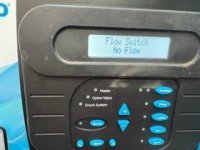
The Hayward chlorinator is a device that adds chlorine to your pool water automatically. It keeps your water clean without you having to measure and add chlorine every day. The “no flow” error means the chlorinator is not detecting enough water moving through it. When this happens, the system turns off and stops making chlorine.
This safety feature protects your chlorinator and pool. Without water flow, the cell inside the device could overheat, or chlorine could build up in one area. That’s why fixing the “no flow” error is important for both your equipment and your health.
Why Does The Hayward Chlorinator Show No Flow?
Several reasons can cause the no flow message on your Hayward system. Here are the most common causes:
- Pool pump not running – The chlorinator needs the pump to push water through.
- Dirty or clogged filter – If your filter is full, water can’t move freely.
- Air in the system – Air pockets reduce water flow.
- Closed or blocked valves – Valves control water direction; if closed, water can’t flow.
- Low pump speed – Some pumps run too slowly to trigger the flow sensor.
- Flow switch problems – The device that senses water flow could be dirty or broken.
- Plumbing leaks – Leaks reduce water pressure and flow.
- Improper installation – If the chlorinator or switch is installed wrong, it may not sense flow.
Many pool owners assume the problem is always the chlorinator. In reality, the issue is often somewhere else in the pool’s circulation system.
Credit: www.troublefreepool.com
How The Hayward Chlorinator Flow Switch Works
The flow switch is a small but critical part of your chlorinator. It detects if water is moving fast enough. If the flow drops below a safe level, the switch sends a signal to shut off chlorine production.
The switch contains a paddle or sensor inside the pipe. When water flows, it pushes the paddle or activates the sensor. If debris or calcium builds up, the paddle can stick. If the switch is installed backwards or too far from the chlorinator, it may not sense properly.
Sometimes, the wires connecting the switch can get damaged by weather or animals.
Troubleshooting Steps For Hayward Chlorinator No Flow
When you see the no flow error, it’s important to diagnose step by step. Don’t replace expensive parts before checking these basics:
1. Check If The Pool Pump Is On
The chlorinator can’t work if the pump is off. Make sure the pump is running and water is moving in the pool.
2. Inspect The Filter
A dirty filter slows water. Clean or backwash your filter as the manufacturer recommends.
3. Look For Air Bubbles
Air in the pump basket or return jets means there’s a leak or loose fitting. Tighten connections and check for cracks in hoses.
4. Open All Valves Fully
Make sure all valves on the suction and return side are open. Sometimes, a partially closed valve is enough to stop the chlorinator.
5. Check Pump Speed
If you have a variable speed pump, try increasing the speed. Some systems need higher flow for the switch to activate.
6. Clean The Flow Switch
Turn off the system. Remove the flow switch and rinse with a hose. Do not use sharp objects to clean the sensor.
7. Check Flow Switch Installation
The arrow on the switch should point in the direction of water flow. If it’s backwards, it won’t work.
8. Look For Leaks
Wet spots around pipes or equipment can mean a leak. Even small leaks lower pressure.
9. Reset The System
Sometimes, turning the power off and back on can reset an error.
Common Fixes For Persistent No Flow Errors
If basic checks don’t fix the problem, you may need to dig deeper. Here are more advanced fixes:
Replacing The Flow Switch
If cleaning and reinstalling the flow switch doesn’t work, it may be faulty. You can order a new switch from Hayward or a pool supply store. Make sure to match the model to your chlorinator system. Installing a new switch usually takes 10–15 minutes with basic tools.
Upgrading The Pump Or Filter
Older or undersized pumps and filters can lead to low flow. If your equipment is over 8–10 years old, or if you added features to your pool (like a heater or extra jets), you may need to upgrade. A larger filter or a more powerful pump can solve chronic flow problems.
Fixing Plumbing Problems
Sometimes, a buried leak or a blockage inside a pipe is the cause. A professional can use a pressure test or a camera to find problems underground.
Adjusting The Chlorinator Settings
Some Hayward systems allow you to set the minimum flow needed to turn on. If the setting is too high, lower it according to the manual. If it’s too low, the system may run even when flow is weak, which is risky.
How To Prevent Hayward Chlorinator No Flow Problems
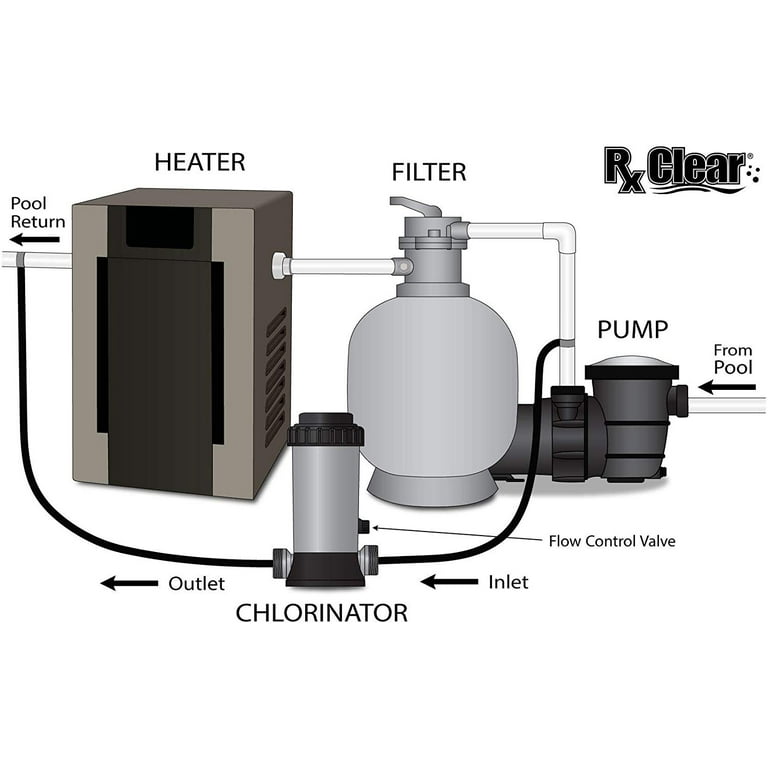
Prevention is easier than repair. Here’s how to avoid most flow-related issues:
- Clean your filter regularly – Follow the schedule for your filter type (cartridge, sand, or DE).
- Check pump and filter pressure – High pressure means a clog; low pressure could mean a leak or air.
- Inspect valves and connections – Make sure everything is tight and open.
- Flush the chlorinator cell – Mineral buildup inside the cell can slow flow. Clean it as recommended.
- Keep water level steady – Low water exposes the skimmer, letting air into the system.
- Use the right pump speed – If you have a variable speed pump, program it to run fast enough for chlorination.
- Winterize your system – In cold climates, drain and protect equipment to prevent freeze damage.
Credit: www.walmart.com
Real-life Examples And Common Mistakes
Let’s look at some situations real pool owners face:
Example 1: Variable Speed Pump Set Too Low
A pool owner wanted to save energy, so they set their pump to run at a very low speed. The water looked clear, but the Hayward chlorinator kept showing “no flow. ” After raising the speed by just a few hundred RPM, the error disappeared.
Many beginners miss that chlorinators need a minimum flow, even if the pump is running.
Example 2: Hidden Clog After Storm
After a heavy storm, leaves and debris clogged the skimmer and filter. The owner cleaned the pool but forgot to backwash the filter. The “no flow” error continued until they cleaned the filter. It’s a reminder to check all parts of the system, not just what’s visible.
Common Mistake: Ignoring Small Air Bubbles
Tiny bubbles in the pump basket often mean a suction leak. Many owners ignore this, but even a small leak can cause a no flow error. Fixing a loose hose clamp or replacing an old O-ring can solve the problem.
Comparing Hayward Chlorinator Models And Flow Switch Types
Different Hayward chlorinator models have different flow requirements and switch types. Here’s a comparison:
| Model | Minimum Flow (GPM) | Flow Switch Type | Typical Issues |
|---|---|---|---|
| AquaRite | 15–20 | Paddle | Debris, low speed |
| AquaRite XL | 20–25 | Sensor | Wrong install, calcium |
| AquaRite Pro | 15–20 | Paddle | Wiring, leaks |
| SwimPure Plus | 15–20 | Paddle | Low pressure |
Key insight: Always check your model’s manual for the minimum flow rate. Setting your pump below this number will cause errors, even if everything else works.
How To Test Water Flow In Your Pool System
If you want to be sure you have enough flow, you can test it:
Using A Flow Meter
A flow meter is a device you attach to your plumbing. It measures gallons per minute (GPM). You can buy a simple meter for $30–$50 online or at a pool store.
Manual Test Method
- Fill a 5-gallon bucket with pool water.
- Place it in front of a return jet.
- Time how long it takes to fill the bucket.
- Calculate: 60 seconds divided by fill time, then multiply by 5. That’s your GPM.
For example, if it takes 15 seconds to fill the bucket:
(60 / 15) × 5 = 20 GPM.
If your chlorinator requires 15 GPM minimum, you’re good. If not, increase pump speed or check for blockages.
Flow Switch Installation: Best Practices
Proper installation of the flow switch makes a big difference. Here’s what you need to know:
- The arrow on the switch must point in the direction of water flow.
- The switch should be installed horizontal for best results. Some models allow vertical installation, but this can be less reliable.
- Place the switch at least 12 inches after the chlorinator cell. Too close or too far can cause errors.
- Avoid installing near elbows or sharp bends in the pipe.
- Make sure wiring is secure and protected from sunlight and animals.
If you’re unsure, check the Hayward manual or hire a pool professional.

Credit: www.youtube.com
Comparing Manual Chlorination Vs. Automatic Chlorinator
Some pool owners consider switching back to manual chlorination when they face ongoing “no flow” errors. Here’s how the two methods compare:
| Feature | Manual Chlorine | Automatic Chlorinator |
|---|---|---|
| Convenience | Low (daily work) | High (set and forget) |
| Chlorine Level Control | Varies (human error) | Consistent |
| Cost Over Time | Higher (more chemical waste) | Lower (efficient use) |
| Maintenance | Low | Medium (flow switch, cell) |
| Error Risks | Low | Flow errors possible |
Insight: While automatic systems can have flow errors, they save time and money long term. Fixing “no flow” issues is usually easier than going back to manual chlorination.
Seasonal Concerns: Summer And Winter Flow Problems
Summer Issues
In hot weather, pools run longer and more debris gets in the water. Filters fill up faster, and pump baskets may clog with leaves. Always check filter and pump basket weekly during summer.
Winter Issues
In cold climates, pools may be closed or run on lower settings. If you use a variable speed pump, don’t set it so low that the chlorinator can’t detect flow. For pools open year-round, check for ice or freeze damage to pipes and valves.
When To Call A Professional
Not every problem can be fixed at home. Call a pool technician if:
- You suspect a leak underground.
- Electrical components are damaged.
- You’ve replaced the flow switch and still get errors.
- The chlorinator or pump is under warranty (DIY fixes can void warranty).
A professional can test for hidden problems and make repairs safely.
Extra Tips Most Beginners Miss
1. Don’t ignore regular cleaning of the chlorinator cell.
Even if the system shows good flow, mineral buildup inside the cell can restrict water movement over time.
2. Keep a log of pump speed and error messages.
Write down the settings that work and when errors happen. This helps diagnose future issues and saves time when talking to a pro.
3. Replace O-rings and seals every few years.
Old rubber parts can let air in, causing flow problems that are hard to see.
4. Store chemicals properly.
Chlorine tablets and other chemicals can break down if stored in hot, wet places. Fresh chemicals dissolve better and keep the system working.
5. Use pool water test kits often.
If chlorine drops for a few days due to a flow error, algae can bloom quickly. Test and adjust chemicals as soon as possible.
Hayward Chlorinator Error Codes: What They Mean
Hayward systems can show different codes besides “no flow.” Here’s a quick guide:
| Error Code | Meaning | Solution |
|---|---|---|
| No Flow | Low or no water flow | See steps above |
| Check Salt | Salt below required level | Add pool salt |
| High Salt | Salt above safe range | Partially drain and refill |
| Check Cell | Cell needs cleaning or is old | Clean or replace cell |
| Service | System needs professional help | Call technician |
Always consult your manual for codes specific to your model.
Where To Find Reliable Information And Spare Parts
Hayward’s official website is a good place for manuals and part numbers. For detailed guides and community support, check forums like Trouble Free Pool. When buying parts, use reputable dealers to avoid counterfeits.
For more technical pool chemistry information, you can visit the CDC’s Swimming Pool Guidelines.
Frequently Asked Questions
Why Does My Hayward Chlorinator Keep Showing No Flow Even After Cleaning The Filter?
There may be another cause, such as a faulty flow switch, air leaks, or the pump running at too low a speed. Check all connections, raise the pump speed, and inspect the flow switch for debris or damage.
Can I Bypass The Flow Switch On My Hayward Chlorinator?
Bypassing the flow switch is not safe. The switch protects your equipment from damage and your pool from unsafe chlorine levels. Always repair or replace the switch rather than bypassing it.
How Often Should I Clean The Chlorinator Cell And Flow Switch?
Clean the cell every 3–6 months, depending on your pool use and water hardness. Clean the flow switch at least once per season, or more if you have frequent errors or lots of debris.
What Happens If I Ignore The No Flow Error?
If you ignore the error, your pool will not get enough chlorine, leading to green water, algae, or bacteria. The chlorinator cell can also get damaged by overheating if it tries to run without water flow.
Is The Hayward Chlorinator Compatible With All Pool Pumps?
Most Hayward chlorinators work with standard single speed and variable speed pumps, but always check your pump’s flow rate matches the chlorinator’s requirements. Using a pump that’s too small or running it too slow can cause constant errors.
A well-maintained chlorinator system keeps your pool clean and safe with minimal effort. When “no flow” errors appear, take a systematic approach—check the pump, filter, valves, and flow switch. Prevent problems by keeping your system clean and making small adjustments as needed.
With the right knowledge, you can enjoy a sparkling pool all season long.