
Many pool owners choose a Hayward salt system because it promises clean, comfortable water with less effort and fewer chemicals. But sometimes, you may notice a frustrating problem: your Hayward salt system will not calibrate. This issue can make your pool water unsafe or cause the salt generator to stop producing chlorine, leading to cloudy water or even algae growth. Understanding why calibration fails, how to fix it, and how to prevent future issues is essential for any pool owner who wants reliable performance from their salt system.
Let’s explore, step by step, why your Hayward salt system may not calibrate, what that means for your pool, and what you can do about it. This guide will break down the technical details into simple, actionable advice, so you can enjoy your pool with confidence all season long.
What Does Calibration Mean In A Hayward Salt System?
Calibration in your Hayward salt system means the control panel is measuring the actual salt level in the water and matching it to the system’s readings. Accurate calibration is necessary for the generator to produce the right amount of chlorine.
If the system cannot calibrate, it may report wrong salt levels, shut down unexpectedly, or trigger warning lights.
During calibration, the system runs a test to check the water’s salinity (salt concentration). It uses sensors to measure how much salt is present and compares this to the expected range, usually 2700–3400 parts per million (ppm) for Hayward systems. If the system cannot match the real salt level with its internal reading, it will not calibrate. This prevents it from running correctly.
Common Signs Your Hayward Salt System Will Not Calibrate
Many pool owners do not realize their system is not calibrated until problems appear. Here are the most frequent warning signs:
- Salt Level Error: The display shows a low or high salt warning, even after adding or removing salt.
- Chlorine Production Stops: The system does not generate chlorine, and pool chlorine levels drop.
- Flashing Lights: The inspect cell or check salt lights blink constantly.
- Inconsistent Readings: Salt readings jump up and down or do not match manual test results.
- System Reboots: The control panel restarts or gets stuck during calibration.
If you notice any of these issues, your Hayward salt system likely has a calibration problem.

Credit: lesliespool.com
Why Calibration Is Critical For Pool Health
A Hayward salt system that cannot calibrate may stop producing chlorine, which is the main sanitizer for your pool. Without enough chlorine, bacteria and algae can grow quickly. This leads to:
- Cloudy or green water
- Strong chlorine smells (caused by chloramines, not free chlorine)
- Skin and eye irritation
- Increased risk of waterborne illnesses
Calibration also helps the system avoid damage. If the control panel thinks the salt is too low or too high, it may shut down to prevent harm to the cell or other parts. Proper calibration means your system works efficiently, saves money on chemicals, and keeps your pool safe.
How A Hayward Salt System Senses And Calibrates Salt Levels
To understand why calibration fails, it’s helpful to know how a Hayward salt system measures salt. Most Hayward systems, such as the AquaRite or AquaRite XL, use a flow switch and a pair of electrodes inside the cell. Here’s what happens:
- Water flows through the cell.
- The system passes a small electric current between the electrodes.
- The control panel measures the conductivity of the water (which increases with more salt).
- It uses this data to calculate the salinity in ppm.
- The result is shown on the display, and the system adjusts chlorine production.
Calibration means matching the displayed reading to the actual salt level, so both manual and electronic results agree.
Main Causes Why A Hayward Salt System Will Not Calibrate
Several factors can prevent a Hayward salt system from calibrating. Understanding each one helps you find the real problem and fix it effectively.
1. Dirty Or Scaled Salt Cell
The most common reason for calibration failure is a dirty salt cell. Over time, minerals like calcium build up on the electrodes. This scaling blocks the electric current and gives false readings.
- Typical signs: Low salt warnings, even with correct salt levels; poor chlorine production.
- Solution: Remove and clean the cell with a mild acid solution (usually a mix of water and muriatic acid). Never use metal tools, as they can damage the coating.
2. Faulty Or Worn Salt Cell
Salt cells have a lifespan of 3–7 years, depending on use and water chemistry. Old or damaged cells may not sense salt correctly.
- Typical signs: Readings drift over time, or the system cannot calibrate even after cleaning.
- Solution: Test the cell using the system’s diagnostic mode or with a multimeter. Replace the cell if it fails the test.
3. Incorrect Salt Level In Pool
If you add too much or too little salt, the system cannot calibrate. Manual testing kits sometimes give different results than the system.
- Typical signs: Large differences between test strip and system readings.
- Solution: Use a reliable salt test kit. Adjust the salt level slowly, adding small amounts and retesting.
4. Faulty Flow Switch
The flow switch detects when water is moving through the cell. If it is dirty, broken, or installed incorrectly, the system may fail to calibrate.
- Typical signs: “No flow” message, or the system does not start calibration.
- Solution: Clean the flow switch and check its wiring. Replace if needed.
5. Bad Water Chemistry
High levels of stabilizer (cyanuric acid), calcium hardness, or very low pH can interfere with salt readings.
- Typical signs: Calibration fails even when the cell and salt level seem fine.
- Solution: Balance your pool water (pH 7.2–7.8, cyanuric acid 30–50 ppm, calcium 200–400 ppm).
6. Electrical Issues Or Loose Connections
Loose wires, corroded contacts, or low voltage can cause the system to fail calibration.
- Typical signs: System turns off, restarts, or fails to sense salt.
- Solution: Inspect wiring and connectors for corrosion or damage. Check that the control panel has stable power.
7. Software Or Firmware Problems
Sometimes, a glitch in the control panel software will block calibration.
- Typical signs: Calibration freezes or the display shows error codes not listed in the manual.
- Solution: Reset the system by turning it off and on. Update firmware if an update is available.
8. Sensor Malfunction
The salt system uses sensors for temperature and salinity. If these fail, calibration will not work.
- Typical signs: Sensor error on the display, or readings that are always the same.
- Solution: Replace faulty sensors. Some models let you test sensors through the diagnostic menu.
How To Troubleshoot A Hayward Salt System That Will Not Calibrate
When your Hayward salt system will not calibrate, follow these steps to find and fix the issue. Move step by step, and do not skip any part. This will save you time and prevent extra costs.
Step 1: Confirm Actual Salt Level
Use a liquid salt test kit (not just test strips) to measure the real salt level in your pool. Write down the result.
- Ideal range: 2700–3400 ppm
- If your reading is outside this range, adjust the salt by adding or diluting with fresh water.
Step 2: Inspect And Clean The Salt Cell
Turn off the system and remove the cell. Look for white, chalky scale or brown stains.
- Soak the cell in a 4: 1 water-to-muriatic acid solution for 15–30 minutes.
- Rinse with fresh water and reinstall.
If the cell is clean but old (over 4 years), consider testing or replacing it.
Step 3: Check Flow Switch And Wiring
Look for debris or scale on the flow switch. Make sure it clicks when you move the paddle.
- If the wire is damaged or corroded, replace the flow switch.
- Check all wiring connections to the control board.
Step 4: Balance Water Chemistry
Use a reliable test kit to check:
- PH (7.2–7.8)
- Alkalinity (80–120 ppm)
- Calcium hardness (200–400 ppm)
- Cyanuric acid (30–50 ppm)
Adjust as needed. Poor water balance can block calibration.
Step 5: Reset And Recalibrate The System
Turn off the power to the salt system for 1–2 minutes. Turn it back on.
- Set the system to super chlorinate mode for 5–10 minutes.
- Switch back to normal mode and watch for calibration.
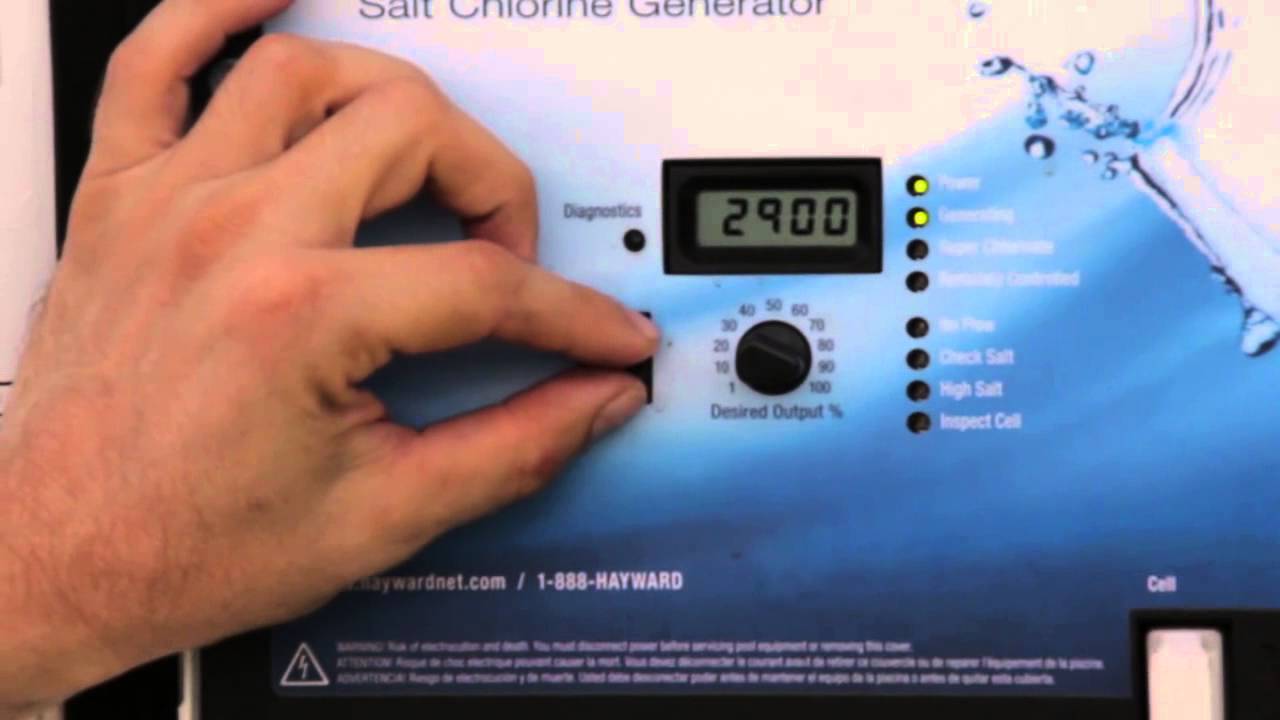
Step 6: Run Diagnostics
Most Hayward control panels have a diagnostic menu.
- Press the diagnostic button or follow the manual to view cell voltage, amperage, and temperature.
- Compare these numbers to those in the manual. Out-of-range values suggest a bad cell or sensor.
Step 7: Replace Faulty Components
If you find a bad cell, sensor, or flow switch, replace it with a genuine Hayward part.
- Do not use cheap aftermarket parts—they may not work correctly and could void your warranty.
Step 8: Update Firmware (if Available)
Some newer Hayward systems allow for firmware updates. Check the official Hayward website for updates. Follow instructions closely.
Comparing Hayward Salt Systems: Which Models Have Calibration Issues?
Not all Hayward salt systems are the same. Some models are more likely to have calibration trouble due to design, age, or sensor type. Here is a comparison of common models:
| Model | Sensor Type | Known Issues | Typical Lifespan |
|---|---|---|---|
| AquaRite | Inline, single sensor | Scale, cell wear | 3–5 years |
| AquaRite XL | Inline, dual sensor | Firmware glitches | 4–7 years |
| AquaRite Pro | Inline, temp + salinity | Sensor errors | 5–7 years |
| AquaTrol | Inline, single sensor | Flow switch wear | 3–5 years |
Older models, especially those with only one sensor, are more sensitive to scale and wiring problems.
Hayward Salt System Calibration Vs. Other Brands
How does Hayward compare to other popular salt systems regarding calibration reliability? Here’s a quick overview:
| Brand | Calibration Method | Ease of Calibration | Common Issues |
|---|---|---|---|
| Hayward | Inline sensor, auto test | Moderate | Scale, sensor errors |
| Pentair | Inline, manual/auto | Easy | Firmware bugs |
| Jandy | Inline, auto | Moderate | Flow switch fails |
| CircuPool | Inline, auto/manual | Easy | Low salt detection |
Hayward systems are generally reliable but need regular cleaning and proper water chemistry to avoid calibration trouble.
Practical Tips To Avoid Calibration Problems
Many calibration issues can be prevented with simple habits. Here are proven tips:
- Clean the salt cell every 3–6 months, or more often if your pool has hard water.
- Test pool water with a good liquid test kit—not just strips. Compare your manual salt reading to the system display.
- Keep water balanced. High calcium, stabilizer, or pH outside the normal range will confuse sensors.
- Inspect wiring and sensors once per season, especially before opening the pool.
- Use only Hayward-approved replacement parts. Off-brand cells or sensors can give false readings.
- Watch for firmware updates for your model. These sometimes fix calibration bugs.
- Don’t over-correct salt levels. Add salt slowly, and retest after 24 hours before adding more.
- Check flow switch orientation after cleaning or repairs. It should point in the direction of water flow.
Real-world Example: Troubleshooting A Persistent Calibration Failure
Imagine a pool owner named Lisa. She added salt based on her test kit, but the Hayward system still showed “low salt. ” She cleaned the cell, checked water chemistry, and even replaced the flow switch. Still, calibration failed.
On closer inspection, Lisa found a loose wire at the control panel. After tightening the connection, the system calibrated perfectly and began making chlorine again.
Insight: Even if you do everything right—cleaning, balancing, replacing parts—a simple wiring issue can block calibration. Always check both the obvious and hidden causes.
Credit: www.youtube.com
When To Call A Professional
Most calibration issues can be solved by careful troubleshooting. But if you have tried all the steps and the system still will not calibrate, it is time to call a pool professional. Signs you need expert help include:
- Error codes that do not clear after a reset
- Burnt or damaged control board
- Water leaks inside the control panel
- Calibration failure after replacing all major parts
Professionals have tools to test the system’s electronics, sensors, and wiring. This can save you time, money, and stress.
The Cost Of Ignoring Calibration Problems
Leaving calibration issues unsolved can be expensive and risky. You may face:
- Green, unsafe water requiring shock treatment or draining the pool
- Costly repairs if the cell or board is damaged by running with the wrong salt levels
- Shorter cell lifespan, meaning you replace parts sooner
- Health risks from swimming in unsanitized water
Fixing calibration now is much cheaper and easier than waiting for bigger problems.
The Role Of Water Temperature In Calibration
Many pool owners overlook the impact of water temperature on calibration. Hayward systems use temperature readings to adjust the salt calculation. If the water is below 60°F (16°C), the system may show false low salt readings or fail to calibrate. This is normal and not a system defect.
- Solution: Wait for warmer weather, or run the system less during the off-season.
Hayward Salt System Maintenance Schedule For Best Calibration
Follow a regular schedule to keep your system healthy:
- Weekly: Test salt and chlorine levels, check for error lights.
- Monthly: Inspect the cell for scale or stains.
- Every 3–6 months: Clean the cell, balance water chemistry.
- Annually: Check all wiring, sensors, and update firmware if possible.
Sticking to this routine will prevent most calibration problems.
What Beginners Often Miss About Hayward Salt System Calibration
Beginners sometimes think the system will always match their manual test kit. In reality, small differences (up to 200 ppm) are normal due to factors like water temperature and sensor accuracy.
Another common mistake is adding too much salt when the system shows a low reading. If the cell or sensors are dirty, adding more salt will only make things worse. Always clean and check the system before adjusting salt levels.
Where To Find Official Hayward Support And Manuals
For the latest manuals, troubleshooting guides, and firmware updates, visit the official Hayward Pool Products website. Download the manual for your exact model for step-by-step instructions and error code explanations.

Credit: www.inyopools.com
Frequently Asked Questions
What Does “calibrate” Mean On My Hayward Salt System?
Calibration means the system is checking and adjusting its salt reading to match the real salt level in your pool. Accurate calibration ensures the system can make enough chlorine and avoid false warnings.
Why Does My Hayward Salt System Show The Wrong Salt Level?
This usually happens because the cell is dirty, sensors are faulty, or the water chemistry is off. Sometimes, wiring or firmware issues cause false readings. Always compare with a manual salt test kit before adding more salt.
How Often Should I Clean My Salt Cell?
Clean your salt cell every 3–6 months, or more often if you have hard water. Regular cleaning prevents scale buildup, which is the main cause of calibration problems.
Can Cold Water Affect Calibration?
Yes, Hayward systems may show low salt or fail to calibrate in cold water (below 60°F/16°C). This is normal—wait for warmer weather or reduce system use during the off-season.
Should I Replace My Salt Cell Or Control Board If Calibration Fails?
Only replace these parts after testing and trying all troubleshooting steps. Sometimes, a simple cleaning or wiring fix solves the problem. If the cell is old or fails the diagnostic test, replacement is necessary.
—
A Hayward salt system that will not calibrate can cause big headaches, but with careful troubleshooting and regular maintenance, you can keep your pool water clear and safe. Understanding the real causes of calibration failure helps you fix problems quickly and avoid costly mistakes.
With the right steps, your Hayward system will provide reliable, low-maintenance pool care for years to come.