
If your Koolmore oven is acting up, not heating, or showing error codes, knowing how to reset it can save you time, money, and stress. Many people feel frustrated when their kitchen appliances don’t work as expected, especially when they’re in the middle of cooking.
The good news is, resetting a Koolmore oven is often a simple process—and understanding the right steps can make your cooking routine smooth again. This guide will walk you through everything you need to know about resetting a Koolmore oven, from the basic steps to advanced troubleshooting, and even how to avoid common mistakes.
Understanding Your Koolmore Oven
Koolmore ovens are known for their modern design and reliable features. Most models come with digital controls, timers, and safety locks. Before you try to reset your oven, it’s important to know your model’s key features and the types of problems that might require a reset.
Some typical reasons to reset your Koolmore oven include:
- Display errors that won’t clear
- Unresponsive touch controls
- Oven not heating even when settings look correct
- Timer or clock issues
- Child lock or safety lock stuck
Always check your oven’s manual for details about your specific model. If you don’t have the manual, Koolmore’s official website provides downloadable versions.
When And Why You Need To Reset
Resetting is not the answer to every oven issue. Sometimes, a reset can solve temporary glitches—other times, it points to a bigger problem. So, when is a reset the right step?
- Unusual error codes: If the oven shows an error that won’t go away after turning it off and on, a reset can help.
- Frozen display: If none of the buttons or controls respond, a reset often restores function.
- Settings won’t change: Sometimes, the oven ignores temperature or timer changes. A reset can clear the internal memory.
- After a power outage: Some Koolmore ovens need a reset to restore normal operation after a blackout.
- Appliance “acts weird”: If the oven turns on and off randomly or the light won’t work, a reset is a safe first step.
Note: If your oven has a burning smell, smoke, or sparks, unplug it immediately and contact a professional. Never try to reset in this situation.
Basic Steps To Reset A Koolmore Oven
Most Koolmore ovens do not have a dedicated “reset” button. Instead, the reset process involves power cycling and sometimes a combination of control panel actions. Here’s how you can do it:
1. Turn Off The Oven
Press the power button to turn the oven off. If your oven does not have a power button, switch it off at the wall or unplug it.
2. Unplug The Oven
Carefully pull the oven’s plug from the wall socket. If your model is hardwired, locate the circuit breaker and switch it off.
3. Wait For 5-10 Minutes
Leave the oven unplugged for at least 5 minutes. This allows the internal electronics to fully discharge. Waiting longer—up to 10 minutes—can be even more effective for stubborn glitches.
4. Plug Back In
Reconnect the power by plugging the oven in or switching the circuit breaker back on.
5. Turn The Oven On
Press the power button or use the control panel to turn the oven back on. The display should light up, and any previous errors may be cleared.
6. Reset The Clock And Settings
After a reset, you may need to set the clock and other preferences again. Follow your oven’s manual for these steps.
Control Panel Reset: Step-by-step
Some Koolmore ovens have advanced digital controls with a built-in reset or “clear” function. If your model has this feature, follow these steps:
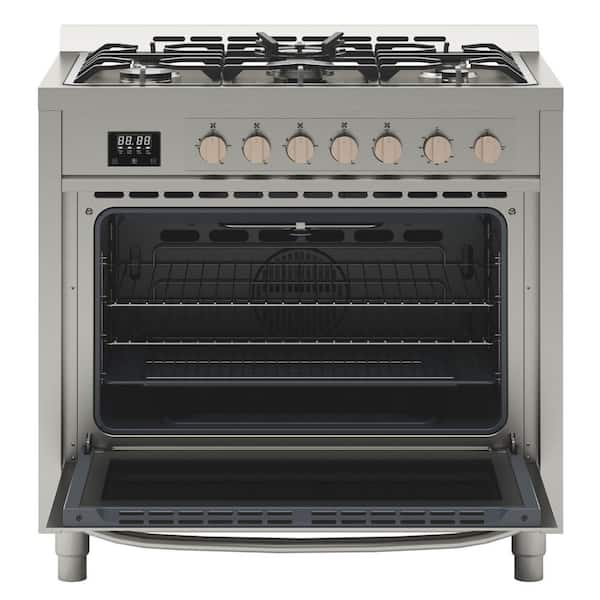
- Locate the Reset/Clear Button: Look for a button labeled “Clear,” “Reset,” or with a symbol like a circular arrow.
- Press and Hold: Press the button for 3–5 seconds until the display blinks or changes.
- Release: Let go when you hear a beep or see the display reset.
- Test the Oven: Try basic functions like setting a timer or preheating to see if normal operation has returned.
Tip: If your oven doesn’t respond, try the power reset method described above.
Credit: www.homedepot.com
How To Reset After A Power Outage
Power outages can sometimes cause the oven’s controls to lock up or display errors. Here’s what you should do:
- Unplug the oven for 10 minutes.
- Plug it back in.
- Set the clock. Most Koolmore ovens need the clock set before any other function will work.
- Test other features.
If the oven still doesn’t work, check your home’s circuit breaker and ensure the outlet is working. Sometimes, the problem is with your home’s power, not the oven itself.
Resetting The Child Lock Or Safety Lock
Koolmore ovens often include a child lock or safety lock to prevent accidental use. If your oven seems “stuck” or won’t respond, the lock might be on. Here’s how to reset or turn off the lock:
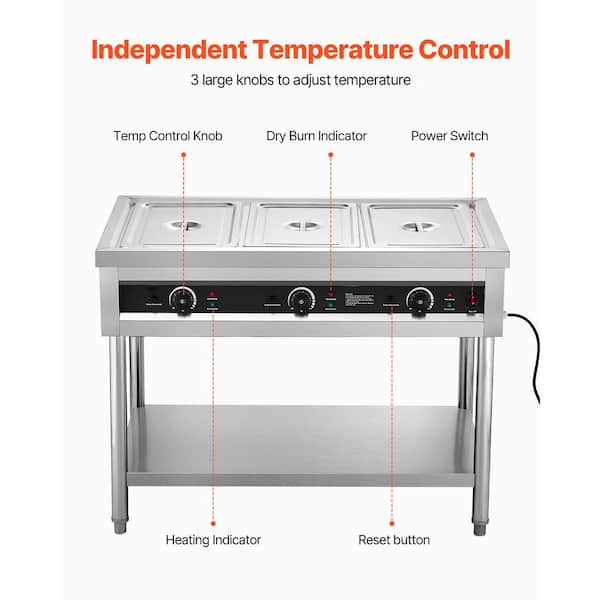
- Find the Lock Symbol: Look for a lock icon on the display or control panel.
- Press and Hold: Press and hold the lock button (often for 3–5 seconds) until the lock symbol disappears.
- Try Basic Functions: Test if you can set the temperature or timer now.
If the lock won’t turn off, try a full power reset as described earlier.
Credit: www.homedepot.com
Resetting Specific Koolmore Oven Models
Not all Koolmore ovens are the same. Some are built-in wall ovens, others are freestanding ranges, and some are countertop convection models. Below is a comparison of reset methods for popular Koolmore oven types:
| Model Type | Reset Method | Special Steps |
|---|---|---|
| Built-in Wall Oven | Power cycle (unplug/plug in) | May need breaker off/on |
| Freestanding Range | Power cycle | Reset clock after power is restored |
| Countertop Convection Oven | Press and hold reset, or unplug | Some have dedicated “clear” buttons |
Always check your specific oven’s user manual for the recommended reset steps.
Advanced Reset: When A Simple Reset Isn’t Enough
Sometimes, a standard reset won’t fix the problem. Here’s what you can try next:
Resetting The Circuit Breaker
If your oven is hardwired, you may need to reset the breaker:
- Locate your home’s electrical panel.
- Find the breaker marked for the oven.
- Switch it off, wait 30 seconds, and switch it back on.
- Return to the kitchen and try the oven again.
This method works for stubborn electrical glitches that a simple unplug won’t solve.
Factory Reset
Some Koolmore ovens allow a factory reset, which restores all settings to default. Use this only if other resets fail:
- Access the main menu on the control panel.
- Find “Settings” or “System.”
- Select “Factory Reset.”
- Confirm when asked.
A factory reset will erase all saved settings, so be prepared to set up your oven again.
Important: If your oven doesn’t have these menu options, a factory reset is not possible. Never attempt to open the oven’s electronics to force a reset.
Troubleshooting Common Problems After Reset
Resetting usually solves minor issues, but sometimes problems continue. Here are some common post-reset issues and what to do:
Display Still Shows An Error
- Double-check the error code in your manual.
- Try another reset after waiting longer (up to 15 minutes).
- If the code stays, call Koolmore support. Persistent errors may mean a part needs repair.
Touch Controls Not Responding
- Make sure your hands are clean and dry.
- Wipe the control panel with a soft, damp cloth to remove grease.
- If the panel stays unresponsive, the touch sensor may be faulty.
Oven Not Heating
- Check if the clock is set—some models won’t start without a set clock.
- Try a different cooking mode (bake, broil, convection) to see if any work.
- If none work, check your home’s circuit breaker and power supply.
Light Won’t Turn On
- The light bulb may need replacing.
- Some ovens require the door to be closed for the light to operate.
- If the light doesn’t work after a reset, consult the manual for bulb replacement steps.
Common Mistakes To Avoid When Resetting
Many users make simple mistakes that prevent a proper reset. Here are a few to watch out for:
- Unplugging for too short a time: Always wait at least 5 minutes after unplugging.
- Forgetting to reset the clock: This step is required before most cooking functions will work.
- Ignoring warning signs: If you smell burning, see smoke, or hear strange noises, do not try to reset—call a professional.
- Not checking the circuit breaker: Sometimes, the oven’s breaker trips but looks “on.” Flip it off and on again.
- Repeatedly resetting without reading the manual: Too many resets can hide real problems. If the same issue returns, call for service.
Credit: koolmore.com
Koolmore Oven Error Codes: What They Mean
Error codes can be confusing. Here’s a look at what some common codes mean and when a reset can help:
| Error Code | Possible Cause | Reset Fix? |
|---|---|---|
| E01 | Control panel glitch | Often fixed by reset |
| E05 | Sensor issue | May need service if reset fails |
| E10 | Heating element fault | Reset rarely solves |
| F1 | Internal error | Try reset, then call support |
| LOC | Child lock engaged | Unlock via control panel |
If your oven shows an error not listed here, check the manual or contact Koolmore’s customer support.
When To Call A Professional
Resetting your Koolmore oven works for simple glitches, but not for everything. Call a professional if:
- The oven trips your home’s circuit breaker repeatedly
- You notice burning smells, smoke, or sparking
- The oven does not turn on at all after a reset
- Error codes return again and again, even after following all reset steps
Attempting to repair or open the oven yourself can void the warranty or cause injury.
Preventing Future Problems
While you can’t avoid every issue, regular care helps prevent the need for frequent resets. Here are some tips:
- Clean the control panel with a damp cloth to prevent sticky buttons.
- Avoid power surges by using a surge protector if possible.
- Do not overload the oven with heavy pots or trays—this can strain the electronics.
- Schedule maintenance if your oven is more than 3–5 years old.
Real User Experiences: Insights That Matter
Many users share that their Koolmore ovens run smoothly for years, but problems can happen after a power outage or kitchen remodel. Here are two non-obvious insights to help you:
- Check the outlet: Sometimes, what looks like an oven problem is actually a loose plug or a faulty outlet. Always test another appliance in the same outlet to rule this out.
- Look for tiny reset holes: On some compact Koolmore ovens, there is a small pinhole labeled “reset” near the controls. Use a paperclip to press it gently for 3 seconds—this can clear some advanced errors.
Comparing Koolmore To Other Oven Brands For Resets
It helps to know how Koolmore ovens compare to other brands when it comes to resets:
| Brand | Reset Button | Reset by Unplugging | Factory Reset |
|---|---|---|---|
| Koolmore | Rare | Yes | Some models |
| Samsung | Some models | Yes | Yes |
| GE | No | Yes | No |
| Whirlpool | No | Yes | Some models |
Koolmore’s reset process is similar to other major brands, but always check your model’s manual for details.
Tips For A Trouble-free Reset
- Always keep your oven’s serial number and manual handy.
- If your oven is under warranty, contact Koolmore support before trying advanced resets.
- Take photos of error codes and settings—this can help technicians if you need service.
- Don’t rush: Giving the oven enough time to discharge is important for a proper reset.
Where To Find More Information
Koolmore’s support page is a useful resource for manuals and troubleshooting guides. For more details on home appliance resets, check out resources like Wikipedia’s Oven Page.
Frequently Asked Questions
Why Does My Koolmore Oven Need To Be Reset?
Most resets are due to temporary electronic glitches, power surges, or control panel errors. Resetting helps clear the oven’s memory and restores normal function.
How Long Should I Unplug My Koolmore Oven To Reset It?
Leave the oven unplugged for at least 5 minutes. For stubborn errors, wait up to 10–15 minutes to ensure all internal power is discharged.
Will Resetting Delete My Cooking Programs And Timer?
Yes, after a reset, you’ll need to set the clock and any custom programs again. Factory resets will erase all stored settings.
My Koolmore Oven Still Shows An Error After Reset—what Should I Do?
Check your manual for the specific error code. If a reset doesn’t clear it, there may be a hardware issue, and you should contact Koolmore support or a qualified technician.
Is It Safe To Reset My Oven Often?
Occasional resets are safe, but if you find yourself resetting frequently, this could signal a deeper issue. Repeated resets can sometimes hide a real problem, so don’t ignore persistent faults.
Resetting a Koolmore oven is usually straightforward and can fix many common problems. With the right steps and a little patience, you can get back to cooking with confidence. Remember to always follow safety guidelines, and don’t hesitate to ask for professional help if you’re unsure.
Your kitchen should be a place of creativity and joy—not stress.