
Keeping your pool clean can feel like a never-ending task, especially when you want the water to always look clear and inviting. Many pool owners turn to automatic cleaners like the Polaris pool cleaner for help. But one question often comes up: *How often should you run your Polaris pool cleaner?* The answer isn’t as simple as “every day” or “once a week.” The right schedule depends on your pool size, how much debris falls into your pool, the season, and even the type of Polaris cleaner you use.
Understanding the best cleaning frequency can help extend the life of your pool equipment, lower costs, and keep your pool sparkling. In this guide, you’ll learn what affects the ideal cleaning schedule, how to adjust it for your situation, and practical tips that most beginners miss.
By the end, you’ll feel confident in making the right decision for your pool’s needs.
Why Polaris Pool Cleaners Are Popular
Polaris has become a trusted name in the world of automatic pool cleaners. Their products are known for their reliability, effective cleaning, and wide range of models for different pool types. A Polaris cleaner works by moving around the pool—scrubbing, vacuuming, and filtering out dirt and debris. Many people invest in a Polaris because it can save hours of manual cleaning each week.
But even the best cleaner won’t do its job if it’s not used correctly. Running it too little means a dirty pool. Running it too much can wear out the parts faster and waste energy. Finding the right balance is key.
Factors That Affect How Often You Should Run Your Polaris Pool Cleaner
There’s no single answer for every pool owner. Instead, several factors combine to shape the right cleaning schedule for your pool. Let’s look at the most important ones.
Pool Usage
How often people swim in your pool has a big effect on cleaning needs. If your pool is used daily, especially by children or during parties, more dirt, sunscreen, and hair will end up in the water. Pools with heavy usage need more frequent cleaning.
Amount Of Debris
Does your pool sit under trees or near a garden? If so, leaves, flowers, insects, and pollen will fall in regularly. Pools in dusty or windy areas collect debris faster. In these cases, running your Polaris more often helps prevent clogs and staining.
Pool Size And Shape
A larger pool takes longer to clean. If your pool is over 40 feet long, a single cleaning cycle might not be enough. Complex shapes with lots of corners or built-in features (like steps and benches) often require more passes from the cleaner.
Type Of Polaris Cleaner
There are different types of Polaris pool cleaners: pressure-side, suction-side, and robotic. Each one has its own cleaning power and ideal usage pattern.
- Pressure-side cleaners use the pool’s return water to move and collect debris.
- Suction-side cleaners connect to the pool’s filtration system.
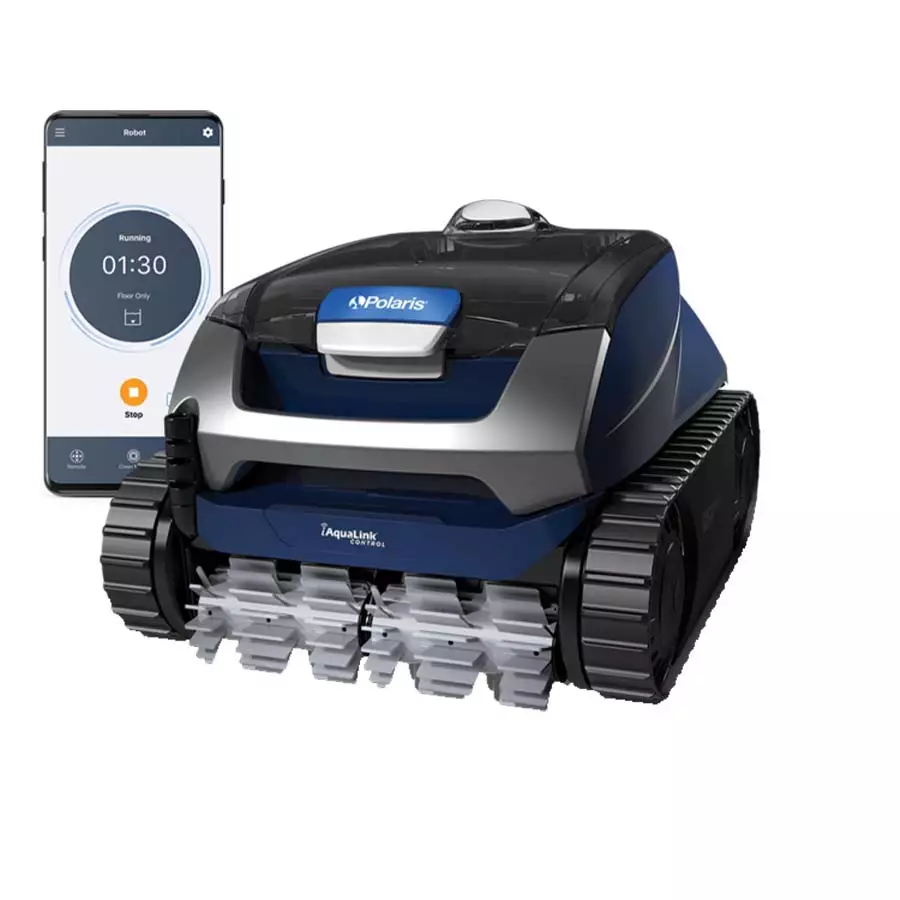
- Robotic cleaners run on electricity and have their own built-in filter.
Robotic cleaners are usually more efficient and may need to run less often than older pressure-side models.
Seasonal Changes
Swimming season isn’t the same all year. In spring and fall, more debris (like pollen or fallen leaves) may end up in the pool. In summer, more swimmers mean more oils and dirt. Adjust your cleaning schedule with the seasons.
Pool Location
Pools in open areas with little wind or debris stay cleaner longer. Pools in wooded areas or near construction sites gather dirt and leaves faster, requiring more frequent cleaning.
Pool Cover Usage
If you use a pool cover when the pool isn’t in use, you’ll notice less debris. This can let you reduce the cleaning frequency, especially during off-season months.
Recommended Polaris Pool Cleaner Schedules
While every pool is unique, there are common guidelines you can use as a starting point. Let’s break down the recommended cleaning schedules based on different situations.
Standard Residential Pools
For most backyard pools with average use and some debris, running your Polaris pool cleaner 2 to 3 times per week is usually enough. Each cleaning cycle should last between 2 to 3 hours. This schedule keeps the water clear and prevents buildup on the pool floor and walls.
High-use Or Heavy Debris Pools
If your pool sees a lot of swimming or is surrounded by trees, you may need to run the cleaner 4 to 5 times per week. During heavy leaf fall or after a storm, daily cleaning might be necessary for a few days.
Low-use Or Covered Pools
Pools that are rarely used, or are always covered when not in use, can often go with once-a-week cleaning. This is enough to catch any dust or small debris that gets in when the cover is off.
After Special Events
If you host a pool party or have a large group of swimmers, it’s smart to run your Polaris cleaner the next day. Oils, dirt, and hair can quickly cloud up the water.
Off-season Maintenance
If you keep your pool open year-round but don’t swim much during the off-season, running your Polaris cleaner every 1-2 weeks is usually sufficient. This prevents buildup and keeps the water moving.
Comparing Polaris Cleaner Types And Cleaning Frequency
Different models of Polaris cleaners have different strengths and recommended usage. Here’s a quick comparison:
| Cleaner Type | Ideal Cleaning Frequency | Best For | Power Source |
|---|---|---|---|
| Pressure-side | 2-4 times/week | Medium to large pools, heavy debris | Pool pump or booster pump |
| Suction-side | 2-3 times/week | Small to medium pools, light debris | Pool filtration system |
| Robotic | 1-3 times/week | Any pool, energy efficient | Electric (plug-in) |
Non-obvious insight: Robotic cleaners often have smart sensors that let them “learn” your pool’s shape. This means they can clean more efficiently and may need shorter or less frequent cycles compared to basic models.
How To Tell If You’re Running Your Cleaner Too Much (or Not Enough)
Finding the right schedule is not just about following a rule—it’s about watching your pool and adjusting as needed. Here’s how to know if your Polaris is running too often or not enough:
Signs Of Overuse
- Worn Wheels or Brushes: If you notice the cleaner’s wheels, brushes, or hoses wearing out quickly, you might be running it too much.
- High Electricity Bills: Running electric cleaners every day can raise your energy costs.
- Shortened Cleaner Lifespan: Overuse can lead to more frequent repairs or the need to replace the cleaner sooner.
Signs Of Underuse
- Visible Dirt or Debris: If you see dirt on the pool floor or leaves floating for days, you’re not cleaning enough.
- Cloudy Water: Dirt and oils can cause cloudy water if not removed regularly.
- Algae Growth: Skipping cleanings can allow algae to build up, making the pool slippery or green.
Practical tip: Take a photo of your pool before and after running the cleaner. Over a few weeks, you’ll see if your schedule is keeping the water as clean as you want.
Customizing Your Cleaning Schedule
No two pools are exactly alike. Here’s how to tailor your cleaning schedule for your unique situation:
Step 1: Start With The Standard
Begin by running your Polaris cleaner 3 times per week for 2–3 hours per session.
Step 2: Observe Results
Check the pool for debris, stains, or cloudy water after each cleaning. Take notes or photos if it helps.
Step 3: Adjust Up Or Down
If the pool looks great and stays clean, try reducing the number of weekly cleanings. If you see more debris or the water gets cloudy, increase the frequency.
Step 4: Adapt For Seasons
In fall and spring, be ready to increase cleanings when more debris falls. In winter or during long periods without swimming, decrease the schedule.
Step 5: Don’t Forget Filter Maintenance
A clean pool cleaner works best with a clean pool filter. Backwash or clean your filter as recommended by your pool manufacturer.
Non-obvious insight: Many beginners think their Polaris isn’t working when they see debris left behind. Often, the real problem is a dirty pool filter, clogged cleaner bag, or a worn hose—not the cleaner itself.

Credit: www.reddit.com
Tips For Maximizing Polaris Cleaner Performance
Getting the most from your Polaris pool cleaner isn’t just about how often you use it. It’s also about proper setup, maintenance, and small adjustments that can make a big difference.
Check Hoses And Connections
A common beginner mistake is ignoring the hoses. Make sure all connections are tight and there are no leaks. Replace worn or cracked hoses as needed.
Clean The Filter Bag Or Canister
Empty the debris bag (pressure-side or robotic models) after each use. A full bag reduces suction and leaves dirt behind.
Inspect And Clean The Cleaner
Check the wheels, brushes, and intake regularly for stuck debris or wear. Replace parts as needed to keep cleaning performance high.
Run The Cleaner At Optimal Times
Run the Polaris during the day if your pool is used mostly in the evening, or overnight if your pool is used during the day. This way, the pool is always clean when you want to swim.
Avoid Running With Swimmers In The Pool
It might seem efficient to clean while people are swimming, but it can tangle hoses and reduce cleaning effectiveness. It’s safer and more effective to run the cleaner when the pool is empty.
Alternate Cleaning Patterns
Some advanced Polaris models allow you to set different cleaning patterns. Use these to cover all areas of the pool, especially if you notice some spots are missed.
Common Mistakes When Running A Polaris Pool Cleaner
Even experienced pool owners sometimes make errors that reduce the effectiveness of their Polaris cleaner. Here are mistakes to watch out for:
- Ignoring the Pool’s Unique Needs: Don’t just copy a friend’s schedule. Your pool’s location, size, and usage are different.
- Not Adjusting for the Seasons: Cleaning needs change throughout the year. Adjust your schedule accordingly.
- Running the Cleaner with a Full Bag: Always empty the debris bag before starting a new cleaning cycle.
- Not Checking for Clogs: Leaves or sticks can clog the cleaner’s intake or hoses, making it less effective.
- Skipping Routine Maintenance: Clean the filter, check for leaks, and inspect moving parts regularly.
- Overusing the Cleaner: Running it all day, every day, can wear out parts without making the pool cleaner.
- Underestimating Debris After Storms: After windy days or rain, run the cleaner as soon as possible to prevent staining.
- Not Reading the Owner’s Manual: Each Polaris model has unique features and instructions. Reading the manual can prevent problems.
How Long Should Each Cleaning Cycle Be?
The ideal cycle length depends on your pool size, the amount of debris, and your cleaner model. Here’s a general guide:
| Pool Size (Gallons) | Typical Cycle Time | Debris Level |
|---|---|---|
| Up to 10,000 | 1.5–2 hours | Low |
| 10,000–20,000 | 2–2.5 hours | Medium |
| 20,000–40,000 | 2.5–3.5 hours | High |
| Over 40,000 | 3–4 hours | Very high |
If your cleaner has a timer, set it to these times and adjust based on results. For manual cleaners, keep an eye on the process and stop when the pool looks clean.
Energy Costs And Running Time
Running a pool cleaner uses electricity (for robotic models) or increases the load on your pool pump (for pressure/suction models). While the cost depends on local electricity rates, here are some example estimates:
- Robotic Cleaner: Uses about 100–200 watts per hour. Running 2 hours, 3 times a week, adds around $1–$3 per month to your bill.
- Pressure-side Cleaner with Booster Pump: Booster pump adds about 750 watts per hour. Running 3 hours, 3 times a week, could add $5–$8 per month.
- Suction-side Cleaner: Uses the pool pump, so added cost is minimal if you’re already running the pump for filtration.
Pro tip: Run your cleaner during off-peak electricity hours if possible to save money.
When To Run Your Polaris Pool Cleaner More Often
Certain situations require extra cleaning:
- After Heavy Rain or Wind: Run the cleaner as soon as possible to remove debris before it stains the pool.
- During Pollen Season: Pools collect pollen fast in spring. Increase cleaning to prevent yellow stains.
- Before and After Pool Parties: Clean before guests arrive and again after the event to remove oils and dirt.
- If You Notice Algae: Increase the frequency and brush the walls manually to help the cleaner.
When You Can Run It Less Often
You can safely reduce cleaning frequency if:
- The pool is covered most of the time
- No one has swum for several days
- There is little debris around the pool area
- You use a high-efficiency robotic cleaner
Important: Even when running your cleaner less, always check for any signs of buildup or water quality issues.
Polaris Cleaner Maintenance For Peak Performance
A well-maintained cleaner lasts longer and works better. Here’s what you should do regularly:
Weekly
- Empty debris bag or canister
- Check hoses for leaks or cracks
- Rinse the cleaner with fresh water after use (especially in saltwater pools)
Monthly
- Inspect and clean wheels and brushes
- Check wear rings and replace if needed
- Clean or backwash the pool filter
Yearly
- Replace worn parts (brushes, wheels, belts)
- Lubricate moving parts as per manual
- Store the cleaner out of the sun when not in use for long periods
Advanced tip: For robotic models, check for software updates on the manufacturer’s website. Some newer models let you update the cleaning program for better efficiency.
How Pool Chemistry Affects Your Cleaner
Pool water chemistry is not just about swimmer comfort—it also affects your cleaner’s performance and lifespan. Water that’s too acidic or basic can damage cleaner parts, while high calcium can clog moving parts.
- Keep pH between 7.2 and 7.6
- Maintain free chlorine at 1–3 ppm
- Control calcium hardness to 200–400 ppm
Test your water weekly and adjust as needed. A well-balanced pool puts less stress on your Polaris cleaner.
The Role Of Manual Cleaning
Even the best Polaris cleaner can’t reach every spot, especially in pools with tight corners or lots of built-in steps. Plan to brush the walls and steps manually once a week to remove any algae or dirt the cleaner misses. This small effort goes a long way toward keeping your pool spotless.
Polaris Cleaner Model Highlights
Not all Polaris cleaners are the same. Here are some of the most popular models and their recommended usage:
| Model | Type | Best For | Cleaning Frequency |
|---|---|---|---|
| Polaris 280 | Pressure-side | Medium/Large, in-ground pools | 2–3 times/week |
| Polaris 3900 Sport | Pressure-side | Large pools, heavy debris | 3–4 times/week |
| Polaris 65 | Pressure-side (above-ground) | Above-ground pools | 2 times/week |
| Polaris 9550 Sport | Robotic | Any pool, energy efficient | 1–2 times/week |
Always check your model’s manual for the most accurate recommendations.
:strip_icc()/bhg-pressure-pool-cleaners-test-polaris-vac-sweep-280-in-ground-jennifer-zyman-02-7fa57c9d410d4da09f9eaf21a9b3dcf3.jpeg)
Credit: www.bhg.com
Saving Time And Money With The Right Schedule
Using your Polaris cleaner efficiently saves you money and extends the life of the machine. Here’s how:
- Lower energy bills: Don’t run the cleaner longer than needed.
- Fewer repairs: Less wear and tear means fewer replacement parts.
- Better pool water: Consistent cleaning means fewer chemical adjustments and less algae.
Expert tip: Keep a simple log of when you run your cleaner and how the pool looks. Over time, you’ll find the perfect schedule that keeps your pool spotless with minimum effort.
Frequently Asked Questions
How Long Should I Run My Polaris Pool Cleaner Each Time?
For most pools, a cleaning cycle of 2–3 hours is enough to cover the entire area. Larger pools may need up to 4 hours, while smaller pools might be clean in less than 2 hours. Check the results and adjust as needed.
Can I Run My Polaris Pool Cleaner Every Day?
Yes, you can, especially during heavy debris periods or high use. But daily use can wear out parts faster and raise energy costs. For most pools, 2–3 times per week is enough. Only run daily if you see lots of new debris each day.
Should I Remove My Polaris Cleaner After Each Use?
For pressure-side and suction-side models, it’s a good idea to remove the cleaner from the pool when not in use. This prevents wear from constant water exposure and keeps hoses from tangling. For robotic models, always remove, empty, and rinse the cleaner after each cycle.
Why Does My Polaris Leave Debris Behind?
If your Polaris leaves dirt or leaves behind, check the debris bag, filter, and hoses for clogs. Also, make sure the cycle is long enough and the cleaner covers all areas. Sometimes, adjusting hose length or replacing worn parts solves the problem.
Where Can I Learn More About Pool Cleaning Best Practices?
You can find more advice on pool cleaning and maintenance from resources like the Swimming Pool Official Maintenance Guide, which offers detailed tips for all pool owners.
Keeping your pool clean should be simple, not stressful. By understanding how often to run your Polaris pool cleaner—and how to adjust for your pool’s unique needs—you’ll enjoy sparkling water all season long, with less work and more fun.
Credit: www.pioneerfamilypools.ca