
Many people rely on their Galanz microwave every day for cooking, reheating, and defrosting. But when the clock is wrong—especially after a power cut—it’s surprising how much it can disrupt your kitchen routine. You glance up, hoping to check the time, only to see the numbers blinking or displaying the wrong hour. Whether you need to set the time for the first time or adjust it after daylight saving changes, learning how to change the time on a Galanz microwave is a useful skill.
This guide will walk you through every step for different Galanz models, explain why accurate time matters, and troubleshoot common problems. You’ll also learn how to keep your microwave’s clock running smoothly, avoid mistakes, and understand what to do if things don’t work as expected.
By the end, you’ll feel confident setting and adjusting the clock on any Galanz microwave.
Why Setting The Correct Time On Your Galanz Microwave Matters
Having the correct time on your microwave is about more than convenience. Here are a few reasons why it’s important:
- Timed cooking: Many microwaves allow you to delay a start or use timed presets, which depend on the accurate clock.
- Kitchen coordination: If you use your microwave as your main kitchen clock, you need the right time for meal planning.
- Power interruptions: After a blackout, the clock resets. Setting it quickly helps you get back to normal.
- Child lock & safety features: Some models use clock-based child lock systems that require the correct time.
You might not realize that incorrect time can cause issues with auto-cook features or lead to under/overcooked meals if you rely on the clock display. This is especially true for advanced models.
Understanding Galanz Microwave Models And Clock Types
Galanz offers a wide range of microwaves, from simple solo models to more advanced convection and inverter types. Different models have slightly different controls for setting the clock.
Some common types:
- Digital microwaves: Most Galanz models have a digital LED or LCD display.
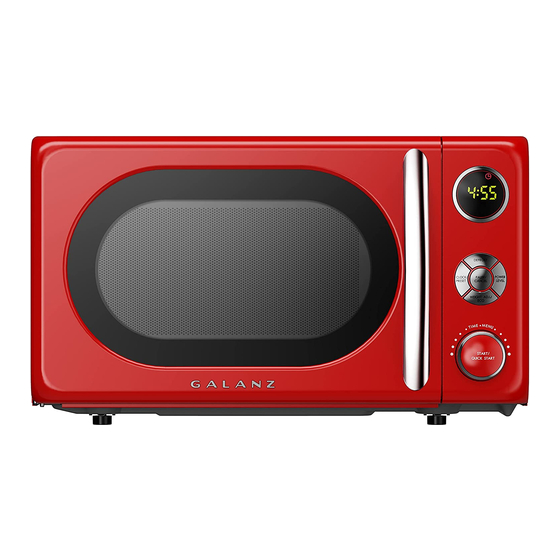
- Dial or knob models: Rare, but some compact or older units have a rotary dial.
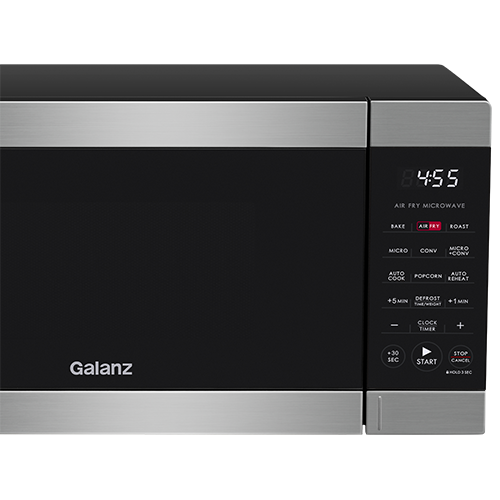
- Touchpad models: Feature a membrane keypad with dedicated buttons for clock functions.
- Button combinations: Some models require pressing two buttons together to access clock settings.
Here’s a quick comparison of common Galanz microwave display types:
| Display Type | How to Identify | Typical Clock Setting Method |
|---|---|---|
| Digital (LED/LCD) | Red or green numbers on a flat screen | Press ‘Clock’, enter time, press ‘Clock’ or ‘Start’ |
| Dial/Knob | Rotary dial instead of buttons | Usually no clock, or set by holding dial |
| Touchpad | Flat panel with labeled buttons | Button combination for clock, numbers to set time |
Knowing your microwave’s control type makes the process easier. If you’re unsure, check the user manual or look for a “Clock” button.
Credit: www.galanz.com
Step-by-step Guide: How To Change The Time On Your Galanz Microwave
Let’s go through the most common methods for changing the time on Galanz microwaves. This covers digital and touchpad models, which make up most Galanz units.
1. Locate The Clock Or Time Button
Most Galanz microwaves have a button labeled Clock or Time. Sometimes, it’s a secondary function on another button (look for small print below main labels). If there’s no obvious button, check for a combination like Stop/Reset + Start or consult your manual.
2. Prepare To Set The Time
- Make sure the microwave is plugged in and not running.
- If the display is off or flashing zeros, this usually means it’s ready for clock setting.
- If there is a child lock, deactivate it first (see troubleshooting section).
3. Setting The Time (standard Method)
Follow these common steps for digital/touchpad Galanz models:
- Press the Clock or Time button once.
- The display may blink or show “00: 00” or “–:–”.
- Enter the correct time using the number keypad.
- For 12: 30, press 1, 2, 3, 0 in sequence.
- Press Clock or Start to confirm.
- The display should stop blinking and show the new time.
Tip: Most Galanz microwaves use a 24-hour format (e.g., 13:00 for 1 PM). If your model supports a 12-hour clock, you may need to press the Clock button twice or press a separate AM/PM button.
4. Alternate Method: Using Other Buttons
Some models use different buttons if there’s no dedicated Clock button:
- Hold the Stop/Reset button for 3 seconds.
- When the display flashes, enter the time.
- Press Start or Stop/Reset again to save.
Check your specific model’s control panel for hints or symbols.
5. Confirm The Time Is Set
When you finish, the new time should show on the display (not blinking). If it returns to zero or keeps flashing, repeat the process, making sure each step is followed.
Non-obvious tip: Some microwaves will not allow clock setting if the door is open. Always close the door before starting.
How To Change The Time After A Power Outage
Galanz microwaves lose the clock time when unplugged or after a power failure. The process to reset is the same as above, but here are a few extra considerations:
- Wait for the microwave to finish its power-up cycle (few seconds).
- If the display shows “0: 00” or “88:88”, it’s in clock setting mode.
- Re-enter the time as soon as possible to avoid confusion.
Some advanced Galanz models have a small battery backup that keeps the clock running for a short period after a power cut, but this is not common.
How To Change The Time Format (12-hour Vs 24-hour)
Not all Galanz microwaves let you switch between 12-hour and 24-hour formats, but some advanced models do. Here’s how to check and change the format:
- Press and hold the Clock button for 3–5 seconds (microwave must be idle).
- The display will show “12Hr” or “24Hr”.
- Use the number pad or Clock button to switch formats.
- Confirm by pressing Start or Clock again.
- Enter the correct time in your chosen format.
If your microwave doesn’t support this, it will ignore these steps and just let you set the time.
Insider tip: If your clock shows “13:00” after you set it, it’s in 24-hour mode. If you want 1:00 PM in 12-hour mode, you’ll need to change formats first (if supported).
Troubleshooting: When You Can’t Set The Time
Sometimes, the clock won’t set as expected. Here are the most common issues and how to fix them:
Microwave Is Running
You cannot set the time while cooking or using a timed feature. Stop or reset the microwave first.
Child Lock Is On
Many Galanz models include a child lock feature. When active, it blocks changes to the clock and other functions.
- To turn off: Press and hold Stop/Cancel for 3–5 seconds until the lock symbol disappears.
Keypad Is Unresponsive
- Make sure the door is fully closed.
- Unplug the microwave for 30 seconds, then try again.
Wrong Time Keeps Showing
- Double-check that you used the correct format (12/24-hour).
- Make sure you pressed the final confirmation button.
Power Outage Issues
- Wait for the microwave to reset fully after power returns.
- Set the time again, as most Galanz microwaves do not remember the clock after losing power.
Advanced tip: On some models, if the keypad fails, a “soft reset” (unplug for 1 minute) can bring it back to normal.
Setting The Time On Specific Galanz Models
Here’s how to set the clock on a few popular Galanz microwaves. These examples cover solo, grill, and convection types.
Galanz Glcmka07ber-07 Retro Microwave
- Press Clock.
- Enter the time with the keypad (e.g., 0730 for 7: 30).
- Press Clock again to save.
Galanz Gswwa16s1sa10 3-in-1 Speedwave
- Press Clock once.
- Enter time using the number buttons.
- Press Start/+30 Sec to confirm.
Galanz Expresswave Sensor Microwave
- Press and hold Clock for 3 seconds to choose 12 or 24-hour format.
- Use the number pad to enter the correct time.
- Press Clock to confirm.
Galanz Countertop Model With No Clock Button
- Hold Stop/Cancel for 3–5 seconds.
- Enter the time when the display blinks.
- Press Start to confirm.
If your model is not listed, try the general methods above or check your manual.
Common Mistakes And How To Avoid Them
Many users make simple mistakes when setting the clock. Here’s what to watch for:
- Not confirming the time: Always press the final “Clock” or “Start” button.
- Wrong format: Entering “2 3 0” for 2:30 PM may result in “02:30” (2:30 AM) if your microwave uses 24-hour time.
- Skipping child lock deactivation: If buttons don’t respond, the child lock may be on.
- Inputting time while the microwave is running: Stop all cooking before setting the clock.
- Misreading the display: “13:00” is 1:00 PM in 24-hour mode.
- Not closing the door: Some microwaves won’t accept clock input with the door open.
Pro tip: If you set the wrong time, simply repeat the process to overwrite the previous setting.
How To Keep Your Galanz Microwave Clock Accurate
- Reset after power outages: The clock usually resets to zero.
- Check twice a year: Adjust for daylight saving time or seasonal changes.
- Avoid unplugging: If possible, keep your microwave plugged in.
- Battery backup: If your model has a backup battery, replace it as recommended.
Hidden insight: Some models drift by a few minutes per month. Check accuracy every few weeks, especially if you use your microwave as your main kitchen clock.
The Role Of The Clock In Galanz Microwave Functions
The microwave clock isn’t just for telling time. It interacts with other features:
- Auto-cook programs: Some need the clock to schedule delayed starts.
- Child lock timing: Certain locks work based on time-of-day.
- Energy-saving mode: Some microwaves dim or turn off the display when not in use, but the clock function remains.
- Timer and alarm features: These need an accurate clock to work properly.
Not setting the time can make these features unreliable or unusable.

Credit: www.youtube.com
What To Do If The Clock Still Won’t Set
Tried everything and the clock still won’t change? Here are your options:
- Check the user manual: Each model can have unique steps.
- Try a hard reset: Unplug for 2 minutes, then plug back in.
- Call Galanz support: Their team can walk you through advanced fixes.
- Firmware update: Rare, but some smart models may need an update via Wi-Fi or USB.
If your microwave is still under warranty, don’t try to open or repair it yourself. Instead, contact support.
Comparing Galanz Microwave Clock Features With Other Brands
How does Galanz stack up against other microwave brands for clock setting? Here’s a comparison of typical features:
| Feature | Galanz | Panasonic | Samsung |
|---|---|---|---|
| Dedicated Clock Button | Most models | Some models | Most models |
| 12/24-Hour Format Option | Advanced models | Yes | Yes |
| Power Outage Memory | Rare | Some models | Some models |
| Clock Used for Delayed Start | Yes | Yes | Yes |
Non-obvious insight: Galanz is competitive, but if you want a clock that survives power loss, check the product specs before buying.
Credit: www.manualslib.com
When To Call A Technician Or Replace The Microwave
If your Galanz microwave consistently fails to keep time or the clock feature stops working, it may be a sign of a deeper issue:
- Control board failure: The electronic board may be damaged.
- Keypad malfunction: Buttons may wear out over time.
- Display issues: The LED/LCD may not work properly.
If your microwave is out of warranty and repair costs are high, it might be time to replace it. Modern models often have better clock features, energy efficiency, and improved safety.
For safety and reliability, always use a qualified appliance technician for repairs. Never attempt to open or fix the microwave yourself, as it contains high-voltage components.
Practical Tips For Everyday Use
- Set reminders: Use your microwave’s timer for short tasks like making tea or timing rest periods for dough.
- Sync with other clocks: Align your microwave clock with your oven, wall clock, or phone for kitchen harmony.
- Check after cleaning: If you move or clean your microwave, make sure it’s plugged in and the clock is correct.
- Use as a backup: The microwave clock is a reliable backup if your main kitchen clock fails.
- Teach everyone: Show all family members how to set the clock, so anyone can fix it after a power cut.
Pro tip: Write down the steps and tape them inside a kitchen cabinet for quick reference.
Where To Find Your Model’s User Manual
If you don’t have your Galanz microwave manual, you can find it online:
- Visit the official Galanz website.
- Search for your model number (usually inside the microwave door).
- Download the PDF and look for the “Clock” or “Time” section.
You can also find helpful guides on Wikipedia for general microwave oven information.
Having your manual handy makes troubleshooting much easier.
Frequently Asked Questions
How Do I Set The Clock On A Galanz Microwave If There Is No Clock Button?
Some models use button combinations instead of a dedicated Clock button. Try holding the Stop/Cancel button for 3–5 seconds until the display flashes, then enter the time and press Start. If this doesn’t work, check your user manual or search your model number online.
Why Does My Galanz Microwave Clock Reset After A Power Outage?
Most Galanz microwaves do not have a backup battery for the clock, so any power interruption resets the time to zero or blank. You’ll need to reset the clock each time power is lost. Some high-end models have a short-term battery backup, but this is rare.
Can I Use My Galanz Microwave Without Setting The Time?
Yes, you can still cook and use basic functions without setting the clock. However, features like delayed start, auto-cook programs, or child lock timing may not work correctly. For full functionality, it’s best to set the time.
How Do I Change From 24-hour To 12-hour Format On My Galanz Microwave?
Press and hold the Clock button for 3–5 seconds until you see “12Hr” or “24Hr” on the display. Use the keypad to switch formats, then confirm with Clock or Start. If this does not work, your model may not support switching formats.
What Should I Do If The Clock Is Wrong Even After Setting It?
Double-check you are using the right format (AM/PM or 24-hour). Make sure you press the final confirmation button (usually Clock or Start). If the problem continues, unplug the microwave for 1–2 minutes and try again. If it still doesn’t set, contact Galanz customer service.
Setting the right time on your Galanz microwave is a simple task once you know the steps. With this complete guide, you’re ready to handle any clock issue—keeping your kitchen on schedule and your microwave working its best.