
Microwaves have become an essential part of daily life for many people. From reheating leftovers to making quick snacks, the microwave oven offers speed and convenience in the kitchen. But what happens when the microwave open button stops working? Suddenly, your routine is interrupted, and even simple tasks become frustrating. A stuck or broken open button is a common problem, but the good news is that you can often fix it yourself with some simple tools and guidance.
This article will guide you through everything you need to know about fixing a microwave open button. You’ll learn why the problem happens, how to safely diagnose it, and step-by-step solutions for different types of microwaves. Along the way, you’ll discover practical tips, common mistakes to avoid, and safety warnings that many beginners miss.
If you want your microwave door to pop open smoothly again, read on.
Understanding How The Microwave Open Button Works
Before you start fixing anything, it helps to know how the open button mechanism actually works. Most microwaves use a mechanical latch system. When you press the button, it pushes a lever inside, which unlatches the door so it can open. Some newer models use electronic touch controls, but the basic idea is the same: the button releases the door’s locking mechanism.
Here’s a simple breakdown of the main parts involved:
- Open button: The part you press on the outside.
- Actuator or lever: Transfers your press into movement inside the microwave.
- Latch hook: Holds the door closed.
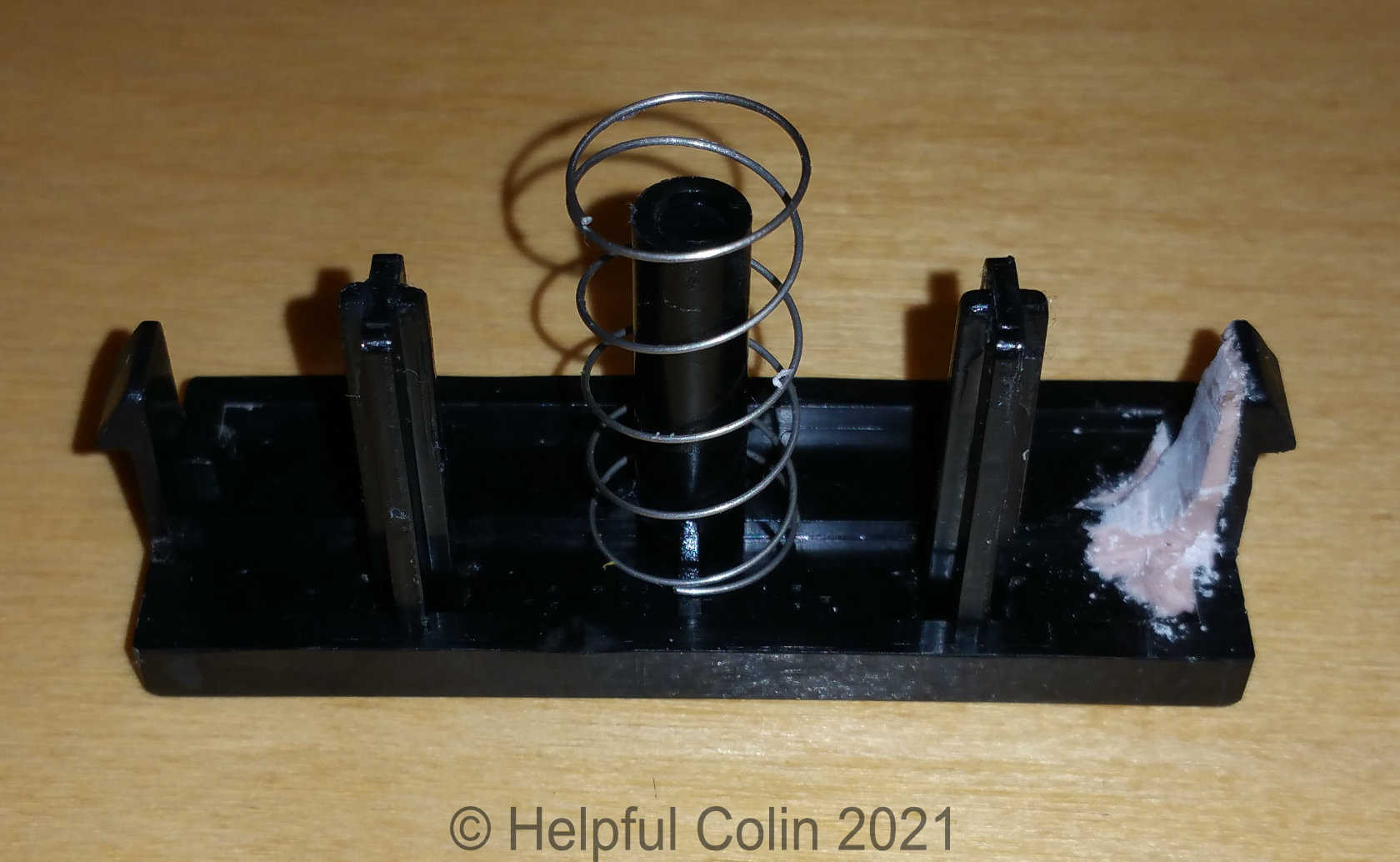
- Spring: Helps return the button to its original position.
- Door switches: Detect if the door is open or closed.
Problems can happen in any of these parts. The button might get stuck, the spring can break, or the latch might be misaligned. Sometimes, food debris or grease gets into the mechanism, causing it to jam.
Safety Precautions Before You Begin
Working with microwaves is different from other kitchen appliances. Even when unplugged, microwaves can store high voltage in their capacitors. Touching the wrong part can cause serious injury. Here are critical safety steps to follow:
- Unplug the microwave. Never work on a microwave that’s connected to power.
- Wait at least 30 minutes after unplugging to allow any stored electricity to discharge.
- Wear rubber gloves and use insulated tools if you need to touch any inner components.
- Avoid the high-voltage capacitor. If you see a large cylindrical or box-shaped part inside, do not touch it.
- Work in a well-lit area and keep children and pets away.
If you feel unsure about any step, it’s safer to call a professional technician. Never risk your safety for a DIY repair.
Diagnosing The Problem
Fixing the microwave open button starts with finding the exact cause. There are several possible reasons why your button isn’t working:
1. The Button Feels Stuck
If the button doesn’t move or feels tight, it may be jammed by food, dirt, or a broken spring.
2. The Button Moves, But The Door Doesn’t Open
This usually means the actuator or latch inside is not working properly. It could be misaligned, broken, or disconnected.
3. The Door Opens, But Only After Several Tries
This is a sign of a weak spring, worn parts, or a partially blocked latch.
4. The Button Is Loose Or Wobbly
A loose button often means the mounting clips or screws inside have come off.
5. The Button Works, But The Door Doesn’t Stay Closed
Sometimes, fixing the open button reveals another problem: the latch or door hooks are damaged.
How To Test Each Issue
- Visual check: Look for obvious dirt, cracks, or broken pieces around the button.
- Listen: Does it make a clicking noise when you press?
- Feel: Is the button stiff, loose, or spongy?
- Try opening with the power off: This rules out electrical issues.
If you’re not sure, take a photo or video as you test. This helps you remember how the parts fit together if you need to open the microwave.
Gathering The Right Tools And Materials
You don’t need a lot of tools for most microwave open button repairs. Here’s a list of what helps:
- Phillips and flathead screwdrivers
- Small pliers
- Cotton swabs
- Isopropyl alcohol or mild detergent
- Rubber gloves
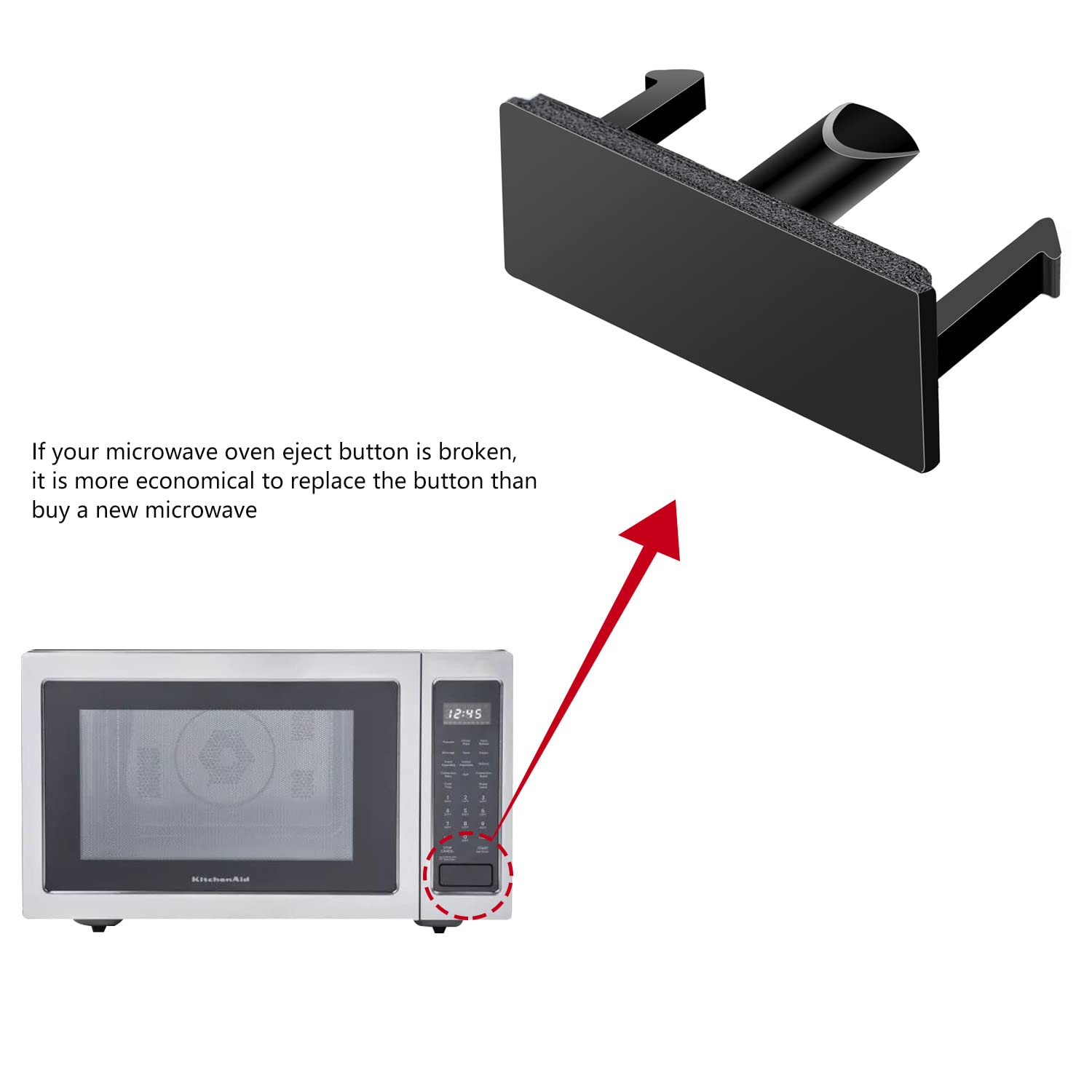
- Replacement parts (if needed, like springs or actuators)
- Flashlight for better visibility
If you have a service manual for your microwave, keep it nearby. Manuals often show diagrams for your specific model.
Step-by-step Fix: Mechanical Open Button
Most home microwaves use a mechanical button. Here’s how you can fix common problems with these:
Step 1: Unplug And Wait
Never skip this step. Unplug the microwave and wait 30 minutes. Double-check that the outlet is off.
Step 2: Remove The Microwave Case
Most microwaves have screws on the back and sometimes on the sides. Use a screwdriver to remove them. Carefully lift off the outer case. Some cases slide back and then up.
Tip: Keep all screws in a small bowl so you don’t lose them.
Step 3: Inspect The Button And Mechanism
Shine your flashlight inside. Look for the open button from the inside. You should see how it connects to a lever or actuator.
- Is there food, grease, or dirt?
- Are any parts bent, broken, or loose?
- Does the spring look stretched or out of place?
Step 4: Clean The Area
Use cotton swabs and isopropyl alcohol to clean around the button and latch area. Remove any crumbs, sticky spots, or grease. Even a small piece of debris can jam the mechanism.
Step 5: Check The Spring And Lever
Gently press the button from the inside and watch how the lever moves. If the spring has popped out, reattach it. If the lever is bent, straighten it with pliers.
Replacement Tip: Springs and levers are cheap and available online or at appliance repair shops. Bring the old part to match the size.
Step 6: Reassemble And Test
Put the case back on, insert the screws, and plug in the microwave. Test the open button several times. If it moves smoothly and the door pops open, you’ve fixed it.
Step-by-step Fix: Electronic Open Button
Some microwaves use a touch-sensitive open button. These are common in modern, high-end models.
Step 1: Unplug And Discharge
As before, unplug and wait. Touch-sensitive buttons usually connect to a small circuit board inside.
Step 2: Remove The Control Panel
You may need to remove screws holding the panel. Be gentle—do not force the panel as wires can be delicate.
Step 3: Inspect For Obvious Problems
- Are there burnt spots or broken wires?
- Does the button pad look damaged or sticky?
Step 4: Clean The Button Pad
Sometimes, sticky residue or moisture can stop a touch button from working. Use a soft cloth with a little isopropyl alcohol to clean the area.
Step 5: Check The Ribbon Cable
The button usually connects to the microwave with a ribbon cable. Make sure it is firmly inserted. Gently unplug and replug it to reset the connection.
Step 6: Replace Damaged Parts
If you see a cracked circuit board or burnt area, the panel may need to be replaced. Order the exact part for your model. Swapping control panels is usually a simple plug-and-play process.
Step 7: Reassemble And Test
Reattach the panel, plug in, and test the touch open button. It should respond instantly.
Fixing Common Specific Problems
Some open button problems are linked to the door or latch rather than the button itself. Here’s how to handle those:
1. Stuck Door
If the door won’t open at all, try gently pressing in on the door while pressing the button. This can relieve pressure on the latch.
2. Misaligned Latch
If the latch doesn’t catch or release, it may be bent. Use pliers to carefully bend it back. If it’s cracked, replacement is best.
3. Broken Button
If the button itself is cracked or missing, you’ll need a replacement. Remove the old button and snap or screw in the new one. Make sure it moves freely.
4. Weak Spring
If the door doesn’t pop open fully, the spring may be weak. Replace it with a new one of similar size and tension.
5. Dirty Mechanism
Clean all moving parts. Even small crumbs can cause trouble. Regular cleaning prevents future problems.
When To Call A Professional
Not every microwave open button problem can be fixed at home. If you find any of these, call a certified repair technician:
- Burnt smells or signs of melting plastic
- Broken circuit boards
- Loose wiring or exposed wires
- Repeated fuse blows after reassembly
Microwave ovens are powerful and can be dangerous if repaired incorrectly. Professional repair is often safer and sometimes covered by warranty.
Credit: helpfulcolin.com
Comparing Repair Vs. Replacement
Sometimes it’s worth asking: Should you fix your microwave or buy a new one? Here’s a quick comparison:
| Repair | Replacement |
|---|---|
| Low cost if the problem is simple | Higher upfront cost |
| Takes 1-2 hours for most fixes | Instant, if available in store |
| Good for newer, high-end models | Better for old or heavily damaged microwaves |
| Eco-friendly, less waste | May offer new features or efficiency |
If your microwave is less than 5 years old and the repair is minor, fixing is usually best. For older or heavily damaged units, replacement may save money long term.
How To Find The Right Replacement Parts
If you need a new button, spring, or actuator, here’s how to get the correct part:
- Check the model number. It’s usually on a sticker inside the door or on the back.
- Search online using your model number and part name (e.g., “Samsung microwave open button”).
- Visit appliance stores or repair shops with the old part for comparison.
- Read reviews and buy from reputable sellers.
- Compare prices and shipping times.
Here’s a simple table comparing sources for microwave parts:
| Source | Pros | Cons |
|---|---|---|
| Official brand stores | Guaranteed fit, reliable quality | Usually most expensive |
| Online marketplaces (e.g., Amazon, eBay) | Wide selection, fast shipping | Quality varies, watch for fakes |
| Local appliance shops | Expert advice, can inspect part | Limited selection, may need to order |
Always match part numbers and check return policies before buying.
Preventing Future Problems
Once you’ve fixed the open button, you want it to last. Here are some tips to keep it working smoothly:
- Clean the button area regularly with a soft cloth.
- Avoid slamming the door or pushing the button too hard.
- Don’t overload the microwave—heavy doors can stress the latch.
- Inspect the mechanism every few months for dirt or wear.
- Teach children proper use to prevent rough handling.
A little care can add years to your microwave’s life.
Common Mistakes To Avoid
Many beginners make simple errors when trying to fix a microwave open button. Here’s what to watch out for:
- Forgetting to unplug before opening the case.
- Losing screws or mixing up their positions.
- Forcing parts—if something won’t move, check for hidden screws or clips.
- Touching the high-voltage capacitor. Always stay away from large capacitors inside.
- Using too much force when cleaning or bending parts.
- Buying the wrong part—double-check your model number.
Take your time, stay organized, and don’t skip safety steps.
Non-obvious Insights For A Smooth Repair
Most guides skip a few critical tips that make repairs easier:
- Photograph each step. Use your phone to take pictures as you go. This makes it much easier to remember how parts fit together.
- Test the button with the case off (but power unplugged). You can gently press the mechanism by hand to see if it moves freely.
- Check the door alignment. Sometimes, a dropped or banged microwave will bend the door or hinges, not just the button. Adjust the hinges if needed.
- Lubricate moving parts. A tiny drop of food-safe lubricant on the latch or button can make movement smoother and reduce wear.
- Look for manufacturer recalls. Some brands have known issues with open buttons and may offer free repairs.
Real-world Example: Fixing A Jammed Button
Let’s walk through a real-life scenario:
Jane noticed her Panasonic microwave door wouldn’t open unless she pressed the button very hard. After unplugging and removing the outer case, she found a piece of popcorn wedged behind the actuator. She used tweezers to remove the debris, cleaned the area with alcohol, and added a tiny bit of lubricant. After reassembling, the button worked like new.
Many problems are as simple as this—but sometimes, two or more parts are involved. Don’t be surprised if you need to clean, adjust, and replace a spring or lever.
Credit: www.amazon.com
Cost Of Repair Vs. Service Call
How much does it cost to fix a microwave open button yourself? Here’s a rough estimate:
| Repair Type | DIY Cost | Professional Cost |
|---|---|---|
| Cleaning and adjustment | $0-$5 (cleaners, tools) | $50-$100 (service fee) |
| Spring or button replacement | $5-$20 (parts) | $80-$150 (parts + labor) |
| Full latch assembly | $20-$40 (parts) | $100-$200 (parts + labor) |
DIY repair saves money but takes more time and care.
Is It Worth Fixing An Old Microwave?
If your microwave is more than 8-10 years old, consider energy use and safety. Newer models are often more efficient and have better safety features. If you’ve already repaired your microwave several times, replacement may be the smarter long-term choice.
However, for minor problems with newer units, fixing the open button is almost always worthwhile.

Credit: www.youtube.com
Where To Learn More About Microwave Repair
If you want to get deeper into appliance repair, plenty of resources are available. The manufacturer’s website often has diagrams and troubleshooting steps. Online forums and video tutorials can show step-by-step fixes for your exact model.
For a deeper understanding of microwave technology and safety, the Wikipedia Microwave Oven Page provides a great starting point.
Frequently Asked Questions
How Do I Know If My Microwave Open Button Problem Is Electrical Or Mechanical?
If your microwave uses a mechanical button (it clicks or moves physically), the issue is probably mechanical—like a jammed latch or broken spring. If it’s a touch-sensitive button and doesn’t respond at all, the problem could be with the circuit board or wiring.
Testing with the power off and visually inspecting the mechanism can help you decide.
Can I Fix A Microwave Open Button Without Opening The Case?
Sometimes. If the problem is caused by dirt or food around the button, cleaning the area from outside may help. But for most issues—like broken springs, levers, or internal misalignment—you’ll need to open the case. Always unplug first.
Is It Dangerous To Repair A Microwave At Home?
There are risks because microwaves store high voltage even when unplugged. Never touch the high-voltage capacitor or wiring inside. If you’re careful, follow safety guidelines, and only work on mechanical parts, it’s generally safe. If you feel unsure, hire a technician.
Where Can I Buy A Replacement Microwave Open Button?
Replacement parts are available from official brand websites, local appliance stores, and online marketplaces like Amazon or eBay. Always use your microwave’s model number to get the correct part.
How Often Should I Clean The Microwave Open Button Area?
It’s a good idea to wipe the button and door area once a week, especially if you use the microwave a lot or have children. Regular cleaning prevents dirt and grease from building up and causing problems.
Fixing a microwave open button may seem challenging, but with care and the right information, it’s a manageable job for most people. By following these steps, you’ll restore convenience to your kitchen and learn new skills along the way.