
Every coffee lover knows the joy of a perfect cup brewed at home. But when the clean light on your Braun coffee maker comes on and stays on, it can turn your morning routine into a frustrating experience. The light is there to help you, but if you’re unsure how to turn it off, it can feel more like a problem than a solution. Many people try to ignore it, but this can lead to weaker coffee, strange tastes, or even a broken machine over time.
This guide will walk you through everything you need to know to turn off the clean light on your Braun coffee maker. You’ll discover why the light comes on, what it means for your coffee, and step-by-step instructions for every Braun model.
You’ll also learn what to do if the light stays on after cleaning, and how to keep your coffee maker in top condition. Whether you’re new to Braun or have been using their machines for years, you’ll find practical advice, clear explanations, and answers to common questions.
Understanding The Clean Light On Braun Coffee Makers
The clean light on Braun coffee makers is more than just a reminder. It’s a built-in warning system that tells you when your machine needs attention. But what does it really mean, and why is it so important?
What Triggers The Clean Light?
Most Braun coffee makers have sensors that monitor the machine’s performance. When the inside of your coffee maker builds up mineral deposits (often called scale), the sensors detect that it’s harder for water to flow or heat up correctly. The clean light turns on to alert you. Sometimes, it’s set by the number of brew cycles, not just the amount of scale. Either way, it’s a sign your coffee maker needs a thorough cleaning.
Many people don’t realize that even if you use bottled or filtered water, some minerals can still collect inside the machine over time. The sensors are designed to notice small changes in flow and temperature, so the light might come on even if you think your water is “soft.
” One less obvious reason for the clean light to appear is using the coffee maker for brewing tea or flavored drinks—these can leave residues that confuse the sensors.
Why You Shouldn’t Ignore The Clean Light
Ignoring the clean light can lead to several problems:
- Slower brewing times
- Weaker or bitter-tasting coffee
- Shorter machine lifespan
- Possible breakdowns or leaks
The clean light helps you avoid these issues by reminding you to descale the machine. Descaling means removing mineral buildup inside, which restores water flow and heating.
Many users are surprised to learn that scale can build up even if they don’t notice any taste difference right away. Over time, the heating element can work less efficiently, which means your coffee isn’t as hot. If the clean light is ignored for many cycles, the machine may even shut itself off or stop brewing as a safety measure.
How The Clean Light Works
When the clean light comes on, it doesn’t turn off by itself. You need to run a special cleaning cycle to clear the buildup and reset the light. If you just unplug the machine, the light usually stays on. That’s why following the correct steps is important.
For some models, the clean light may flash instead of staying solid. A flashing light usually means the cleaning cycle has started but not finished. If you unplug your coffee maker during the cycle, you’ll need to start over. This is a detail many users miss, and it’s a common reason for complaints about the clean light staying on.
How To Turn Off The Clean Light: Step-by-step Guide
Turning off the clean light is not as simple as pressing a button. You need to do a proper cleaning cycle (descaling). The process is easy, but you must follow the steps for your Braun coffee maker model. Here’s a complete guide for every situation.
Step 1: Gather Your Supplies
Before starting, get the following:
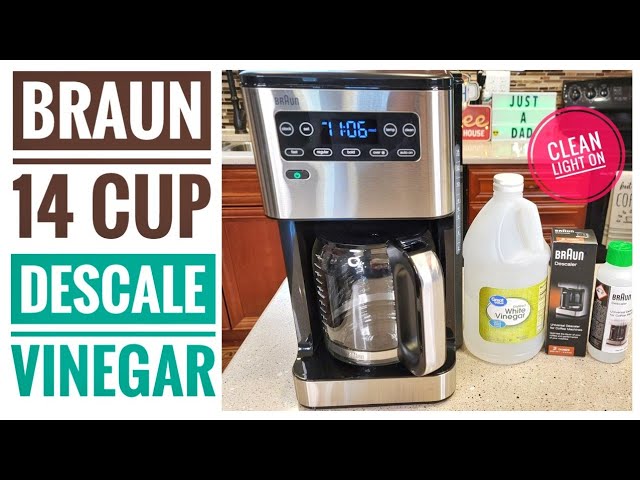
- Descaling solution (Braun recommends their own, but citric acid or white vinegar also works)
- Fresh water
- Empty carafe
- Clean cloth (for wiping)
Do not use harsh chemicals like bleach. Only use solutions meant for coffee makers.
If you have hard water, consider buying an extra bottle of descaler to keep on hand. Some users run out and try to substitute with soap or other cleaners—don’t do this. Soap can damage the machine and won’t descale properly.
Step 2: Prepare The Coffee Maker
- Make sure the coffee maker is off and cool.
- Empty the water tank and carafe.
- Remove any coffee grounds from the filter basket.
For better results, take a moment to wash the carafe and basket with warm water. This removes oils that can interfere with the cleaning solution. Wipe the outside of the water tank, especially around the lid, to keep dust and mold away.
Step 3: Add Descaling Solution
Follow the instructions on your descaling solution. For Braun’s own brand:
- Mix the descaler with water as directed (usually 1: 4 ratio).
- Pour the mixture into the water tank.
If using white vinegar, use equal parts vinegar and water.
One beginner mistake is to pour the solution directly into the filter basket. Always pour it into the water tank, just like you would with regular water. If you’re using citric acid, dissolve about 1–2 tablespoons in a full tank of water.
Step 4: Start The Cleaning Cycle
This step is where most people get confused. The cleaning cycle is not just a normal brew. You must activate the special cleaning program.
For Braun Brewsense, Multiserve, And Pureflavor Models
- Plug in the machine.
- Press and hold the CLEAN button until the light flashes (about 3 seconds).
- The cleaning cycle will start automatically. The process usually takes 45-50 minutes.
- The machine will run the solution through, then pause several times. Let it finish completely.
Don’t worry if the machine stops and starts during the process. It’s normal for the cleaning cycle to “rest” and soak. If you hear the machine making different sounds, it’s just the pump moving at different speeds to clear buildup.
For Braun Kf7000, Kf7170, And Similar Models
- Fill the water tank with descaler mixture.
- Press and hold the CLEAN button until you hear a beep or see a flashing light.
- The clean cycle begins. Wait until it finishes (light will usually turn off or stop flashing).
Some models will beep at the end of the cycle. If you’re unsure, wait until the clean light changes or turns off before unplugging.
For Other Or Older Braun Models
Check the manual for your model. Usually, the process is similar: hold the clean button until the cycle starts.
If you don’t have your manual, Braun’s website has copies for download. Search for your model number and look for cleaning instructions.
Step 5: Rinse The Machine
After the cleaning cycle:
- Discard the used solution from the carafe.
- Fill the water tank with fresh, clean water.
- Run a full brew cycle (without coffee) to rinse out any leftover descaler.
- Repeat the rinse if you still smell vinegar or cleaner.
This step is important. Some users skip it and end up with sour-tasting coffee for days. It’s better to run two rinse cycles than to risk leftover chemicals. If you see suds or smell anything other than clean water, rinse again.
Step 6: Check The Clean Light
After a proper cleaning cycle, the clean light should turn off automatically. If it’s still on, see the troubleshooting section below.
If the light is still on, try unplugging the machine for a minute and plugging it back in. For some stubborn cases, the cycle may need to be repeated with a stronger solution (use less water in the mix).
What If The Clean Light Stays On?
Sometimes, the clean light does not turn off even after you’ve done a cleaning cycle. This is a common issue, and it usually means one of two things:
- The cleaning cycle was not completed correctly.
- The machine did not detect the cleaning process.
Here’s what to do:
1. Make Sure You Used The Right Cycle
If you just ran a normal brew with vinegar, the clean light will not turn off. You must use the special cleaning mode. Always press and hold the clean button until the cycle starts.
Some users try to trick the machine by running multiple “brew” cycles with vinegar. This won’t work. The sensors look for specific patterns during the clean cycle, like pauses and water flow speed.
2. Repeat The Cleaning Process
Sometimes, heavy buildup means the first cleaning was not enough. Repeat steps 3–6 above. Make sure you let the cycle finish (don’t interrupt it).
If you live in an area with very hard water, you might need to clean twice in a row. If you’ve never descaled before and the light is flashing, it’s a sign of heavy buildup. Don’t be afraid to use a second batch of solution.
3. Reset The Coffee Maker
For some Braun models, you can try a manual reset:
- Unplug the coffee maker for 5 minutes.
- Plug back in and see if the light is gone.
- If not, run the cleaning cycle again.
A manual reset rarely fixes the issue if there’s real buildup. However, it can help if the light is stuck due to a power glitch.
4. Check For Sensor Issues
If the light still stays on after several tries, the sensor may be dirty or faulty. Wipe down the water tank and surrounding area. If nothing works, contact Braun support.
Some advanced users gently clean the sensor area with a cotton swab, but this isn’t necessary for most people. Never use sharp objects or cleaners near the sensor.
Cleaning Frequency And Maintenance Tips
Regular maintenance is the key to a long-lasting coffee maker and great tasting coffee. Here’s how often you should clean and what else to do.
How Often To Clean
- Descale (clean cycle): Every 1–3 months, depending on your water hardness and use.
- Rinse: After every brew.
- Deep clean: Every 3–6 months, even if the clean light is off.
If you use hard water, clean more often. If you use filtered water, you may go longer.
A handy way to remember: if you brew daily with tap water, plan to descale every month. If you only brew on weekends, every 2–3 months is enough. Some users set a calendar reminder to avoid forgetting.
Maintenance Checklist
- Wipe the exterior weekly.
- Clean the carafe and basket after every use.
- Change water filters as recommended (usually every 2 months).
- Check the clean light regularly.
Many people forget to change the water filter. A clogged filter can reduce water flow and cause the clean light to come on early. Always buy the correct filter for your model.
Why Descaling Matters
Mineral buildup is invisible, but it can clog pipes, slow brewing, and ruin taste. Descaling keeps water flowing and coffee tasting fresh.
One non-obvious benefit: regular descaling can help your machine heat up faster, which saves energy and makes for hotter coffee. Even if you don’t notice problems, regular maintenance prevents costly repairs.
Comparing Cleaning Methods For Braun Coffee Makers
There are several ways to descale your Braun coffee maker. Each method has pros and cons. Here’s a comparison to help you choose:
| Cleaning Method | Effectiveness | Safety | Cost | Odor/Taste After |
|---|---|---|---|---|
| Braun Descaling Solution | Very High | Safe (designed for machine) | Medium | None |
| White Vinegar | High | Safe | Low | Sometimes lingers |
| Citric Acid | High | Safe | Low | Minimal |
| Other Brand Solutions | Varies | Usually Safe | Medium/High | None |
Insight: Braun’s own solution is optimized for their sensors, so it is most likely to turn off the clean light reliably.
Another detail: citric acid is a good eco-friendly option. It’s odorless and easy to rinse, which is useful if you’re sensitive to vinegar smells. However, always dissolve it completely before use.
How Water Type Affects Cleaning Needs
Not all water is the same. Hard water contains more minerals that cause buildup.
| Water Type | Cleaning Frequency Needed | Common in These Areas |
|---|---|---|
| Hard water | Every 1-2 months | Midwest US, some Europe, Australia |
| Soft water | Every 3 months | Pacific Northwest US, Japan |
| Filtered water | Every 4+ months | Using home water filter |
If you’re not sure about your water, check with your local supplier or try a home test kit.
Non-obvious tip: If you move to a new city, the water may be harder or softer than you’re used to. Adjust your cleaning schedule accordingly. If you notice white spots in your kettle or on dishes, you likely have hard water.
Credit: www.thekitchn.com
Mistakes To Avoid When Turning Off The Clean Light
Many people make simple mistakes that keep the clean light on or harm the coffee maker. Here’s what to avoid:
- Using regular brew mode instead of clean mode. The machine will not reset the light if you just brew vinegar through it.
- Interrupting the cleaning cycle. If you stop it early, the sensors do not recognize the cleaning.
- Forgetting to rinse. Leftover descaler can taste bad or damage parts.
- Using harsh chemicals. Never use bleach, ammonia, or other cleaners not made for coffee makers.
- Ignoring repeated clean light warnings. This can lead to machine breakdown or leaks.
Pro tip: Always let the cleaning cycle finish completely, even if you think it’s taking too long.
If you’re in a hurry, it’s better to wait and clean the machine when you have time. Rushing the process can lead to more problems later.
Braun Coffee Maker Models: Cleaning And Reset Differences
Braun makes several types of coffee makers. While most are similar, some have unique features. Here’s a quick overview:
| Model Series | Clean Button Location | Cleaning Cycle Start | Light Turns Off Automatically? |
|---|---|---|---|
| BrewSense (KF7000, 7000BK, 7170, 7150) | Front panel | Press & hold CLEAN | Yes |
| MultiServe (KF9050, KF9150) | Top panel | Press & hold CLEAN | Yes |
| PureFlavor | Side/front | Press & hold CLEAN | Yes |
| Older Braun Models | Varies | May require extra steps | Sometimes manual reset |
Always check your user manual if you’re unsure. You can find manuals on the official Braun website or contact their support.
Some older models have a “calc” button instead of “clean. ” The process is similar, but you may need to press two buttons at once or use a different sequence to reset the light.
Credit: www.youtube.com
Common Questions About Braun Coffee Maker Cleaning
Many users have similar questions when dealing with the clean light. Here are some clear answers.
Does The Clean Light Mean My Coffee Maker Is Broken?
No, the clean light is just a warning. It means scale buildup has reached a level where cleaning is needed. If you clean and reset as described, your coffee maker will work like new.
Can I Use Any Descaler?
Braun recommends their own solution. However, white vinegar or citric acid also works. Just make sure to rinse thoroughly to avoid any taste or smell.
If you try a new descaler brand, always check the label for compatibility with Braun machines. Some generic products are too strong or too weak.
How Long Does The Cleaning Cycle Take?
Most Braun models need 45–50 minutes for a full cleaning cycle. This is normal, as the machine runs slowly to dissolve scale.
If your cycle finishes in less than 20 minutes, something went wrong. Try again and make sure you used enough solution.
Is It Safe To Use The Coffee Maker With The Clean Light On?
You can use it, but it’s not recommended. Coffee quality will drop, and you risk long-term damage.
Over time, ignoring the light means repairs may not be covered by warranty.
What If I Lost My Manual?
You can find manuals for all Braun models at the official Braun website. Search by model number for the correct instructions.
Practical Tips For A Spotless Coffee Maker
- Use filtered water if possible to slow down scale buildup.
- Wipe the water tank and exterior every week to prevent mold and stains.
- Store your coffee maker in a dry place to avoid moisture buildup.
- Run a rinse cycle (just water, no coffee) after using flavored coffees or syrups.
If your machine smells musty after vacation, run a rinse cycle with a little lemon juice, then rinse with water. It’s a safe way to refresh the machine without harsh chemicals.
When To Call For Service
If you’ve tried all the steps above and the clean light won’t turn off, it may be time to call Braun customer service. Other signs you need help:
- Machine leaks or makes loud noises during brewing
- Buttons don’t respond
- Clean light is flashing or different color
Braun’s support team can help you diagnose sensor issues or arrange repairs.
Don’t attempt to open or repair the machine yourself—this can void your warranty and make things worse.
Where To Buy Braun Descaling Solution
You can find the official Braun descaling solution online and in many stores. Buying the right descaler ensures the sensors work correctly and may keep your warranty valid. For more details, visit the official Braun website or stores like Braun Household.
Stores like major supermarkets, home stores, and even some coffee shops carry Braun-approved solutions. Having a bottle ready at home means you’ll never have to delay cleaning.

Credit: manuals.plus
Frequently Asked Questions
How Do I Know When To Clean My Braun Coffee Maker?
The clean light will turn on when it’s time to descale. You may also notice slower brewing or poor taste. If you use hard water, clean more often.
Can I Turn Off The Clean Light Without Cleaning?
No, you must run the full cleaning cycle in “clean” mode. The light is designed to reset only after this process is complete.
Why Does The Clean Light Come Back Quickly After I Clean?
If the light returns soon, your water may be very hard, or the cycle was incomplete. Try cleaning again and always rinse thoroughly.
What’s The Best Descaling Solution For Braun Coffee Makers?
Braun’s own solution is best, but white vinegar or citric acid works too. Always rinse well to avoid tastes or smells.
Is It Safe To Use Vinegar To Descale My Braun Coffee Maker?
Yes, vinegar is safe and effective. Mix equal parts vinegar and water. Rinse with fresh water 2-3 times after cleaning.
Great coffee starts with a clean machine. By understanding what the clean light means and following these steps, you can keep your Braun coffee maker working like new. With regular care, you’ll enjoy delicious coffee every day—without frustration or guesswork.