
Lighting up your pool at night can turn an ordinary swim into something magical. The right pool light does more than just help you see—it makes your backyard look beautiful and keeps everyone safe. But if you’ve never switched on a pool light before, it can feel confusing.
There are different types of pool lights, different control panels, and even some safety steps you must follow. Whether your pool light is old or new, manual or remote-controlled, it’s important to know the right way to turn it on.
This guide will walk you through everything you need to know, step by step. You’ll learn about common pool light types, how to find and use the switch, and what to do if your pool light doesn’t turn on. We’ll also cover important safety tips and maintenance ideas, so your pool stays bright and safe for years.
Even if you’re a beginner, you’ll find clear explanations, real-life examples, and practical advice that most guides miss. By the end, you’ll have the confidence to handle your pool light like a pro.
Understanding Pool Light Basics
Before you try to turn on a pool light, it helps to know what kind of light you have and how it works. Pools use different types of lights, and each can have its own switch, power source, and control method.
Main Types Of Pool Lights
- Incandescent lights: These are the classic pool lights. They use a standard bulb, like in an old lamp. They’re bright but use more energy and don’t last as long as other types.
- Halogen lights: Halogen bulbs are a bit more efficient than incandescent. They make a clear, bright light but also generate heat.
- LED lights: LED pool lights are popular because they use less energy and last much longer. Many can change colors and be controlled by remote or smartphone.
- Fiber optic lights: These use a cable to shine light into the pool. The actual bulb is outside the water, making them safer and easier to service.
How Pool Lights Are Powered
Most pool lights are wired directly into the pool’s electrical system. Some are connected to a dedicated switch near the pool, while others are part of the main house electrical panel. Modern pools might even have lights controlled by a smartphone app or wireless remote.
Common Control Locations
- Near the pool equipment pad: Many pools have a switch next to the pump and filter.
- Inside the house: Some lights connect to a switch by the back door or in the garage.
- On a control panel: Newer pools may have a digital panel, sometimes with a touchscreen.
- Remote controls or apps: Many LED systems let you control lights wirelessly.
Knowing your light type and where the controls are will help you turn it on safely and quickly.
Safety First: What You Must Check Before Turning On
Electricity and water can be a dangerous mix if you’re not careful. Always take safety seriously before trying to turn on your pool light.
Check For Water In The Light Fixture
Before switching on, look through the pool water at the light. If you see bubbles, fog, or water inside the lens, don’t turn it on. This can cause a short circuit or even an electric shock. Call a pool technician if you see water inside.
Inspect The Area For Damage
Walk around the pool and check:
- The light fixture for cracks or broken glass
- Loose or exposed wires near the pool
- The switch or control panel for signs of damage
If you see any damage, do not use the light until it’s fixed.
Know Where Your Circuit Breaker Is
It’s important to know how to cut power to your pool light quickly. Locate your pool’s circuit breaker box before you start. Most are labeled “Pool Light” or similar. If something goes wrong, you’ll need to turn off the breaker right away.
Never Touch Electrical Parts When Wet
This sounds obvious, but it’s easy to forget. Dry your hands completely before touching any switch, panel, or remote control.
Pro Insight: Many people overlook the ground fault circuit interrupter (GFCI). This is a safety device that cuts electricity if there’s a problem. Make sure your pool light is on a GFCI circuit. Press the “test” and “reset” buttons to check that it’s working before using the light.
Step-by-step: How To Turn On A Pool Light
Turning on your pool light is usually simple, but the exact steps depend on your setup. Here’s a complete guide for the most common situations.
If You Have A Manual Switch
Most traditional pools use a simple wall switch.
- Find the switch: Look near the pool equipment, inside the house, or on the back patio. It’s often labeled “Pool Light.”
- Check the breaker: Make sure the pool light breaker is ON. If it’s off, flip it on.
- Dry your hands: Before touching the switch, make sure your hands are dry.
- Flip the switch ON: Listen for a click or look for a small pilot light.
- Check the pool: Walk outside and see if the light is shining underwater.
If the light doesn’t come on, don’t keep flipping the switch. Move to the troubleshooting section below.
Using A Control Panel
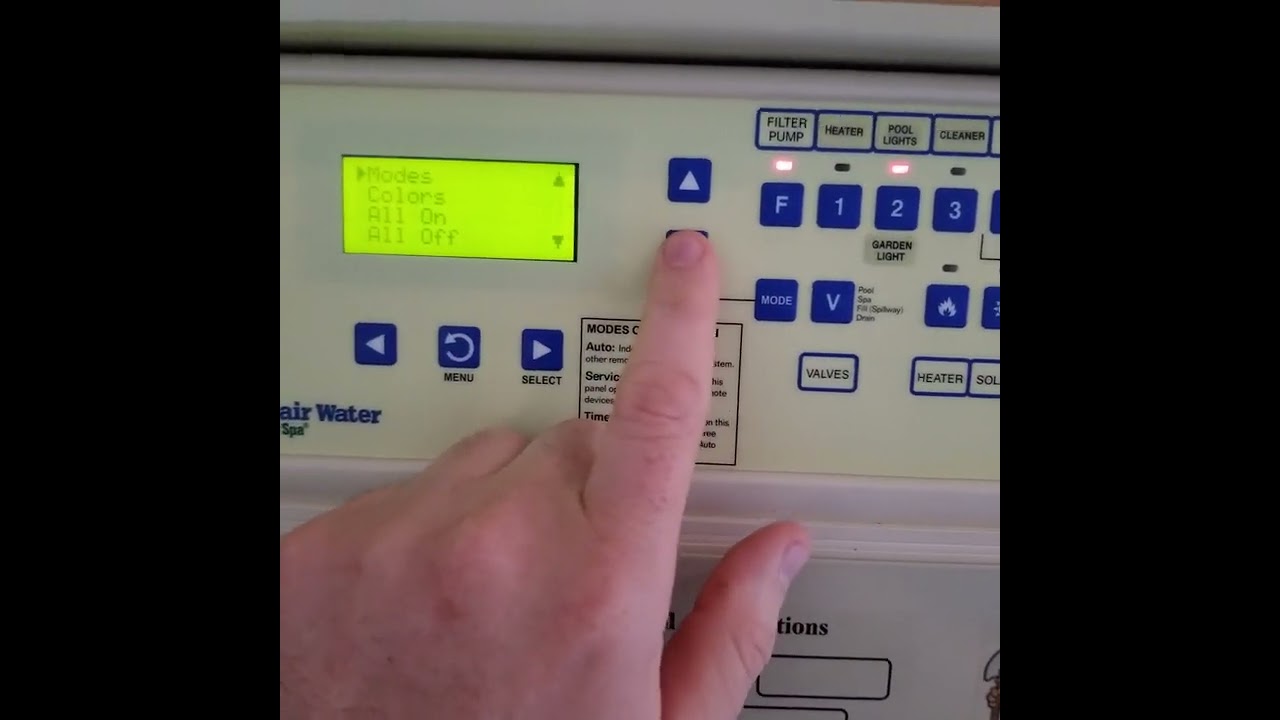
Newer pools may have a digital control panel.
- Locate the panel: This could be near the equipment pad or inside the house.
- Turn on the system power: Make sure the panel is powered up.
- Select ‘Pool Light’ on the menu: Use the touchscreen or buttons.
- Choose the mode: Some panels let you pick brightness or color.
- Press ‘ON’: Wait a few seconds for the light to activate.
Some panels have timers. If your light doesn’t turn on, check if a timer is set for later.
Using A Remote Control Or Smartphone App
LED pool lights often work with a wireless remote or app.
- Check the remote batteries: Replace if weak.
- Open the app on your phone: Make sure your phone is connected to the pool’s WiFi or Bluetooth.
- Select your pool light: Some apps control several devices.
- Tap ‘ON’ or pick a color: Wait for the light to respond.
Tip: Most remotes have a short range (20–40 feet). Stand close to the pool equipment if the light doesn’t respond.
For Fiber Optic Pool Lights
Fiber optic pool lights have a special power box.
- Find the illuminator box: Usually near the pool equipment.
- Turn on the box switch: This sends light down the fiber cable into the pool.
- Adjust color wheel or brightness: Some boxes have color wheels you can turn.
Fiber optic systems are rare in new pools but common in older ones.
What To Do If Your Pool Light Won’t Turn On
Sometimes, you do everything right but the pool stays dark. Here’s how to quickly find and solve the problem.
Common Reasons A Pool Light Won’t Turn On
- Tripped breaker: The circuit breaker may have flipped off.
- Burned-out bulb: Pool light bulbs wear out over time.
- Loose wire: Vibration or weather can loosen connections.
- Faulty GFCI: If the GFCI trips, the light loses power.
- Remote control issues: Battery dead or out of range.
- Timer conflict: The light may be set to turn on at a different time.
Step-by-step Troubleshooting
- Check the breaker: Go to your breaker box and look for a tripped switch. If it’s off, flip it on. If it keeps flipping, call an electrician.
- Test the GFCI: Press “reset” on the GFCI outlet. If it won’t stay on, there’s a problem in the wiring or light.
- Try a different control: If you use a remote, try the manual switch. If the app doesn’t work, reboot your phone.
- Look for signs of water or damage: If you see water in the light or cracks, stop and call a pro.
Non-obvious insight: Many pool lights have a hidden fuse in the junction box. If everything else looks fine, ask your pool service if your model has a fuse to check.
Credit: www.youtube.com
Important Pool Light Safety Tips
Turning on the pool light is just the beginning. Keeping your pool safe and well-lit requires a few good habits.
Never Swim With A Broken Pool Light
If you see flickering, hear buzzing, or notice the light going on and off, don’t swim until it’s fixed. Faulty lights can leak electricity into the water.
Test Your Gfci Monthly
GFCI outlets and breakers protect against shock. Press the “test” button every month. If the pool light goes off and comes back on when you press “reset,” your GFCI is working.
Only Use Pool-rated Bulbs
Never replace a pool light bulb with a regular house bulb. Pool lights are special for water use and must be sealed tight.
Hire A Professional For Repairs
Even if you’re handy, working with electricity near water is risky. If you need to replace bulbs, fix wires, or repair the fixture, call a licensed pool electrician.
Don’t Overload The Circuit
Some people try to connect extra lights or devices to the pool light circuit. This can cause overheating or a fire. Only use the light as designed.
Comparing Pool Light Types
If you’re not sure what kind of pool light you have—or want to upgrade—this comparison will help you see the differences.
| Type | Brightness | Energy Use | Lifespan | Special Features |
|---|---|---|---|---|
| Incandescent | Good | High | ~1,000 hours | Low cost |
| Halogen | Very Good | Medium | ~2,000 hours | Clear light |
| LED | Excellent | Low | ~30,000 hours | Color change, remote control |
| Fiber Optic | Good | Low | ~10,000 hours | Safe, easy service |
Experience-based tip: Many pool owners don’t realize how much energy they can save by switching to LED. Over five years, an LED pool light can cut power costs by up to 80% compared to incandescent.
How To Find Your Pool Light Switch
Locating the right switch is often the hardest part, especially if you just moved into a new house.
Common Places To Look
- Near the pool equipment: Look for a box or outdoor switch by the pump and filter.
- Patio or porch wall: Many homes have a labeled switch by the door to the backyard.
- Inside the garage: Sometimes the switch is in the garage, near the door to the yard.
- Main breaker panel: Rare, but some pools are wired directly to a breaker.
How To Identify The Right Switch
- Labels: Most switches are labeled “Pool Light.” If not, look for a switch that doesn’t control anything else.
- Test in daylight: If you’re not sure, flip switches one by one and check the pool.
- Ask previous owners: If you’re new to the home, ask the last owner or your pool service.
Non-obvious insight: If you have more than one pool light (for example, in a spa or waterfall), you may have a separate switch for each light.
Using Timers And Automation Systems
Many modern pools come with timers or automation systems that control the pool light and other features.
How Timers Work
Timers turn your pool light on and off automatically at set times.
- Mechanical timers: Set with pins or dials. Reliable but basic.
- Digital timers: Program with buttons or a touchscreen. Often part of a bigger panel.
How To Set A Timer
- Locate the timer: It could be in a gray box by the pool or built into the control panel.
- Set the ON time: Choose when you want the light to turn on.
- Set the OFF time: Set when the light should go off.
- Test the timer: Make sure the light responds at the right time.
Using Automation Systems
Advanced pools may use automation panels like Pentair IntelliTouch or Jandy Aqualink. These control lights, pumps, and heaters from one place—or even your phone.
- Use the menu to select “Lights.”
- Pick a color or mode if you have LEDs.
- Schedule lighting for parties or safety.
Example: If you’re hosting a pool party at 8 pm, you can program your lights to turn on automatically at sunset.

Credit: www.reddit.com
Pool Light Maintenance: Keeping It Working
Turning on the pool light is easy—if you keep it in good shape. Regular maintenance prevents problems and keeps your pool safe.
Clean The Lens
Over time, dirt, algae, or calcium can build up on the light lens. Clean it every few months with a soft brush or cloth. Never use harsh chemicals.
Check The Seal And Gasket
Pool lights have a rubber gasket to keep water out. If you see fog inside the lens, the gasket may be old or cracked. Replace it right away to avoid leaks.
Replace Burned-out Bulbs Quickly
A burned-out bulb is more than just dark—it can let water in and damage the fixture. Change it as soon as possible, but always turn off the breaker first.
Watch For Flickering
Flickering means a loose wire, bad bulb, or electrical problem. Don’t ignore it—fix the problem before using the light again.
Professional Service
Have a licensed pool electrician check your pool lighting system every 1–2 years. They can spot hidden problems and keep your pool up to code.
Upgrading Your Pool Light: Is It Worth It?
If your pool light is old, dim, or always breaking, you might wonder if it’s time to upgrade. Here’s a quick comparison to help you decide.
| Feature | Old Incandescent | Modern LED |
|---|---|---|
| Energy use | High | Very low |
| Color options | White only | Multiple colors |
| Control method | Manual switch | Remote/app |
| Lifespan | 1–2 years | 10+ years |
| Maintenance | Frequent | Rare |
Straight-to-the-point advice: If you can afford it, upgrade to LED. You’ll save money, enjoy better lighting, and have fewer problems.

Credit: www.wikihow.com
Pool Light Color And Mood Settings
LED pool lights often come with color and mood features that go beyond simple ON and OFF.
How To Change Colors
- Remote control: Press the color button to cycle through options.
- App control: Use your phone to pick colors or set patterns.
- Preset modes: Some systems have “party,” “romantic,” or “relax” modes.
When To Use Different Colors
- Blue or white: Best for swimming and safety.
- Red or pink: For parties or special events.
- Green: Good for relaxing evenings.
Practical tip: If your pool light has a “show” mode, try it for holidays. For example, set red and green for Christmas, or red, white, and blue for national holidays.
How To Turn Off A Pool Light
Turning off is as simple as the reverse of turning on.
- Flip the manual switch OFF.
- Use the panel or app to select ‘OFF’.
- Turn off the timer or automation if set.
Always check that the light is fully off before leaving the area.
Pool Light Energy Saving Tips
Pool lights can use a lot of energy if left on all night. Here’s how to save power.
- Switch to LED: Most energy-efficient.
- Use timers or automation: Only run the light when needed.
- Clean the lens: A dirty lens needs more power for the same brightness.
- Replace old bulbs: Newer bulbs use less energy.
Example: Running a 500-watt incandescent pool light for 8 hours costs about $0.50 per night. An LED costs less than $0.10.
Pool Light Regulations And Codes
Pool lighting must meet local and national electrical codes for safety.
- UL listed: Make sure your light is certified for underwater use.
- Bonding and grounding: All pool lights must be connected to a ground wire to prevent shock.
- GFCI protection: This is required by code in most areas.
Check with a licensed electrician if you’re not sure your pool meets the rules. For more on pool electrical safety, visit the National Fire Protection Association.
Frequently Asked Questions
How Do I Know If My Pool Light Is Safe To Use?
Check for cracks, water inside the lens, or flickering. Test your GFCI monthly. If you see any problems, don’t use the light until it’s checked by a professional.
Can I Replace A Pool Light Bulb Myself?
In most cases, it’s best to call a licensed pool electrician. Replacing a pool light bulb means working near water and electricity, which is dangerous without training.
Why Does My Pool Light Keep Tripping The Breaker?
This usually means there’s a short circuit or water inside the fixture. Turn off the power and call a professional for help.
How Long Do Pool Light Bulbs Last?
It depends on the type. Incandescent bulbs last about 1,000 hours, halogen about 2,000, and LEDs can last 30,000 hours or more.
Is It Worth Upgrading To Led Pool Lights?
Yes. LEDs use much less energy, last longer, and offer more features like color change and remote control. They cost more upfront but save money and hassle over time.
Lighting your pool should be simple and safe. With these steps and tips, you can enjoy your pool at night with confidence and style.