
Unlocking an induction stove can seem confusing, especially if you’re using it for the first time or if the child lock is activated. Many users find themselves pressing buttons or touching icons without results, feeling frustrated when the stove stays unresponsive.
If you’re facing this issue, you’re not alone. Knowing how to unlock your induction stove is essential for safe, efficient cooking and avoiding accidental mishaps. This guide will walk you through everything you need to know, from understanding why induction stoves lock, to step-by-step instructions for different brands, and even troubleshooting common problems.
By the end, you’ll feel confident using your stove and solving lock issues without calling for help.
Understanding Induction Stove Locks
Induction stoves use digital control panels instead of traditional knobs. These panels often include locking features for safety and energy efficiency. Knowing why these locks exist helps you understand their importance.
Why Do Induction Stoves Have Locks?
- Child Safety: To prevent children from turning on the stove accidentally.
- Cleaning Protection: To stop the stove from activating while you wipe the surface.
- Power Saving: To avoid unintentional power use.
- Accident Prevention: To stop changes to settings during cooking.
Most induction stoves come with at least one locking feature. Some have more advanced systems with multiple lock types.
Types Of Locks On Induction Stoves
- Child Lock: Stops all functions except unlocking.
- Control Lock: Disables panel settings but may allow power off.
- Cleaning Lock: Short-term lock for surface cleaning.
Each brand can use different names or symbols for these locks. It’s important to know which lock your model uses.
How Do Induction Stove Locks Work?
When you activate the lock, the stove’s control panel ignores touches. Usually, a small lock icon lights up. You can’t turn on burners, adjust temperature, or use timers until you unlock it.
Some stoves lock automatically when not in use or after a power cut. Others require manual activation. The unlocking method depends on the brand and model.
Preparing To Unlock Your Induction Stove
Before you begin, check these basics:
- Is the stove plugged in and receiving power?
- Are all surfaces dry? (Moisture can confuse touch panels.)
- Is the lock icon or a message showing on the display?
If the answer is yes, you’re ready to unlock your stove.
Common Unlocking Methods For Induction Stoves
Most induction stoves follow similar unlocking steps. However, always check your user manual if you have it. Below are the most common methods.
1. Press And Hold The Lock Button
Nearly all modern induction stoves have a lock button (sometimes shown as a key or padlock symbol).
- Locate the lock symbol on the control panel.
- Press and hold the button for 3–10 seconds.
- Wait for a beep or the lock icon to disappear.
- Try using the stove to confirm it’s unlocked.
Tip: If nothing happens, try holding the button for longer. Some models need a 10-second press.
2. Simultaneous Button Press
Some brands require pressing two buttons together.
- Find the two buttons marked in your manual (often “+” and “-”, or “Power” and “Lock”).
- Press and hold both for 3–5 seconds.
- Release and check if the panel is unlocked.
3. Power Cycle
If the panel is frozen or unresponsive:
- Turn off the stove at the main power switch.
- Wait at least 60 seconds.
- Turn the power back on.
- Try the unlock sequence again.
This resets the electronics and can clear minor glitches.
4. Special Brand-specific Unlock Methods
Some induction stoves have unique unlock methods. Below are examples for popular brands.
Unlocking Methods By Popular Brand
Unlocking can vary by manufacturer. Here are step-by-step instructions for well-known induction stove brands.
Bosch Induction Stoves
- Standard Method: Press and hold the “Key” symbol for 4 seconds until the lock icon disappears.
- For Some Models: Press and hold the “Panel Lock” button if available.
Samsung Induction Stoves
- Press and hold the “Lock” button for 3 seconds.
- If there’s no “Lock” button, press and hold the “Start/Set” button for 3–5 seconds.
Electrolux Induction Stoves
- Touch and hold the “Lock” icon for 4 seconds.
- A beep will sound, and the lock light will turn off.
Lg Induction Stoves
- Press and hold the “Child Lock” button for 3 seconds.
- If you see “L” or “Lo” on the display, repeat the process.
Panasonic Induction Stoves
- Touch and hold the “Lock” or “Function” button (depends on model) for 5 seconds.
Prestige And Indian Brands
- Usually, hold the “Lock” or “Pause” button for 3–5 seconds.
- Some models use a combination of “+” and “-” buttons.
Whirlpool Induction Stoves
- Press and hold the “Lock” or “Control Lock” button for 3 seconds.
Miele Induction Stoves
- Press the “Lock” symbol for 5 seconds or follow the display instructions.
Comparison: Unlocking Steps For Different Brands
Here’s a quick look at unlocking methods for popular brands.
| Brand | Unlocking Method | Time to Hold | Special Note |
|---|---|---|---|
| Bosch | Press and hold “Key” symbol | 4 seconds | Some models use “Panel Lock” |
| Samsung | Press and hold “Lock” or “Start/Set” | 3–5 seconds | Varies by model |
| Electrolux | Touch and hold “Lock” icon | 4 seconds | Listen for beep |
| LG | Press and hold “Child Lock” | 3 seconds | If “L”/”Lo” shows, repeat |
| Prestige | Hold “Lock” or “Pause” | 3–5 seconds | Some use “+ and -” together |
Unlocking When The Panel Is Not Responding
Sometimes, the lock doesn’t clear even when you follow the usual steps. This can happen for several reasons:
- Power surge or outage: The electronics might freeze.
- Moisture on the panel: Even a small amount can block touch sensors.
- Damaged panel: Physical damage can stop buttons from working.
What To Do
- Dry the surface: Use a soft towel to wipe any moisture.
- Restart the power: Turn off the stove at the circuit breaker for 60 seconds.
- Try the unlock method again: After power returns, attempt the normal unlock process.
If the panel is still unresponsive, the control board may need service.
Troubleshooting Common Problems
Unlocking doesn’t always go smoothly. Here’s how to handle common issues:
The Lock Icon Won’t Disappear
- Make sure you’re holding the button long enough.
- Check for stuck buttons or physical dirt.
- Try cleaning the panel gently.
The Stove Beeps But Stays Locked
- Some models require two steps: Unlock, then press “Power.”
- Check the display for error codes.
- If you see a code, refer to your manual.
The Panel Flashes Or Shows Error Codes
- Look for codes like “E,” “F,” or numbers.
- These may mean a technical fault.
- Try a power cycle, but if the code stays, contact service.
The Stove Relocks Automatically
- Some stoves relock after a few minutes.
- Unlock and start cooking within 30 seconds to prevent auto-lock.
Safety Precautions Before And After Unlocking
Safety is crucial with induction stoves. Here’s what to keep in mind:
- Never unlock the stove if children are unsupervised.
- Always dry your hands and the panel before touching controls.
- Do not use sharp objects to press buttons.
- If you smell burning or see smoke, unplug the stove and call for help.
Advanced Lock Features On Modern Induction Stoves
Newer induction stoves have smart lock features. These can be confusing but add extra safety.
Types Of Advanced Locks
- Automatic Lock: Engages after a set time or when the stove is off.
- Partial Lock: Only locks certain functions (like temperature).
- Parental Controls: Require a code or sequence to unlock.
Managing Advanced Locks
- Read the manual for your model. Some locks need a sequence of button presses.
- For digital models, check if there’s an app control or remote unlock feature.
Example: Smart Induction Stove With App Lock
Some high-end stoves connect to your phone. If the app sets a lock, you must disable it in the app before using the panel.

Credit: www.youtube.com
Unlocking Induction Stoves Without A Manual
Lost your manual? Don’t worry. Here’s a practical approach:
- Look for buttons with a lock, key, or child icon.
- Try holding these buttons for 3–10 seconds.
- If there are “+” and “-” buttons, try pressing them together.
- If the panel has a “Function” or “Menu” button, hold it.
- If nothing works, unplug for 1–2 minutes and retry.
If these steps fail, search for your model number online and download the manual from the manufacturer’s site.
Comparing Induction Stove Lock Types
Understanding the differences between lock types can help you troubleshoot faster.
| Lock Type | What It Does | How to Unlock | When Used |
|---|---|---|---|
| Child Lock | Disables all functions | Hold “Lock” or “Child” button | Always on if enabled |
| Cleaning Lock | Short-term lock for cleaning | Hold “Lock” or “Function” button | After pressing “Clean” |
| Control Lock | Locks settings, not power | Usually “Lock” + “Power” | While cooking |
| App Lock | Disables all panel controls | Unlock via app | Smart stoves only |

Credit: www.youtube.com
What If You Forgot The Unlock Code?
Some induction stoves, especially smart models, let you set a PIN code. If you forget it:
- Check the manual for reset steps.
- Try the default code (often 0000 or 1234).
- If you can’t reset it, contact customer support with your serial number.
When To Call For Professional Help
Sometimes, unlocking fails due to hardware or software faults. Call a technician if:
- The panel shows error codes that won’t clear.
- The lock stays on after repeated attempts.
- The panel is cracked or damaged.
- The stove turns on and off randomly.
Do not try to open the stove yourself. Modern induction stoves contain high-voltage parts.
Preventing Future Lock Problems
You can avoid lock issues by following these tips:
- Keep the panel clean and dry.
- Teach all users the unlock method.
- Don’t let children play near the stove.
- Read the manual for your specific model.
- Update firmware if your stove is smart-enabled.
Non-obvious Insights For Beginners
Many first-time induction stove users miss these key points:
- Finger Placement Matters: Touch panels often need your finger to cover the whole button area. Using just a fingertip edge may not work.
- Power Fluctuations Affect Locks: After a blackout, the stove may stay locked. Always try a power cycle before assuming there’s a fault.
- Some Models Have Hidden Locks: Certain stoves hide advanced lock settings in menus. Check the manual for extra options.
Extra Troubleshooting: Dealing With Persistent Lock Issues
If your induction stove remains locked after trying all methods:
- Check for software updates: Some smart stoves require the latest firmware to function correctly.
- Inspect for panel cracks: Even small cracks can break the touch function.
- Use a stylus: If your hands are very dry or calloused, the panel might not sense your touch well. Try using a rubber-tipped stylus.
If nothing works, it’s likely a hardware issue.
Unlocking Induction Stoves In Rental Apartments
Many rental apartments install induction stoves. If you move in and find it locked:
- Ask the landlord for the manual or unlock code.
- Check for any stickers or notes near the stove.
- Follow the general unlocking steps above.
Never try to pry open the panel or force buttons.
Induction Stove Lock Vs. Gas Stove Lock
Induction stoves use digital locks, while gas stoves often have mechanical safety features.
- Induction locks: Electronic, require button sequences.
- Gas locks: Usually a physical child safety knob.
This means unlocking an induction stove is about knowing the right sequence, not using force.
Real-life Example: Unlocking A Bosch Induction Stove
Maria bought a Bosch induction stove for her new home. On her first day, she saw a lock symbol and could not turn on the burners. She tried pressing the “Power” button, but nothing happened. After searching online, she found she needed to press and hold the “Key” symbol for four seconds.
The lock light disappeared, and she could cook.
Maria’s advice: “Don’t panic if your induction stove locks. Look for the lock symbol and try holding it down. If you’re not sure, check your model online.”
How To Find Your Stove’s Unlock Instructions Online
If you don’t have a manual, try these steps:
- Look for the model number on the side or bottom of the stove.
- Search “[Brand] [Model Number] manual” online.
- Download the PDF from the official website or a trusted source.
- If you can’t find it, try forums or cooking communities.
For more details, the Wikipedia page on induction cooking has additional technical information.
Frequently Asked Questions
How Do I Know If My Induction Stove Is Locked?
Most induction stoves show a lock icon or a message like “L” or “Lo” on the display. If you press buttons and nothing happens, your stove is likely locked.
Can I Use My Induction Stove If The Lock Is On?
No, the lock function disables all or most controls for safety. You must unlock the stove before cooking.
My Stove Stays Locked After A Power Cut. What Should I Do?
Try a power cycle: turn off the stove at the main switch for 60 seconds, then turn it back on. If it stays locked, try the standard unlock method for your brand.
Is Unlocking The Stove The Same As Resetting It?
No. Unlocking clears the safety lock, while resetting restarts the electronics. You may need to unlock after a reset.
Why Does My Induction Stove Lock Again By Itself?
Some stoves have an auto-lock feature for safety. If you don’t start cooking soon after unlocking, the panel may relock. Always start your cooking soon after unlocking.
Unlocking an induction stove is simple once you know the method for your model. With practice, you’ll unlock it in seconds and enjoy fast, safe, and efficient cooking every time.
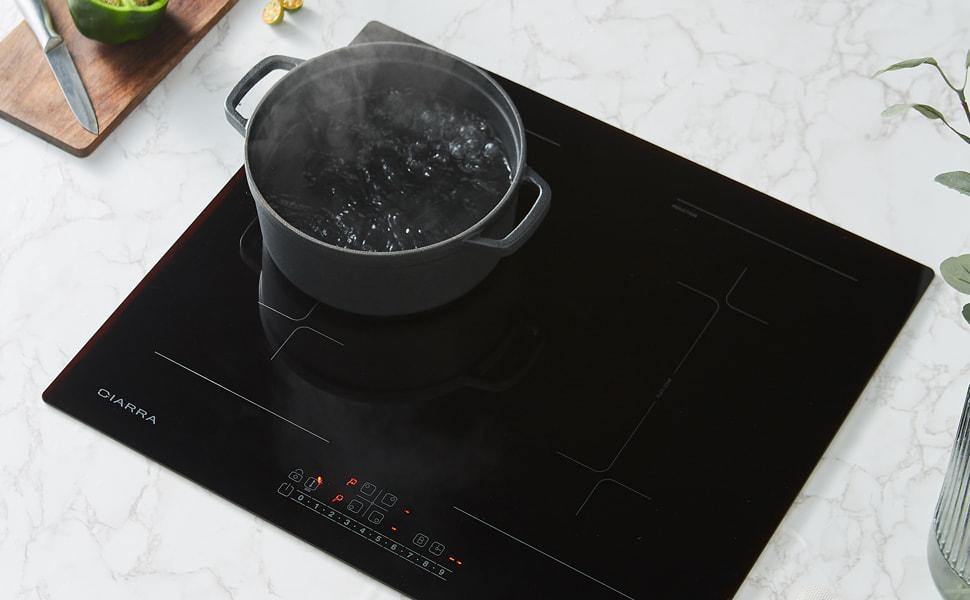
Credit: www.ciarraappliances.com