
Keeping your pool clean and safe is important for every pool owner. If you have an Intex Saltwater System, you already know it’s a reliable way to keep your pool water fresh with less chemical use. However, many people don’t use the self-clean function correctly, or they skip it, leading to problems like cloudy water or calcium buildup. Understanding how to use the self-clean feature properly can make your pool maintenance much easier and extend the life of your equipment.
This guide will walk you through everything you need to know about using the self-clean function on your Intex Saltwater System. You’ll learn why it matters, how to prepare, and step-by-step instructions. Along the way, you’ll discover tips most beginners miss, common mistakes to avoid, and how to troubleshoot problems. By the end, you’ll feel confident using self-clean to keep your pool sparkling with less effort.
What Is Self Clean On The Intex Saltwater System?
The self-clean feature is a built-in maintenance cycle for your Intex Saltwater System. It works by reversing the electrical polarity inside the electrolytic cell. This process helps remove mineral buildup, especially calcium deposits, that naturally form over time as the system converts salt into chlorine.
Why does this matter? If these minerals are not cleaned away, they can block the cell, making it less efficient. Over time, you may notice the chlorine levels drop, the water gets cloudy, or the system shows error codes. Self-clean mode is designed to prevent this, keeping your system running well and your water healthy.
Most Intex Saltwater Systems let you choose how often the self-clean runs. The options are usually every 5, 10, or 14 days. Choosing the right setting depends on your pool’s size, water hardness, and how often you use the pool.
It’s important to know that the process of polarity reversal not only helps in cleaning but also in making the cell last longer. Some advanced models let you adjust the duration of the self-clean cycle, which can be useful if your pool faces specific issues like high mineral content or very frequent use.
For example, if you live in an area with well water, which often contains more minerals, you may need to use the feature more often than someone with city water.
Benefits Of Using Self Clean
Many pool owners think that adding salt and running the pump is enough. But using self-clean has several important benefits:
- Longer Equipment Life: Regular self-cleaning prevents hard mineral buildup, protecting the cell and other parts.
- Better Water Quality: Consistent chlorine production keeps the water clear and safe.
- Lower Maintenance: Less manual cleaning and fewer chemical shocks.
- Saves Money: Delays expensive repairs or replacements.
A surprising fact: skipping or misusing self-clean can cut the life of your cell by up to 50%. That’s why it’s worth learning the correct steps.
Another key benefit is that regular self-cleaning helps your system maintain steady chlorine production even during periods of heavy pool use, such as summer holidays or after a big pool party. Without this, you might find yourself adding extra chemicals or cleaning by hand, which can be time-consuming and expensive.
Also, self-clean prevents the cell from becoming “clogged,” which can lead to increased energy use as the system works harder to push water through.
For families with sensitive skin or allergies, keeping the system clean means you can keep chlorine levels stable without sudden spikes. This can make swimming more comfortable, especially for kids or anyone prone to itchy skin after swimming.
Credit: www.ebay.com
Preparing For Self Clean
Before you use self-clean mode, take a few minutes to prepare. This makes the process smoother and avoids problems.
Check Salt And Water Levels
Make sure the pool’s salt level is correct for your system. Intex systems usually require a salt concentration of 2,500-3,500 ppm (parts per million). Too much or too little salt can cause errors or poor cleaning.
To measure salt levels, use a salt test strip or a digital salt meter for accuracy. Don’t just guess or rely on the amount you added weeks ago—rain, splash-out, and evaporation can change the salt concentration. Always dissolve salt fully before starting the system, since undissolved salt at the bottom can harm the cell or pool liner.
Check the water level as well. The pump and saltwater system should not run if the water is too low, as this can damage the motor or cause air to enter the system. Air in the system can reduce water flow, which may trigger error codes or stop the self-clean from working properly.
Inspect The System
- Look for visible debris in the skimmer or pump basket.
- Check the cell for any large calcium flakes or scale.
- Make sure all hoses are tight and there are no leaks.
- Clean the pool water surface if needed.
It’s also a good idea to look for any signs of wear, such as cracked hoses or loose fittings, since leaks can lead to electrical problems. If you find lots of debris or leaves in your pool after a storm or wind, clear these out before running self-clean.
Large particles can block the cell and reduce cleaning efficiency.
Test Water Chemistry
Before starting, test for:
- Free chlorine
- PH
- Total alkalinity
- Cyanuric acid (stabilizer)
Unbalanced water can reduce the effectiveness of the self-clean process.
For example, if your pH is too high, minerals like calcium will form scale more quickly, making self-clean work harder. Keeping pH in the recommended range (usually 7. 2–7. 6) will help the cell stay clean longer. Low alkalinity can make pH swing wildly, which also affects the system’s performance.
Power Check
Ensure the system is plugged into a GFCI outlet (for safety) and the circuit is not overloaded.
Check that the cord and plug are in good condition with no fraying. Never use extension cords, as they can cause voltage drops that affect the system’s electronics. If you have frequent power surges in your area, consider a surge protector for extra safety.
How The Self Clean Feature Works
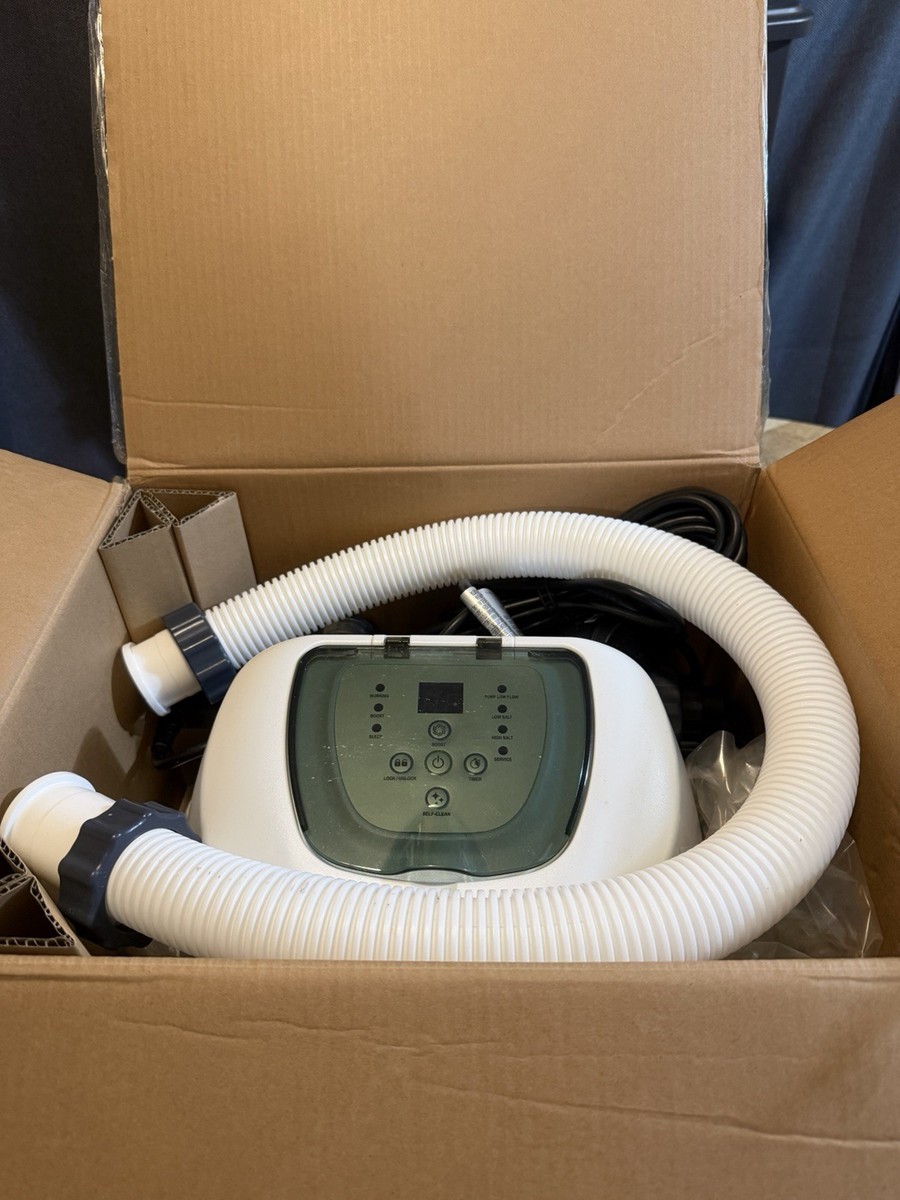
The self-clean mode is an automated process. When activated, the system reverses the electrical charge in the cell. This causes mineral deposits to loosen and fall off, instead of sticking to the cell’s metal plates.
Here’s a simple breakdown:
- The system stops normal chlorine generation.
- It switches polarity, sending current the opposite way through the cell.
- Minerals, especially calcium, are dislodged.
- The system flushes these particles out with water flow.
This process usually takes 30–60 minutes, depending on your model and self-clean interval setting.
During the cycle, you may see tiny white flakes or cloudiness in the water near the return jet. These are harmless particles of loosened mineral deposits, and your pool filter will remove them over the next few hours. If you have a sand or cartridge filter, check it after the self-clean cycle and clean it if you see a lot of debris.
Some Intex systems display a countdown timer during self-clean, so you know how long is left. If your model does not, listen for changes in pump noise or watch for the self-clean indicator light.
Step-by-step: How To Use Self Clean On Intex Saltwater System
Now, let’s go through the process in detail. These steps apply to most Intex saltwater models, but check your user manual for model-specific details.
1. Turn Off The System
Always start with the system powered off. This prevents electrical shock and lets you safely inspect the unit.
Also, disconnect the power if you plan to open or detach any part of the system. Water and electricity do not mix, so always put safety first.
2. Inspect And Rinse The Cell (if Needed)
Look inside the cell. If you see large flakes or heavy scale, gently rinse with a hose. For stubborn scale, soak the cell in a mix of white vinegar and water (never acid unless the manual says it’s safe).
Tip: Never use sharp tools to scrape the cell. This can damage the coating and reduce its lifespan.
If you notice slimy buildup or algae, wipe gently with a soft brush or cloth. For pools near trees, it’s common to find organic material stuck in the cell—remove these before starting self-clean.
3. Restore Power
Plug the system back in and turn it on. Wait for the display to show it’s ready.
Watch for any warning lights or error messages. If something does not look right, turn off the system and double-check all connections and water levels before moving on.
4. Select The Self Clean Interval
Press the self-clean button or use the menu to select how often you want self-clean to run. Typical options are:
- 5 days: For hard water or frequent pool use
- 10 days: For average conditions
- 14 days: For soft water or light use
If you are unsure, start with 10 days.
Some systems let you change this interval at any time, so adjust as needed if you notice more scale, or reduce it if your water is very soft and you see no buildup.
5. Activate The Self Clean Cycle
Hold the self-clean button for 2–5 seconds (model dependent), or select the self-clean option in the menu. The display will show a self-clean icon or message.
The system will now run the cleaning cycle. You may hear different sounds or notice bubbles from the cell—this is normal.
On some models, the flow rate may slow down slightly during self-clean. This is not a cause for concern, as the system is working as designed.
6. Wait For The Cycle To Finish
The display will show when the self-clean is done (often with a beep or message). Do not interrupt the process.
Interrupting the cycle can leave the cell partly cleaned, leading to faster buildup and reduced chlorine output.
7. Resume Normal Operation
After self-clean, the system will return to normal chlorine generation. Check the display for any error codes.
If you see warnings like “low salt” or “check cell,” address these right away before swimming.
8. Test Pool Water
Check chlorine and pH levels after the first use. This helps you see if the system is working well.
If chlorine is low, increase the run time. If pH rises after self-clean, adjust with acid or pH reducer as needed.
Setting The Self Clean Interval: What’s Best?
Choosing how often to run self-clean is important. Too often wastes energy, too little allows buildup.
Here’s a quick comparison:
| Interval | Best For | Pros | Cons |
|---|---|---|---|
| Every 5 days | Hard water, heavy use | Prevents scale, best for tough conditions | Uses more energy |
| Every 10 days | Normal water, average use | Balanced maintenance, saves energy | May miss heavy buildup in hard water |
| Every 14 days | Soft water, low use | Most energy efficient | Risk of scale if water is hard |
Non-obvious insight: Many beginners choose the longest interval to save energy, but this can cause cell damage if you have hard water. Always check your water hardness before choosing.
Also, don’t be afraid to adjust the interval during the season. For example, if you notice more deposits during a heat wave or after refilling with fresh water, shorten the interval. Flexibility helps your system last longer and keeps your pool clear.
Signs You Need To Use Self Clean
Sometimes, you need to run self-clean more often than the regular interval. Watch for these signs:
- Low chlorine output even when salt is correct
- Error codes related to low flow or cell problems
- Visible scale inside the cell
- Cloudy water or algae despite normal operation
If you see these, run self-clean manually and check the system.
Other signs include higher than normal pH or the feeling of “roughness” on pool surfaces, which can mean scale is forming. If swimmers complain about eye or skin irritation more than usual, check your system—these are early warning signs of poor sanitation.
Manual Vs. Automatic Self Clean
Some Intex models allow both automatic and manual self-clean. Here’s how they compare:
| Method | How It Works | When to Use | Special Tips |
|---|---|---|---|
| Automatic | Runs at set interval | Regular maintenance | Set it and check monthly |
| Manual | Start self-clean anytime | When you see scale or errors | Use after adding lots of salt or after storms |
Tip: If you use the pool heavily (parties, storms, pets), run manual self-clean after these events.
Manual self-clean is also useful if you notice a sudden drop in chlorine after refilling the pool or after adding new chemicals. It gives you more control and peace of mind.

Credit: www.amazon.com
Common Mistakes To Avoid
Many pool owners make errors with the self-clean function. Avoid these pitfalls:
- Ignoring water hardness: High calcium makes scale form faster. Test your water at least once per season.
- Forgetting to clean debris: Large dirt or leaves can block the cell and reduce cleaning.
- Not checking for error codes: If the system beeps or shows a warning, don’t just ignore it—read the manual and act.
- Using the wrong interval: Too long between self-cleans means more problems later.
- Skipping salt checks: Even with self-clean, wrong salt levels can cause damage.
Non-obvious insight: If you live in an area with “softened” tap water, the water can pick up minerals from pipes and still cause scale. Don’t assume soft water means no maintenance.
Also, avoid running the self-clean cycle during heavy pool usage. Chlorine levels may dip during the process, so schedule self-clean for times when the pool isn’t being used, like early morning or late evening.
Deep Cleaning The Cell: When Self Clean Is Not Enough
Sometimes, self-clean mode cannot remove all deposits. If the cell looks crusty or you get repeated errors, do a deep clean:
- Turn off power and remove the cell.
- Mix a 50/50 solution of white vinegar and water in a bucket.
- Soak the cell for 1–4 hours (check manual).
- Rinse well with a hose.
- Reinstall and run a manual self-clean cycle.
Warning: Some sources suggest using muriatic acid. Only do this if the manual says it’s safe, and wear gloves and eye protection.
Deep cleaning is most effective when you see thick, chalky buildup that won’t rinse away. Always use a plastic container for soaking, and never mix cleaning solutions. After deep cleaning, the cell should look cleaner and water flow should improve.
How Self Clean Fits Into Your Maintenance Routine
Using self-clean is just one part of pool care. Here’s how it fits with other tasks:
| Task | How Often | Why It Matters |
|---|---|---|
| Self clean cycle | Every 5–14 days | Prevents scale, keeps cell working |
| Test water chemistry | 1–2 times per week | Ensures chlorine and pH are right |
| Remove debris | As needed (usually weekly) | Keeps flow strong, prevents blockages |
| Deep clean cell | Every 1–2 months or as needed | Removes tough buildup |
Combining these tasks keeps your pool safe and enjoyable.
Add a reminder on your calendar or phone for each task. Consistency prevents most problems and reduces the need for emergency fixes.
Troubleshooting Self Clean Problems
Even with regular use, you may face issues with self-clean. Here’s how to handle common problems:
Self Clean Won’t Start
- Check power supply (GFCI reset if needed)
- Look for error codes (consult manual)
- Inspect cell connections (loose wires can prevent cleaning)
Also, check the timer settings. If the system is set to run at a different time, self-clean may not start immediately.
System Beeps Or Shows Error During Self Clean
- Check for debris blocking the cell
- Test salt level (too high or low can cause errors)
- Look for leaks at hose connections
Try restarting the system after fixing these issues. Sometimes a simple reset can solve error codes.
Cell Still Has Scale After Self Clean
- Run a manual cycle again
- Deep clean if buildup remains
- Check water hardness; consider adding a scale inhibitor if your water is very hard
Check the pool filter too—if it’s dirty, it may not be removing loosened scale effectively.
Cloudy Water After Self Clean
- Test chlorine and adjust run time
- Shock the pool if needed (after heavy use or storms)
- Clean the filter to remove loosened debris
If the problem continues, inspect the cell for damage or contact Intex support.
Tips For Easier And Better Self Clean Results
- Use a timer: Set reminders for self-clean and other tasks.
- Document settings: Write down your chosen interval and dates of deep cleaning.
- Store the manual: Keep the user guide in a safe place for quick reference.
- Buy extra test strips: This makes regular water testing easy.
- Upgrade hoses: Stronger hoses prevent leaks during cleaning cycles.
Pro tip: If you’re away for several weeks, ask a neighbor or friend to check the system and run a manual self-clean.
Another helpful tip: keep a simple logbook of maintenance and chemical levels. This makes it easy to spot patterns and fix issues faster.
When To Replace The Cell
Even with good care, all saltwater cells wear out. Signs you need a new cell:
- Chlorine output drops and self-clean doesn’t help
- Repeated error codes after cleaning
- Physical damage to cell plates
Most Intex cells last 2–5 years with regular self-cleaning. If you need a replacement, buy the correct part for your model.
If you notice rust or deep pitting on the cell plates, replace the cell right away. Using a worn-out cell can damage the control unit or reduce sanitation, risking swimmer health.
Safety Warnings And Best Practices
- Never run self-clean with people in the pool.
- Don’t mix chemicals: Always add salt first, let it dissolve, then start the system.
- Wear gloves if you handle the cell for deep cleaning.
- Keep the area dry to avoid electrical hazards.
Always unplug the system before doing any maintenance, even quick checks. Water and electricity are a dangerous mix, so take a few extra seconds to be safe.
For more pool safety information, you can check the official CDC pool disinfection page.
Frequently Asked Questions
Why Does My Intex Saltwater System Need Self-cleaning?
Self-cleaning removes mineral buildup, mainly calcium, from the cell. Without it, the system cannot produce enough chlorine, and the cell can fail early.
How Do I Know If Self-clean Worked?
After self-clean, check the display for a finished message. Then, inspect the cell for less scale and test the pool water for proper chlorine levels.
Can I Use Pool Chemicals With The Saltwater System?
Yes, but use only non-copper algaecides and avoid calcium-based shock. Too many chemicals can interfere with the cell and the self-clean process.
What Should I Do If Self-clean Doesn’t Fix A Problem?
Try a deep clean with vinegar, check the water hardness, and inspect for debris or physical damage. Replace the cell if problems continue.
How Often Should I Run Self-clean If My Water Is Very Hard?
Set the interval to every 5 days and check the cell monthly. You may need to deep clean more often if you live in a hard water area.
Keeping your Intex Saltwater System clean is not just about pressing a button—it’s about understanding your pool, water, and equipment. Using self-clean the right way saves time, money, and stress, so you can enjoy your pool all season long.
Credit: www.walmart.com