
If you own a pool with a saltwater system, you probably enjoy the soft water feel and fewer chemicals. But when your Intellichlor salt chlorine generator starts flashing green and red, things quickly get confusing. Is the cell broken? Is your water unsafe? These mixed lights can mean a range of issues, from simple water balance errors to complex equipment failures.
Let’s break down what these blinking lights actually mean, why they appear, and—most importantly—how you can fix them. With the right steps, you can get your pool back to sparkling clean and safe in no time.
What Is The Intellichlor Salt Chlorine Generator?
The Intellichlor is a popular salt chlorine generator made by Pentair. It takes ordinary table salt (sodium chloride) dissolved in your pool water and converts it into chlorine using a process called electrolysis. This means you don’t need to add chlorine manually, making pool care much easier.
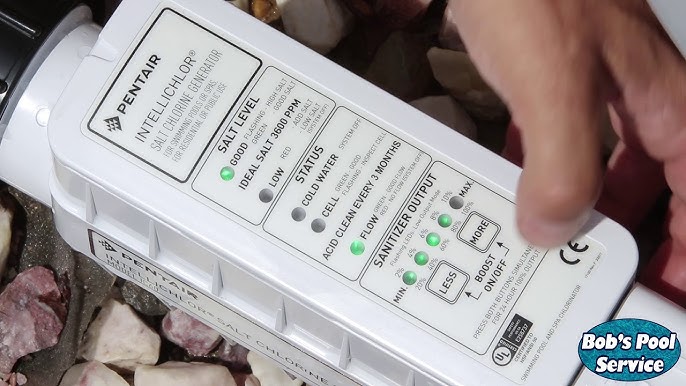
The unit itself has a small display with lights that show you its status. Normally, you’ll see a steady green light when things are working well. But when the lights start flashing—especially green and red together—it’s a sign the system needs attention.
Understanding The Green And Red Flashing Lights
When your Intellichlor is flashing both green and red, it’s not just a random pattern. These lights are the unit’s way of telling you something is wrong or needs checking.
What Each Light Means
- Green flashing light: The unit is trying to operate but senses a potential problem.
- Red flashing light: There is a problem that may prevent the system from producing chlorine.
When both are flashing together, it usually means the cell is not generating chlorine as it should.
Common Causes
These lights can be triggered by:
- Low salt levels
- High salt levels
- Cold water temperature
- Calcium buildup on the cell plates
- Poor water flow
- Cell nearing the end of its life
Understanding which of these is causing your issue is the first step to a fix.
What To Do When Your Intellichlor Is Flashing Green And Red
Instead of guessing, follow a careful process to diagnose and fix the problem. Here’s a step-by-step approach used by pool professionals.
1. Check Your Salt Level
Your Intellichlor needs a specific salt concentration to work. Too little or too much salt will trigger flashing lights.
- Ideal salt range: 3000–4200 parts per million (ppm)
- Below 3000 ppm: The cell struggles to make chlorine
- Above 4200 ppm: The system may shut down to avoid damage
Use a salt test strip or a digital meter, not just the cell’s reading (it can be off by 500 ppm or more).
Tip: Water loss from splash-out or heavy rain can lower salt levels, while adding salt without testing can push them too high.
2. Inspect The Water Temperature
Intellichlor units are sensitive to cold water. If your pool drops below 52°F (11°C), chlorine production will stop and you’ll see flashing lights.
- If it’s winter or early spring, the water may simply be too cold.
- Wait until the water warms up, or use a pool heater if needed.
3. Check Water Flow
Intellichlor needs good flow to work. Low flow or air bubbles in the cell can cause the green and red lights to flash.
- Make sure the pump is running properly.
- Clean your skimmer and pump basket.
- Check for clogged filters or partially closed valves.
Intellichlor has a built-in flow switch. If water flow is too low, it won’t operate.
4. Examine For Calcium Buildup
Over time, calcium deposits can form on the metal plates inside the cell. This slows chlorine production and can trigger warning lights.
- Remove the cell and look inside: White, crusty buildup is a sign.
- Soak the cell in a 4: 1 water-to-muriatic acid solution for 15–20 minutes.
- Rinse well with fresh water before reinstalling.
Non-obvious insight: Even a thin layer of calcium can trigger the lights—don’t wait for heavy buildup to clean the cell.
5. Test The Water Chemistry
Besides salt, other water chemistry issues can confuse the Intellichlor’s sensors:
- High calcium hardness (over 400 ppm) leads to faster cell scaling.
- PH out of range (ideal: 7.4–7.6) affects cell sensors.
- Cyanuric acid (stabilizer) too high or low can impact chlorine effectiveness.
Correct any imbalances and retest.
6. Reset The System
Sometimes, the Intellichlor’s electronics just need a reset.
- Turn off the power to the pool system at the breaker.
- Wait 1–2 minutes.
- Turn the power back on.
This can clear temporary errors.
7. Check The Cell Life
Intellichlor cells last 3–7 years, depending on pool size, usage, and maintenance.
- When a cell is near end of life, it may flash warning lights even if other factors are okay.
- If you’ve had your cell for several years, it might be time for a replacement.
Practical tip: Keep a record of when you installed your cell and how many operating hours it has logged.
8. Inspect The Power Center And Wiring
Loose or corroded connections in the power center can cause odd errors and flashing lights.
- Open the power center and look for loose wires or corroded terminals.
- Tighten any loose connections with the power off.
- Look for signs of water damage.
Hidden detail: A weak or failing power supply can trigger both green and red lights even if the cell is fine.
9. Update Or Recalibrate The Software (if Available)
Some newer Intellichlor models allow software updates or recalibration. Check your user manual or Pentair’s website for instructions.
- Software bugs can cause false warnings.
- Recalibration matches the cell’s readings to your actual water conditions.
This step is often overlooked but can resolve stubborn problems.
Interpreting The Intellichlor Led Status Lights
For quick reference, here’s what the main Intellichlor indicator lights mean:
| Light | Status | Meaning |
|---|---|---|
| Green solid | Normal | Chlorine generation OK |
| Green flashing | Warning | Possible low salt, cold water, or low flow |
| Red solid | Problem | Cell is off or needs service |
| Red flashing | Error | Serious problem, check manual |
| Green & Red flashing | Alert | Multiple possible issues, see troubleshooting |
This table helps you quickly match what you see with what’s really going on.
Common Real-world Scenarios
Let’s look at a few examples to see how these steps work in practice.
Scenario 1: Flashing Lights After A Rainstorm
A pool owner notices green and red flashing right after a heavy rain. After testing, the salt level is at 2700 ppm—below the recommended range.
Action: Add the correct amount of salt to bring the ppm to 3400. The lights go back to solid green within a few hours.
Scenario 2: Flashing Lights In Early Spring
Another user sees flashing lights in March. Salt and chemistry are perfect, but the water is 50°F.
Action: Wait until the water warms up above 52°F. The system resumes normal operation.
Scenario 3: Flashing After Salt Addition
A pool owner adds salt but skips mixing it in. The Intellichlor senses high salt (4500 ppm) in some spots.
Action: Run the pump for 24 hours to dissolve and circulate the salt evenly. Levels balance out, and the lights turn green.
Non-obvious insight: Salt can settle in spots if not mixed well, causing false high readings near the cell.
How To Add Salt Correctly
If your salt is low, don’t just dump it in.
- Calculate how much to add. Use a salt calculator with your pool’s size and current salt reading.
- Spread salt around the pool. Don’t pour it all in one spot.
- Brush the pool floor. This helps dissolve the salt faster.
- Run the pump. Circulate the water for at least 24 hours.
- Retest before adding more. Too much salt is hard to fix.
Adding salt slowly prevents overcorrection and keeps your Intellichlor happy.
Cleaning The Cell: How And When
Most Intellichlor cells need cleaning every 3–6 months, or when you see scaling.
- Turn off the pool system.
- Remove the cell using the union nuts.
- Inspect for buildup. White crust means it’s time to clean.
- Soak in diluted muriatic acid (1 part acid to 4 parts water) for 15–20 minutes. Never use straight acid.
- Rinse with fresh water. Never scrape the plates with metal tools.
Caution: Always wear gloves and eye protection when handling acid.
Regular cleaning not only fixes green and red flashing but also extends the life of your cell.
Comparing Intellichlor With Other Salt Chlorine Generators
If you’re wondering how the Intellichlor’s error signals and troubleshooting compare with other brands, here’s a quick comparison:
| Brand | LED/Error Codes | Common Issues | Average Cell Life |
|---|---|---|---|
| Pentair Intellichlor | Green/Red flashing, codes | Salt, flow, temp, scale | 3-7 years |
| Hayward AquaRite | Check Cell, Inspect Cell | Salt, scale, low flow | 3-5 years |
| Jandy TruClear | Solid/Flashing lights | Salt, flow, cell | 3-5 years |
While all systems have their quirks, Intellichlor’s LED system gives more detailed feedback—if you know how to read it.
Preventing Future Intellichlor Problems
Most green and red flashing problems are preventable with good pool care habits.
- Test salt levels monthly with a digital tester.
- Clean the cell every 3–6 months.
- Keep water chemistry balanced. Check pH, alkalinity, calcium, and cyanuric acid regularly.
- Watch for cold water. In cooler climates, expect the cell to stop working in winter.
- Inspect wiring and connections yearly. Look for corrosion or damage.
Extra tip: Take photos of your cell and control panel when things are working well. This helps you spot changes or errors later.
When To Call A Professional
Sometimes, you’ve tried everything and the lights keep flashing. It’s time to call a pool technician if:
- The cell is clean, salt and chemistry are perfect, but the error won’t clear.
- You see burnt wiring, water inside the control box, or obvious damage.
- The cell is over five years old and has never been replaced.
A good technician can test the cell with a multimeter, check for software updates, and quickly spot electrical faults.

Credit: www.reddit.com
The Cost Of Ignoring Flashing Lights
Ignoring Intellichlor’s warning lights can lead to bigger problems:
- Unsafe pool water: No chlorine means algae and bacteria can grow fast.
- Shortened cell life: Running with bad water chemistry or salt levels damages the cell.
- Costly repairs: Electrical problems can damage the power center or pool pump.
Address issues early to avoid expensive fixes later.
Troubleshooting Checklist For Intellichlor Flashing Green And Red
Keep this summary handy when you see flashing lights:
- Test salt levels with a separate tester.
- Check water temperature (above 52°F).
- Ensure good water flow.
- Inspect and clean the cell for calcium.
- Balance pH, alkalinity, and calcium.
- Reset the system power.
- Check cell age and hours.
- Inspect wiring and power center.
- Update/recalibrate software if available.
Most problems can be solved with these steps.
How Intellichlor Communicates: More Than Just Lights
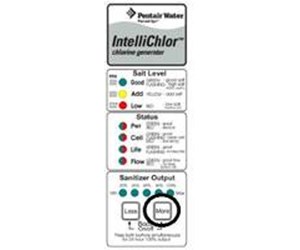
Intellichlor models like the IC20, IC40, and IC60 also show output percentage, salt level, and cell life with extra LEDs and sometimes a digital readout. Reading the manual for your specific model can reveal hidden status codes.
Advanced tip: Some automation systems (like Pentair EasyTouch or IntelliTouch) can display detailed Intellichlor status and error messages on their control panels. This is very helpful for troubleshooting.
Real-world Data: Intellichlor Failure Rates
According to a survey by pool service pros:
- About 70% of Intellichlor flashing light issues are due to basic water chemistry or salt problems.
- Only 10% are actual cell failures.
- The rest are wiring, flow, or power center issues.
Most problems can be fixed without replacing the cell, saving you money.
Credit: www.inyopools.com
Why Intellichlor’s Lights Matter For Pool Safety
The green and red flashing lights are not just for show. If the cell isn’t making chlorine, your pool water can become unsafe quickly—especially in hot weather or with heavy swimmer use.
- Without chlorine, bacteria and algae can grow in as little as 24–48 hours.
- Children and people with weak immune systems are at higher risk.
If you can’t fix the lights right away, add chlorine manually to keep the pool safe until the system is working again.
Comparing Saltwater Pools To Chlorine Pools
Some owners wonder if saltwater systems like Intellichlor are more trouble than they’re worth. Here’s a comparison:
| Aspect | Saltwater (Intellichlor) | Traditional Chlorine |
|---|---|---|
| Chlorine Maintenance | Automatic (with salt) | Manual addition |
| Water Feel | Softer, less eye irritation | Harsher, more chemicals |
| Equipment Cost | Higher upfront (cell & controls) | Lower upfront, higher chemical cost |
| Typical Problems | Cell scaling, sensor errors | Chlorine handling, pH swings |
While saltwater systems need some attention, most owners find them easier and more pleasant in the long run.
Extra Tips For Intellichlor Owners
- Always keep a spare bag of pool salt on hand.
- Label your power center breakers for faster troubleshooting.
- Check the Intellichlor manual for specific error codes.
- Don’t ignore small changes in the light pattern—catching problems early saves time and money.
Reliable Resources For More Help
For full details and troubleshooting, the Pentair official website has user manuals, guides, and support articles. You can also find help from local pool stores or certified technicians.
If you want to read more, the Pentair Intellichlor user manual is a great resource: Pentair Intellichlor.
Credit: www.youtube.com
Frequently Asked Questions
Why Does My Intellichlor Flash Green And Red After Cleaning The Cell?
After cleaning, it can take a few minutes for the system to reset and sense proper salt levels and flow. If the lights don’t turn solid green after 15–30 minutes, double-check that the cell is installed correctly, the flow is good, and your salt level is in range.
Can Cold Water Permanently Damage The Intellichlor Cell?
No, cold water simply makes the Intellichlor stop producing chlorine. The cell will not be damaged, but you should not try to force operation below 52°F (11°C). Wait for the water to warm up before expecting normal function.
What’s The Fastest Way To Check If My Salt Level Is Really The Problem?
Use a digital salt tester or strip test—don’t rely only on the Intellichlor’s reading. Compare your test result to the system’s display. If there’s a big difference, recalibrate the cell or consult the manual.
How Long Does An Intellichlor Cell Last?
With normal use and good water care, most cells last 3–7 years. High calcium, poor water balance, or running the system non-stop can shorten this lifespan. Keeping the cell clean is the best way to maximize its life.
Should I Add Chlorine Manually If The Intellichlor Is Flashing Green And Red?
Yes. If the cell isn’t making chlorine, add liquid chlorine or chlorine tablets to keep your pool safe until you fix the problem. Don’t swim if the water turns cloudy or green.
—
When your Intellichlor flashes green and red, don’t panic. With careful steps—checking salt, temperature, flow, and cleaning the cell—you can almost always fix the issue yourself. This keeps your pool water clean, safe, and enjoyable all season long.