
When you see the Pentair Intellichlor cell light flashing green, it can be confusing—especially if you’re new to saltwater pool systems. Is your pool okay? Does something need fixing? Are you about to face an expensive repair? This small green light tells a bigger story about how your pool is working and what you should do next. Understanding these signals can save you time, money, and stress. This guide will make you confident about your Intellichlor system, help you fix problems, and keep your pool water safe and clear.
Understanding The Pentair Intellichlor Cell
Before diving into what the green flashing cell light means, it helps to know what the Intellichlor cell does. The Pentair Intellichlor is a salt chlorine generator—it turns salt in your pool water into chlorine. This keeps your pool clean and free of harmful bacteria. The cell is the heart of the system; water flows through it, and the cell uses electricity to convert salt into chlorine.
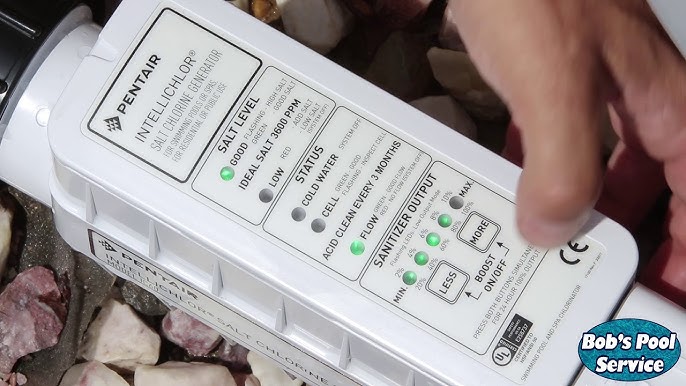
On the front of the device, you’ll see several lights. Each light tells you about a different part of the system. The most important ones are:
- Power
- Cell
- Salt Level
- Flow
- Status
Knowing what each light means helps you understand your system’s health. The cell light tells you if the generator is making chlorine. If it’s solid green, everything is fine. If it’s flashing, it’s time to pay attention.
What Does The Flashing Green Cell Light Mean?
When the cell light flashes green, your Pentair Intellichlor is in a special mode. In most cases, it means the system is cleaning itself. The cell reverses polarity to remove mineral buildup. This is normal and happens automatically to keep the cell working.
But sometimes, a flashing green light can mean something else. For example:
- The cell might be nearing the end of a cleaning cycle.
- The cell could be starting up after being off.
- There might be a temporary issue (like low salt or flow) that the system is trying to fix.
It’s important to look at the other lights and your pool’s behavior. Don’t panic—most of the time, this light is not a sign of a major problem.
Credit: www.youtube.com
Normal Operation Vs. Warning Signs
How do you tell if the flashing green cell light is normal or a warning? Here’s how:
| Situation | What the Flashing Green Light Means | What You Should Do |
|---|---|---|
| Only Cell Light Flashes | Self-cleaning mode | No action needed |
| Cell + Other Lights Flash | Possible issue (salt, flow, power) | Check salt, flow, and power |
| Flashing + Beeping | Error or warning | Check manual and take action |
If only the cell light is flashing and the other lights look normal, your system is probably just cleaning itself. If other lights are also flashing, or you hear beeping, you should check for problems.
How The Self-cleaning Cycle Works
The self-cleaning feature is a big advantage of the Intellichlor. Over time, minerals like calcium can build up on the cell plates. This build-up can stop the cell from making chlorine. To fix this, the system reverses the electrical flow (called polarity reversal). This knocks minerals off the plates and keeps the cell working longer.
During this process:
- The cell light flashes green.
- The system runs the cleaning cycle, which takes a few minutes.
- When the cycle finishes, the light usually returns to solid green.
Most users never need to worry about this cycle. However, if the light stays flashing for a long time, it could mean the cell is struggling to clean itself, or another issue is present.
Credit: www.inyopools.com
Reasons The Cell Light Flashes Green (and What To Do)
Let’s look at the main reasons you’ll see a flashing green cell light—and what steps to take.
1. Self-cleaning In Progress
This is the most common reason. The cell automatically cleans itself every few hours. The light flashes during this time, then returns to normal.
What to do: Nothing. Wait a few minutes and check back. If the light returns to solid green, you’re fine.
2. Startup Or Power Reset
When you turn the system on or after a power loss, the cell may flash green as it starts up.
What to do: Wait 2–5 minutes. If the light stays flashing, check the other system lights.
3. Low Salt Level
If your pool’s salt level drops below the recommended range (usually 3000–4200 ppm), the cell may flash green as it tries to adjust.
What to do: Test your pool water with a salt test kit. Add pool salt if needed.
4. Low Flow
The cell needs enough water flow to work. If the flow light is also on or flashing, the water may not be moving fast enough.
What to do:
- Check your pool pump and filter.
- Clean the skimmer and pump baskets.
- Make sure the valves are open.
5. Dirty Or Scaled Cell
If the cell is dirty or covered in calcium scale, it may flash green more than usual. The self-cleaning cycle might not be enough.
What to do: Turn off the system and remove the cell. Inspect for white or chalky buildup. Clean with a mild acid solution (following Pentair’s instructions).
6. Cell Near End Of Life
Intellichlor cells last about 5,000 hours (3–5 years for most pools). As the cell ages, it may flash green more often or for longer.
What to do: Check the hours of operation if your control panel shows them. If the cell is old, consider replacing it.
7. Temperature Issues
The cell only works well above 60°F (16°C). Cold water can cause the cell light to flash green.
What to do: Check water temperature. In cold seasons, this is normal and not a problem.
8. Software Or Firmware Problems
Rarely, the controller might have a software glitch, causing unusual light patterns.
What to do: Turn the power off for 60 seconds, then back on. If the problem continues, contact a Pentair dealer.
How To Check And Interpret All Intellichlor Lights
The Intellichlor uses several lights to communicate. Here’s a quick reference:
| Light | Solid Green | Flashing Green | Red or Off |
|---|---|---|---|
| Power | System is on | Startup, resetting | System off or no power |
| Cell | Producing chlorine | Self-cleaning or issue | Error or not working |
| Salt | Correct salt level | Salt adjusting | Low or high salt |
| Flow | Good water flow | Insufficient flow | No flow detected |
| Status | Normal | Cycle change or minor issue | Major problem |
Always check all lights together. If only one is flashing, it’s probably normal. If several flash or show red, take action.
Step-by-step Troubleshooting For A Flashing Green Cell Light
When the cell light flashes green, use these steps:
Step 1: Observe All Lights
Check the power, salt, flow, and status lights. Write down what each one is doing.
Step 2: Wait 5–10 Minutes
If only the cell light is flashing, wait 5–10 minutes. The cycle may end on its own.
Step 3: Test Salt Level
Use a digital tester or test strips to measure salt. The ideal range is 3000–4200 ppm. If it’s low, add pool salt.
Step 4: Check Water Flow
- Make sure the pump is running.
- Clean filter and baskets.
- Look for blocked or closed valves.
Step 5: Inspect The Cell
Turn off power. Remove and look inside the cell. If you see white, hard deposits, clean the cell with a diluted acid solution.
Step 6: Reset The System
Turn off the power for at least 1 minute, then restart. This clears minor glitches.
Step 7: Call For Help
If none of these steps work, or if you see error codes, contact a pool technician or Pentair support. There may be a bigger issue.
Tip: Always keep the manual handy for your specific Intellichlor model.
How To Clean A Pentair Intellichlor Cell
A dirty or scaled cell is one of the most common reasons for a flashing green light. Here’s how to clean it safely:
What You Need
- Bucket or container
- White vinegar or diluted muriatic acid
- Rubber gloves and goggles
Steps
- Turn off all power to the pool system.
- Remove the cell by loosening the unions.
- Inspect for scale (white or crusty buildup).
- Mix cleaning solution: 1 part muriatic acid to 4 parts water (always add acid to water, not the other way).
- Soak the cell plates (not wires or connectors) for 5–10 minutes.
- Rinse well with fresh water.
- Reinstall the cell and turn power on.
Never use metal tools to scrape the cell. This can damage the coating and shorten cell life.
How To Check And Adjust Salt Level
Maintaining the right salt level is key. Too little salt means not enough chlorine; too much can damage the system.
- Test salt weekly with a digital meter or test strips.
- Add pool-grade salt slowly (never dump it in one spot).
- Run the pump to help salt dissolve.
- Wait 24 hours, then retest before adding more.
Insider tip: It’s better to be slightly under the recommended level than over. High salt can cause more problems than low salt.
Common Myths About The Flashing Green Light
Many pool owners worry when they see a flashing green cell light, but not every situation is a problem. Here are some myths:
1. “flashing Green Means The Cell Is Broken.”
Not always. Most of the time, it’s just self-cleaning.
2. “you Must Call A Technician Right Away.”
Many issues can be solved with basic checks.
3. “adding More Salt Will Fix Any Light.”
Too much salt can make things worse. Always test first.
4. “the Cell Should Never Flash.”
Flashing during cleaning or startup is normal.
Understanding these facts can save you unnecessary panic and service calls.
Credit: www.reddit.com
When To Replace Your Intellichlor Cell
The Intellichlor cell has a limited lifespan. Here’s how to know it’s time for a new one:
- The cell light flashes or stays red even after cleaning.
- Chlorine levels stay low even when salt and flow are good.
- The system shows “Cell Life Low” or similar messages.
- The cell is more than 5 years old for most users.
Pro tip: Write the installation date on the cell with a waterproof marker. This makes tracking age easier.
Preventative Maintenance For A Healthy Intellichlor System
A little care can prevent most problems:
- Test salt and chlorine weekly.
- Inspect the cell for scale every month in warm weather.
- Clean the cell every 3–6 months or as needed.
- Keep the pump and filter in good shape.
- Winterize the system if you close your pool.
These simple steps help you avoid surprises and keep your system running for years.
Comparing The Intellichlor To Other Salt Chlorinators
How does the Pentair Intellichlor compare to other brands? Here’s a quick look:
| Feature | Pentair Intellichlor | Hayward AquaRite | Jandy TruClear |
|---|---|---|---|
| Self-Cleaning | Yes (polarity reversal) | Yes | Yes |
| Cell Lifespan (hours) | 5,000 | 8,000 | 4,000 |
| Salt Range (ppm) | 3000–4200 | 2700–3400 | 4000–4500 |
| Display Type | LED lights | LCD screen | LED lights |
| Warranty | 3 years | 1 year | 2 years |
The Intellichlor is known for its robust self-cleaning and simple LED display. It’s user-friendly but may need replacement sooner than some competitors.
Advanced Troubleshooting: When The Flashing Green Light Won’t Stop
If you’ve tried all basic steps and the flashing green cell light won’t go away, look deeper:
Check For Firmware Updates
Some Pentair systems allow firmware updates. These can fix bugs or improve performance. Ask your dealer or check the official Pentair website for details.
Inspect Power Supply
If the power supply is unstable, the system may reset often, causing repeated flashing. Use a multimeter to check voltage. Pool equipment should have a dedicated, stable power source.
Look For Pool Chemistry Issues
- High calcium hardness can cause more scaling.
- PH above 7.8 can speed up scale formation.
- Cyanuric acid (stabilizer) should be in the correct range (30–50 ppm).
Balancing these keeps the cell working well.
Look For Flow Sensor Problems
If the flow sensor is dirty or broken, the cell may not turn on properly. Clean or replace the sensor as needed.
Consider System Age And Usage
If your pool runs year-round, the cell may wear out faster. Track operating hours and replace the cell at the end of its lifespan.
Insider insight: Many users forget that heavy pool use (lots of swimmers, hot weather) means the cell works harder. This can make the light flash more as the system compensates.
Saving Money And Time: Diy Vs. Calling A Pro
Many problems with the Pentair Intellichlor cell light flashing green can be fixed at home. Cleaning the cell, testing salt, and checking flow are all DIY-friendly. But if you:
- See error codes you don’t understand,
- Notice water leaks from the cell,
- Can’t get the system to reset,
It’s best to call a pool technician. Attempting repairs on the control board or wiring can be dangerous and may void your warranty.
How To Prevent Scale Build-up
Scale is the enemy of every salt cell. Here’s how to slow it down:
- Keep pH in the 7.4–7.6 range.
- Keep calcium hardness between 200–400 ppm.
- Use a scale inhibitor (pool chemical) if you have hard water.
- Brush your pool walls to prevent debris from entering the cell.
Hidden tip: If you live in a hard water area, check your cell every month, even if the light isn’t flashing. Early cleaning is much easier than removing thick scale.
Real-world Examples And Common Mistakes
Many pool owners make the same errors when they see a flashing green cell light:
- Ignoring the light for weeks. This can lead to poor chlorine levels and cloudy water.
- Adding salt without testing. Too much salt can damage the cell and other pool parts.
- Using harsh chemicals to clean the cell. Only use what Pentair recommends.
- Not resetting after cleaning. Always restart the system to clear error codes.
Example: One user noticed the light flashing and added more salt without testing. The salt level rose above 5000 ppm, which damaged the cell and voided the warranty. Testing first could have saved hundreds of dollars.
Upgrading Or Replacing Your Intellichlor System
If your system is old or you want new features, you might consider upgrading. Newer Pentair models offer better displays, remote monitoring, and longer warranties. Always check compatibility with your existing control box and wiring before buying.
For more information on salt chlorinator technology and pool care, visit the Salt Water Chlorination Wikipedia page.
Frequently Asked Questions
What Does A Flashing Green Cell Light Mean On My Pentair Intellichlor?
A flashing green cell light usually means the cell is in self-cleaning mode. This is normal and should last a few minutes. If the light stays flashing or other lights also flash, check salt, water flow, and cell cleanliness.
How Often Should I Clean My Intellichlor Cell?
Clean the cell every 3–6 months or if you see white buildup. In hard water areas, check more often. Always turn off the power before removing the cell.
Can I Add Salt To My Pool Without Testing First?
No, you should always test salt levels before adding more. Too much salt can damage the system. The ideal range is 3000–4200 ppm for most Intellichlor models.
What Should I Do If The Flashing Green Light Won’t Stop?
First, check all other lights and test salt and flow. Clean the cell if needed. Try resetting the system. If the light still flashes, or you see error codes, call a pool technician.
How Long Does A Pentair Intellichlor Cell Last?
Most cells last 3–5 years or about 5,000 hours of use. Heavy usage or poor water balance can shorten this lifespan. Write down your installation date to keep track.
—
A flashing green cell light on your Pentair Intellichlor is usually not a reason to worry. It’s often a sign that your system is working to keep itself clean. But it’s also your early warning system. By learning what it means, checking your salt and flow, and cleaning the cell regularly, you can avoid most problems and enjoy a sparkling, safe pool all season long. Remember, a little routine care goes much further than waiting for bigger issues to appear. With the right attention, your Intellichlor will be a reliable partner for years.