
A sparkling pool is more than just water and chlorine—it’s a science of balance. For many pool owners, the Pentair Intellichlor salt chlorine generator has changed the way they sanitize and enjoy their pools. But what happens when the Low Salt Light turns on? This small signal can cause worry and confusion, especially if you’re not sure why it’s lit or how to fix it. Understanding what this light means, why it activates, and how to respond is essential for keeping your pool safe, clear, and hassle-free.
This article will give you everything you need to know about the Pentair Intellichlor Low Salt Light, from why it comes on, what it’s telling you, and how to address it. Whether you’re a new pool owner or have years of experience, you’ll find practical advice, real-world examples, and expert tips to keep your system running smoothly. You’ll also discover common mistakes, troubleshooting steps, and guidance that goes beyond the basics. If you want to master your saltwater pool, this is your complete guide.
What Is The Pentair Intellichlor Low Salt Light?
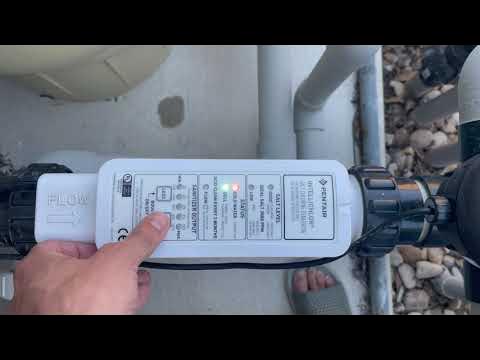
The Low Salt Light on the Pentair Intellichlor is a small indicator that plays a big role in maintaining your pool’s health. It’s found on the cell unit of the salt chlorine generator—a device that turns salt into chlorine, sanitizing your pool water automatically. This light activates when the salt level in the pool drops below the minimum threshold needed for effective chlorine production.
Most Intellichlor models (like the IC20, IC40, and IC60) have a panel with several indicator lights. When the Low Salt Light comes on, it’s a warning: your pool’s salt level is too low for the system to work properly. If ignored, your pool may not get enough chlorine, leading to cloudy water, algae, or unsafe conditions.
It’s important to know that the Low Salt Light is not just a suggestion—it’s a sign that action is needed. Running the generator with low salt can damage the cell and shorten its life. So, understanding this light and what to do next is crucial for every Intellichlor owner.
How The Intellichlor System Works
To truly understand the Low Salt Light, you first need to know how the Intellichlor Salt Chlorine Generator operates. This system is designed to simplify pool care by automating chlorine production. Here’s a step-by-step look at what happens inside your pool equipment:
- Salt Is Added to Pool Water: Pool owners add specific amounts of pool-grade salt (sodium chloride) to the water. The ideal range is usually between 3000 and 4200 parts per million (ppm), depending on the model.
- Saltwater Circulates Through the System: The pool pump moves water through the filter and then through the Intellichlor cell.
- Electrolysis Occurs: Inside the cell, a low-voltage electrical current converts dissolved salt into pure chlorine gas.
- Chlorine Sanitizes the Water: The chlorine gas dissolves instantly, killing bacteria, algae, and contaminants.
- Salt Reforms and Repeats the Cycle: After sanitizing, the chlorine recombines with water and returns to salt, ready to be converted again.
If the salt level is too low, electrolysis can’t produce enough chlorine, and the system triggers the Low Salt Light. The process stops working efficiently, and you must address the salt level for normal operation.
Why The Low Salt Light Turns On
The Low Salt Light is triggered for several reasons, and understanding them helps you find the right solution fast. Here are the most common causes:
- Actual Low Salt Level: The most direct cause is simply not enough salt dissolved in your pool. Over time, splash-out, backwashing, leaks, or heavy rain can reduce salt concentration.
- Sensor Issues: The Intellichlor uses sensors to measure salt levels. If they’re dirty, scaled, or malfunctioning, the system might give a false low salt warning.
- Temperature Effects: Cold water (typically below 60°F/16°C) can interfere with readings, making the system think the salt is low even if it isn’t.
- Dilution from Adding Water: Topping off the pool with fresh water dilutes salt.
- Aging or Scaling Cell: Calcium build-up on the cell plates reduces performance, sometimes causing incorrect salt readings.
- Power Issues or System Faults: Fluctuations in voltage, loose connections, or damaged cables can affect sensor accuracy.
It’s important not to guess. Always test the actual salt level with a reliable test kit before adding more salt. Adding salt unnecessarily can cause high salt conditions, which bring their own problems.
The Ideal Salt Range For Intellichlor
Maintaining the right salt concentration is key for the Intellichlor to work as designed. The recommended range varies by model, but generally:
- IC20/IC40/IC60: 3000–4200 ppm (parts per million)
- Optimal Level: 3400 ppm for most pools
When salt drops below 2600 ppm, the Low Salt Light will usually activate, and chlorine production will decrease or stop. Above 4500 ppm, you may see a High Salt Light, which can also damage the cell.
Here’s a quick reference table for Intellichlor salt levels:
| Salt Level (ppm) | System Status | Effect |
|---|---|---|
| Below 2600 | Low Salt Light On | Poor chlorine production, cell may turn off |
| 2600–3000 | Borderline | Reduced chlorine output |
| 3000–4200 | Normal Operation | Full chlorine output |
| Above 4500 | High Salt Light On | Potential cell damage, must lower salt |
Staying within this range is not just about chlorine—it extends the life of your expensive cell and helps your pool water feel soft and comfortable.
Step-by-step Guide: What To Do When The Low Salt Light Comes On
Seeing the Low Salt Light can be stressful, but the solution is usually straightforward. Here’s how to handle it step by step:
1. Confirm The Salt Reading
Never add salt just because the light is on. Use a reliable salt test kit or digital salt meter to measure your pool’s salt level. Strip kits are cheap but can be inaccurate; drop tests or digital meters are more reliable.
- Test water from the middle of the pool, away from return jets.
- Record the reading and compare it to the Intellichlor’s ideal range.
2. Inspect The Cell And Sensors
Check the cell for calcium buildup or debris. Mineral scaling on the plates can cause false low salt readings.
- Remove the cell (follow manufacturer’s instructions).
- Visually inspect for white, chalky deposits.
- Clean with a mild acid solution if needed (see cleaning section below).
3. Check Water Temperature
If your pool water is cold (below 60°F/16°C), wait for it to warm up. The system can misread salt levels in cold conditions. In many climates, this is a common issue in spring and fall.
4. Examine Pool Water For Dilution
Have you recently added a lot of fresh water, backwashed, or had heavy rain? These events can dilute salt and lower the concentration.
5. Add Salt If Needed
If your test confirms low salt, add the correct amount based on your pool size and current salt level. Use pool-grade salt only—never table salt or rock salt.
- Calculate how much salt to add using the pool’s volume and target ppm.
- Spread salt evenly around the pool (not directly into the skimmer).
- Run the pump for 24 hours to fully dissolve.
Here’s a practical example:
If you have a 20,000-gallon pool and your salt test shows 2500 ppm, and you want to reach 3400 ppm:
- Each 40-pound bag of salt raises 1000 gallons by 480 ppm.
- You need (3400–2500 = 900 ppm) increase.
- For 20,000 gallons: (20 x 0.48 = 9.6 ppm per bag), so about 1.9 bags.
Always add less than you think you need, retest, and add more if required.
6. Reset The System
Sometimes, after fixing the problem, the light stays on. Try turning the system off and back on, or reset according to the manual.
7. Monitor And Repeat
Retest your salt level after 24 hours. If the light remains on, review the earlier steps or contact a pool professional.
Common Mistakes When Dealing With The Low Salt Light
Many pool owners make simple errors when responding to the Low Salt Light. Avoid these common mistakes to save time, money, and frustration:
- Adding Salt Without Testing: Guessing or relying only on the light can cause over-salting, which is harder to fix than low salt.
- Using the Wrong Type of Salt: Only use salt labeled for pools. Table salt contains additives, and rock salt can have impurities that damage your cell.
- Ignoring Cell Maintenance: Failing to clean the cell leads to scale buildup and false readings.
- Not Circulating Water After Adding Salt: Salt must be fully dissolved before the generator can sense the new level.
- Forgetting Temperature Effects: Not accounting for cold water can lead to unnecessary salt addition.
- Skipping Regular Testing: Relying only on the Intellichlor’s lights isn’t enough. Independent testing is always wise.
Two insights often missed: Even a small leak can slowly drop salt levels over months, and power surges or electrical issues can temporarily confuse the system’s sensors. Keep these in mind when troubleshooting.

Credit: www.reddit.com
How To Test And Adjust Salt Levels Correctly
Proper testing and adjustment are the foundation of a healthy salt pool. Here’s how to do it like a pro:
Choosing The Right Test Kit
Not all test kits are created equal. For best results:
- Digital Salt Meters: Fast and accurate, but require calibration.
- Drop Test Kits: Very reliable for home use.
- Test Strips: Convenient, but less precise.
Digital meters may cost more upfront, but they give peace of mind for years.
Testing Best Practices
- Test at least once a month, and after heavy rain, splash-out, or water changes.
- Take water from elbow-depth, away from returns.
- Rinse test equipment with pool water before and after use.
Adjusting Salt Safely
- Always add salt in stages—never all at once.
- Spread salt across the shallow end, brushing to dissolve.
- Run the pump for 24 hours to ensure even distribution.
- Wait a full day before retesting.
Here’s a simple pool salt adjustment chart:
| Pool Size (gallons) | To Raise 500 ppm | To Raise 1000 ppm |
|---|---|---|
| 10,000 | 42 lbs | 83 lbs |
| 15,000 | 63 lbs | 125 lbs |
| 20,000 | 83 lbs | 167 lbs |
| 25,000 | 104 lbs | 208 lbs |
Always start with less salt and re-test. Too much salt is much harder to fix than too little.
Cleaning And Maintaining The Intellichlor Cell
A clean cell is critical for accurate salt readings and efficient chlorine production. Calcium and mineral buildup are common, especially in hard water areas. Here’s how to keep your cell in top shape:
When To Clean The Cell
- Every 3–6 months in normal use.
- More often if you notice white buildup or reduced chlorine output.
- If the Low Salt Light comes on and the cell looks dirty.
How To Clean Safely
- Turn off the pool pump and Intellichlor system.
- Remove the cell following manufacturer instructions.
- Inspect for buildup.
- Rinse with a high-pressure hose to remove loose debris.
- If scale remains, soak in a mild acid solution (usually 1 part muriatic acid to 4 parts water; always add acid to water, never the other way).
- Soak for 10–15 minutes only.
- Rinse thoroughly and reinstall.
Never scrape the cell plates with metal objects, as this can damage the coating and shorten cell life.
Signs Of A Failing Cell
- Frequent Low Salt Light even after cleaning and adding salt.
- Reduced chlorine output.
- Physical damage, corrosion, or visible wear on the cell plates.
Intellichlor cells last 3–7 years, depending on use and maintenance. If problems persist, consider professional inspection.
Credit: www.youtube.com
Practical Troubleshooting Scenarios
Sometimes, things aren’t as simple as adding more salt. Here are some real-world scenarios and how to handle them:
Scenario 1: Light On, Salt Level Normal
You test the water and salt is in range, but the light stays on.
- Check for scale buildup on the cell.
- Inspect electrical connections for corrosion or looseness.
- Reset the Intellichlor system.
- If unresolved, the sensor or cell may need replacement.
Scenario 2: After Heavy Rain
Your pool had a week of storms and now the light is on.
- Test salt level—rain and splash-out dilute salt.
- Top up with calculated amount of pool salt.
- Run pump for 24 hours and retest.
Scenario 3: Cold Weather Start-up
It’s early spring, water is cold, and the light is on.
- Wait until water warms above 60°F/16°C.
- If the light persists in warmer water, follow standard troubleshooting.
Scenario 4: Persistent Low Salt Despite Adding Salt
You’ve added the right amount, but the light comes back after a few weeks.
- Check for leaks (even slow ones).
- Inspect for frequent backwashing or overflow.
- Monitor for evaporation and refill patterns.
- Hidden leaks are a common cause for recurring issues.
Scenario 5: System Resets Or Flashes Randomly
The light turns on and off without pattern.
- Inspect power supply and ensure voltage is stable.
- Check for loose wiring or control box issues.
- Consult a professional if electrical troubleshooting is outside your comfort zone.
Extending The Life Of Your Intellichlor System
Your salt chlorine generator is a major investment. Here’s how to protect it for years to come:
- Maintain Proper Salt Levels: Avoid both low and high salt—both extremes shorten cell life.
- Clean the Cell Regularly: Prevents scale, improves readings, and ensures efficient chlorine production.
- Keep Water Chemistry Balanced: High calcium, low pH, or high stabilizer can stress the system.
- Protect From Power Surges: Use a surge protector or pool equipment timer to avoid electrical spikes.
- Winterize if Needed: In cold climates, follow proper winterization steps.
A well-maintained system can last over 5 years, saving you hundreds in chlorine and repair costs.

Credit: www.reddit.com
Comparing Intellichlor To Other Salt Chlorine Generators
How does Pentair Intellichlor stack up against other brands? Here’s a quick comparison of key features:
| Feature | Pentair Intellichlor | Hayward AquaRite | Jandy TruClear |
|---|---|---|---|
| Salt Range (ppm) | 3000–4200 | 2700–3400 | 3000–4000 |
| Self-Cleaning | Yes (reverse polarity) | Yes | Yes |
| Display Panel | LED lights | Digital display | LED & digital |
| Cell Life (years) | 3–7 | 3–5 | 3–5 |
| Warranty | 3 years | 1–3 years | 3 years |
Intellichlor stands out for its wide salt range and robust cell life, but its LED-based indicators (like the Low Salt Light) require you to pay close attention to water testing and maintenance.
Expert Tips For Trouble-free Operation
Here are some expert tips that even experienced pool owners may not know:
- Keep a Log: Track salt additions, water tests, and maintenance. Over time, you’ll spot patterns and avoid mistakes.
- Test for Phosphates: High phosphate levels can reduce chlorine effectiveness, leading to false “low chlorine” or “low salt” conclusions.
- Don’t Ignore Weather: Heavy rain, evaporation, and temperature swings all affect salt. Adjust your maintenance schedule seasonally.
- Monitor Cell Age: If your cell is over 5 years old, factor in natural wear when troubleshooting.
When To Call A Professional
While most Low Salt Light issues can be solved at home, there are times when expert help is needed:
- Persistent false readings after cleaning and testing.
- Electrical or control box issues.
- Suspected sensor or cell failure.
- Unexplained leaks or water loss.
A qualified pool technician can diagnose deeper issues, saving you time and preventing expensive damage.
Where To Find Reliable Support And Information
For more information, always check the official Pentair Intellichlor manual or the company’s support website. Online forums and pool owner communities are also valuable for sharing real-world experiences. For technical questions, the Pentair official site offers troubleshooting guides, FAQs, and contact information.
Frequently Asked Questions
What Does The Pentair Intellichlor Low Salt Light Mean?
The Low Salt Light indicates that your pool’s salt level has dropped below the minimum required for proper chlorine generation. It’s a warning that you need to check and possibly add salt to restore normal operation.
How Do I Test And Correct Low Salt In My Pool?
Use a digital salt meter or drop test kit to measure the salt level. If it’s below the recommended range (usually 3000–4200 ppm), calculate how much pool salt to add based on your pool size and current salt level. Add in stages, circulate for 24 hours, and retest.
Can Cold Water Trigger The Low Salt Light Even If Salt Is Normal?
Yes. Cold water (below 60°F/16°C) can cause the Intellichlor to misread salt levels and turn on the Low Salt Light. Wait until the water warms up before taking further action.
How Often Should I Clean The Intellichlor Cell?
Clean the cell every 3–6 months, or more often if you notice scale buildup or reduced chlorine output. Regular cleaning prevents false readings and extends the life of your system.
What Happens If I Ignore The Low Salt Light?
If you ignore this warning, your pool may not get enough chlorine. This can lead to unsafe water, algae growth, and potential damage to the Intellichlor cell. Always address the Low Salt Light promptly for a healthy pool.
Maintaining the right salt level in your pool isn’t just a chore—it’s the secret to a long-lasting, trouble-free Intellichlor system. With the right knowledge and a few smart habits, you can enjoy crystal-clear water and peace of mind all season long.