
When your Pentair Intelliflo pool pump displays “Not Active” on its screen, it’s easy to feel lost or frustrated. Pool owners rely on their pumps to keep water clean and safe, so when the display suddenly goes blank or stops responding, it can turn a relaxing day into a troubleshooting headache. Fortunately, understanding the causes and solutions for a non-active display can save time, money, and stress. This guide breaks down exactly what “Display Not Active” means, why it happens, and how you can fix it with confidence—even if you’re not a technical expert.
What Does “pentair Intelliflo Display Not Active” Mean?
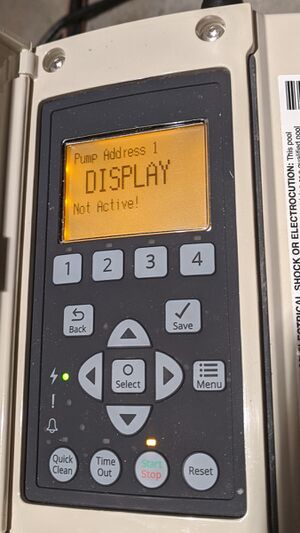
The Intelliflo pump uses a digital display to show status messages, settings, and alerts. When the display reads “Not Active,” it signals that the screen is not receiving power, or the communication between the display and the pump’s control board has failed. Sometimes, the pump might still be working in the background, but you cannot see or change settings. In other cases, the pump stops working altogether.
There are several reasons why this message appears:
- Power supply interruptions
- Faulty wiring or loose connections
- Damaged display panel
- Failed control board
- External controller interference
Ignoring this issue can lead to bigger problems, such as poor water quality, higher energy bills, or even pump damage. That’s why understanding the root cause is essential.
How The Pentair Intelliflo Display Works
The Intelliflo pump is known for its variable speed technology and energy efficiency. Its display is more than just a screen—it’s the main interface for programming schedules, adjusting speeds, and monitoring pump health. Here’s a quick look at how it functions:
- The display is powered by the pump’s main control board.
- Data travels between the board and the screen through a ribbon cable or direct wiring.
- The display responds to both manual inputs and commands from automation systems (like pool automation panels).
If any link in this chain fails, the display can become “Not Active,” leaving you unable to control or monitor the pump.
Key Features Of Intelliflo Display
- LCD screen shows RPM, watts, error codes, and status
- Simple button interface for easy programming
- Backlit for night visibility
- Designed to resist water and sun exposure
But even this robust system is not immune to faults.
Main Causes Of “display Not Active” On Pentair Intelliflo
Let’s break down the most common reasons your display goes inactive, and what signs to look for.
1. Power Supply Issues
This is the number one reason for an inactive display. If the pump is not getting enough power, the display can’t turn on.
- Tripped circuit breaker: Sometimes, a power surge or overload will trip the breaker.
- Blown fuse: The pump may have an internal fuse that protects its electronics.
- Loose or corroded wiring: Outdoor connections are exposed to weather and can loosen or corrode over time.
- Voltage drop: Long runs of wire or undersized wire can cause the voltage to drop below the required level.
Tip: Always check power at the pump with a multimeter before moving to more complex troubleshooting.
2. Display Panel Failure
Even though the display is designed to last, water intrusion, heat, or simple aging can cause it to fail.
- Screen goes blank: No backlight or text at all.
- Partial display: Some buttons or sections work, others don’t.
- Flickering or scrambled text: Indicates possible internal damage.
Non-obvious insight: Sometimes, insects or small animals can nest inside the control panel, causing unexpected display issues.
3. Control Board Malfunction
The control board is the “brain” of the pump. If it fails, the display cannot function.
- No response to button presses
- Pump doesn’t start or stops randomly
- Error codes before going inactive
Control board issues are often harder to diagnose without experience.
4. Communication Errors
Modern pool systems often connect the Intelliflo pump to automation panels or external controllers. If communication fails:
- The display may show “Not Active”
- Settings cannot be changed directly on the pump
- Pump may default to a basic mode
Sometimes, the “Not Active” message simply means that the automation system has taken over control.
5. Physical Damage
Storms, accidents, or improper installation can physically damage the display or its wiring.
- Cracked screens
- Broken buttons
- Cut or pinched wires
These problems are usually visible with a careful inspection.
6. Software Or Firmware Glitches
Just like any smart device, the Intelliflo’s software can sometimes freeze or crash.
- Display gets stuck on one screen
- Buttons stop working until a reset
- Occasional reboots or “ghost” errors
Resetting the pump often fixes these glitches, but not always.
7. Environmental Factors
Pools are harsh environments—sun, rain, chemicals, and temperature swings can all affect electronics.
- High humidity inside the panel
- UV damage to plastic parts
- Condensation on the circuit board
These factors often cause slow, hard-to-notice degradation.
How To Troubleshoot A Pentair Intelliflo Display That Is Not Active
Fixing the “Not Active” display starts with a step-by-step approach. Here’s how to narrow down the problem and what you can do at each step.
Step 1: Check Power At The Pump
- Turn off all power to the pump at the breaker.
- Remove the cover to access wiring.
- Use a multimeter to test for 240V or 120V (depending on your model).
- Restore power and watch for any signs of life on the display.
If there’s no voltage, the problem is before the pump—check breakers, fuses, and wiring back to the panel.
Step 2: Inspect Wiring And Connections
- Look for loose, frayed, or corroded wires at the terminal block and inside the display.
- Gently tug each wire to check for secure connections.
- Check the ground wire for proper attachment.
- Look for signs of water ingress or insect nests.
If you find problems, turn off power and repair or replace the damaged wires.
Step 3: Test The Display Panel
- If possible, borrow a display from another working pump and swap it briefly.
- If the new display works, your original panel is faulty.
- If the new display also doesn’t work, the issue is deeper—likely the control board or power.
Advanced tip: Some pool supply stores can test your display for you.
Step 4: Examine The Control Board
- Look for burn marks, swollen capacitors, or corrosion.
- Check if any fuses on the board are blown.
- If the board looks or smells burnt, it likely needs replacement.
Non-obvious insight: Control boards can sometimes be repaired by a professional, saving the cost of a full replacement.
Step 5: Review Automation System Connections
- If your pump is connected to a pool automation system, disconnect the automation cable and see if the display returns to normal.
- Some automation systems “lock out” the local display—this is normal and not a fault.
Check your automation system’s manual for specific behavior.
Step 6: Reset Or Power Cycle The Pump
- Turn off the breaker and wait for 2-5 minutes.
- Turn power back on and watch the display.
- If the display comes back, it was likely a software glitch.
If the problem returns, you may need a software update or deeper service.
Step 7: Call For Professional Help
If you’ve tried all steps and the display is still not active, it’s time for an expert. Some issues require special tools or parts. A Pentair-certified technician can:
- Diagnose complex control board failures
- Replace or repair display panels
- Update software or firmware
- Check for hidden electrical problems
Comparing Common Causes And Solutions
Here’s a quick visual comparison of the main causes and their fixes:
| Cause | Signs | DIY Fix? | Pro Needed? |
|---|---|---|---|
| Power Supply | No lights, no hum | Yes | No (usually) |
| Display Failure | Blank or partial screen | Sometimes | Maybe |
| Control Board | Unresponsive, errors | No | Yes |
| Automation Error | Display “locked out” | Yes | No |
| Physical Damage | Visible cracks, breaks | No | Yes |
Prevention: How To Avoid Display Problems In The Future
A little prevention goes a long way. Here’s how to keep your Intelliflo display working smoothly for years.
1. Protect From Water And Sun
Install a weatherproof cover over the pump if it’s in direct sunlight or rain. UV rays can damage the plastic and electronics over time.
2. Check Wiring Annually
Once a year, turn off the power and open the control box. Inspect all wires for corrosion, loose connections, or animal damage.
3. Update Firmware
Ask your pool professional about updating your pump’s firmware. Updates can fix bugs and improve reliability.
4. Keep Automation Systems Updated
If you use an automation panel, update its software regularly and use only compatible devices.
5. Schedule Regular Service
A professional checkup every 1-2 years can catch small problems before they cause a display failure.

Credit: www.youtube.com
When To Repair And When To Replace
Sometimes, fixing an old or badly damaged display is not the best choice. Here’s a quick guide:
| Issue | Repair | Replace | Notes |
|---|---|---|---|
| Loose wire | ✔ | Simple fix | |
| Cracked display | ✔ | Buy new panel | |
| Blown fuse | ✔ | Easy fix | |
| Burned control board | ✔ | Replace board | |
| Software glitch | ✔ | Try reset first |
Cost Of Repairing Or Replacing The Display
The cost depends on the exact issue:
- Simple wiring fix: $0–$100 if you do it yourself
- New display panel: $150–$300 for parts
- Control board replacement: $300–$600 (parts plus labor)
- Professional diagnosis/service call: $100–$200
Tip: If your pump is still under warranty, contact Pentair before spending money on repairs.
Signs You Need A New Pump Instead
Most display problems can be fixed, but if your pump is over 10 years old, or if you’re facing repeated failures, upgrading may be smarter:
- Frequent electrical issues
- Cracks or leaks in the pump body
- Outdated or unsupported model
Newer Intelliflo models are even more energy-efficient and may qualify for rebates.
Real-world Examples
Here are some situations pool owners have faced:
- Case 1: Jane’s display went blank after a thunderstorm. She found a tripped breaker and a blown fuse. Replacing the fuse fixed the problem.
- Case 2: Mike’s display showed “Not Active” after connecting to a new automation system. The display came back after disconnecting the automation cable. The issue was a setting in the automation panel, not the pump.
- Case 3: Ravi’s display started flickering, then went dead. The cause was a small insect nest inside the panel. After cleaning and resealing, the display worked again.
Learning from these cases can help you spot similar issues quickly.
Credit: www.troublefreepool.com
Mistakes Pool Owners Often Make
- Ignoring the problem: Hoping it will go away often leads to bigger, more expensive repairs.
- Replacing the display without checking power: The problem is often with wiring or the control board, not the display itself.
- Forgetting about automation systems: Not realizing that automation can lock out the display causes unnecessary worry.
- Using the wrong replacement parts: Always use genuine Pentair parts to avoid compatibility problems.
- Not turning off power before repairs: This can be dangerous and damage your equipment.
When To Call Pentair Support
If you’ve checked power, wiring, and swapped the display, but it’s still not working, Pentair’s support team can help. Write down:
- Your pump’s model and serial number
- What you’ve already tried
- Any error codes or symptoms
Having this information speeds up the process.
You can find Pentair’s contact info and support resources on their official support page.
Upgrading To A Newer Intelliflo Model
If your display problem is the last straw, a new Intelliflo pump offers:
- Higher energy efficiency (saves money)
- Quieter operation
- Easier controls and better displays
- Longer warranty
Compare the cost of repair vs. upgrade, especially if your pump is over 8-10 years old.
Myths About Pentair Intelliflo Displays
- Myth: If the display is inactive, the pump is broken.
*Fact:* Sometimes, the pump still runs on a schedule or default speed.
- Myth: You must replace the whole pump to fix the display.
*Fact:* Most display issues are separate from the pump motor.
- Myth: Automation always causes display problems.
*Fact:* Properly installed automation rarely causes issues; it’s often a wiring or settings error.

Credit: www.youtube.com
Frequently Asked Questions
Why Does My Pentair Intelliflo Display Say “not Active” After Connecting An Automation System?
When you connect an automation system (like EasyTouch or IntelliTouch), it can take over control of the pump. The local display may show “Not Active” or become unresponsive, which is normal. Check your automation settings and documentation to make sure everything is configured correctly.
Can I Replace The Display Panel Myself?
Yes, if you’re comfortable with basic electrical work and follow safety steps. Always turn off the power before starting. Unscrew the old display, disconnect the cable, and plug in the new one. If the new display still doesn’t work, the problem is likely deeper, such as the control board.
How Can I Tell If My Display Panel Or Control Board Is Bad?
Try swapping the display with a working one from another pump. If the new display works, your original panel is faulty. If it doesn’t, the control board may be bad. Also, look for other signs like no response, error codes, or burnt smells.
Will A Software Update Fix A “not Active” Display?
Sometimes, a software or firmware update can resolve bugs causing the display to freeze or go inactive. However, most “Not Active” problems are due to power, wiring, or hardware issues. Try a reset first, then consult a pro if needed.
Is The Pentair Intelliflo Display Covered Under Warranty?
The display is usually covered under the pump’s warranty if you are the original owner and the pump is within the warranty period (often 2-3 years). Check your paperwork and contact Pentair support with your serial number for details.
A well-functioning display is the heart of your Pentair Intelliflo pump experience. With careful troubleshooting and smart maintenance, you can solve most “Not Active” issues yourself and keep your pool sparkling clean all season long.