
If you own a pool with a Pentair Intelliflo pump, you know how important the keypad is. It lets you control everything—from speed settings to schedules. But what happens when the Pentair Intelliflo keypad stops working? Suddenly, your pool routine is interrupted, and frustration kicks in. This problem is more common than you might think, but the solutions are often within reach. Whether you’re a pool owner, technician, or just like to fix things yourself, understanding why the keypad fails—and how to fix it—can save you money and time.
In this guide, you’ll discover the main causes behind keypad issues, step-by-step troubleshooting, repair options, and tips for preventing future problems. You’ll also learn about real-world examples, when to call a professional, and how the Intelliflo compares to other pool pumps. This article is designed for readers who want clear answers, practical advice, and confidence in handling their Pentair Intelliflo keypad not working situation.
Understanding The Pentair Intelliflo Keypad
The Pentair Intelliflo is a variable speed pool pump known for its energy savings and smart controls. The keypad is the main interface that allows you to:
- Turn the pump on or off
- Change speed settings
- Set schedules and timers
- Monitor system alerts
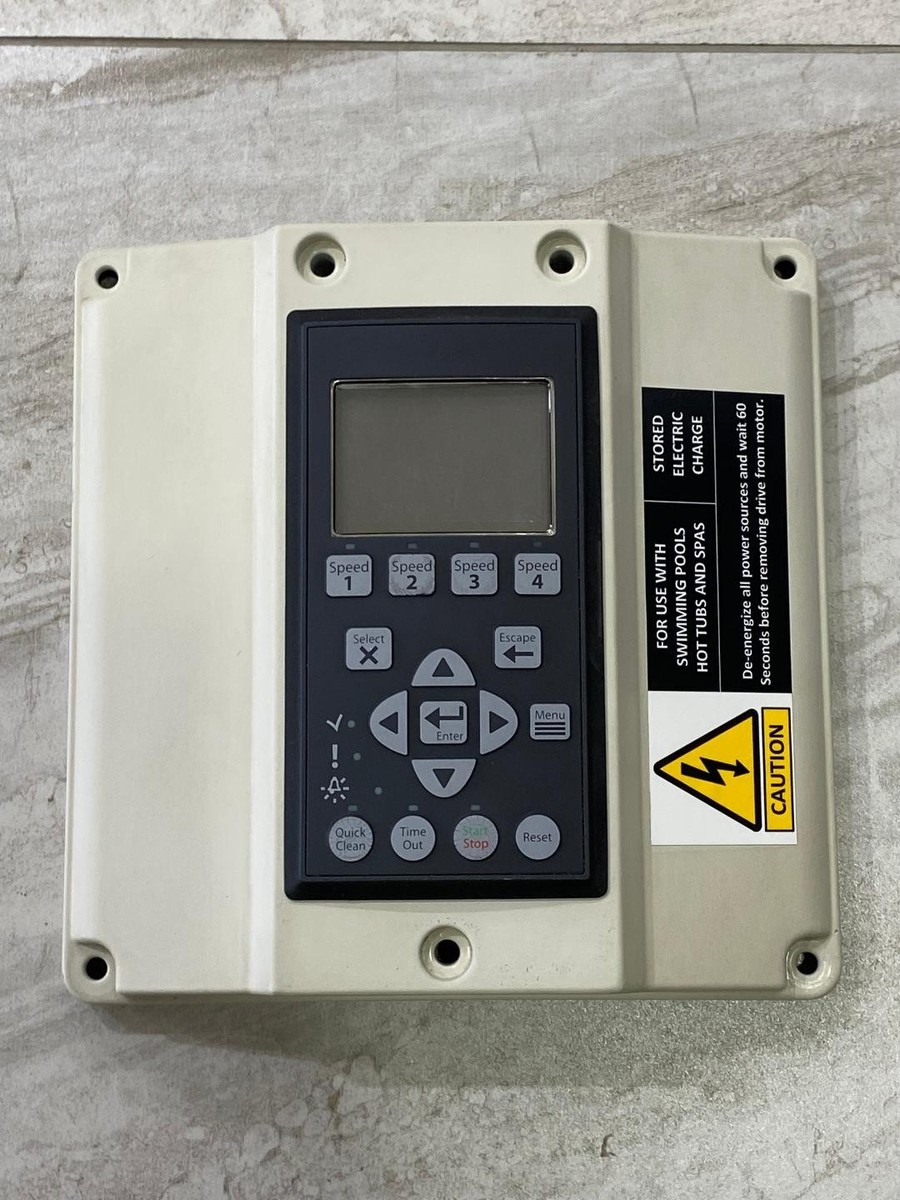
The keypad is a small panel with buttons and a display screen mounted on the pump motor. It’s designed to withstand outdoor conditions, but like any electronic device, it can develop problems over time.
Why is this keypad so important? Without it, you lose direct access to the pump’s features. Some models allow control from a separate automation system or smartphone app, but many pool owners depend heavily on the physical keypad. When it fails, the pump may continue running on its last setting, but adjusting anything becomes difficult.
Non-obvious insight: Many users don’t realize that keypad failures can also affect the pump’s ability to communicate with automation systems. If you use automation, a faulty keypad may disrupt more than just manual controls.
Common Reasons The Pentair Intelliflo Keypad Stops Working
When your Intelliflo keypad is unresponsive or blank, several factors could be at play. Here are the most frequent causes:
- Moisture or Water Damage: The keypad is designed for outdoor use, but heavy rain, condensation, or a direct spray from a hose can let water seep inside. This can cause the buttons or display to stop working.
- Sun and Heat Exposure: Over years, sunlight can fade and damage the display, while heat may cause the keypad membrane to warp, leading to unresponsive buttons.
- Electrical Issues: Power surges, grounding problems, or loose wiring often lead to keypad malfunctions. Sometimes, a tripped breaker or GFCI outlet interrupts power to the pump.
- Faulty Keypad Overlay or Membrane: The soft, rubbery layer you press can wear out, making some or all buttons stop responding.
- Control Board Failure: The keypad sends signals to the control board inside the pump. If the board fails, the keypad may appear dead, even if it’s in perfect condition.
- Display Screen Failure: The LCD or LED screen itself may fail, making it look like the keypad isn’t working, even if the buttons respond.
- Insect or Rodent Damage: Small pests can get inside the pump housing and chew wires, causing intermittent or total failure.
- Corrosion: Over time, humidity and chemicals can corrode connectors and contacts behind the keypad.
- Software or Firmware Glitches: Sometimes, an internal software error can freeze or lock up the keypad.
Expert tip: Keypad problems often start small—a button that needs extra pressure, a flickering display—before total failure. Fixing issues early can prevent bigger repairs.
Signs And Symptoms Of A Non-working Keypad
How do you know the keypad is the problem? Look for these signs:
- No Display: The screen is blank, even when the pump should have power.
- Unresponsive Buttons: Pressing keys does nothing, or only some buttons work.
- Partial Display: Only part of the screen lights up, or displays scrambled characters.
- Flickering or Faded Screen: The display is hard to read, especially in sunlight.
- Stuck or Sticky Buttons: Buttons feel jammed or don’t “click.”
- Error Messages: Messages like “Keypad Error” or codes not listed in the manual.
It’s important to confirm that the issue is with the keypad—not another part of your pool system. For example, if your pump isn’t running at all, check for power before blaming the keypad.
Beginner insight: If the keypad is dead, but you can still control the pump using an automation system or app, the problem is likely limited to the keypad itself.
Step-by-step Troubleshooting Guide
Before calling a technician or buying replacement parts, follow these steps to diagnose the problem. You’ll need a screwdriver, a multimeter (for electrical checks), and basic safety gear.
1. Check For Obvious Power Issues
- Make sure the pump’s circuit breaker is on.
- Check the GFCI outlet (if used); press the “reset” button.
- Inspect the main power switch to the pump.
If there’s no power, the keypad will not work. Restore power first.
2. Inspect The Keypad For Physical Damage
- Look for cracks, moisture, or discoloration on the keypad.
- Press each button to see if some work and others do not.
If there’s visible water inside, allow it to dry for 24–48 hours before further tests.
3. Look For Error Codes
- Some Intelliflo models display error codes or messages when there’s a keypad issue.
- Write down any codes and check the manual for explanations.
4. Test For Wiring Or Connector Problems
- Turn off power to the pump.
- Open the control panel and check the ribbon cable connecting the keypad to the control board. Is it loose or corroded?
- Gently reseat the connector.
Safety warning: Never open the pump’s control panel while power is on.
5. Try A Simple Reset
- Turn off power to the pump at the breaker.
- Wait 60 seconds, then turn power back on.
- Sometimes, this resets a frozen keypad or software glitch.
6. Check The Control Board
- If you’re comfortable, use a multimeter to check voltage at the control board.
- If the board is getting power but the keypad is not working, the keypad may be at fault.
7. Test The Keypad On Another Pump (if Possible)
- If you have access to another Intelliflo, swap the keypads (same model only) to see if the problem follows the keypad or stays with the pump.
Non-obvious insight: On some models, the keypad can be removed and mounted remotely. Testing it in a different location can reveal wiring or environmental issues.
8. Try External Control (if Available)
- If you use automation (like Pentair ScreenLogic), try changing pump settings from your app or automation panel.
- If external control works but the keypad does not, the keypad is the likely problem.
9. Inspect For Pests Or Corrosion
- Look for insect nests, chewed wires, or greenish corrosion inside the control area.
- Clean carefully and replace damaged wires.
By following these steps, you can often narrow down the cause of the keypad failure.
Keypad Repair Vs. Replacement
Once you’ve diagnosed the problem, the next decision is whether to repair or replace the keypad.
When Can You Repair?
- Minor membrane issues: Sometimes, cleaning under sticky buttons restores function.
- Moisture damage: If caught early and fully dried, the keypad may recover.
- Loose connectors: Re-seating or cleaning the ribbon cable can fix intermittent problems.
However, most keypad failures require replacement, as the parts are sealed and not meant to be repaired.
When Do You Need Replacement?
- Cracked or faded display
- Multiple dead buttons
- Severe water damage
- No improvement after resets and connector checks
Replacement keypads are available for most Intelliflo models. Make sure to buy the correct part number for your pump.
Comparing Repair And Replacement
Here’s a comparison of what you can expect in terms of cost, time, and success rate:
| Option | Typical Cost | Time Required | Success Rate |
|---|---|---|---|
| Repair (cleaning, drying, connectors) | $0–$50 | 1–2 hours | Low–Medium |
| Keypad Replacement | $100–$300 | 1–2 hours | High |
| Control Board Replacement | $200–$500 | 2–3 hours | Medium |
| Professional Service Call | $150–$400 | 2–5 days (appointment) | High |
Tip: Many pool owners try simple repairs first. If those fail, replacing the keypad usually solves the problem.
How To Replace The Pentair Intelliflo Keypad
If you’ve decided replacement is needed, here’s how to do it safely:
Tools And Materials Needed
- Replacement keypad (get the exact model)
- Screwdrivers (Phillips and flathead)
- Needle-nose pliers
- Clean rag
Step-by-step Instructions
- Turn off power at the breaker and confirm the pump is off.
- Remove the old keypad: Unscrew the panel from the pump motor. Carefully disconnect the ribbon cable.
- Inspect and clean: Check the area for corrosion or debris. Clean with a dry rag.
- Install the new keypad: Connect the ribbon cable firmly, screw the keypad in place, and ensure all seals are tight.
- Power on: Restore power and test all buttons.
- Check for leaks: Make sure no moisture can enter behind the new keypad.
Beginner mistake: Forgetting to match the replacement keypad to your exact Intelliflo model. Always check part numbers.

Credit: www.polytecpools.com
Preventing Future Keypad Failures
Keeping your Pentair Intelliflo keypad working well saves trouble and money. Here are proven ways to prevent common problems:
- Install a Sun Shield: Sun exposure fades and cracks the keypad. Use a shade or UV cover if the pump is in direct sunlight.
- Seal Out Moisture: Check the seal around the keypad yearly. Replace cracked rubber or caulking.
- Avoid Direct Water Spray: Never spray the pump directly with a hose. Clean gently with a damp cloth.
- Check for Pests: Inspect for insects or rodents at least twice a year, especially in spring and fall.
- Secure Connections: Each season, ensure the keypad connector is tight and free of corrosion.
- Update Software: If your Intelliflo supports firmware updates, keep it current to avoid software glitches.
- Use a Surge Protector: Protect the pump from electrical spikes during storms.
- Read Error Codes Early: Don’t ignore warning messages. Early action can prevent bigger failures.
Real-world example: One pool owner in Texas extended his keypad life by 5 years simply by shading it and sealing out moisture—simple steps that make a big difference.
When To Call A Professional
Some keypad problems require expert help. Call a technician if:
- You see burning, melting, or a burning smell inside the pump.
- The keypad has failed repeatedly after replacement.
- You are not comfortable working with electrical equipment.
- The control board shows signs of damage or corrosion.
- Warranty repair may be covered—check your documentation.
Professionals have the right tools to test and replace parts safely. They can also check for deeper problems in the pump’s electronics.
How Keypad Failure Affects Pool Operation
A broken keypad can cause more than inconvenience. Consider these impacts:
- Pump runs only at last setting: No way to change speed or schedule.
- Missed cleaning cycles: If schedules can’t be updated, water quality may drop.
- No error alerts: Problems like blocked baskets or low flow may go unnoticed.
- Automation system problems: Some pool automation systems require keypad communication.
Expert tip: If your pool pump is stuck at high speed due to a keypad failure, your electricity bill could jump by $50–$100 per month.
Pentair Intelliflo Vs. Other Pool Pumps (keypad And Controls)
Is the Intelliflo’s keypad more reliable than other brands? Here’s a quick comparison:
| Pump Brand | Keypad Location | Common Issues | Repair Cost | Wireless Control |
|---|---|---|---|---|
| Pentair Intelliflo | On motor, remote-mountable | Moisture, fading, connector issues | $150–$300 | Yes (with automation) |
| Hayward EcoStar | On motor, removable | Display failure, stuck buttons | $180–$350 | Yes |
| Jandy VS FloPro | On motor, basic display | Limited by basic keypad | $120–$250 | Yes |
| Sta-Rite IntelliPro | Same as Pentair (shared design) | Same as Pentair | $150–$300 | Yes |
Non-obvious insight: Because Pentair and Sta-Rite share keypad designs, replacement parts are often interchangeable, but always check compatibility.
Credit: www.ebay.com
Real-world Scenarios: What Pool Owners Experience
Thousands of pool owners have faced keypad issues. Here are some real examples:
- Sudden failure after a storm: A Florida owner found the keypad dead after lightning. Surge protection was missing. Solution: replaced keypad and added a surge protector.
- Moisture under the display: In humid climates, condensation collected inside the keypad. Drying and resealing fixed the issue.
- Buttons only work sometimes: One user found a loose connector was the culprit. Reseating fixed the problem without new parts.
- Faded display in desert sun: In Arizona, the display faded after three years. A sun shield and new keypad extended life.
- Keypad error code: An owner received a “Keypad Error” on the display. The ribbon cable had corroded. Replacing the cable solved it.
Practical tip: Keep a log of when problems start and what you tried. This helps if you call for service or need warranty support.
How To Order The Right Replacement Keypad
Not all Intelliflo keypads are the same. Here’s how to get the right part:
- Find your pump’s model and serial number: Usually on a label on the motor.
- Check your manual: It lists compatible part numbers.
- Order from a trusted dealer: Use a Pentair-authorized seller to avoid counterfeit parts.
- Ask about return policies: In case you order the wrong keypad.
If you’re unsure, take a clear photo of your pump and keypad and show it to your dealer.
What To Do While Waiting For Parts
If your keypad is out of order and you’re waiting for a replacement:
- Set the pump to a safe default speed before it fails, if possible.
- Use automation or smartphone apps to control the pump (if available).
- Monitor pool water quality closely.
- Run the pump on a manual timer if needed.
Beginner insight: Most Intelliflo pumps will keep running at their last programmed speed and schedule, even if the keypad dies—so your pool stays clean in the short term.
Software And Firmware Considerations
Some keypad issues are related to software, not hardware:
- Frozen display: May be fixed by a “hard reset” (power cycling).
- Unusual error codes: Sometimes resolved by updating the pump’s firmware.
- Automation communication errors: Check for software updates for your automation system as well.
You can find firmware updates and instructions on the Pentair official website or through your pool service provider. If you are unsure, ask a professional for help.

Credit: www.youtube.com
Long-term Reliability And Maintenance
How long should a Pentair Intelliflo keypad last? Most owners get 5–8 years, but harsh conditions can shorten this. Regular care extends the life of both keypad and pump.
- Clean the keypad gently every few months.
- Inspect seals and connectors yearly.
- Protect from sun and pests.
- Respond quickly to early warning signs.
Pro insight: When replacing a keypad, check the control board and wiring for wear—solving all small issues at once prevents repeated repairs.
Frequently Asked Questions
Why Is My Pentair Intelliflo Keypad Not Lighting Up?
A blank or dark keypad usually means no power is reaching the pump, or the keypad itself has failed. Check the circuit breaker, GFCI, and all power connections. If the pump runs but the display is still blank, the keypad or display module may need replacement.
Can I Use My Pool Pump If The Keypad Is Not Working?
Yes, in most cases, the Intelliflo pump will continue running at its last programmed setting. However, you won’t be able to change speed, schedules, or respond to errors until the keypad is fixed. If your pool uses automation, you might still have control through your app or panel.
How Much Does It Cost To Replace A Pentair Intelliflo Keypad?
Replacement keypads typically cost $100–$300 for the part alone. If you hire a professional, expect total costs to reach $250–$400 including labor. Prices vary depending on your location and pump model.
How Can I Prevent My Keypad From Failing Again?
Protect your keypad by shielding it from sun, keeping it dry, sealing out pests, and checking connections each season. Use a surge protector to guard against electrical damage. Early maintenance prevents most failures.
Where Can I Find Official Pentair Support And Parts?
The best place to find support, manuals, and genuine parts is the Pentair Official Support site. You’ll find troubleshooting help, part numbers, and authorized dealers.
Your Pentair Intelliflo pump is a reliable investment, and with the right steps, you can keep its keypad—and your pool—running smoothly for years to come. When in doubt, don’t hesitate to call a professional and always use genuine replacement parts for the best results.