
When you invest in a smart pool system, you expect everything to work seamlessly. That’s why it’s so frustrating when your Pentair pool equipment refuses to connect to WiFi. Whether you’re trying to control your pool from your smartphone, set schedules, or check water quality remotely, a lost connection means lost convenience. This problem is more common than you might think, and it can leave even tech-savvy pool owners scratching their heads.
If your Pentair system won’t connect to WiFi, don’t worry—you’re not alone. Many users face this issue, and it’s usually fixable with the right steps. This guide will walk you through everything you need to know: from understanding why the connection fails, to practical troubleshooting, and even tips to prevent future issues. You’ll find easy-to-follow advice, examples from real users, and expert insights that go beyond the basics. Let’s get your Pentair back online and your pool under control.
How Pentair Pool Equipment Connects To Wifi
Before diving into troubleshooting, it helps to know how Pentair smart systems use WiFi. Most Pentair products—like the IntelliCenter, ScreenLogic2, and Pentair Home App—connect to your home’s wireless network. This link allows you to control your pool’s pumps, heaters, lights, and more from anywhere.
Here’s a simple breakdown:
- Your Pentair system has a WiFi module or connects to a gateway device.
- It seeks out your home WiFi network (usually 2.4 GHz, as 5 GHz is often unsupported).
- Once connected, data passes between your Pentair controller and your phone or computer via the internet.
If any part of this chain breaks, you lose remote access. Issues can come from the Pentair device, your router, your internet provider, or even app/software glitches.
Common Reasons Pentair Will Not Connect To Wifi
Many pool owners wonder: “Why won’t my Pentair system connect?” Here are the most frequent causes:
1. Wifi Signal Is Too Weak
Pool equipment is often installed outdoors, far from the router. Thick walls, metal, or even water can block the signal.
2. Wrong Wifi Frequency
Most Pentair devices only work on 2.4 GHz WiFi. If your router is set to 5 GHz only, the system won’t see it.
3. Incorrect Wifi Password
A simple typo or an outdated password can stop the connection.
4. Network Name Issues (ssid)
Special characters or spaces in your WiFi name can confuse the device.
5. Firmware Or App Bugs
Outdated firmware or glitches in the Pentair app can cause connection failures.
6. Router Settings
Advanced router settings like MAC filtering or firewalls may block the Pentair unit.
7. Device Hardware Problems
Rarely, the WiFi module in the Pentair hardware can fail.
8. Internet Outage
Sometimes, the home internet is the real problem, not the Pentair device.
Step-by-step Troubleshooting For Pentair Wifi Connection
Let’s move from the simplest fixes to more advanced solutions. Follow these steps in order, and you’ll solve most issues without calling support.
1. Check Wifi Signal Strength
Your Pentair controller or gateway should be within a reasonable distance from your router. If you’re unsure, use your smartphone:
- Stand near the Pentair device and check WiFi bars.
- If the signal is low or drops, move your router closer, or install a WiFi extender.
Tip: Water, concrete, and metal block WiFi. Try placing the router higher or use mesh networking.
2. Confirm You’re Using 2.4 Ghz Wifi
Pentair devices rarely support 5 GHz networks. Here’s how to check:
- Open your router’s admin panel (see router label or manual).
- Ensure 2.4 GHz is enabled and broadcasting.
- If your network combines 2.4 and 5 GHz with the same name, create separate names (for example, “HomeWiFi24” and “HomeWiFi5”).
Non-obvious Insight: Some routers default to only 5 GHz, especially after a reset. Always double-check after any network changes.
3. Verify Wifi Name And Password
Go to your router settings:
- Use only letters and numbers in your WiFi name (SSID).
- Avoid special symbols like #, $, &, or spaces.
- Re-enter your WiFi password in the Pentair app—copy-paste errors are common.
Practical Example: One user found their Pentair wouldn’t connect because their WiFi was named “Smith’s House #1.” Changing it to “SmithsHouse1” fixed the issue.
4. Power Cycle Everything
Unplug your Pentair device, router, and modem for 30 seconds. Then plug back in:
- Turn on modem, wait for full startup.
- Start router, wait for lights to stabilize.
- Power on Pentair controller last.
This simple sequence often fixes communication glitches.
5. Update Firmware And Apps
Old software can create bugs:
- In the Pentair app, check for updates.
- Visit the Pentair website for firmware files if your controller supports manual updates.
- Update your smartphone’s operating system.
Expert Tip: Always update the app before updating hardware firmware.
6. Check Advanced Router Settings
Some routers have advanced features that can block new devices:
- Disable MAC filtering or whitelist the Pentair MAC address (found on the device label).
- Turn off guest networks for Pentair connections.
- Make sure DHCP is enabled (it gives out IP addresses automatically).
7. Reconnect Using The Pentair App
Every Pentair system has its own WiFi setup steps. Most use the app to search for your device and connect. Follow the app’s prompts carefully:
- Choose the correct Pentair device from the list.
- Select your 2.4 GHz WiFi network.
- Enter your password slowly and double-check for typos.
Non-obvious Insight: Some Pentair devices create their own temporary WiFi (like “Pentair_XXXX”) for setup. Connect your phone to this first, then return to the app.
8. Test Internet Access
Try browsing the web on your phone using the same WiFi. If pages don’t load, the problem is your internet—not Pentair. Call your ISP if needed.
9. Factory Reset As A Last Resort
If all else fails, reset your Pentair controller to factory settings. This will erase schedules and preferences, so use this carefully:
- Locate the reset button (check manual).
- Hold for 10–15 seconds until lights blink.
- Set up WiFi from scratch.
10. Contact Pentair Support
If the device still won’t connect, your hardware may be faulty. Gather these details before calling:
- Model number and purchase date
- Steps already tried
- Error messages/screenshots
- Router make and model
Pentair support can walk you through advanced steps or arrange repairs if needed.
Comparing Common Pentair Devices: Wifi Connectivity Features
Not all Pentair pool controllers use WiFi the same way. Here’s a quick comparison of popular models and their connection features:
| Pentair Model | WiFi Support | Setup Method | Special Notes |
|---|---|---|---|
| IntelliCenter | Yes (built-in) | Pentair Home App | Supports both WiFi and Ethernet |
| ScreenLogic2 | Yes (via gateway) | ScreenLogic Connect App | Often needs firmware updates |
| EasyTouch/IntelliTouch | No (requires add-on) | ScreenLogic2 Interface | Needs extra hardware for WiFi |
| Pentair Home App Devices | Yes (direct) | Pentair Home App | Some only support 2.4 GHz |
Real-world Examples Of Pentair Wifi Issues
Sometimes, seeing how others solved their problems can help. Here are two cases from actual Pentair users:
Case 1: Outdoor Router Placement
A pool owner struggled for weeks to connect their IntelliCenter. Their router was inside a closet at the front of the house, while the pool was in the backyard. After moving the router closer to a window near the pool, the Pentair device connected instantly.
Case 2: Hidden 5 Ghz Network
One user had a modern router with combined 2. 4 and 5 GHz networks named the same. The Pentair device kept failing to connect. Separating the network names (“MyHome2G” and “MyHome5G”) allowed them to choose the correct one, and setup worked.
Advanced Solutions For Persistent Problems
If you’ve tried all the basics, but nothing works, these advanced tips may help:
Upgrade To A Mesh Wifi System
A mesh system uses multiple access points to cover a large area. This can be a game-changer for pools far from the main house. Brands like Eero or Google Nest WiFi are popular.
Install A Dedicated Outdoor Access Point
Weatherproof outdoor access points can deliver strong WiFi right where you need it. Look for models rated for outdoor use.
Use Ethernet When Possible
Some Pentair controllers (like IntelliCenter) support Ethernet. If possible, run a network cable for the most reliable connection.
Assign A Static Ip Address
Sometimes, giving your Pentair device a fixed IP address in your router settings can help with stability. Check your router’s manual for “static DHCP” or “reserved IP” instructions.
Check For Electrical Interference
Pool equipment, pumps, or even solar inverters nearby can sometimes interfere with WiFi signals. Try changing the WiFi channel in your router settings.
How To Prevent Future Wifi Issues With Pentair
After you get your Pentair system connected, take these steps to avoid future headaches:
1. Label Your Networks Clearly
Give your 2. 4 GHz network a clear, simple name. Don’t change it unless necessary.
2. Keep Firmware Updated
Check for Pentair and router updates every few months.
3. Backup Your Settings
If your controller supports backups, save your configuration after setup.
4. Monitor Wifi Health
Use free apps like “WiFi Analyzer” to check signal strength near your pool area.
5. Secure Your Network
Use WPA2 security, but keep passwords simple enough to enter without mistakes.
6. Educate All Users
If family or pool staff use the system, show them how to reconnect if the network changes.
What To Do If Your Pentair Device Keeps Disconnecting
A system that works for a while, then drops offline, is even more annoying than not connecting at all. Here’s what to check:
- WiFi Interference: Nearby devices (like baby monitors, microwaves) can cause drops. Change your router’s WiFi channel.
- Overheating: If the Pentair controller is in a hot area, it may reboot or disconnect. Make sure there’s airflow.
- Network Congestion: Too many devices on your WiFi can slow everything down. Disconnect unused gadgets or upgrade your internet plan.
- Power Fluctuations: Unstable power can reset your pool controller. Consider a surge protector or UPS.
- Firmware Bugs: Some Pentair firmware versions have known WiFi bugs. Check Pentair’s support site for updates or patches.
When To Call A Professional
Most connection issues are fixable at home, but sometimes you’ll need expert help. Call a pool tech or Pentair-certified installer if:
- You’ve tried all steps and the device still won’t connect
- The WiFi module or antenna looks damaged
- You’re uncomfortable changing router settings
- Your pool equipment is under warranty (to avoid voiding it)
A professional can test with special tools and may spot hidden problems like faulty wiring or interference.
Data: Typical Wifi Range And Signal Strength For Outdoor Devices
It’s useful to know how far your WiFi should reach, and what signal strength your Pentair device needs.
| WiFi Type | Typical Indoor Range | Typical Outdoor Range | Recommended Signal (dBm) |
|---|---|---|---|
| 2.4 GHz WiFi | 45 meters (150 feet) | 90 meters (300 feet) | -67 dBm or better |
| 5 GHz WiFi | 15 meters (50 feet) | 30 meters (100 feet) | -67 dBm or better |
Note: Walls, windows, and other obstacles reduce these numbers, sometimes by half or more.
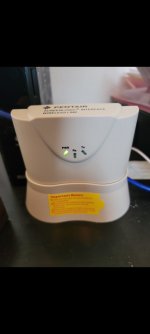
Credit: www.troublefreepool.com
Common Mistakes To Avoid When Setting Up Pentair Wifi
Many connection problems are caused by simple setup errors. Here’s what to watch for:
1. Choosing The Wrong Network:
During setup, always select the 2. 4 GHz WiFi, even if your phone is on 5 GHz.
2. Rushing Through Setup:
Wait for each light or prompt before clicking “next” in the app.
3. Ignoring Firmware Updates:
Skipping updates can lead to bugs that are already fixed.
4. Using Special Characters In Passwords:
Stick with letters and numbers for best compatibility.
5. Placing Device In A Dead Zone:
Don’t install the Pentair controller in a basement, metal box, or behind thick walls.
6. Changing Wifi Settings Without Updating Pentair:
If you change your WiFi password or name, you must reconnect your Pentair device.
Quick Reference: Pentair Wifi Troubleshooting Steps
For fast help, here’s a summary you can use:
- Move router closer or add extender for strong signal.
- Make sure you’re using 2.4 GHz WiFi.
- Check WiFi name and password for special characters.
- Power cycle router, modem, and Pentair controller.
- Update all apps and firmware.
- Disable advanced router features that may block new devices.
- Carefully follow Pentair app setup steps.
- Test internet access on another device.
- Factory reset as a last resort.
- Call support if nothing works.

Credit: partners.pentair.com
The Role Of Customer Support And Warranty
If your Pentair device is new, or you suspect a hardware defect, don’t hesitate to contact Pentair’s customer support. They may offer a replacement if you’re under warranty. Always keep your proof of purchase and record the device’s serial number.
For more help, the official Pentair Support page has manuals, troubleshooting guides, and firmware downloads.
Frequently Asked Questions
Why Does My Pentair Controller Only Connect To 2.4 Ghz Wifi?
Most Pentair pool devices are designed for 2.4 GHz WiFi because it offers better range and penetration through walls and outdoor spaces. The 5 GHz band is faster but has a shorter range, which isn’t ideal for equipment installed outside or far from the router.
My Pentair Device Shows “connected” But The App Can’t Control It. What Should I Do?
This usually means the Pentair device is on your WiFi, but can’t reach the internet or the app’s server. Check that your home internet is working, reboot your router, and ensure there are no firewall rules blocking Pentair’s connection. Also, make sure your phone is on the same network during setup.
Can I Use A Mobile Hotspot For My Pentair Wifi Connection?
It’s possible but not recommended. Mobile hotspots can drop connections and often use different security settings. For best results, use a stable home WiFi network with 2. 4 GHz enabled.
How Do I Find My Pentair Device’s Mac Address?
Look for a sticker on the Pentair controller, gateway, or WiFi module. The MAC address is a string of letters and numbers (like 00:1A:2B:3C:4D:5E). You’ll need this if your router uses MAC filtering.
Is There A Way To Control My Pentair Pool If Wifi Is Down?
Yes. Most Pentair systems have a manual control panel or local interface. You can turn pumps, lights, and heaters on/off directly at the equipment. However, schedules and remote access won’t work until WiFi is restored.
Getting your Pentair pool system back online doesn’t have to be a mystery. With a step-by-step approach—and a little patience—you can solve most WiFi issues yourself. Remember, strong and simple WiFi settings, regular updates, and a clear setup process will keep your smart pool running smoothly all season long.

Credit: www.youtube.com