
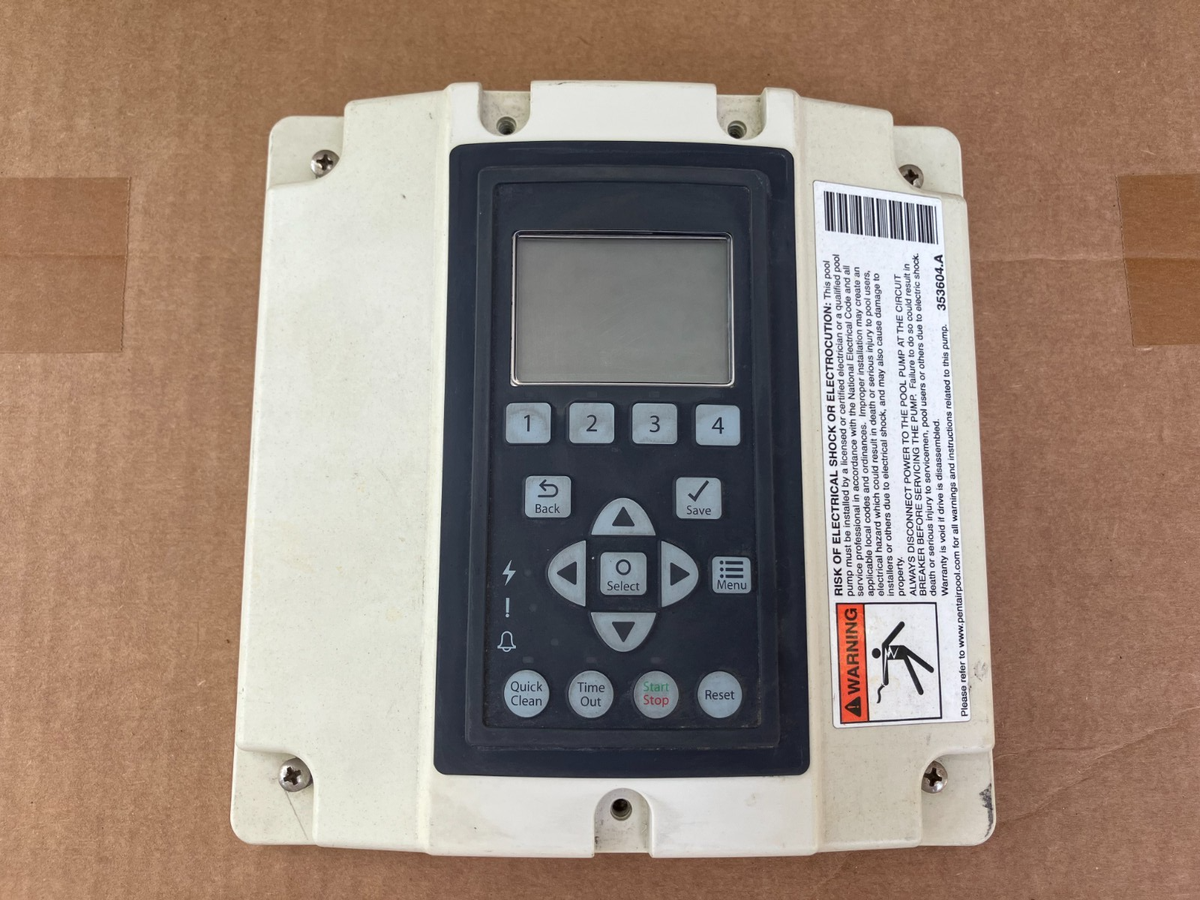
If your Pentair pool pump display is not working, you may feel frustrated or even worried about your pool’s health. Pool pumps are the heart of your pool’s system, and their displays are the window into how everything is running. When that display goes blank, shows random characters, or becomes unresponsive, it can be hard to know where to begin. But you are not alone—many pool owners experience this issue, and with the right guidance, most display problems can be solved without calling a technician.
Understanding why the display on a Pentair pool pump fails is important. It not only helps you fix the problem faster but also prevents future headaches. In this article, you’ll find practical, step-by-step advice for diagnosing the issue, learn about the most common causes, and discover advanced troubleshooting techniques.
Whether you’re a first-time pool owner or you’ve been maintaining pools for years, you’ll find the help you need right here.
Why The Pentair Pool Pump Display Matters
The display on your Pentair pool pump is more than just a screen. It’s your main way to communicate with the pump and control its functions. From adjusting speed and schedules to reading error codes, the display keeps you in control. When it stops working, you lose access to:
- Performance monitoring (flow rates, RPMs)
- Error or warning codes
- Scheduling and timer settings
- Manual control for cleaning or maintenance
Without a working display, you might miss important issues that could damage your pump or pool system. For example, you could overlook a low-flow warning or an overheating alert, which could lead to expensive repairs. That’s why fixing a non-working display should be a priority.
Common Symptoms Of Display Failure
Before you try to fix the problem, you need to recognize the most common signs of display failure:
- The display is completely blank, even when the pump is running.
- The display shows random or broken characters.
- The backlight turns on, but no numbers or text appear.
- The display is frozen and does not respond to button presses.
- Only some segments or pixels work, making it hard to read.
Each symptom points to a different set of possible causes. For example, a blank display with a running pump often suggests a power or connection issue, while random characters may mean there’s a problem with the control board.
Credit: www.ebay.com
Understanding Pentair Pool Pump Models
Pentair makes several types of pool pumps, each with different control panels and displays. Knowing your model helps you troubleshoot correctly.
Common Pentair Pool Pump Models
- Pentair IntelliFlo: Variable speed, advanced digital display, programmable.
- Pentair SuperFlo VS: Variable speed, basic digital display.
- Pentair WhisperFlo: Some models with digital controls, others with analog.
- Pentair Challenger: Usually analog, but newer versions may have displays.
Check your pump’s label or manual to confirm the model. If you don’t have the manual, you can often find it on the Pentair official website.
Why Model Differences Matter
Some troubleshooting steps are specific to certain models. For example, the IntelliFlo has a more complex control board and a larger display, while the SuperFlo VS is simpler. Always refer to your pump’s manual for model-specific details.
Quick Checks Before Advanced Troubleshooting
Sometimes, the solution is simple. Before opening up your pump or buying new parts, try these quick checks:
- Power Supply: Make sure the pump is getting power. Check the circuit breaker and reset it if needed.
- Timer Settings: Some pool systems have external timers. If the timer is off, the display will not work.
- Loose Connections: Vibration or weather can loosen wires. Check that all connections to the control panel are snug.
- Display Contrast: Some models have a contrast or brightness setting. If it’s turned down, the display may look blank.
- External Controllers: If you use a pool automation system (like Pentair EasyTouch), make sure it’s working. Sometimes the display is disabled when controlled remotely.
If the display still does not work after these checks, move on to more detailed troubleshooting.

Credit: www.reddit.com
Main Causes Of Pentair Pool Pump Display Failure
Most display failures fall into a few main categories. Understanding these helps you focus your efforts.
1. Power Issues
Without proper power, the display cannot function. Common power problems include:
- Tripped circuit breakers
- Blown fuses
- Faulty power supply wiring
- Voltage drops due to long cable runs
2. Control Board Problems
The control board is the “brain” of the pump. If it malfunctions, the display can go blank or show errors. Causes include:
- Water damage from leaks or condensation
- Corroded connectors
- Burned-out components
- Age-related failure
3. Display Screen Failure
The LCD or LED display itself can fail. This might show as:
- Dead pixels or segments
- Faint or unreadable text
- Flickering or flashing
4. Cable And Connector Issues
A loose or corroded cable can disconnect the display from the board. Look for:
- Disconnected ribbon cables
- Corroded pins or sockets
- Damaged wires from rodents or wear
5. Environmental Factors
Outdoor pool pumps face harsh conditions:
- Sunlight can fade screens over time.
- Water can cause corrosion if seals fail.
- Insects sometimes get inside the control panel.
6. Software Or Firmware Glitches
Occasionally, a glitch in the pump’s software can freeze the display. This is more common on advanced models with programmable controls.
7. User Error
Simple mistakes, like pressing the wrong button sequence or setting the display to “off” mode, can cause confusion.
Step-by-step Troubleshooting Guide
Solving a Pentair pool pump display problem is usually a process of elimination. Here’s a clear, practical guide to follow.
Step 1: Check Power To The Pump
- Verify that the main pool pump breaker is ON.
- Use a multimeter to check voltage at the pump terminals (usually 230V or 115V, depending on your model).
- Inspect the GFCI outlet if one is used; reset it if tripped.
- If the pump has a power switch, confirm it is in the ON position.
If the pump runs but the display is blank, power is reaching the motor but not the control panel—this suggests an internal issue.
Step 2: Inspect For Obvious Damage
- Open the control panel (with power OFF) and look for water, rust, or insect nests.
- Check for any burnt smells or blackened components on the control board.
- Examine cables for cuts, chew marks, or disconnected plugs.
Any visible damage usually requires repair or replacement of affected parts.
Step 3: Test The Display
- If your model allows, reset the pump by turning off power for 5 minutes, then turning it back on.
- On some models, you can run a self-test—consult your manual for how to do this.
- Observe if the display briefly lights up during power-up (even a “flash” is a clue).
No response during self-test suggests the display or control board is faulty.
Step 4: Try A Firmware Reset
- For programmable models, press and hold the reset button (if present) for 10-15 seconds.
- If there’s no reset button, cycle power OFF and ON three times in quick succession.
- Some pumps can be reset by holding both “up” and “down” buttons together at startup.
Firmware resets can clear frozen screens or glitches.
Step 5: Check External Controllers
- If your pump is connected to an automation system, unplug the data cable and try the display again.
- Some automation systems “take over” the display, making it look dead when it’s actually being controlled remotely.
- Test the display with all external controllers disconnected.
If the display returns, the issue is with the external controller settings.
Step 6: Inspect And Clean Connectors
- With power OFF, carefully unplug and replug ribbon cables between the display and control board.
- Clean any corrosion with electrical contact cleaner and a soft brush.
- Make sure all connectors are fully seated.
Loose or dirty connections are a common cause of intermittent display problems.
Step 7: Replace Suspect Components
- If you’ve isolated the problem to the display or control board, replacement is usually the best fix.
- Order genuine Pentair parts for your model to ensure compatibility.
- DIY replacement is possible for most people, but if you’re not comfortable, call a pool technician.

Credit: www.youtube.com
Advanced Troubleshooting Techniques
If the problem persists, or you want to dig deeper, try these advanced methods.
Using A Multimeter
A multimeter helps check for voltage and continuity. Here’s how:
- With power ON, measure voltage at the display connector. It should match the value in your pump’s manual (often 5V or 12V DC).
- Test continuity on ribbon cables—no breaks should be present.
- If voltage is present but the display is dead, the display itself is likely faulty.
Diagnosing Control Board Problems
- Look for bulging or leaking capacitors.
- Check for cold (cracked) solder joints, especially near the display connector.
- If you see green or white powder, that’s corrosion—clean it, but if damage is severe, replace the board.
Checking For Firmware Updates
- Visit the official Pentair website to see if a firmware update is available for your model.
- Some models allow you to update firmware with a USB stick or special tool.
- Firmware updates can fix known bugs, including display freeze issues.
Swapping Displays
If you have access to another compatible Pentair pump, swap the displays temporarily. If the problem follows the display, it’s a display issue. If it stays with the pump, the control board is to blame.
Preventing Display Problems
Prevention saves time and money. Here’s how to avoid future display failures:
- Protect from Water: Ensure the control panel is sealed. Replace gaskets or O-rings if they look worn.
- Shade the Pump: Sunlight ages displays quickly. Use a weatherproof cover or shade cloth.
- Regular Inspections: Check for insects, rust, or loose wires every few months.
- Surge Protection: Install a surge protector to protect against lightning or power surges.
- Keep Manuals Handy: Store your pump’s manual in a dry place for quick reference.
Real-world Examples
To make the process clearer, here are a few scenarios pool owners have faced:
- Case 1: Jane noticed her IntelliFlo pump’s display was completely blank. The pump was running. She found that the GFCI had tripped. Resetting it brought the display back.
- Case 2: Mark’s display showed only random dots. Opening the panel, he found an ant nest inside. After cleaning and reseating the ribbon cable, the display worked.
- Case 3: Sam’s display flickered and died after a thunderstorm. Surge damage had burned the control board. Replacing the board fixed the problem.
In all these cases, basic troubleshooting saved time and money.
Cost Comparison: Repair Vs. Replacement
Is it better to repair or replace parts? Here’s a comparison for a typical Pentair IntelliFlo pump:
| Solution | Estimated Cost | Time Required | Skill Level |
|---|---|---|---|
| Resetting Connections | $0 | 10-30 minutes | Beginner |
| Replace Display | $100-$200 | 30-60 minutes | Intermediate |
| Replace Control Board | $300-$500 | 1-2 hours | Advanced |
| Hire Technician | $150-$400 (labor only) | 1-2 hours | Professional |
In many cases, a simple reset or cleaning fixes the problem for free. If not, replacing just the display is usually cheaper than swapping the entire pump.
Pentair Warranty And Support
Pentair offers warranties on their pool pumps, usually from 1 to 3 years. Here’s what you need to know:
- Warranty covers defects in materials and workmanship, not damage from power surges, flooding, or insects.
- DIY repairs may void the warranty. Check your policy before opening the pump.
- Pentair’s support line can walk you through basic troubleshooting.
You can find warranty details and contact support on the Pentair official warranty page.
Common Mistakes When Troubleshooting
Some mistakes can make things worse or waste time. Avoid these:
- Ignoring safety: Always turn off power before opening the pump.
- Guessing parts: Don’t buy parts without confirming the real problem.
- Over-tightening screws: This can crack the display or board.
- Forgetting to check automation systems: Many display issues are due to external controllers.
- Skipping regular checks: Small leaks or loose cables get worse if ignored.
When To Call A Professional
While many display problems are DIY-friendly, some situations need a pro:
- You see burnt or melted components.
- Water has flooded the inside of the control panel.
- You’re not comfortable with electrical work.
- The pump is still under warranty.
A professional can diagnose and repair safely, and may even save you money by preventing further damage.
Table: Quick Reference For Display Symptoms
Here’s a handy chart to help you match symptoms to likely causes:
| Symptom | Possible Cause | Suggested Fix |
|---|---|---|
| Blank display, pump runs | Loose cable, failed display, automation override | Check connections, disconnect automation, replace display if needed |
| Random characters | Control board fault, insect damage | Inspect board, clean and reseat cables, replace board if needed |
| Display flickers | Low voltage, failing display | Check power supply, replace display |
| Segments missing | Display screen aging | Replace display |
| No response to buttons | Firmware freeze, control board issue | Reset firmware, replace board if needed |
Data Table: Pentair Pump Display Lifespan
How long does a pool pump display last? Here’s what most owners experience:
| Display Type | Typical Lifespan | Major Risks | Replacement Cost |
|---|---|---|---|
| LED | 7-10 years | Sun damage, power surges | $100-$180 |
| LCD | 5-8 years | Moisture, insects | $120-$200 |
It’s common for displays to need replacement before the pump motor itself.
Two Non-obvious Insights
- Automation System Conflicts: Many display issues are actually caused by automation systems like Pentair EasyTouch or IntelliCenter. If your display is blank or unresponsive, always disconnect the automation system before replacing parts. This step is often missed and can save you money.
- Humidity and Micro-Leaks: Even if you don’t see visible water, humidity inside the control panel can slowly corrode display connectors over several years. Opening the panel and airing it out once a season, especially in humid climates, can prevent early display failure.
Frequently Asked Questions
Why Does My Pentair Pump Display Turn On But Not Show Any Numbers?
This is often due to a contrast setting that’s too low, a loose display cable, or a failing display screen. Try adjusting the contrast (if available) and reseat the ribbon cable. If the problem remains, the display may need replacement.
Can I Run My Pentair Pool Pump Without The Display Working?
Yes, in most cases, the pump will keep running on its last programmed settings. However, you cannot change speed, schedules, or see errors. This can be risky if a problem occurs, so repair the display as soon as possible.
Is It Safe To Open The Pentair Pump Control Panel Myself?
It’s generally safe if you turn off all power and wait for a few minutes before opening the panel. However, if you’re not comfortable with electronics, call a professional. Never work on the pump when wet or during rain.
How Do I Know If The Problem Is With The Display Or The Control Board?
Swap the display with a known good one if possible. If the new display works, your old display is faulty. If not, the control board is likely the problem. Checking for voltage at the display connector with a multimeter also helps pinpoint the issue.
Where Can I Find Official Pentair Parts And Manuals?
Official parts and manuals are available at pool supply stores and on the Pentair official website. Always use genuine parts for safety and compatibility.
A non-working Pentair pool pump display can seem like a big problem, but with a methodical approach, most issues are easy to solve. Start with the basics: check for power, reset the system, and inspect all connections. Don’t overlook the impact of automation systems or the effects of humidity and insects. With a little patience and care, you can get your display working again and keep your pool running smoothly. And if you ever feel uncertain, don’t hesitate to call a professional—peace of mind is always worth it.