
Resetting your Electrolux dishwasher can solve many common issues—maybe your machine won’t start, is stuck mid-cycle, shows a blinking error code, or just isn’t cleaning as it should. If you’ve tried the basics and nothing works, a reset can be a simple, effective solution. But not everyone knows how to do it the right way, and mistakes can sometimes make things worse. In this guide, you’ll learn exactly how to reset your Electrolux dishwasher step by step, understand why a reset works, and discover what to do if the reset fails. Whether you’re dealing with a noisy beeper, a flashing light, or a cycle that just won’t finish, this article will help you get your dishwasher running again—quickly and safely.
Why You Might Need To Reset Your Electrolux Dishwasher
Modern dishwashers use sensors and control boards to run. If something goes wrong, the machine may get confused or stuck. Common reasons to reset include:
- Error codes: The display shows a code (like i20, i30, or i50), and the dishwasher won’t start.
- Unresponsive controls: Buttons do not work, or the display is frozen.
- Interrupted cycles: The dishwasher stops mid-cycle and won’t continue.
- Power surges: After a blackout or electrical spike, the dishwasher acts oddly.
- Unusual noise or beeping: The machine starts making sounds or lights blink unexpectedly.
A reset can clear these problems. But you must know when a reset is enough—and when the problem might need a repair.
Understanding Electrolux Dishwasher Models
Electrolux makes several types of dishwashers: built-in, freestanding, slimline, and compact. Most modern models share similar reset methods, but some steps can differ. Check your user manual for your specific model, but the general principles apply to most Electrolux dishwashers.
Common Electrolux Dishwasher Series
- 700 Series
- 800 Series
- 900 Series
- Slimline models
- Integrated panel models
Older Electrolux dishwashers may have different control panels, but the reset basics usually stay the same.

Credit: www.youtube.com
How The Dishwasher Control Board Works
The control board is like the brain of your dishwasher. It tells the machine when to start, fill with water, heat, and drain. If the software gets “stuck,” a reset can clear memory errors. Think of it like rebooting your computer.
Some dishwashers also have a “child lock” or “delay start” that can make it look frozen. Make sure these features aren’t turned on before you reset.
Basic Steps To Reset An Electrolux Dishwasher
Most Electrolux dishwashers can be reset with a few simple steps. Here’s the general process:
1. Power Cycle Reset
This is the most common reset method. It’s safe and works for most problems.
- Turn off the dishwasher using the control panel (press the Power or Off button).
- Unplug the dishwasher from the wall outlet. If you can’t reach the plug, turn off the circuit breaker that powers the dishwasher.
- Wait 5 minutes. This allows the control board to fully discharge.
- Plug the dishwasher back in or turn the breaker back on.
- Turn on the dishwasher from the control panel.
The dishwasher should reboot and clear most errors.
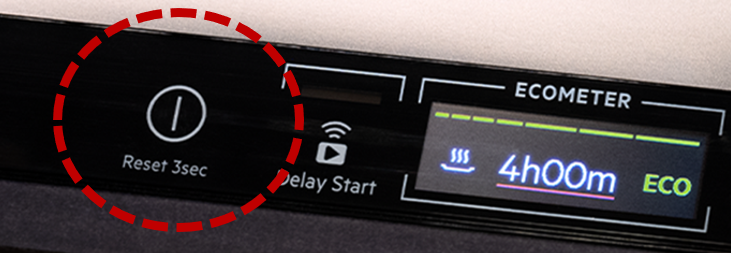
2. Control Panel Button Reset
Some models have a special reset sequence using the control buttons.
- Make sure the door is fully closed and latched.
- Press and hold the Start/Cancel button for 3 to 5 seconds.
- Wait for the control panel to beep or display to change.
- Release the button. The dishwasher should reset.
Check your manual for the exact button combination if this does not work.
3. Cancel Cycle Reset
If your dishwasher is stuck mid-cycle:
- Open the door slightly to pause the cycle.
- Press the Start/Cancel button once (or twice, depending on the model).
- Wait for the water to drain and for the machine to beep or display “End.”
- Close the door and try to start a new cycle.
Pro tip: Always let the dishwasher finish draining before unplugging. If you unplug mid-cycle, standing water can stay inside.
4. Factory Reset (advanced)
Some newer models allow a full factory reset. This erases all settings and returns the machine to its original state.
- With the dishwasher powered on, locate the Delay and Start/Cancel buttons.
- Press and hold both buttons together for 3–5 seconds.
- The display will usually flash or beep.
- Release the buttons. The dishwasher will reset to factory settings.
Not all Electrolux models support this. If unsure, check your manual or the Electrolux support website.
When A Reset Won’t Fix The Problem
A reset is quick, but it cannot fix every issue. If you reset the dishwasher and:
- The same error code appears again and again
- The machine won’t power on (no lights or sounds)
- There is a burning smell or water leak
You likely have a hardware issue—like a failed pump, sensor, or control board. In these cases, call a professional repair technician or contact Electrolux customer support.
Common Error Codes And What A Reset Can Fix
Electrolux dishwashers display error codes to help you find problems. Here are some examples:
| Error Code | Meaning | Can a Reset Help? |
|---|---|---|
| i20 | Drain problem | Sometimes (if caused by a sensor glitch) |
| i30 | Leak detected | Rarely (reset may clear code, but leak must be fixed) |
| i50 | Wash motor failure | Unlikely (usually needs repair) |
| iC0 | Control board error | Yes (reset is recommended) |
| i60 | Heating problem | Sometimes (if just a glitch) |
Key insight: If the error code returns after you reset, the fault is not just software. Look for blockages, leaks, or broken parts.

Credit: www.elektroda.com
How To Tell If The Reset Worked
Once you finish the reset, check these signs:
- The display panel lights up normally.
- No error codes show.
- Buttons respond as expected.
- You can start a new cycle without issues.
- The dishwasher drains and fills correctly.
If the dishwasher is silent, does not light up, or keeps flashing the same code, repeat the reset once. If still stuck, further troubleshooting is needed.
Troubleshooting After A Failed Reset
If resetting does not work, try these steps before calling for service:
- Check the power supply: Make sure the outlet and breaker are working.
- Inspect the door latch: The dishwasher won’t run if the door isn’t shut properly.
- Look for water leaks: Pools of water under the unit may trigger a safety shutdown.
- Clean filters and spray arms: Blockages can cause errors.
- Review error codes: Write down any code for the repair technician.
Here’s a helpful comparison of what a basic reset can and cannot solve:
| Problem Type | Will Reset Help? | What to Do Next |
|---|---|---|
| Stuck cycle | Yes, usually | Try power cycle reset |
| Repeated error code | Maybe | Check for blockages, reset again |
| No power at all | No | Check power, call service |
| Water leak | No | Fix leak first |
| Unresponsive panel | Sometimes | Try button reset or unplug |
Safety Tips Before You Reset
Resetting your dishwasher is safe if you follow these precautions:
- Disconnect power before touching wiring or parts.
- Never reset during a heavy wash cycle, as hot water may spray.
- Always dry your hands before handling plugs or breakers.
- Do not force the door open during a cycle.
Insider tip: Some dishwashers beep or buzz after a reset. This is normal—it’s the system checking itself.
How To Find Your Electrolux Dishwasher’s Model Number
Knowing your model number helps when looking up reset steps or ordering parts. Here’s where to look:
- On the inside edge of the door (open the door and check the side).
- On the frame behind the kickplate (bottom panel).
- On the user manual cover.
Write down your model number before calling support or searching online.
Advanced Reset Methods For Specific Models
Some Electrolux dishwashers have extra reset options. Here are a few examples:
Resetting Slimline Or Integrated Models
- Open the door and locate the hidden control panel.
- With the machine off, press and hold the Delay and Start buttons at the same time.
- Hold for 3–5 seconds.
- Watch for a beep or flashing display.
This works on many slimline and integrated Electrolux models.
Resetting Older Electrolux Dishwashers
Older units (before 2010) may not have digital controls. To reset:
- Turn off the dishwasher with the power button.
- Wait 60 seconds.
- Turn on again. There is often no need to unplug.
If the problem continues, these models often need a service technician.
How To Reset After A Power Outage
A power outage can confuse the control board. After power returns:
- Open and close the dishwasher door to “wake up” the control panel.
- Press the Start/Cancel button.
- If nothing happens, unplug for 5 minutes and try again.
Power surges can damage electronics. If the dishwasher stays dead, check your home’s breaker box or call an electrician.
Resetting When The Child Lock Is On
The child lock feature stops the dishwasher from starting by mistake. If controls won’t respond:
- Look for a “key” symbol or “CL” on the display.
- Press and hold the Child Lock button (or Dry and Start together) for 3–5 seconds.
- The symbol should disappear. Now try the regular reset.
If you’re unsure about the child lock, check the user manual.
How To Reset After Water Leak Detection
If the dishwasher senses a leak, it may shut down. You’ll see an i30 code or hear beeping.
- Turn off and unplug the dishwasher.
- Remove the lower access panel (kickplate) and check for water.
- Mop up any water with a towel.
- Let the dishwasher dry for 24 hours.
- Plug back in and try to start.
If the code returns, the leak is not fixed—call a technician.
Resetting After A Blocked Drain
A blocked drain can cause the i20 error code. To reset:
- Remove the lower rack and filters.
- Clean any debris from the filter and drain area.
- Reinstall parts.
- Run a short cycle. If the code returns, unplug and reset.
Expert tip: Always clean filters monthly to avoid drain errors.
What To Do If Your Dishwasher Resets Itself
Some Electrolux dishwashers auto-reset after power failures or errors. If you notice the dishwasher restarts randomly:
- Check for loose plugs or power surges.
- Make sure the circuit breaker is not tripping.
- If it happens often, the control board may be faulty.
In this case, call Electrolux support or a qualified repair person.
When To Call For Professional Help
A reset is a good first step. But if you notice these signs, stop and call for help:
- Burning smell
- Water under the dishwasher
- Repeated tripped breaker
- No display or lights after reset
- Unusual noises that continue after reset
Trying to fix serious problems yourself can be risky.
Preventing Future Dishwasher Errors
Prevention keeps your dishwasher running smoothly and avoids frequent resets.
- Clean filters every month.
- Check spray arms for blockages.
- Use the correct detergent (too much can cause suds errors).
- Don’t overload racks—crowding leads to poor cleaning and errors.
- Run hot water before starting to help sensors work properly.
Real-world insight: Many errors start from clogged filters or using the wrong soap. Simple maintenance reduces resets.
How Electrolux Dishwasher Resets Compare To Other Brands
Electrolux uses modern control boards, similar to other big brands. Here’s how their reset process compares:
| Brand | Reset Method | Unique Features |
|---|---|---|
| Electrolux | Power cycle, button hold | Some models support factory reset |
| Bosch | Hold Start button, unplug | Special error code reset |
| Whirlpool | Unplug, button combo | Heated dry + Normal reset |
| Samsung | Power off/on, Smart Reset | Wi-Fi/app support |
Electrolux resets are simple and usually do not need tools. Always check your manual for model-specific instructions.
Using The Electrolux Support Website
For step-by-step guides, model-specific reset instructions, and downloadable manuals, visit the official Electrolux Support page. This is a reliable source for troubleshooting tips and contact information.
Non-obvious Insights About Dishwasher Resets
- Not all power cuts are equal: If your home has “dirty” power (frequent surges or brownouts), the dishwasher may need more frequent resets. Consider a surge protector for your kitchen outlets.
- Software updates: Some newer Electrolux dishwashers can get firmware updates from technicians. If your machine has recurring “brain freeze,” ask a professional about a software update.
- Water quality matters: Hard water can trigger errors that seem like software glitches. Installing a water softener can reduce the need for resets.
- Environmental sensors: Newer models have sensors that detect humidity, leaks, and more. These can be sensitive to kitchen conditions—keep the area dry and clean.
Frequently Asked Questions
How Often Can I Safely Reset My Electrolux Dishwasher?
You can reset your dishwasher as often as needed for minor problems. However, if you need to reset it more than once a week, there is likely a deeper issue that needs attention.
Will Resetting Erase My Saved Settings Or Cycle Memory?
A basic power reset will not erase stored settings like language or cycle preferences. Only a factory reset will clear all memory and return the dishwasher to its original state.
My Dishwasher Shows “i20” Even After A Reset. What Should I Do?
The i20 code means a drain problem. If it comes back after a reset, check and clean the filters, drain hose, and sump area. If the error remains, the drain pump may need repair.
Can I Reset The Dishwasher During A Cycle?
You can, but it’s better to pause or cancel the cycle first. Unplugging during a wash can leave water inside or cause other errors. Always let the machine finish draining before resetting.
Where Can I Get The Official Reset Instructions For My Model?
Visit the Electrolux Support website and enter your model number to download the correct manual and find troubleshooting tips.
—
Resetting your Electrolux dishwasher is a simple way to fix many everyday problems. With the right steps, you can clear error codes, unfreeze controls, and get your dishes clean again. But remember, a reset is not a cure-all. If the problem returns or involves leaks, power issues, or strange noises, professional help is your best option. Keep your machine clean, follow safety tips, and you’ll enjoy years of trouble-free washing.
Credit: support.electrolux.co.uk