
Many people face a common problem with their KitchenAid dishwasher: the control lock turns on, and they cannot start or change any cycles. If you have ever pressed the buttons only to get no response, or seen a small lock symbol on the display, you are not alone. This feature keeps the dishwasher safe, especially in homes with children, but when you need to use your dishwasher, the control lock can be frustrating.
Understanding how to turn off the control lock is essential for daily use. The process can seem confusing because KitchenAid has several dishwasher models, and the steps may look a little different. If you press the wrong button or hold it for the wrong amount of time, nothing happens.
Some users even think their dishwasher is broken, when the fix is actually simple.
This guide will help you learn exactly how to turn off the control lock on any KitchenAid dishwasher model. You will discover why the control lock exists, what the lock symbols mean, and clear steps for disabling it. You will also learn about common mistakes, what to do if the control lock will not turn off, and how to prevent this problem in the future.
Let’s make your dishwasher work for you again.
Understanding The Control Lock Feature
Before you can solve the problem, it helps to know what the control lock does and why KitchenAid includes it.
The control lock is a safety feature designed to prevent accidental use of the dishwasher. When the control lock is on, all the buttons become unresponsive. This means cycles cannot be started, changed, or canceled. For families with children, this prevents curious hands from starting the dishwasher or changing settings during a wash.
You might see one of these signs when the control lock is active:
- A small padlock icon lights up on the display.
- The word “Control Lock” appears on the screen.
- All buttons beep, but nothing happens when you press them.
The feature is useful, but if you do not know how to turn it off, it can make the dishwasher seem broken.
Why Does The Control Lock Activate?
The control lock can turn on for several reasons:
- Manual activation: Someone pressed the control lock button, often by holding down a button for three seconds.
- Power surges or outages: Sometimes, when power returns after an outage, the dishwasher resets with the lock engaged.
- Accidental pressing: Cleaning the panel or brushing against the buttons can trigger the lock.
- Child safety: If kids play near the dishwasher, parents may activate the lock intentionally.
Knowing why the lock is on can help you avoid the problem in the future.
How To Identify The Control Lock Button
Different KitchenAid dishwashers place the control lock option in different places. You need to know exactly where to look.
Common Places To Find The Control Lock Button
- On the far right of the control panel, sometimes labeled “Control Lock.”
- Shared with another button, such as “Heated Dry,” “4 Hour Delay,” or “Top Rack Only.” The words “Hold 3 sec for Control Lock” might be printed under the main function.
- Touchpad models: The lock symbol appears next to the button, but the button itself may have another name.
If you are not sure, check your user manual. If you do not have the manual, KitchenAid’s official website has a model lookup.
How To Recognize The Lock Status
- Light on: The control lock is active.
- Light off: The dishwasher is ready for use.
- Flashing light: The lock may be in the process of turning on or off.
Step-by-step: Turning Off Control Lock On Kitchenaid Dishwashers
Here are the most common ways to turn off the control lock, depending on your model.
Method 1: Using The Dedicated Control Lock Button
- Find the “Control Lock” button on your control panel.
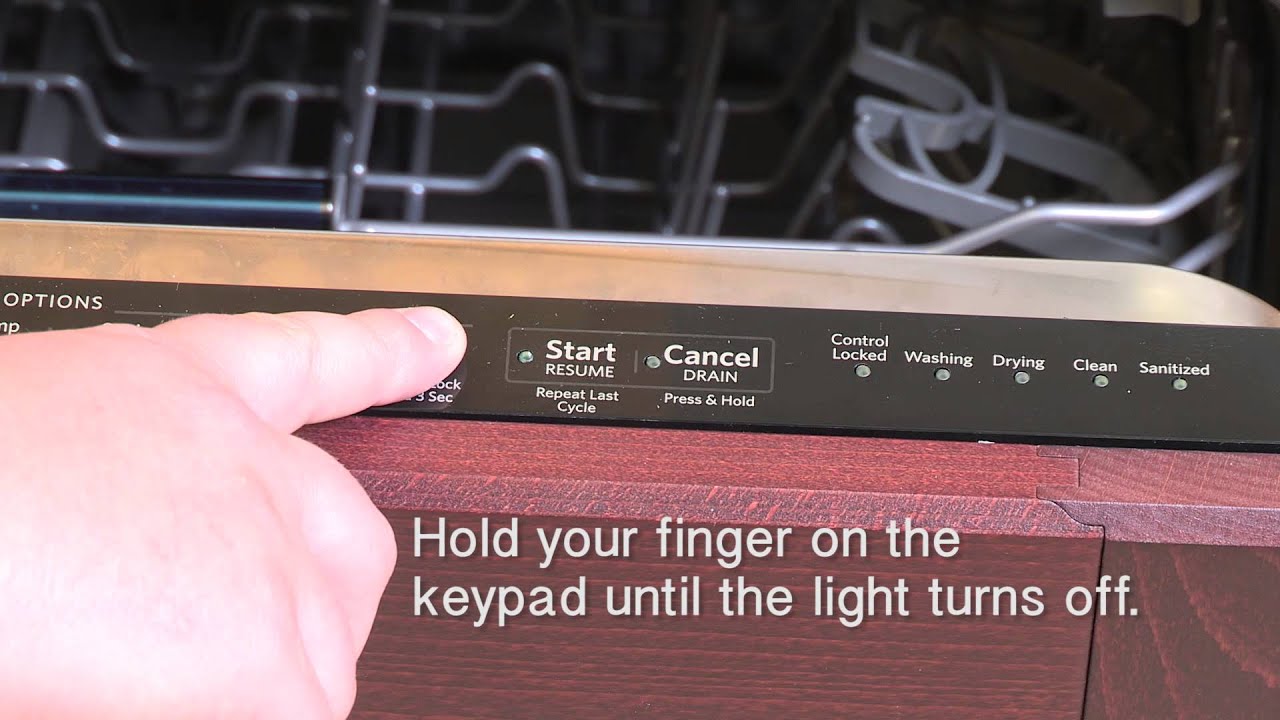
- Press and hold the button for 3 seconds. You may hear a beep or see the lock light turn off.
- Check the display: The lock icon or message should disappear.
- Test the buttons: Try starting a cycle or pressing another button to make sure the lock is off.
Method 2: Using A Shared Button
On many models, the control lock is activated or deactivated by holding down another button.
- Look for text under the buttons: For example, under “Heated Dry,” you might see “Hold 3 sec for Control Lock.”
- Press and hold that button for 3 seconds.
- Wait for a beep or light change: The lock should turn off.
- Try the controls: If they work, you have turned off the lock.
Method 3: For Touchpad Models
- Locate the button with the lock icon or description.
- Press and hold for 3-5 seconds.
- Listen for a beep or watch for the light to turn off.
- Test the dishwasher.
How Long To Hold The Button
This is a detail many users miss. If you press the button too briefly, nothing will happen. KitchenAid usually requires 3 seconds, but some models need 5 seconds. Hold the button until you see the change.
Example Model Instructions
Here’s how the steps look for three popular KitchenAid models:
| Model | Control Lock Button | Hold Duration | Indicator |
|---|---|---|---|
| KDTM404KPS | Heated Dry | 3 seconds | Padlock icon |
| KDFE204KBL | 4 Hour Delay | 3 seconds | “Control Lock” text |
| KDTM354DSS | Control Lock | 5 seconds | Control Lock Light |
It is important to read your model’s panel carefully. Some users try the wrong button and think their dishwasher is faulty.
What To Do If Control Lock Will Not Turn Off
Sometimes, even if you hold the correct button, the lock will not deactivate. Here’s what you can try:
1. Double-check The Button
Check if you are pressing the right button. Look for small print or a lock symbol. If you are not sure, search your model number online for a manual.
2. Try A Power Reset
Unplug the dishwasher or turn off the circuit breaker for 1 minute. Power it on again. Sometimes, this clears glitches.
3. Dry Your Hands And Panel
Moisture or wet hands can make touch-sensitive buttons unresponsive. Dry both, then try again.
4. Press And Hold Longer
Some models need you to hold the button for up to 10 seconds. Try a longer press.
5. Check For Child Lock
Some KitchenAid dishwashers have both a child lock and a control lock. Make sure you are turning off the correct one. The child lock might need a different button or sequence.
6. Inspect For Error Codes
If you see blinking lights or error messages, the dishwasher may have another issue. Look up the code in your manual.
7. Call Kitchenaid Support
If none of these steps work, your dishwasher may need service. Call KitchenAid or a trusted repair technician.
Common Mistakes When Turning Off Control Lock
Many people make these errors:
- Pressing the button too briefly: Always hold for at least 3 seconds.
- Pressing the wrong button: Some models share the lock with a different button.
- Trying during an active cycle: Most dishwashers require you to turn off the lock when the machine is not running.
- Ignoring small text: “Hold 3 sec” or “Hold to unlock” is printed in tiny letters under the correct button.
Reading the control panel carefully saves time and frustration.
Preventing Accidental Control Lock Activation
To avoid this problem in the future:
- Clean the panel gently: Do not rub hard over buttons.
- Teach family members: Show them which button activates the lock.
- Watch for pets and children: Curious hands or paws can press buttons.
- Use the lock only when needed: If you do not have young children, you may not need to activate the lock often.
The Difference Between Control Lock And Other Locks
It’s easy to confuse the control lock with other safety features.
Control Lock
- Locks all control buttons.
- Prevents starting, stopping, or changing cycles.
- Meant for safety and accidental button press prevention.
Door Lock
- Engages during a wash cycle.
- Prevents opening the dishwasher mid-cycle.
- Not user-controlled.
Child Lock
- Similar to control lock on most models.
- In some dishwashers, requires a different button or sequence.
Understanding these differences is key to troubleshooting.

Credit: www.wikihow.com
When To Use The Control Lock
The control lock is most helpful in these situations:
- Homes with children: Prevents kids from starting or stopping cycles.
- During cleaning: Keeps buttons from being pressed accidentally.
- When away from home: Stops unwanted use by guests or visitors.
For most people, the lock is a safety feature, not an everyday necessity.
Tips For Kitchenaid Dishwasher Owners
If you want to avoid future problems with the control lock, consider these expert tips:
- Stick a small label near the lock button with instructions for unlocking.
- Keep your manual in a kitchen drawer for quick reference.
- Check KitchenAid’s website for updates, as some models get firmware updates that can change button sequences.
- Do not use sharp objects on the panel, as scratches can make buttons harder to press.
- Show all family members how to use and turn off the lock.
These steps make dishwasher use smooth for everyone in the household.
Troubleshooting: Control Panel Not Responding
If you turn off the control lock, but your panel still does not work, another problem may be present.
Possible Causes
- Power supply issue: Make sure the dishwasher is plugged in and the breaker is on.
- Moisture or grease: Clean the panel with a soft, dry cloth.
- Panel failure: Electronic touchpads can fail after years of use.
- Child lock active: Some models have both locks.
What To Do
- Try a hard reset: Unplug or cut power for one minute.
- Test other buttons: See if any respond.
- Look for error codes: Flashing lights can give clues.
- Call a technician: If you suspect hardware failure.
Control Lock Myths And Facts
Many rumors exist about the control lock. Here are the real facts:
- Myth: Turning off the lock is the same for every dishwasher.
- Fact: Each model may need a different button or hold time.
- Myth: The dishwasher is broken if the lock will not turn off.
- Fact: Most cases are user error or temporary glitches.
- Myth: Control lock stops the dishwasher mid-cycle.
- Fact: It only prevents new cycles from starting or changes.
Knowing the truth helps you avoid wasting time or money on unnecessary repairs.
Comparing Kitchenaid Models: Control Lock Locations
Different models place the control lock in various spots. Here is a comparison:
| Model Series | Control Lock Location | Shared With | Common Hold Time |
|---|---|---|---|
| KDTM | Far right | Heated Dry | 3 seconds |
| KDFE | Middle panel | 4 Hour Delay | 3 seconds |
| KDTE | Top panel | Control Lock only | 5 seconds |
| KDPM | Next to Start | Hold to Lock | 3-5 seconds |
Double-check your model’s control panel for labels and symbols.
What If The Control Lock Keeps Coming Back?
Some users find that the lock keeps activating on its own. This can be caused by:
- Electrical surges: Use a surge protector if possible.
- Sticky buttons: Clean your panel with alcohol wipes to remove residue.
- Panel wear: Old panels may send false signals. Replacement may be needed.
- Firmware bugs: Some newer models can be updated by a technician.
If the problem is frequent, write down when it happens and share this with a repair specialist.
When To Call A Professional
Most control lock issues are user errors, but call a technician if:
- The lock will not turn off after all steps above.
- The display is blank or shows unusual codes.
- Other buttons are also unresponsive.
- The dishwasher does not start, even with the lock off.
A professional can test the control board and recommend repair or replacement.
Safety And Maintenance Tips
To keep your dishwasher running smoothly:
- Clean the control panel once a week with a soft cloth.
- Avoid water drips on the buttons; water can cause malfunctions.
- Check for updates from KitchenAid for your specific model.
- Use the lock feature only when needed to reduce wear on the button.
A little care prevents most control problems.
User Stories: Real Experiences With Control Lock
Many owners have shared their experiences online. Here are a few examples:
- Anna from Texas was sure her dishwasher was broken. After reading her manual, she discovered she had activated the control lock while cleaning the panel. Three seconds holding the “Heated Dry” button fixed the issue.
- Mike in California found the lock kept coming back after a power outage. He installed a surge protector, and the problem stopped.
- Sara, a parent of young children, uses the lock every day. She put a reminder label for babysitters to hold “4 Hour Delay” for three seconds to unlock.
Hearing from others helps you realize these problems are common—and fixable.
Extra Troubleshooting: Stubborn Control Lock Problems
If all else fails, try these advanced steps:
- Disconnect power for 10 minutes: This can clear deeper software glitches.
- Check door latch: If the door is not closing properly, some models will not unlock.
- Examine for stuck buttons: Press each button a few times to free them.
- Inspect for moisture inside panel: If you see condensation, let the dishwasher air out with the door open for several hours.
- Factory reset: Only as a last resort—check your manual, as this can erase custom settings.
These steps usually solve even the most stubborn lock problems.
Kitchenaid Dishwasher Control Panel: Key Features
Understanding your control panel helps prevent mistakes. Here are some features:
- Cycle selection: Pick wash cycles.
- Delay start: Set wash time for later.
- Heated dry: Extra drying option, sometimes shared with the lock.
- Control lock: Safety feature.
Some panels are touch-sensitive, others have physical buttons. Always check your manual for details.
Using The Control Lock Properly
The control lock is not just for emergencies. Smart use helps:
- During cleaning: Lock prevents accidental cycle starts.
- For rentals or public spaces: Stops unwanted use.
- For special needs households: Helps caregivers maintain safety.
If you do not need it, leave it off.

Credit: www.wikihow.com
How Kitchenaid Control Lock Compares To Other Brands
KitchenAid’s control lock works much like those on other dishwashers, but some brands use different buttons or symbols.
| Brand | Control Lock Activation | Unlock Time | Unique Features |
|---|---|---|---|
| KitchenAid | Hold “Heated Dry” or labeled button | 3-5 seconds | Often shares with other functions |
| Whirlpool | Hold “Control Lock” | 3 seconds | Dedicated lock light |
| Bosch | Hold “Start” | 3 seconds | Shows “CL” on display |
| Samsung | Hold “Child Lock” | 3 seconds | Child lock and control lock separate |
Always read your dishwasher’s manual for specifics.
Where To Find Official Kitchenaid Support
If you need more help, KitchenAid provides online resources:
- User manuals: Enter your model on their support page.
- Troubleshooting guides: Step-by-step instructions.
- Live chat and phone support: For direct help.
Visit KitchenAid’s Owners Center for manuals and contact options.
Credit: www.youtube.com
Frequently Asked Questions
How Do I Know If The Control Lock Is On?
Look for a padlock icon or the words “Control Lock” on the display. If all buttons are unresponsive except the lock, the control lock is active.
Which Button Unlocks The Control Lock On Kitchenaid Dishwashers?
It depends on your model. Most use the “Heated Dry”, “4 Hour Delay”, or a dedicated “Control Lock” button. Hold the correct button for 3–5 seconds until the lock turns off.
Why Won’t My Control Lock Turn Off Even After Holding The Button?
Possible reasons include pressing the wrong button, not holding it long enough, moisture on the panel, or a software glitch. Try drying the panel, pressing longer, or resetting the power.
Will Turning Off The Control Lock Reset My Dishwasher?
No, turning off the control lock only reactivates the control panel. It does not cancel cycles or erase settings.
Can I Disable The Control Lock Feature Permanently?
No, the control lock is a built-in safety feature. You cannot turn it off forever, but you can avoid activating it unless needed.
Getting the control lock off your KitchenAid dishwasher does not have to be a mystery. With the right steps, a little patience, and the knowledge from this guide, you can solve the problem quickly and keep your kitchen running smoothly. If you ever need official guidance, always check your manual or visit KitchenAid’s Owners Center for the latest information.