
If you own a saltwater pool, you know the importance of keeping the water balanced and clean. The Aqua Rite salt chlorinator is a popular device that helps automate this process by turning salt into chlorine. However, many pool owners face a frustrating issue: the Aqua Rite salt reading not accurate. This problem can cause confusion and even damage your pool if not solved correctly. Understanding why these salt readings go wrong, how to fix them, and how to prevent future errors is essential for every pool owner.
This article will guide you through the reasons for inaccurate salt readings, practical troubleshooting steps, and expert tips to make your Aqua Rite system reliable again. You’ll also find advanced insights that most pool owners miss, real-world examples, and professional advice so you can trust your salt chlorinator and enjoy your pool with confidence.
How The Aqua Rite Salt System Works
Before diving into the reasons for inaccurate readings, it’s important to know how the Aqua Rite system functions. The Aqua Rite uses a sensor and a salt cell. As water passes through the cell, an electric current transforms dissolved salt into chlorine, sanitizing your pool. The system constantly measures the salt level to keep it within a safe range (usually 2700–3400 ppm).
If the reading is off, the system might add too much or too little chlorine, causing water quality problems or equipment damage. That’s why reliable salt readings are crucial.
Signs Your Aqua Rite Salt Reading Is Not Accurate
Many pool owners miss the early warning signs. Here are common clues:
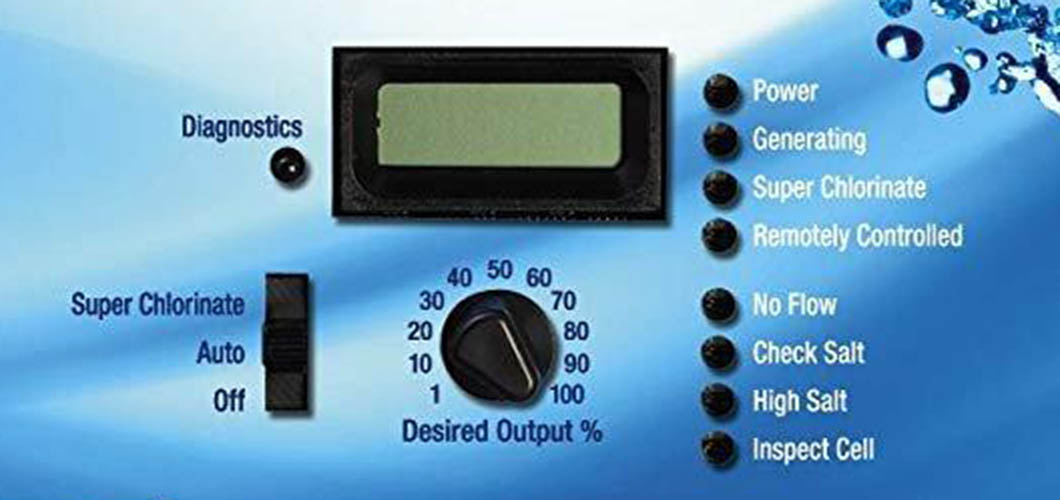
- The display shows “Check Salt” or “Low Salt” even after adding salt.
- The salt level reading is much higher or lower than expected (for example, it shows 4000 ppm after a recent water change).
- Pool water feels itchy or irritates the eyes despite a “normal” reading.
- Chlorine production suddenly drops or spikes without reason.
- The system cycles on and off, or shows error codes you haven’t seen before.
If you notice one or more of these, it’s time to investigate.
Common Causes Of Inaccurate Aqua Rite Salt Readings
Let’s look at the main reasons why your salt reading might not match reality. For each cause, you’ll learn what’s happening, why it matters, and how to check for it.
1. Dirty Or Scaled Salt Cell
Over time, minerals and calcium build up on the metal plates inside the salt cell. This buildup (called scaling) blocks the sensor and confuses the reading.
- What happens: The cell struggles to produce chlorine and sends false low or high salt alerts.
- How to check: Turn off the system, remove the cell, and inspect for white, crusty deposits.
2. Faulty Or Old Salt Cell
Salt cells have a limited life (usually 3–7 years). As they wear out, their sensors become less reliable.
- What happens: The system might report very low salt, even if you just added it.
- How to check: Look for a “Cell Life” or “Replace Cell” warning on the control panel.
3. Sensor Problems
The Aqua Rite uses a sensor to measure salt, temperature, and sometimes flow. If this sensor is dirty, loose, or broken, readings will be wrong.
- What happens: The display jumps between numbers or stays fixed at an odd value.
- How to check: Inspect the sensor for debris, corrosion, or loose wiring.
4. Incorrect Salt Addition Or Water Dilution
If you add salt unevenly, or after a heavy rain or water top-up, the reading may be off until the water mixes well.
- What happens: The system might show a spike or drop for several hours or days.
- How to check: Manually test the water with a reliable test strip or digital meter.
5. Low Water Temperature
Salt cells work best when water is warm (above 60°F/16°C). Cold water can confuse the sensor.
- What happens: The system may show low salt even if the actual level is fine.
- How to check: Compare the system’s temperature reading with a pool thermometer.
6. Software Or Firmware Glitches
Occasionally, a bug in the control board’s software causes misreadings.
- What happens: Erratic numbers, stuck displays, or error messages.
- How to check: Power-cycle the system or update the firmware if possible.
7. Electrical Issues
Loose or corroded wires, faulty circuit boards, or poor grounding can affect the sensor signals.
- What happens: The display may go blank, flicker, or show strange numbers.
- How to check: Carefully inspect all wiring connections for corrosion or looseness.
8. Using The Wrong Type Of Salt
Only pool-grade sodium chloride (NaCl) should be used. Other types may contain additives or impurities.
- What happens: The system may misread the level, and unwanted minerals can coat the cell.
- How to check: Confirm the salt bag says “pool salt” and is at least 99% pure NaCl.
9. System Calibration Errors
The Aqua Rite allows manual calibration. If set wrong, it will always show the wrong salt level.
- What happens: The display is off by a consistent amount compared to manual testing.
- How to check: Test pool water with a separate kit and compare results.
10. Unmixed Or Layered Water
If salt is dumped in one place or not allowed to dissolve fully, the sensor may read only the local concentration.
- What happens: The reading swings up and down as water circulates.
- How to check: Brush the pool thoroughly after adding salt and retest after 24 hours.
Troubleshooting Steps: Fixing Inaccurate Aqua Rite Salt Readings
If you suspect your reading is wrong, follow these steps in order. Each step helps narrow down the problem and gets your pool back on track.
Step 1: Confirm With A Manual Test
Never trust only the Aqua Rite display. Use a high-quality salt test strip or a digital salinity meter. Collect water from the deep end, away from jets or returns.
- If the manual test matches the Aqua Rite, the issue is likely fixed.
- If not, continue with the next steps.
Step 2: Inspect And Clean The Salt Cell
Turn off the power. Remove the cell and look for white or gray scaling. To clean:
- Rinse with a hose.
- If needed, soak in a 4: 1 water to vinegar or muriatic acid solution for 15–30 minutes.
- Rinse thoroughly and reinstall.
Pro Tip: Never use a sharp object to scrape the cell, as it can damage the coating.
Step 3: Check The Sensor
Locate the sensor (often built into the cell or in the plumbing near the cell). Make sure it’s clean, free from debris, and connected firmly.
- If dirty, gently clean with a soft brush.
- If corroded, consult a technician.
Step 4: Reset Or Calibrate The System
Most Aqua Rite models allow you to calibrate the salt level. Refer to your manual:
- Press and hold the diagnostic or menu button until the display flashes.
- Adjust the reading to match your manual test.
Note: Calibration should be done rarely, not as a frequent fix.
Step 5: Review Recent Pool Changes
Ask yourself:
- Did you add water recently?
- Has it rained heavily?
- Did you add salt in one spot?
If yes, allow 24–48 hours for water to circulate fully before trusting the reading.
Step 6: Update Software Or Check For Firmware Issues
If your system has a digital control panel, check the manufacturer’s website for updates or instructions.
Step 7: Inspect Electrical Connections
Turn off all power. Open the control box and visually inspect wires for corrosion, breaks, or loose connections. Tighten or clean as needed.
Step 8: Replace Old Or Faulty Parts
If the cell is over 5 years old, or the sensor is damaged, replacement may be needed. Always use OEM (original equipment manufacturer) parts for best reliability.
Credit: lesliespool.com
How To Prevent Inaccurate Salt Readings
A little maintenance goes a long way. Here are actions you can take to keep your Aqua Rite system working reliably.
- Test salt manually once a month, even if the system seems fine.
- Clean the salt cell every 3–6 months, or as needed in hard water areas.
- Check wiring and connections at the start and end of every pool season.
- Brush the pool after adding salt to help it dissolve evenly.
- Keep water chemistry balanced (pH, alkalinity, calcium hardness) to reduce scaling.
- Replace old parts before they fail completely.
Comparing Aqua Rite Salt Reading With Manual And Digital Methods
It’s helpful to compare the Aqua Rite reading with other common salt measurement tools. Here’s how they stack up:
| Method | Accuracy | Ease of Use | Cost | Common Issues |
|---|---|---|---|---|
| Aqua Rite Display | Good (when cell/sensor is clean) | Very Easy | Included with system | Sensor/cell scaling, calibration drift |
| Salt Test Strips | Fair (±200 ppm) | Easy | Low | Color reading errors, strip age |
| Digital Salinity Meter | Excellent (±50 ppm) | Moderate | Medium | Calibration needed, battery issues |
Non-obvious insight: Relying on just one method can be risky. Using a digital meter as a backup can catch problems before they get worse.
Credit: www.reddit.com
Real-world Examples: What Pool Owners Experience
To make the advice more practical, let’s look at real situations.
Example 1: The Case Of The “phantom Low Salt” Warning
Sarah added the right amount of salt to her pool. The Aqua Rite kept showing “Low Salt” even though a test strip showed 3200 ppm. After cleaning the cell (which was heavily scaled), the reading returned to normal.
Lesson: Even a thin layer of scale can block the sensor.
Example 2: The Unmixed Salt Problem
James poured all the salt into his deep end and turned on the system right away. For two days, the Aqua Rite reading jumped between 2300 and 4100 ppm. After brushing the pool and waiting another day, the reading stabilized at 3400 ppm.
Lesson: Salt must be well mixed before trusting the reading.
Example 3: Firmware Glitch
Maria’s Aqua Rite showed random numbers after a power outage. Resetting the system fixed the display instantly.
Lesson: Software resets can clear temporary glitches.
Advanced Tips Most Pool Owners Miss
- Water temperature matters: If your pool drops below 60°F (16°C), the Aqua Rite may show false low salt readings. Wait until water warms up before adding salt or recalibrating.
- Electrical noise can affect readings: If you have other high-power equipment (like pool heaters or pumps) nearby, make sure all equipment is properly grounded. Electrical interference can cause erratic readings.
- Use only recommended salt: Some “water softener” salts contain additives that foul sensors and cause false readings.
When To Call A Professional
If you’ve tried all these steps and your Aqua Rite salt reading is still not accurate, it’s time to call a pool technician. Persistent problems may point to:
- Failed control boards
- Internal sensor damage
- Hidden wiring faults
A trained tech can diagnose and repair these quickly, saving you money and frustration.
Understanding The Cost Of Inaccurate Salt Readings
Ignoring wrong salt readings is risky. Here’s why:
| Problem Caused | Potential Cost | How It Happens |
|---|---|---|
| Low Chlorine Levels | $200+ (algae cleanup) | System thinks salt is high, stops making chlorine |
| Corroded Pool Equipment | $500–$2000 (pump/heater damage) | System thinks salt is low, over-chlorinates |
| Shortened Cell Life | $400–$800 (cell replacement) | Cell runs too long or too hard due to wrong reading |
Expert tip: Fixing an inaccurate reading early is much cheaper than waiting for big repairs later.
Comparing Aqua Rite With Other Salt Chlorinators
Some pool owners wonder if switching brands would help. Here’s a quick look at how Aqua Rite compares to two other leading brands.
| Brand | Reading Accuracy | Sensor Type | Ease of Troubleshooting |
|---|---|---|---|
| Aqua Rite | Good, if maintained | Integrated cell sensor | Moderate |
| Pentair IntelliChlor | Very Good | Separate sensor | Easy (modular design) |
| Zodiac Clearwater | Good | Integrated | Moderate |
Switching brands is rarely needed if you maintain your system. Aqua Rite remains popular for its reliability and wide support.
How To Tell If Your Salt Cell Needs Replacement
Beyond just cleaning, salt cells do wear out. Signs you need a new cell:
- Cell is over 5 years old and cleaned regularly, but readings are still wrong.
- Control panel shows “Check Cell” or “Replace Cell.”
- Cell output drops even when salt and water chemistry are good.
- White flakes keep returning quickly after cleaning.
Always use an OEM cell for best accuracy and lifespan.

Credit: www.youtube.com
The Role Of Pool Chemistry In Salt Reading Accuracy
Water chemistry affects your salt cell’s performance and the accuracy of readings. Key factors:
- High calcium hardness leads to more scaling on the cell.
- Low pH can corrode the cell and sensor.
- High cyanuric acid (stabilizer) can mask problems with chlorine production.
Check and adjust your pool chemistry monthly for best results.
Diy Or Professional: Deciding Who Should Fix The Problem
Many salt reading issues are simple enough for handy pool owners to fix. Cleaning the cell, checking wiring, and calibrating the system are good DIY tasks.
But if you see:
- Repeated electrical errors
- Water leaks inside the control box
- Multiple failed replacement parts
…then it’s safer to call a technician. They have tools to test sensors and boards properly.
Why Trusting Only The Display Is Risky
A surprising fact: Even new Aqua Rite systems can show wrong readings if water is not mixed or chemistry is off. Always verify with a separate method—especially after big changes like adding salt or refilling the pool.
Where To Find Official Guidance
For the most accurate, up-to-date instructions, consult the manufacturer’s website or manuals. You can find detailed guides at the Hayward Pool official site.
Frequently Asked Questions
Why Does My Aqua Rite System Keep Saying “low Salt” After Adding More Salt?
Often, this means the salt has not fully dissolved or the cell is dirty. Brush the pool, allow 24 hours for mixing, and clean the cell. If the error remains, check with a manual salt test and calibrate if needed.
How Do I Manually Test The Salt Level In My Pool?
Use a salt test strip or a digital salinity meter. Collect a sample from the deepest part of the pool, away from returns. Compare the result to the Aqua Rite display. This helps confirm which reading is correct.
What Type Of Salt Should I Use For My Aqua Rite System?
Always use pool-grade sodium chloride that is at least 99% pure. Avoid water softener, rock, or table salt, as these can contain additives and minerals that cause inaccurate readings and damage the cell.
How Often Should I Clean My Aqua Rite Salt Cell?
Clean the cell every 3 to 6 months, or whenever you notice scaling or a drop in chlorine production. In hard water areas, more frequent cleaning may be needed to prevent buildup.
When Should I Replace My Aqua Rite Salt Cell?
Most cells last 3–7 years. Replace the cell if you see a “Replace Cell” warning, output drops even after cleaning, or readings are still wrong after all troubleshooting steps.
Getting accurate salt readings is not just about technology—it’s about smart maintenance and understanding your pool. By following these steps and tips, you’ll enjoy clear, safe water and a reliable Aqua Rite system for years to come.