
Aqua Rite Chlorine Generator Troubleshooting No Lights
Many pool owners rely on the Aqua Rite Chlorine Generator for clean, safe water. This automatic system uses salt to make chlorine, so you don’t need to buy or handle chlorine manually. But sometimes, the unit stops working and shows no lights at all. This is more than an inconvenience—it means your pool isn’t getting sanitized, which can quickly lead to cloudy water or even algae growth.
If you walk up to your Aqua Rite control box and see that every light is off, it’s easy to feel worried. Is it a simple fix, or is something seriously wrong? In this guide, you’ll learn exactly how to troubleshoot the “no lights” problem.
We’ll look at common causes, step-by-step tests, and reliable solutions. You’ll also find practical tips and examples from real pool owners. By the end, you’ll know how to diagnose and solve the issue confidently—even if you’re not a technical expert.
Understanding The Aqua Rite Chlorine Generator
Before troubleshooting, it’s helpful to know how the Aqua Rite system works. The generator consists of two main parts: the control box (mounted on the wall) and the salt cell (installed in your plumbing). The control box manages power and settings. The salt cell converts salt into chlorine using electricity.
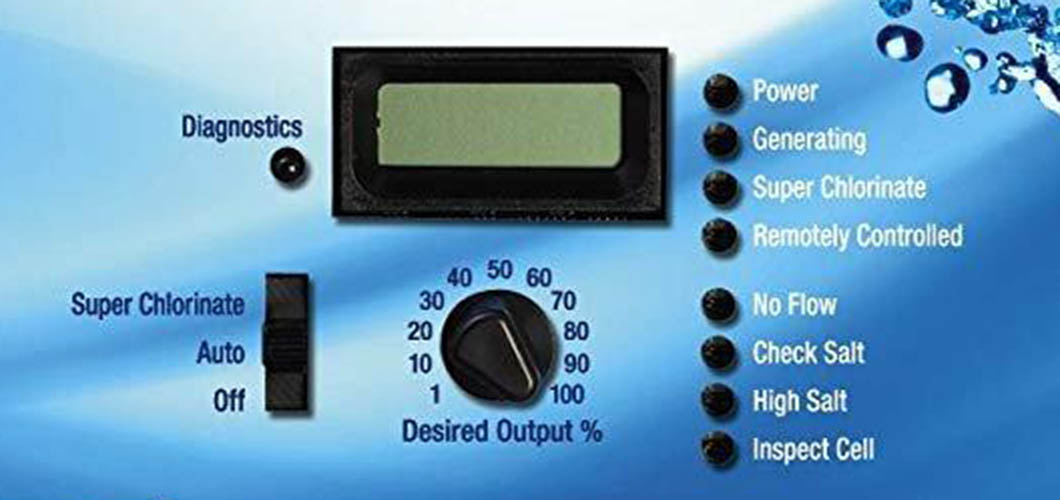
The control box has indicator lights and a digital screen. Normally, you see lights for “Power,” “Generating,” and “Check Salt” or “High Salt. ” If all lights are off, the unit isn’t working at all. These lights are important because they show if the system is producing chlorine or if there is a problem, like low salt levels.
Most Aqua Rite systems run on 120V or 240V power. They connect to your pool’s timer or circuit breaker. If the system loses power, it can’t function. Sometimes, the problem is simple—like a tripped breaker—but sometimes, it’s more complex. Also, some pools have Aqua Rite units wired so they only get power when the pool pump is running. If the pump timer is set incorrectly, the generator may not turn on at all. Pool owners sometimes forget that changes to pump schedules can affect the chlorine generator’s power.
Knowing how your specific system is wired is useful. For example, some control boxes have a small “ON/OFF” switch inside the panel. If this switch is off (by accident or during maintenance), the system will show no lights, even if everything else is working.
Common Reasons For No Lights
When your Aqua Rite generator shows no lights, several things could be wrong. Let’s look at the most frequent causes:
1. Power Loss
If there’s no electricity to the control box, all lights will stay off. This could be due to a tripped breaker, faulty wiring, or a disconnected timer. Even something simple like a power outage in your neighborhood can stop the unit.
2. Blown Fuse
Inside the control box is a small fuse. If this fuse blows, the system loses power. Fuses protect the unit from electrical surges or shorts. Sometimes the fuse is blown because of a sudden electrical spike—this often happens during storms or if there’s a short in the wiring.
3. Loose Or Damaged Wiring
Wires connecting the generator to the power supply can become loose, corroded, or broken. Animals, weather, or age can cause problems. Even a slightly loose wire can interrupt the flow of power and turn all the lights off.
4. Failed Circuit Board
The control box contains a circuit board. If this board fails, the unit won’t turn on. Sometimes, parts like capacitors or relays burn out. You may notice a burnt smell or see dark spots on the board if this is the issue.
5. Tripped Gfci Outlet
Some pools use a GFCI (Ground Fault Circuit Interrupter) outlet for safety. If it trips, power is cut to the generator. GFCIs are designed to protect against electric shock, so even small amounts of moisture or current leaks can make them trip.
6. Timer Or Automation Issues
If your generator is connected to a pool timer or automation system, these devices can malfunction or interrupt power. Sometimes, timers fail slowly—one day the system works, the next day it doesn’t. Automation systems can also update their software and accidentally change the schedule.
7. Transformer Failure
The transformer inside the control box converts voltage for the system. If it stops working, the generator won’t power up. Transformers can overheat or become damaged by power surges.
8. Salt Cell Issues
Although rare, a damaged salt cell can sometimes cause the control box to shut down. This usually happens if the cell is shorted out or if water gets inside the cell cable.
Understanding these causes is the first step toward reliable troubleshooting. Many beginners overlook simple issues like fuses or GFCI outlets, focusing only on complex repairs. For example, it’s common to think the whole unit is bad when the real issue is just a tripped GFCI or a loose wire.
Step-by-step Troubleshooting Guide
Let’s walk through the process to find out why your Aqua Rite shows no lights. Follow these steps in order. Most solutions don’t require special tools, but you’ll need a screwdriver and, in some cases, a multimeter.
1. Check Power Supply
Start by making sure the generator is getting power.
- Go to your pool’s circuit breaker panel. Find the breaker labeled for the pool or salt system.
- Make sure the breaker is ON. If it’s tripped, reset it.
- If your system uses a timer, make sure the timer is set correctly and working.
Also, check if the pool pump is running. If the pump isn’t on, the Aqua Rite may not have power. If the breaker keeps tripping, there may be a wiring problem or a short in the system. In some homes, outlets for the pool system are controlled by a switch inside the house or garage—double-check these are “on” as well.
2. Inspect The Gfci Outlet
Many pool systems use a GFCI outlet for safety. It looks like a regular outlet but has “Test” and “Reset” buttons.
- Press the “Reset” button firmly.
- If the outlet clicks and power returns, the issue was a tripped GFCI.
GFCI outlets can trip for many reasons, including moisture or electrical surges. If it keeps tripping, check for water leaks nearby. Sometimes, old GFCI outlets become too sensitive and trip even without a real problem. Replacing an old GFCI can sometimes solve repeated trips.
3. Examine The Fuse
Inside the Aqua Rite control box is a small fuse, usually located near the power wires.
- Turn off power at the breaker before opening the box.
- Remove the cover and find the fuse.
- Check if the fuse looks burned or broken.
- Replace with a new fuse of the same rating (usually 20A, glass cartridge type).
If the new fuse blows immediately, there may be a deeper electrical issue. It’s important to use a fuse with the correct rating, or you could risk damaging the control board or wiring.
4. Inspect Wiring And Connections
Look for loose, corroded, or disconnected wires.
- Check all wires inside the control box and where it connects to power.
- Tighten any loose screws or connectors.
- Look for signs of corrosion or burning.
Sometimes, animals chew wires or connectors rust due to moisture. If you see green or white powder on the wires, that’s usually corrosion and should be cleaned off. Make sure to check both ends of the wiring—at the control box and at the timer or breaker.
5. Test The Circuit Board
If everything above checks out, the problem might be the circuit board.
- Look for visible damage: Burned spots, bulging capacitors, or broken parts.
- Smell for burnt odors.
- If you have a multimeter, test power at key points (if comfortable).
Circuit board failure is common in older units. If the board is bad, you’ll need a replacement part. For some models, the board is easy to change with basic tools, but others may need a technician. If your unit is still under warranty, check with the manufacturer before replacing expensive parts.
6. Inspect The Transformer
The transformer converts high voltage (120V/240V) to lower voltage for the unit.
- Listen for humming or buzzing sounds; a dead transformer is usually silent.
- Check for overheating.
- If you have a multimeter, measure voltage output.
Transformers can fail from age, power surges, or moisture damage. If the transformer is hot to the touch or smells burnt, replace it. Sometimes, you can see dark spots or melted areas on a bad transformer.
7. Check The Salt Cell
A faulty salt cell can sometimes cause shutdowns. However, it’s less likely than the previous steps.
- Look for visible cracks or corrosion.
- Check the cell cable and connection to the control box.
If the cell is damaged, replace it. If it’s dirty, clean according to manufacturer instructions. Be sure to use only the recommended cleaning solution—using acid too often or for too long can damage the cell.
8. Review Timer Or Automation Settings
If your pool uses a timer or automation system:
- Make sure the timer is set to turn on the generator.
- Look for wiring errors or software glitches.
Timers can fail due to age or bugs in automation software. If you recently changed settings, double-check that the generator’s schedule still matches the pool pump’s. Some automation systems have “lockout” features that can accidentally disable the salt system.
9. Try A Hard Reset
Sometimes, electronics freeze or lock up.
- Turn off power at the breaker for 5–10 minutes.
- Turn power back on and check for lights.
A hard reset can solve some minor software or electronic issues. For some systems, removing power for a few minutes is enough to clear errors that keep the lights off.
10. Contact Technical Support
If you’ve tried all steps and still see no lights, it’s time to call for help.
- Write down your model number, serial number, and any steps you’ve tried.
- Contact Hayward (the manufacturer) or a certified pool technician.
Some repairs need special tools or parts. Don’t attempt advanced fixes if you’re unsure—they can be dangerous. Hayward support can often walk you through more advanced tests over the phone or recommend a local technician.
Troubleshooting Tips From Experienced Pool Owners
Pool owners often share their own tips and stories. Here are practical insights you may not find in manuals:
- Sometimes, spiders or insects crawl inside the control box and create webs. This can short-circuit the board. Clean out any bugs. One pool owner found a nest of ants inside their box—after cleaning, the system worked perfectly.
- Corrosion is common in humid climates. Spray connectors with electrical contact cleaner to prevent rust. Dielectric grease on connectors can also help keep moisture out.
- Power surges during storms can blow fuses or damage boards. If you live in a stormy area, use a surge protector. Some pool owners install a whole-house surge protector for extra safety.
Beginner mistake: Many people replace the salt cell first, thinking it’s always the problem. In reality, the control box is more likely to cause “no lights.” If you’re not sure, swap the cell with a working one from a friend’s pool before spending money on a new cell.
Another tip: Document any changes you make—write down when you replaced the fuse or checked the wiring. This helps you or a technician track the problem over time.

Credit: www.inyopools.com
Comparison Of Common Causes
To help you understand the likelihood of each cause, here is a simple comparison:
| Cause | Frequency | Repair Difficulty | Estimated Cost |
|---|---|---|---|
| Power Loss | Very Common | Easy | $0 |
| Blown Fuse | Common | Easy | $5–$10 |
| Loose Wiring | Moderate | Easy to Moderate | $0–$20 |
| Circuit Board Failure | Moderate | Moderate | $100–$250 |
| Transformer Failure | Rare | Moderate | $50–$120 |
| Salt Cell Issue | Rare | Moderate | $200–$400 |
| Timer Issue | Occasional | Easy | $10–$80 |
Signs Of Deeper Electrical Problems
Sometimes, the problem is not just with the generator but with your pool’s electrical system. Watch for these signs:
- Lights flicker or go out on other pool equipment
- Circuit breaker trips often
- Outlets nearby don’t work
If you notice these signs, call a licensed electrician. Electrical safety is critical—don’t risk injury by guessing. Older pool wiring may not meet modern safety codes, which can cause “mystery” problems that are hard to fix without professional tools.
How To Prevent Future Problems
Keeping your Aqua Rite generator in good shape helps avoid “no lights” issues. Here are practical tips:
- Inspect wiring and connectors every season for corrosion or damage.
- Clean inside the control box yearly to remove dust, bugs, or webs.
- Check fuse and GFCI outlet regularly.
- Use a surge protector if you live in a storm-prone area.
- Follow manufacturer maintenance guidelines for salt cell cleaning.
Also, keep the control box out of direct sun and away from sprinklers—excess heat and water can shorten its life. Mark your calendar for seasonal checks so you don’t forget. Preventive care is much cheaper than emergency repairs.
These steps help your system last longer and reduce repair costs.
Data Table: Aqua Rite Generator Life Expectancy
To understand how long parts typically last, see this data:
| Component | Average Lifespan | Signs of Failure |
|---|---|---|
| Salt Cell | 3–5 years | Low chlorine, error lights |
| Circuit Board | 5–8 years | No lights, burnt smell |
| Fuse | 1–3 years | No power, blown fuse |
| Transformer | 8–12 years | No power, silent transformer |
When To Replace Vs. Repair
Should you fix the unit or buy new parts? Here’s a guide:
- Fuse or wiring: Always repair first. Cheap and quick.
- Circuit board: If your system is over 6 years old and repairs cost more than half the price of a new unit, consider replacing.
- Salt cell: If the cell is cracked or heavily corroded, replacement is best.
Many pool owners waste money by replacing parts blindly. Always diagnose before buying. If possible, borrow a part from a neighbor’s pool to test before ordering expensive replacements.
Also, weigh the age of your system. If it’s near the end of its lifespan, a new unit may save headaches in the long run.
Real Example: Solving “no Lights” In A Backyard Pool
Let’s look at a real-life troubleshooting process.
Sarah, a pool owner in Texas, found her Aqua Rite generator with no lights after a storm. She checked the breaker—ON. She reset the GFCI outlet—no change. She opened the control box and saw the fuse was burned. After replacing the fuse, the lights came on.
But the fuse blew again after a few hours.
Sarah then checked the wiring and found a wire chewed by rodents. After repairing the wire and replacing the fuse, the system worked. She learned to inspect wiring regularly and use rodent deterrents.
This example shows how simple issues like fuses and wiring can cause major shutdowns. Another owner shared that their system stopped working after a gardener splashed water inside the box—drying it out and resetting the GFCI fixed the problem.

Credit: www.youtube.com
Advanced Troubleshooting: Using A Multimeter
If you’re comfortable with electrical testing, a multimeter can help. This tool measures voltage and continuity.
- Set the multimeter to AC voltage.
- Test power at the input terminals (should match your supply: 120V or 240V).
- Test output voltage at the transformer.
- Check continuity on the fuse.
If you find power at the input but no output, the problem is inside the box. If there’s no power at the input, check upstream wiring.
Many beginners skip multimeter testing, but it saves time and prevents guessing. If you’re nervous about using a multimeter, watch a short online video or ask a handy friend for help. Always follow safety instructions when using electrical tools.
Data Table: Troubleshooting Steps And Success Rates
Here’s a table showing how often each step solves the “no lights” problem:
| Step | Success Rate | Time Required |
|---|---|---|
| Reset breaker/GFCI | 35% | 5 min |
| Replace fuse | 25% | 10 min |
| Check wiring | 15% | 15–30 min |
| Test circuit board | 10% | 30–60 min |
| Test transformer | 8% | 20–30 min |
| Salt cell check | 7% | 10 min |
Safety Precautions
Always follow electrical safety rules:
- Turn off power before opening the control box.
- Use insulated tools.
- Never touch exposed wires.
- If unsure, call a professional.
Pool equipment uses high voltage. Safety is more important than speed. Even experienced DIYers sometimes make mistakes—work slowly and double-check every step.
External Resource For Further Reading
For more detailed information on pool salt systems and troubleshooting, visit the Hayward Pool official site.
Credit: lesliespool.com
Frequently Asked Questions
Why Does My Aqua Rite Generator Show No Lights After A Storm?
Storms can cause power surges, which may blow fuses or damage the circuit board. Always check the fuse first and inspect for signs of surge damage. If you live in a stormy area, consider adding surge protection for your pool equipment.
Can I Use My Pool When The Generator Is Off?
It’s not recommended. Without chlorine, water can become unsafe and prone to algae. If the generator is down, use liquid chlorine until it’s fixed. Be sure to test the water daily if you’re adding chlorine by hand.
How Often Should I Check The Fuse And Wiring?
Inspect the fuse and wiring at least once per season, or after any electrical issue. Preventive checks help avoid sudden failures. If your area has frequent power outages, check more often.
What Tools Do I Need For Troubleshooting?
A screwdriver, replacement fuse, and multimeter are helpful. For advanced repairs, you may need wire strippers or electrical contact cleaner. Having a flashlight and a phone camera can also help you see and document hard-to-reach parts.
Is It Worth Repairing An Old Aqua Rite Unit?
If the system is over 8 years old and repairs cost more than half the price of a new unit, consider replacing. Newer models are more efficient and reliable. Remember, old wiring and parts become less safe with age.
Aqua Rite generators are reliable but, like any equipment, can have issues. With careful troubleshooting, most “no lights” problems can be solved quickly. Always start with simple checks and follow safety guidelines. With this knowledge, you can keep your pool clean and safe all season.