
If you own a pool with a Hayward pool heater, you expect warm water whenever you want to swim. But sometimes, you see an error code on the heater’s display and the water stays cold. One of the most common codes is the Hayward pool heater SF code. This code can confuse pool owners and leave you wondering, “What does SF mean?” and “How do I fix it?” Understanding this code, why it happens, and how to solve it can save you time, money, and frustration. This guide will give you a complete look at the SF code—what it means, why it appears, how to troubleshoot, and ways to prevent it in the future. If you want your Hayward heater to run smoothly, or you want to avoid expensive repairs, keep reading. You’ll find clear answers, practical steps, and expert insights all in one place.
What Is The Hayward Pool Heater Sf Code?
The SF code stands for “Shorted Flame Sensor” or “Stuck Flame Sensor.” This code is a fault alert that tells you something is wrong with the heater’s flame sensing system. The flame sensor is a small but important part. Its job is to check if there is a real flame inside the heater when the gas is flowing. If the sensor is not working right, or if the control board thinks the sensor is always “on” (even when it shouldn’t be), the SF code will appear.
The SF code is not just a random alert. It’s a safety feature. If the heater thinks there is a flame when there isn’t, or if the flame sensor is not working, it can be dangerous. Gas could build up and cause a fire or explosion.
That’s why the heater stops working and shows the SF code—it’s protecting your pool and home.
Many pool owners see the SF code and think their heater is broken for good. But that’s rarely true. Most of the time, the problem is fixable and does not mean you need a new heater. Understanding the code is the first step to getting your heater running again.
How The Flame Sensor Works
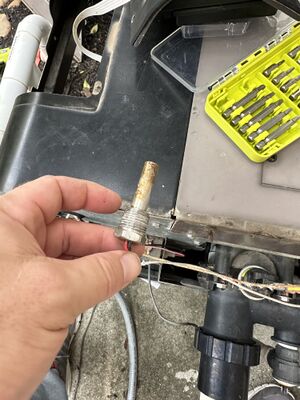
To really understand the SF code, you need to know how a flame sensor works in a Hayward pool heater. The flame sensor is usually a thin metal rod near the gas burner. When your heater tries to light, gas flows to the burner and an igniter creates a spark or a hot surface to start the flame.
Once the flame is burning, the sensor detects a small electric current created by the flame. If the sensor “sees” the flame, it tells the heater it’s safe to keep running. If the sensor does not detect a flame—or if it’s stuck or dirty—the heater will shut down and show a fault code.
Here’s what happens step-by-step:
- Heater starts: You set the temperature, and the heater begins its startup sequence.
- Gas flows: The control board opens the gas valve.
- Ignition: The igniter creates a spark or heats up.
- Flame: Gas ignites and starts burning.
- Sensor check: The flame sensor checks for a flame.
- Safe running: If a flame is detected, the heater keeps working. If not, it shuts down.
A dirty or faulty sensor, or a broken wire, can confuse the system and trigger the SF code. Sometimes, the control board itself can also be the problem.
Credit: www.troublefreepool.com
Common Causes Of The Sf Code
Understanding why the SF code appears can help you fix the problem faster. There are several common reasons this code shows up on Hayward heaters:
- Dirty Flame Sensor
- Over time, the flame sensor can get covered with soot, dust, or residue from gas. This stops it from sensing the flame correctly.
- Loose or Broken Wires
- If the wire connecting the sensor to the control board is loose, damaged, or corroded, the signal cannot reach the board.
- Failed Flame Sensor
- Sensors can wear out. If the sensor itself is faulty, it may always show “on” or “off,” triggering the SF code.
- Faulty Control Board
- Sometimes, the control board misreads the sensor signal. This is less common, but it happens, especially in older units.
- Moisture or Water Damage
- Pool heaters are often outside. Rain, leaks, or condensation can cause moisture on the sensor or inside the heater, leading to errors.
- Incorrect Installation
- If the heater or sensor was not installed properly, wires can get pinched, or connectors can be left loose.
- Gas Supply Problems
- If there is not enough gas pressure or the gas valve is not working right, the flame might not stay on, and the sensor will not detect it.
- Insect or Animal Nest
- Wasps, spiders, or small animals can build nests inside the heater, blocking the flame or damaging the sensor wires.
Most SF code problems are simple to fix. But sometimes, the cause is hidden and needs more careful troubleshooting.
Signs And Symptoms Before The Sf Code Appears
The SF code often appears after a few warning signs. If you notice these, you might catch the problem early:
- Heater tries to start but shuts off quickly
- Clicking sounds, but no ignition
- “Heater on” light blinks or goes out
- Pool water stays cold even though heater is “on”
- Smell of gas near the heater (always take this seriously and turn off the heater)
- Error code SF flashes on the display, sometimes with other codes
These symptoms do not always mean the SF code is coming, but they often appear first. If you spot them, check your heater before it fully shuts down.
How To Troubleshoot The Sf Code
Solving the SF code can be simple or complex, depending on the cause. You do not always need a professional right away. Here’s a step-by-step guide to troubleshooting the SF code on a Hayward pool heater:
Step 1: Turn Off Power And Gas
Before you touch anything inside the heater, always turn off the power at the breaker and shut off the gas supply. This keeps you safe from electric shock and gas leaks.
Step 2: Open The Heater Panel
Use a screwdriver to remove the screws and open the access panel. Most Hayward heaters have a front panel you can easily remove.
Step 3: Locate The Flame Sensor
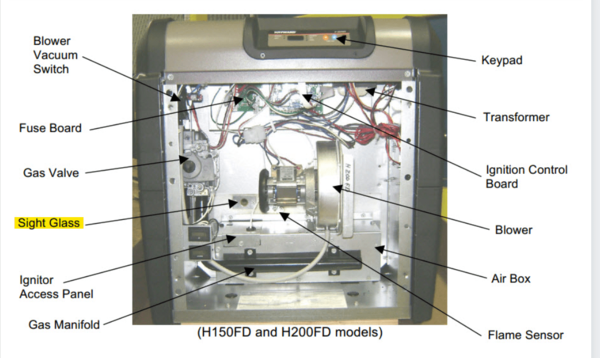
The flame sensor is a thin metal rod, usually with a white ceramic base, located near the burner. It may have one or two wires attached.
Step 4: Inspect The Sensor
Look for signs of dirt, soot, corrosion, or damage. If the sensor looks dirty, that’s likely the problem.
Step 5: Clean The Flame Sensor
Remove the sensor by loosening the mounting screw. Gently clean the metal rod with fine sandpaper or a soft cloth. Do not use water or strong chemicals—just polish the metal so it shines. Clean the connector as well.
Step 6: Check Wiring
Inspect the wire from the sensor to the control board. Look for loose connectors, cuts, or corrosion. Reconnect or replace any damaged wires.
Step 7: Check For Moisture
Look for water droplets or signs of rust near the sensor and control board. If you find moisture, dry the area with a cloth and let the heater air out before restarting.
Step 8: Reinstall Sensor And Close Panel
Put the sensor back in place, tighten the screw, and reconnect the wire. Close the heater panel and secure the screws.
Step 9: Restore Power And Gas
Turn the power and gas back on. Try to start the heater.
Step 10: Test The Heater
Set the thermostat and watch the heater go through its startup sequence. If the SF code clears and the heater works, you have fixed the problem.
If the SF code comes back, you may have a deeper problem—like a bad sensor or faulty control board. In that case, move to advanced troubleshooting or call a professional.
Advanced Troubleshooting For The Sf Code
Sometimes, the basic steps do not solve the SF code. Here are advanced steps for pool owners who want to dig deeper:
1. Test The Flame Sensor With A Multimeter
A working flame sensor will show a small voltage (microamps) when the flame is on. Remove the sensor and test with a multimeter set to microamps. If there is no reading, the sensor may be bad.
2. Check The Control Board
If the sensor and wiring are good, the main control board could be the problem. Boards can be damaged by power surges, age, or moisture. Check for burnt spots, loose connections, or error lights.
3. Inspect The Burner
A dirty or blocked burner can stop the flame from reaching the sensor. Clean the burner with compressed air or a soft brush.
4. Review Error History
Some Hayward heaters store error codes. Check the manual to see how to view the error history. This can show if the SF code is a new problem or part of a larger issue.
5. Replace Faulty Parts
If the sensor, wiring, or control board is faulty, replace it with genuine Hayward parts. Avoid cheap aftermarket parts—they can cause more problems.
Advanced troubleshooting is not for everyone. If you are not comfortable with electric or gas repairs, call a licensed pool technician.
How To Reset The Hayward Pool Heater After Sf Code
After fixing the issue, you may need to reset the heater to clear the SF code. Here’s how:
- Turn off the power to the heater for 1-2 minutes.
- Turn the power back on.
- Press the reset button (if your model has one) or follow the manual’s reset instructions.
- Set your desired temperature and start the heater.
If the SF code returns, go back to troubleshooting. If it stays clear and the heater works, you’re done.
When To Call A Professional
Some SF code problems need an expert. Call a professional pool technician if:
- You smell gas or suspect a leak
- You are not comfortable working with gas or electricity
- The SF code stays after cleaning and checking all parts
- The control board or sensor needs replacement
- You see other warning codes at the same time
A licensed technician has the tools and training to fix complex problems safely.
Cost Of Fixing The Sf Code
Many pool owners worry about the cost. The good news: most SF code issues are cheap to fix.
- Cleaning the sensor: Free if you do it yourself
- New flame sensor: $15–$50 for most Hayward models
- Wiring repair: $10–$30 for parts
- Professional service call: $75–$150 (varies by region)
- Control board replacement: $200–$400 (only if needed)
Most repairs are less than $100 if you do it yourself. Hiring a pro is more expensive, but sometimes necessary for safety.
How To Prevent The Sf Code
Prevention is always easier than repair. Here are ways to avoid the SF code in the future:
- Regular Cleaning
- Clean the flame sensor every pool season (or more often if you use the heater a lot).
- Keep the Area Dry
- Protect the heater from rain, leaks, and sprinklers. Check for signs of water inside the heater.
- Check Wiring
- Inspect wires for damage or corrosion once a year.
- Burner Maintenance
- Clean the burner and inside of the heater to prevent blockages.
- Professional Service
- Have a pool tech inspect your heater once a year. They can spot problems early.
- Install Rodent and Insect Screens
- Keep small animals and bugs out of the heater by using screens on vents.
Regular care can help your Hayward heater run for many years without error codes.

Credit: www.youtube.com
Hayward Heater Models That Show The Sf Code
Not all Hayward pool heaters use the SF code. Here are popular models that do:
- Hayward H-Series (millivolt and electronic)
- Hayward Universal H-Series (Low NOx)
- Hayward HeatPro Heat Pump (some versions)
- Hayward ED2 and ED1 series
Always check your owner’s manual to confirm what codes your model uses. Some older models use different codes or lights.
Other Hayward Heater Error Codes
The SF code is just one of several error codes you might see. Here’s a quick comparison of common Hayward codes and what they mean:
| Error Code | Meaning | Typical Cause |
|---|---|---|
| SF | Shorted Flame Sensor | Dirty or faulty sensor, bad wiring, or control board |
| LO | Ignition Failure | No flame detected, gas or ignition problems |
| HS | High Limit Switch | Heater is too hot, water flow issues |
| IF | Ignition Failure | Flame did not ignite or stay lit |
| AO | Air Flow Switch | Blocked vent or pressure switch issue |
Each code means something different. If you see codes besides SF, check your manual for details.
Real-world Examples: Pool Owners’ Experiences
Understanding the SF code is easier with real stories. Here are two true examples:
Case 1: Quick Fix by Cleaning
Maria noticed her pool heater would not stay on. The SF code flashed. She opened the heater and found the flame sensor covered in black soot. After gently cleaning it with sandpaper, she reinstalled the sensor and the heater worked perfectly.
She saved $120 on a service call.
Case 2: Wiring Trouble
John’s Hayward heater kept showing the SF code even after cleaning the sensor. He checked the wires and found a mouse had chewed through the insulation. He replaced the wire, wrapped it with tape, and the heater started working. He now checks for animals each season.
Many pool owners miss these simple checks and call for expensive repairs. A little DIY can go a long way.
Comparing Hayward With Other Brands
How does Hayward stack up against other brands when it comes to error codes and troubleshooting? Here’s a quick look:
| Brand | SF Code Equivalent | Ease of Fix | Parts Cost |
|---|---|---|---|
| Hayward | SF (Shorted Flame Sensor) | Easy for most owners | Low |
| Raypak | “FL” or “SEN” | Moderate difficulty | Low–Medium |
| Pentair | “ERR SF” | Easy–Moderate | Low |
| Jandy | “FS” | Moderate | Medium |
Hayward heaters are known for clear codes and easy sensor access. Most owners can handle SF code fixes themselves.
Credit: www.troublefreepool.com
Non-obvious Insights Most Pool Owners Miss
When it comes to the SF code, there are two key insights many beginners overlook:
1. Humidity and Weather Matter More Than You Think
- Outdoor heaters in humid or rainy areas get dirty sensors and water damage much faster. Cover your heater or use a weather shield to reduce SF code problems.
2. Power Surges Can Damage the Control Board
- If your heater is plugged into an outlet or wired into the house, power surges from lightning or outages can damage the control board. Use a surge protector for your pool equipment—it’s a cheap way to prevent expensive repairs.
Missing these points often leads to repeated SF code problems, even after cleaning or replacing the sensor.
What To Avoid When Fixing The Sf Code
Many pool owners make mistakes when trying to fix the SF code. Avoid these common errors:
- Using water or harsh chemicals to clean the sensor. Only use a dry cloth or fine sandpaper.
- Forcing connectors. Gentle pressure is enough; don’t bend or break parts.
- Skipping safety steps. Always turn off power and gas before opening the heater.
- Ignoring the manual. Each Hayward model is a bit different. Check your manual for sensor location and reset steps.
- Replacing parts with cheap knockoffs. Always use genuine Hayward parts for best results.
Staying safe and using the right methods leads to faster, longer-lasting fixes.
Useful Resources For Hayward Heater Owners
If you want to learn more or need official support, check these sources:
- Hayward’s official website and support pages
- Your heater’s user manual (usually available online if you lost it)
- Pool technician forums for real-world advice
- Pool & Spa News for industry updates
These resources can help you dig deeper if you need more information.
Frequently Asked Questions
What Does The Sf Code Mean On A Hayward Pool Heater?
The SF code stands for “Shorted Flame Sensor.” It means the heater’s flame sensor is not working correctly—often because it’s dirty, damaged, or has a wiring problem. The heater shuts down to prevent unsafe operation.
Can I Fix The Sf Code Myself, Or Do I Need A Professional?
Many pool owners can fix the SF code themselves by cleaning the flame sensor and checking wires. If the problem is deeper—like a bad control board or gas leak—it’s best to call a professional.
How Often Should I Clean The Flame Sensor?
Clean the flame sensor at the start of every pool season, or more often if you use the heater a lot or live in a humid area. Regular cleaning prevents most SF code problems.
Is The Sf Code Dangerous?
The SF code is a safety feature. It stops the heater when the flame sensor is not working. While the code itself is not dangerous, do not ignore gas smells or repeated faults—call a pro if you’re unsure.
What If The Sf Code Returns After I Fix It?
If the code comes back quickly, check for deeper issues like bad wiring, a faulty control board, or moisture inside the heater. If you can’t find the cause, a licensed technician should inspect the unit.
Your Hayward pool heater is designed to keep your water warm and safe. The SF code can be annoying, but with the right knowledge, it’s usually easy to fix. By understanding what causes this code, how to solve it, and how to prevent it in the future, you’ll enjoy worry-free pool heating for many seasons.