
If your Hayward Tiger Shark robotic pool cleaner starts and then stops, it can be frustrating, especially when you expect a clean pool and smooth operation. Many pool owners experience this issue, and it often leads to questions like “Is my Tiger Shark broken?” or “Can I fix it myself?” The good news is, most problems with the Tiger Shark stopping after starting have clear causes and, in many cases, simple solutions. This guide will help you understand why your Tiger Shark behaves this way, how to troubleshoot, and what you can do to get it back on track—without expensive repairs or unnecessary stress.
By the end of this article, you’ll know the main reasons for this start-stop behavior, step-by-step troubleshooting methods, and how to avoid common mistakes. You’ll also learn how to keep your Tiger Shark running smoothly in the future.
Understanding How The Hayward Tiger Shark Works
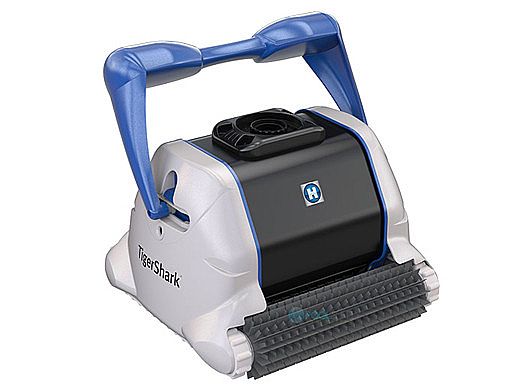
Before you jump into fixing your Tiger Shark, it helps to know how it functions. The Hayward Tiger Shark is a robotic pool cleaner powered by a low-voltage transformer. It moves on wheels or tracks, uses an internal pump to create suction, and collects debris in a filter cartridge or bag. The robot operates automatically, following a programmed cleaning cycle that usually lasts around 2 to 3 hours.
When you turn it on, the robot:
- Receives power from the control box.
- Runs a self-test to check for problems.
- Starts the cleaning cycle by moving and sucking up debris.
- Stops and signals the end of the cycle, or stops if it finds an issue.
If your Tiger Shark starts and then stops, it may be failing the self-test, losing power, or running into a mechanical or electrical problem.
Common Reasons Why Hayward Tiger Shark Starts Then Stops
Several issues can cause the Tiger Shark to stop soon after starting. Below are the most common causes:
1. Power Supply Problems
The power supply (the control box) converts household electricity to a safe, low voltage for the robot. Problems here are frequent:
- Loose connections: If the power cord or plug is not seated properly, the robot may get a quick burst of power, then lose it.
- Faulty outlet: An old or broken outlet can cause intermittent power loss.
- Damaged power supply: Internal faults in the transformer or control box can trigger automatic shutdown.
2. Clogged Or Dirty Filter
A blocked filter restricts water flow, causing the robot to sense a problem and stop.
- Full filter cartridge: If the cartridge or bag is filled with debris, the robot cannot operate.
- Fine debris: Even small particles can clog the filter quickly, especially after storms or heavy pool use.
3. Blocked Impeller Or Drive System
The impeller (fan) moves water through the robot. If it’s blocked, the robot stops to protect itself.
- Twigs, leaves, or hair: These can jam the impeller or get wrapped around the drive system.
- Worn or damaged parts: If the impeller blades break or the drive belt slips, movement stops.
4. Faulty Motor
The Tiger Shark uses one or two motors—one for movement, one for suction. If a motor is weak or worn out, it may run for a few seconds, then overheat and stop.
- Burnt-out motor: Motors fail after years of use or electrical surges.
- Water intrusion: A leaking seal allows water to enter the motor housing.
5. Obstructed Wheels Or Tracks
If the wheels or tracks can’t turn, the robot’s sensors detect a problem and stop the cycle.
- Debris in wheels/tracks: Small stones, sticks, or pool toys can jam the moving parts.
- Worn tracks: Over time, the rubber tracks stretch or break, causing slippage.
6. Faulty Float Or Buoyancy Issues
The Tiger Shark must float at the right depth. If air gets trapped inside or the floats are damaged, the robot might tip, get stuck, and stop.
- Air in the robot: Not “burping” the robot before use can trap air.
- Damaged floats: Old or cracked floats cause instability.
7. Electrical Or Control Board Failure
The internal control board manages all robot functions. A fault here can cause a false error and immediate shutdown.
- Loose wires or corroded terminals: Water or age can cause poor connections.
- Failed components: Chips or relays may fail from age or electrical spikes.
8. Software Or Firmware Glitches
Some Tiger Sharks have programmable features. A software error can cause unpredictable behavior, including starting and stopping.
- Power surges: Can corrupt the robot’s memory.
- Interrupted cycles: Removing the robot during a cycle can confuse its program.
9. Pool Water Issues
The Tiger Shark is designed for typical pool water conditions. Unusual chemistry can sometimes affect sensors or cause unexpected shutdowns.
- High calcium or algae: Can clog the filter and impeller quickly.
- Cold water: Some models struggle in water below 60°F (15°C).
10. User Errors
Simple mistakes can cause problems.
- Not resetting the robot after cleaning: The robot may “remember” a clogged filter and refuse to start.
- Improper cable handling: Twisted or kinked cables may interrupt power.

Credit: www.ebay.com
Step-by-step Troubleshooting: What To Check First
When your Tiger Shark starts then stops, follow these steps in order. Each step is designed to be easy and safe for the average pool owner.
1. Check The Power Supply And Cables
- Unplug the power supply from the outlet and wait 2 minutes.
- Inspect the power cord for cuts, nicks, or kinks.
- Plug the control box into a different outlet you know works.
- Press the reset or power button and listen for any clicks or lights.
If the power supply doesn’t turn on or the lights blink oddly, the issue is likely with the power supply or cable.
2. Inspect The Filter And Intake
- Open the Tiger Shark’s filter compartment.
- Remove the filter cartridge or bag and rinse it with a hose.
- Check for fine debris stuck in corners or folds.
- Make sure the filter is completely dry and intact before replacing.
A clean filter often solves sudden stops, especially after heavy pool use.
3. Examine The Impeller And Internal Passages
- Turn off and unplug the robot.
- Flip it over and look for the impeller cover (usually held by screws).
- Remove the cover and check for twigs, leaves, or hair wrapped around the impeller.
- Spin the impeller gently by hand to check for smooth movement.
Replace the cover and test again.
4. Check The Wheels, Tracks, And Brushes
- Look for anything jammed in the wheels or tracks.
- Spin the wheels and check for even movement.
- If the tracks look loose or cracked, they may need replacement.
- Inspect the brushes for wear and tear.
5. Reset The Robot
- Turn off the power.
- Remove the robot from the pool.
- Wait 5 minutes to allow any software errors to reset.
- Re-submerge, making sure to “burp” out air bubbles by tilting the robot until no more bubbles escape.
- Plug back in and start a cycle.
6. Observe The Robot’s Behavior
- Watch the Tiger Shark during the first few minutes.
- Listen for unusual noises (grinding, clicking, or silence).
- Note if it stops at the same spot or after the same amount of time.
This can help you pinpoint the problem.
7. Test In A Clean, Debris-free Pool
If possible, test the robot in a clean pool to rule out water chemistry or heavy debris as the cause.
Comparing Hayward Tiger Shark Models: How Differences Affect Troubleshooting
Not all Tiger Sharks are the same. Some differences in model features can affect how you diagnose the “starts then stops” problem.
| Model | Filter Type | Motors | Common Failure Points |
|---|---|---|---|
| Tiger Shark QC | Cartridge | 2 (drive & pump) | Impeller, drive belt, power supply |
| Tiger Shark Plus | Bag | 2 (drive & pump) | Motor seals, tracks |
| Tiger Shark Standard | Cartridge | 1 (combo) | Filter, control board |
Insight: If you own a model with a filter bag, check for fine debris clogging more often. If you have a dual-motor model, a drive failure may not affect suction, so look for movement problems separately.
Practical Examples Of Real-world Issues
Let’s look at a few real cases that show how these problems appear:
- Case 1: After a storm, a pool owner found their Tiger Shark would start, move a few feet, and then stop. After checking, they found the filter was packed with fine dirt and leaves. Cleaning the filter solved the problem.
- Case 2: Another owner noticed the robot would start, then stop with a loud click. The issue was a small stick jammed in the impeller. Removing the stick fixed it.
- Case 3: A Tiger Shark started and stopped immediately after plugging in. The cause was a corroded terminal inside the power supply, which was repaired by a technician.
These examples show that most issues can be found with careful inspection.
When To Repair, Replace, Or Call A Professional
Sometimes, troubleshooting at home is not enough. Here’s when you should seek professional help:
- Electrical burning smell from the robot or power supply.
- Visible water in the motor compartment (foggy plastic or water droplets).
- Repeated shutdowns after all basic troubleshooting steps.
- Robot is under warranty—do not open it, as this can void coverage.
Repairs such as changing tracks, cleaning filters, or removing debris can be done at home. But electrical, motor, or control board repairs should be left to a qualified technician.
Preventive Maintenance: Keeping Your Tiger Shark Running
Regular care can prevent most “starts then stops” issues. Here’s what to do:
- Clean the filter after every use, especially after storms or heavy pool use.
- Inspect the cable for wear and store it loosely coiled.
- Check the impeller monthly for debris.
- Wash the robot’s exterior to remove pool chemicals and prevent corrosion.
- Store indoors out of sun and rain when not in use.
- Update firmware if your model supports it (see user manual).
- Replace worn tracks or brushes as soon as you see signs of damage.
These steps not only reduce downtime but also extend the life of your Tiger Shark.
Comparing Tiger Shark Problems To Other Pool Robots
How does the “starts then stops” issue with the Tiger Shark compare to problems with other robotic pool cleaners? Here’s a quick look:
| Brand | Common Start/Stop Causes | Ease of DIY Fix | Unique Issues |
|---|---|---|---|
| Hayward Tiger Shark | Filter, impeller, power supply | Moderate | Track tension, self-test errors |
| Dolphin Nautilus | Filter, power cord, motor | Easy | Swivel cord faults |
| Polaris 9550 | Debris jams, software | Moderate | Remote control glitches |
Non-obvious insight: Hayward robots are more sensitive to filter clogging than some competitors. Always clean filters and check water clarity before each cycle.
Credit: www.poolsupplyunlimited.com
Avoiding Common Mistakes
Many owners repeat a few mistakes that cause or worsen the start-stop problem:
- Ignoring the filter: Even “self-cleaning” robots need filter maintenance.
- Running the robot with twisted cable: This can cut power or confuse sensors.
- Not burping the robot: Air pockets can cause the robot to float or stall.
- Forcing the robot to run in dirty water: After storms or heavy pool use, always skim and vacuum first.
- Skipping regular checks: A five-minute check each week prevents hours of frustration.
Advanced Troubleshooting: For Experienced Diyers
If you’re comfortable with small repairs, you can go deeper:
Checking The Control Board
- Unplug the robot and remove the cover (see manual).
- Look for burnt components or corroded connections.
- Gently clean with a soft brush and contact cleaner.
- Do not attempt to repair chips or complex circuits without training.
Testing The Motors
- Use a multimeter to check for continuity in the motor wires.
- If the motor hums but doesn’t spin, it may be jammed or burnt out.
Inspecting Seals And Gaskets
- Check all gaskets for cracks or wear.
- Replace any seals that look brittle or flattened.
Warning: Opening the robot can void the warranty. Proceed only if you are out of warranty and confident in your skills.
How Pool Conditions Affect Tiger Shark Performance
Your pool’s environment can influence how well the Tiger Shark works:
- Large pools with many trees: Require more frequent filter cleaning.
- Sandy or dusty regions: Fine debris can clog the robot quickly.
- High bather load: More sunscreen, hair, and small objects in the pool.
- Pools with unusual shapes: The robot can get stuck or confused by sharp corners.
Tip: Adjust your cleaning schedule to match your pool’s unique challenges.
When Replacement Is The Best Option
If your Tiger Shark is more than 5–7 years old, and the cost of repairs is high, consider replacement. Newer models are more efficient, easier to clean, and often come with better support. Compare prices and features before buying. For reliable information, see the official Hayward Pool Cleaners site.
Expert Tips For Smooth Operation
- Always rinse the robot with fresh water after use to remove pool chemicals.
- Store the power supply indoors to prevent weather damage.
- Replace the filter cartridge every season, even if it looks clean.
- Use a pool cover to keep debris out when not using the pool.
- Keep the cable straight and untwisted for best performance.
Frequently Asked Questions
Why Does My Hayward Tiger Shark Stop After A Few Seconds?
This usually means a problem with the filter, impeller, or power supply. Start by checking the filter for debris, inspect the impeller for blockage, and test the power supply with a different outlet.
Can I Run The Tiger Shark Without The Filter?
No, you should never run the robot without its filter. The filter protects the motor and impeller from debris, and running without it can cause serious damage.
How Often Should I Clean The Filter Cartridge?
Clean the filter cartridge after every cleaning cycle, especially if your pool collects a lot of debris. A clogged filter is the most common reason for start-stop problems.
What Should I Do If The Robot Is Stuck On A Pool Drain?
Turn off the power, gently lift the robot off the drain, and check the tracks and wheels for damage. Avoid using the robot if your pool drain is raised or uncovered.
Is It Safe To Repair The Tiger Shark Myself?
You can handle basic maintenance like cleaning filters, checking for debris, and replacing tracks. For electrical or motor repairs, contact a professional to avoid injury or voiding the warranty.
Keeping your Hayward Tiger Shark in good shape takes a bit of regular attention, but understanding why it starts and stops unexpectedly puts you in control. With careful troubleshooting, most problems can be fixed at home, and your pool will stay sparkling clean all season long.
Credit: www.ebay.com