
If you own an Opal Ice Maker, you know the joy of having fresh, chewy nugget ice at your fingertips. But like any kitchen appliance, your Opal needs a bit of care to keep performing at its best. One important part of maintenance is changing the filter. A clean filter not only keeps your ice tasting pure but also protects your machine from scale and buildup. Many new users are unsure about when and how to replace the filter, and some are even surprised that regular filter changes are essential for both ice quality and machine life.
This guide will walk you through every detail of changing the filter on your Opal Ice Maker. Whether you’re just starting out or you’ve used your Opal for years, you’ll find step-by-step instructions, practical tips, troubleshooting advice, and answers to the most common questions.
With the right approach, you can make the filter change process easy, safe, and stress-free.
Why Filter Changes Matter For Your Opal Ice Maker
It’s easy to overlook the importance of a small part like the water filter. After all, if the ice still looks clear, what’s the harm? But the filter plays a bigger role than you might think. First, it removes impurities and chlorine from your tap water. This not only improves the taste and smell of your ice but also prevents mineral deposits from building up inside the machine.
Second, a clogged or old filter can slow down ice production or even cause your machine to break down. Opal’s compact design relies on clean water to move smoothly through its system. Even minor blockages can lead to extra noise, reduced ice output, or strange tastes.
One thing many people miss: using unfiltered or heavily mineralized water can void your Opal’s warranty. Regular filter changes are not just about taste—they’re a smart way to protect your investment.
How Often To Change The Filter
Opal recommends changing the filter every 3 months or after producing about 150 gallons of ice, whichever comes first. However, your own schedule may vary based on a few factors:
- Frequency of use: If you run your Opal every day, you’ll need to change the filter more often.
- Water quality: Hard water or high levels of chlorine can shorten filter life.
- Household size: More users mean more frequent filter changes.
A practical tip: Mark your calendar or set a reminder on your phone. Some Opal models even have a filter change indicator, but not all do. Keep a log with the date of your last change—this simple habit prevents accidental neglect.
Tools And Supplies You’ll Need
Before you start, gather these items:
- Replacement Opal filter (make sure it matches your model)
- Clean cloth or paper towel
- Mild dish soap (optional, for cleaning the reservoir)
- Pitcher of fresh water
- Bowl or small container (for catching drips)
You don’t need any special tools, but having everything on hand avoids unnecessary pauses.
Understanding Your Opal Filter Type
Not all Opal Ice Makers use the same filter. There are two main types:
- Round Opal filter: Screws directly onto the water tank.
- Side tank filter: Found in Opal models with an attached side water tank.
Check your user manual or look at the existing filter to confirm which style you have. Using the wrong filter can lead to leaks or poor ice quality. If you’re unsure, take a photo of your machine and compare it with images on the official Opal website or your retailer’s site.
Table: Common Opal Filter Types And Compatibility
| Opal Model | Filter Type | Replacement Part Number |
|---|---|---|
| Opal Nugget Ice Maker (1.0) | Round Opal Filter | OPALFILT01 |
| Opal 2.0 | Side Tank Filter | OPALSIDEFILT |
| Opal with Side Tank | Side Tank Filter | OPALSIDEFILT |
Always double-check your model before ordering a replacement.
Step-by-step Guide: How To Change The Filter On Opal Ice Maker
Changing the filter might seem intimidating, but with the right guidance, it’s quick and easy. Here’s how to do it safely and correctly.
1. Turn Off And Unplug The Machine
Safety comes first. Press the power button to turn off your Opal, then unplug it from the wall. This prevents electrical accidents and gives you a clear workspace.
2. Remove The Water Reservoir Or Side Tank
For most models, you’ll need to take out the water reservoir:
- Grasp the reservoir firmly and lift it out of the unit.
- If your Opal has a side tank, unclip or gently slide it off.
Set the tank on a flat surface. Some water may drip, so use a towel if needed.
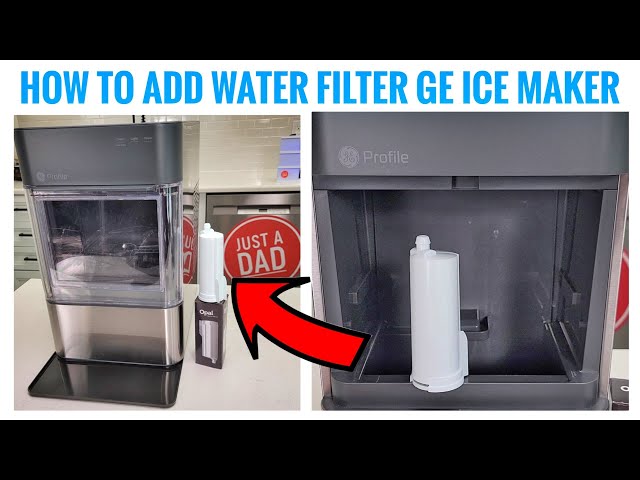
3. Locate And Remove The Old Filter
- On standard models: The round filter is usually attached to the base of the reservoir. Twist it counterclockwise to remove.
- On side tank models: The filter is inside the side tank, usually at the bottom. Pull it out gently.
If the filter feels stuck, wiggle it slightly—don’t force it, or you might damage the connection.
4. Clean The Reservoir (optional But Recommended)
Take this opportunity to give your reservoir or side tank a quick rinse:
- Use mild dish soap and warm water.
- Rinse thoroughly to remove any soap residue.
- Wipe dry with a clean cloth.
Clean water tanks mean fresher ice and a healthier machine.
5. Prepare The New Filter
Before installing, soak the new filter in cold water for 5 minutes. This primes the filter and removes loose carbon dust. Skipping this step can cause black flecks in your ice or slow water flow.
Shake off excess water after soaking.
6. Install The New Filter
- For round filters: Align the new filter with the connection point and twist clockwise until snug.
- For side tank filters: Slide the filter into place, pushing gently until it clicks or feels secure.
Don’t overtighten—just a firm seal is enough.
7. Reattach The Water Reservoir Or Side Tank
- Place the reservoir or tank back into position.
- Make sure it’s seated properly to avoid leaks.
8. Fill The Reservoir With Fresh Water
Use cold, clean tap water. Avoid distilled, softened, or hot water, as these can harm the machine or reduce ice quality.
9. Run A Rinse Cycle
To flush out any carbon dust or air bubbles:
- Plug in and turn on the Opal.
- Let it make one full batch of ice.
- Discard the first batch, as it may contain filter residue.
This step is often skipped by beginners, but it’s important for clean-tasting ice.
10. Reset Filter Change Indicator (if Your Model Has One)
Some Opal Ice Makers have a filter timer or indicator. Check your user manual for instructions on resetting this feature after changing the filter.
When To Change Your Filter: Signs To Watch For
Even if you set a schedule, there are some warning signs that your filter needs attention sooner:
- Ice tastes or smells strange: Metallic, chlorine, or musty flavors mean the filter is saturated.
- Reduced ice production: If your Opal is making less ice than usual, a clogged filter might be the cause.
- Machine is noisier than normal: Extra effort to pump water can make the Opal louder.
- Visible particles in ice: Black specks or cloudiness usually mean the filter is overdue for a change.
If you notice any of these, change the filter—even if it hasn’t been three months yet.
Troubleshooting Common Problems
Changing the filter is usually smooth, but sometimes issues pop up. Here’s how to fix the most common ones.
The New Filter Won’t Fit
- Double-check that you have the right replacement for your Opal model.
- Make sure the filter is aligned correctly.
- If it still won’t fit, inspect for debris or damage on the connection point.
Leaks After Installation
- Ensure the filter is fully seated and not cross-threaded.
- Check that the reservoir or side tank is reattached properly.
- Wipe away any water and observe for drips over the next hour.
Machine Won’t Make Ice
- Confirm the reservoir is filled and seated correctly.
- Run a cleaning cycle if the machine was unused for a long time.
- If the problem persists, try reinstalling the filter or contact Opal support.
Water Tastes Odd After Filter Change
- Always discard the first batch of ice after changing the filter.
- Rinse the reservoir and side tank thoroughly.
- If the taste remains, soak the filter longer before installing.
Table: Troubleshooting At A Glance
| Problem | Possible Cause | Solution |
|---|---|---|
| Filter doesn’t fit | Wrong model or misalignment | Check compatibility, realign filter |
| Leaking water | Poor seal or loose reservoir | Reseat filter and tank |
| No ice production | Empty tank or air in system | Fill tank, run rinse cycle |
| Bad taste | Residue from new filter | Discard first batch, rinse tank |
Where To Buy Opal Replacement Filters
For best results, always use official Opal replacement filters. These are tested for compatibility and performance. You can buy them at:
- The official Opal website
- Major retailers like Amazon, Walmart, or Home Depot
- Appliance stores
Avoid generic or off-brand filters. They may not fit well or may not filter water to the right standard. Always check for the correct part number.

Credit: www.amazon.com
How To Extend Filter Life And Improve Ice Quality
While changing the filter regularly is essential, you can do more to help your Opal run smoothly:
- Use clean, cold tap water only. Avoid softened or distilled water.
- Clean the reservoir and side tank every 2-3 weeks.
- If your water is very hard, consider using a pre-filter for your tap.
- Don’t run the machine dry—this stresses the pump and filter.
A hidden tip: If you know your water is full of sediment or minerals, let the tap run for a few seconds before filling your Opal. This flushes out particles that can quickly clog a filter.
Comparison: Opal Filter Vs. No Filter
It can be tempting to skip the filter to save money, but this choice has real consequences. Here’s a quick comparison.
| With Filter | Without Filter |
|---|---|
| Clear, pure-tasting ice | Possible chlorine or mineral taste |
| Protects machine from scale buildup | Faster mineral deposits, higher repair risk |
| May extend machine life | Can reduce machine lifespan |
| Keeps warranty valid | May void warranty |
For most users, the small cost and effort of filter changes are worth it.

Credit: www.amazon.com
What Beginners Often Miss
Changing an Opal filter is simple, but some details are easy to overlook:
- Soaking the filter: Many people install the new filter dry. This can cause cloudy ice or poor flow. Always soak it first.
- Discarding the first batch of ice: The first ice after a filter change often contains carbon dust. Throw it out to avoid gritty or odd-tasting cubes.
- Cleaning the reservoir: Even if it looks clean, invisible film or bacteria can affect ice quality. A quick rinse is always worthwhile.
- Checking filter compatibility: Not all Opal filters are universal. Double-check before buying.
- Resetting the indicator: If your Opal has a filter timer, you need to reset it or you’ll miss your next change.
Understanding these points means fewer surprises and better performance from your ice maker.
Safety And Disposal Tips
Changing the filter is safe, but it’s smart to follow these guidelines:
- Always unplug the machine before starting.
- Don’t use excessive force—if the filter is stuck, wiggle gently.
- Dispose of used filters in regular household trash unless your area recycles them.
- Wash hands after handling the old filter.
If you ever notice cracks in the reservoir, leaks that won’t stop, or repeated bad-tasting ice, contact customer support.
Cleaning And Maintenance After Changing The Filter
A new filter is a great time for a full clean:
- Wipe down the machine’s exterior with a damp cloth.
- Clean the ice bin with mild soap and rinse well.
- Check for any mold or slime in corners—especially if the machine was unused for a while.
Routine cleaning, combined with regular filter changes, is the best way to keep your Opal running smoothly.
How To Store Extra Filters
If you buy filters in bulk, store them in a cool, dry place, away from direct sunlight. Don’t open the package until you’re ready to use it. Unopened filters have a long shelf life—usually up to two years.
What To Do If You Lost The User Manual
If you don’t have your Opal’s manual, don’t worry. Most guides are available online for free. Visit the official manufacturer’s website and search for your model. Manuals include diagrams, troubleshooting steps, and filter change instructions.
For visual learners, there are also video tutorials and step-by-step guides on YouTube. Just be sure to choose videos from trusted sources.
When To Call For Service
Most filter changes can be done at home, but some situations need professional help:
- The filter housing is damaged or cracked.
- The machine leaks heavily after installation.
- You hear unusual noises that don’t stop after a rinse cycle.
- The machine still makes bad-tasting ice after several filter changes.
If you face these issues, contact Opal customer support or a certified technician. Don’t try to repair electrical components yourself.
Credit: www.youtube.com
Frequently Asked Questions
How Do I Know Which Filter Fits My Opal Ice Maker?
Check your user manual or look at the current filter for a model number. If you’re unsure, visit the official Opal website or retailer’s site for compatibility charts. Always match the filter type (round or side tank) to your Opal model.
Can I Use My Opal Ice Maker Without A Filter?
Yes, you can operate the machine without a filter, but it’s not recommended. Ice quality may suffer, and mineral buildup can damage your machine over time. Using a filter helps protect your investment and keeps your warranty valid.
How Do I Dispose Of The Old Opal Filter?
Most filters can go in regular household trash. Some areas have recycling programs for water filters—check your local guidelines. Rinse the filter before disposal to avoid drips.
My Ice Tastes Odd After Changing The Filter. What Should I Do?
This is usually caused by carbon dust from the new filter. Discard the first batch of ice and rinse the reservoir. If the taste remains, soak the filter longer or run another rinse cycle.
Where Can I Find Official Opal Replacement Filters?
You can buy them on the official Opal website, major online retailers, and appliance stores. Only use filters marked as compatible with your model. For more details, you can check GE Appliances.
Keeping your Opal Ice Maker in top shape is easy once you know how to change the filter. Regular filter changes mean tastier ice, longer machine life, and fewer headaches. With the clear steps and tips above, you’ll enjoy perfect nugget ice every time—without the guesswork.