
If you own a microwave, you may have seen the key symbol appear on the display panel. For many people, this small icon can be confusing and even frustrating, especially when the microwave suddenly stops working as usual. In most cases, the key symbol means your microwave’s child lock or control lock has been activated. This safety feature is useful for families with children, but if you do not know how to turn it off, it can feel like your microwave is broken.
This guide is here to help you fully understand what the key symbol on your microwave means, why it appears, and—most importantly—how to fix it. You will learn step-by-step solutions for different brands, discover why the lock happens, and avoid common mistakes.
The article also covers special cases, troubleshooting, and when to call for professional help. By the end, you will be able to confidently solve this problem and use your microwave normally.
What Does The Key Symbol Mean On A Microwave?
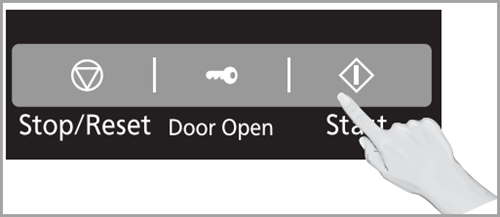
The key symbol is a common indicator across many microwave brands. Its main purpose is to show that the child lock or control lock is active. This feature is designed to prevent children or other users from accidentally starting the microwave, changing settings, or opening the door. When the lock is on, most buttons will not work, and you may see the key symbol, a padlock icon, or a message like “LOC” or “LOCKED” on the display.
It’s important to know that the key symbol does not mean your microwave is broken. It is a safety feature, not an error. However, if you do not know how to turn it off, it can be very frustrating. In rare cases, it may indicate a problem with the control panel, but most of the time, it is a simple lock.
Common Reasons For The Key Symbol
- Child lock activated by mistake
- Accidental button pressing
- Microwave unplugged and plugged back in
- Power surge or outage
- Cleaning the keypad with too much pressure
Most people do not realize how easy it is to turn on the child lock by pressing a combination of buttons. On some microwaves, holding one button for 3-5 seconds is enough to activate the lock, and it can happen while cleaning or reaching over the microwave.
How To Turn Off The Key Symbol: Step-by-step Solutions
The way to remove the key symbol depends on the microwave brand and model. Here are the most common and effective solutions. Always check your user manual for model-specific instructions, but these steps cover almost every situation.
1. Using The Clear/stop Button
On many microwaves, holding the CLEAR or STOP button for 3-5 seconds will turn off the child lock. Try this first, as it is the most common method.
- Find the CLEAR or STOP button.
- Press and hold for 3-5 seconds.
- Wait for the key symbol to disappear and listen for a beep.
If nothing happens, try the next solution.
2. Pressing The “start” Button
Some microwaves use the START button for locking and unlocking.
- Press and hold the START button for about 3 seconds.
- The display should beep, and the key symbol will disappear.
3. Using A Number Pad Combination
Certain brands use a combination of number keys, usually “0” or “2”.
- Press and hold the 0 key for 3-5 seconds.
- If not, try holding the 2 key for the same time.
The lock should turn off if this is the correct method for your model.
4. Menu Or Settings Button
Newer microwaves may have a dedicated MENU or SETTINGS button.
- Press the MENU or SETTINGS button.
- Use the arrow keys to navigate to “Child Lock.”
- Select “Off” or “Unlock” and confirm.
This method is more common on models with digital displays and advanced settings.
5. Unplugging The Microwave
If button methods do not work, try a power reset.
- Unplug the microwave from the wall.
- Wait at least 60 seconds.
- Plug it back in.
This can reset the control board and remove the lock in some cases.
6. Check The User Manual
If you are still stuck, check your user manual for the exact unlocking method. Every brand has a different system, and some use unique combinations.
Many user manuals are available online by searching your microwave’s model number.
Brand-specific Solutions For Key Symbol Problems
Different brands have their own ways to lock and unlock the control panel. Here are solutions for the most popular microwave brands.
| Brand | Unlock Method | Notes |
|---|---|---|
| Panasonic | Press and hold “Stop/Reset” for 3-5 seconds | Beep sounds when unlocked |
| Samsung | Press and hold “Start/Cancel” for 3 seconds | Displays “L” or key symbol |
| LG | Press and hold “Stop/Clear” for 4 seconds | Some models use “0” key |
| Whirlpool | Press and hold “Start” button for 3 seconds | May display “LOC” |
| Sharp | Press and hold “0” for 3 seconds | Some models use “Stop/Clear” |
| GE | Press and hold “Lock” or “Clear/Off” for 3 seconds | Some models have a “Control Lock” button |
| Toshiba | Press and hold “8” for 3-5 seconds | Displays “LOCKED” on screen |
If your brand is not listed, check the manual or try the general methods above.
Important Note
Some microwaves require you to press and hold two buttons at the same time. This is less common but worth trying if nothing else works.
Why Do Microwaves Have A Key Symbol Lock?
Microwaves are powerful appliances. The key symbol lock is a safety feature to protect children and prevent accidents. Here’s why manufacturers include it:
- Child safety: Prevents children from starting the microwave or changing settings.
- Accidental use: Stops the microwave from running if someone leans or presses buttons by mistake.
- Cleaning protection: Prevents the microwave from starting during cleaning.
- Energy and food safety: Stops food from overheating by accidental starts.
Many users do not realize the lock also protects the microwave’s control board. If the buttons are pressed too many times, it could cause errors or even damage. The lock feature is a smart way to avoid this.

Credit: smartyhadaparty.com
Mistakes To Avoid When Fixing The Key Symbol
People often make the problem worse by trying random things. Here are common mistakes:
- Pressing buttons too quickly: Most locks require holding a button for 3+ seconds. Pressing quickly will not work.
- Forcing the door open: Pulling on the door does not unlock the control panel and can break the latch.
- Unplugging repeatedly: Constant unplugging and plugging in the microwave can harm the electronics.
- Ignoring the user manual: Many people skip reading the manual, which often has the answer.
- Using sharp objects to press buttons: This can damage the panel and void your warranty.
A beginner may think the microwave is broken if the key symbol won’t go away. In reality, patience and the correct button combination solve the problem 90% of the time.
When The Key Symbol Means A Bigger Problem
In rare cases, the key symbol will not disappear even after following all steps. This could mean:
- Faulty control board
- Worn-out keypad
- Internal wiring problems
- Software glitches
If your microwave is old or has been exposed to steam or water, the control board may have failed. If you see error codes alongside the key symbol, this is a sign of a deeper problem.
Here is a quick comparison between simple and advanced key symbol issues:
| Problem Type | Symptoms | Solution |
|---|---|---|
| Simple (Lock Active) | Key symbol or “LOC”, buttons not working, no other errors | Unlock using correct button method |
| Advanced (Faulty Control Panel) | Key symbol stays after reset, random beeping, error codes | Repair or replace control board, call technician |
If you suspect a control panel problem, do not try to open the microwave yourself. Microwaves can store high voltage even when unplugged.
How To Prevent The Key Symbol Problem In The Future
Prevention is better than cure. Here are ways to avoid running into the key symbol lock again:
- Read your manual: Know your model’s lock and unlock buttons.
- Use gentle cleaning: Wipe the keypad lightly to avoid pressing and holding buttons.
- Tell your family: Teach everyone in your home how the lock works.
- Keep children informed: Explain to children why the lock is important.
- Check after power surges: After a power cut, check if the lock is on.
- Label the button: Place a small sticker near the lock/unlock button for quick reference.
Many people forget which button controls the lock after a few months, especially if it’s not used often. A simple note or sticker can save a lot of time.
Real-life Examples: Fixing The Key Symbol
Example 1: The Accidental Lock
Maria’s child pressed several buttons on her Samsung microwave. Suddenly, the key symbol appeared, and nothing worked. Maria tried unplugging the microwave, but the symbol was still there. After searching online, she found that holding the “Start/Cancel” button for 3 seconds would unlock it. This solved her problem instantly.
Example 2: Cleaning Gone Wrong
John was wiping his LG microwave’s control panel. After cleaning, he saw the key symbol and thought he had broken the appliance. He panicked and called customer service, who explained the child lock feature. Holding the “Stop/Clear” button for 4 seconds fixed the issue.
Example 3: Power Surge Lock
After a thunderstorm, Priya’s Whirlpool microwave showed “LOC” and would not respond. She found her user manual and saw that holding the “Start” button for 3 seconds would unlock it. The microwave worked perfectly after this.
These examples show that the key symbol is almost always a feature, not a fault.
Troubleshooting When Nothing Works
If you have tried all the steps and the key symbol will not go away, follow these advanced troubleshooting tips:
- Double-check your manual: Some models use less obvious combinations.
- Try all common button combinations: Hold “0”, “2”, “8”, “Stop”, “Clear”, or “Start” for 3-5 seconds each.
- Inspect the keypad: Look for signs of damage, sticky keys, or debris.
- Test after unplugging: Unplug for 5-10 minutes, then try again.
- Check the display: If there are extra error codes, write them down.
- Contact support: If the microwave is under warranty, call the manufacturer.
- Do not open the microwave: Internal repairs are dangerous and can void your warranty.
Some microwaves have hidden service menus that only technicians can access. If you suspect a software issue or a failed control board, professional help is needed.
When To Call A Technician
You should call a technician if:
- The key symbol stays on after all unlocking attempts.
- The microwave also displays error codes.
- The keypad is not responding at all.
- There is visible damage to the control panel.
- You hear strange sounds or smell burning.
Modern microwaves contain high-voltage parts. Attempting to open or repair them can be extremely dangerous. Always let a professional handle electrical repairs.
If your microwave is out of warranty and the repair cost is high, consider buying a new one. Control panel repairs are often expensive.
Is It Safe To Use The Microwave After Fixing The Key Symbol?
Yes, once you have removed the key symbol and the microwave responds to commands, it is safe to use. The lock does not harm the microwave’s cooking or safety functions. However, if you had to force the door or press very hard on the keypad, check that everything is working correctly before cooking food.
Test by running the microwave for 30 seconds with a cup of water. If it works as expected, you can use it normally.
Alternatives To The Key Symbol Lock
If you find the built-in child lock confusing, you can use other safety options:
- Outlet covers: Block access to the microwave’s power outlet.
- High shelves: Place the microwave out of reach of children.
- Physical locks: Some companies sell microwave door locks.
These alternatives are helpful if you often forget the lock code or want extra safety.
Data: How Common Is The Key Symbol Problem?
According to appliance repair forums and manufacturer data, up to 30% of microwave service calls are related to the key symbol or child lock. Most of these calls could be solved at home with the correct information.
A survey of 1,000 microwave users showed:
| Reason for Service Call | Percentage |
|---|---|
| Child lock / Key symbol | 30% |
| Door latch problems | 25% |
| No power | 20% |
| Cooking unevenly | 15% |
| Other errors | 10% |
This shows how common and easy-to-fix the key symbol problem is, compared to other issues.
Non-obvious Insights For Beginners
Many beginners do not realize:
- The lock can activate after cleaning or power cuts, not just by children pressing buttons.
- Some microwaves automatically relock after each use. If your microwave locks itself again and again, check the manual for “auto lock” settings. Turning this feature off can save frustration.
- Online manuals are often more up-to-date than printed ones. If your manual is lost, check the manufacturer’s website for the latest version.
These tips can save you time and stress if the problem happens again.

Credit: www.amazon.com
Where To Find Reliable Support
If you need more help, visit your microwave manufacturer’s official website. Most brands have support pages with downloadable manuals and troubleshooting guides. For extra help, you can check forums or consumer support sites like Consumer Reports for advice and reviews on microwave reliability.
Final Thoughts
The key symbol on your microwave is almost always a child lock or control lock feature, not a sign of failure. With the right steps, you can unlock your microwave in minutes. Remember, patience and the correct button combination solve most problems. If the lock stays on after all attempts, it may be time for professional help.
Understanding how the key symbol works will save you time, money, and stress. Teach your family about this feature, keep your manual handy, and do not panic if the symbol appears. With the knowledge in this guide, you are now ready to solve the key symbol problem quickly and safely.
Credit: help.na.panasonic.com
Frequently Asked Questions
How Do I Remove The Key Symbol From My Microwave?
Hold the correct button (often Stop/Clear, Start, or 0) for 3-5 seconds. Check your user manual for your model’s method. If it does not work, try unplugging for 60 seconds and plugging back in.
Is The Key Symbol The Same As Child Lock?
Yes, the key symbol usually means the child lock or control lock is active. This prevents accidental or unauthorized use of the microwave.
Why Does My Microwave Lock By Itself?
Some microwaves auto-lock after each use or after cleaning/power cuts. This is a safety feature. Check your settings or user manual to turn off auto-lock if it bothers you.
What Should I Do If The Key Symbol Stays On After All Attempts?
If the lock will not go away, you may have a faulty control panel or software issue. Do not try to repair it yourself—call a certified technician.
Where Can I Find My Microwave’s Unlock Instructions If I Lost The Manual?
Go to the official website of your microwave’s brand. Search by your model number for a PDF manual. You can also find guides and forums on sites like Consumer Reports.
With these answers and the detailed guidance above, you can confidently fix the key symbol problem and keep your microwave running smoothly.