
If you own a Samsung fridge, you know it’s built for durability and convenience. But accidents happen—sometimes glass shelves crack, get stuck, or simply need cleaning. Removing glass from your Samsung fridge may seem simple, but it’s a task that requires careful steps to avoid damage or injury. Many users break more glass, scratch the interior, or even hurt themselves because they don’t follow the right process. This guide will show you how to remove glass in Samsung fridges safely, share real user experiences, and provide pro tips for cleaning and handling. Whether you need to deep-clean, replace a shelf, or rescue a dropped item, you’ll find everything you need right here.
Understanding Samsung Fridge Glass Shelves
Before you start, it’s important to know what type of glass you’re dealing with. Samsung refrigerators usually come with tempered glass shelves. This material is much stronger than regular glass and designed to hold heavy items. However, tempered glass can shatter if handled incorrectly. Most Samsung models have removable shelves, sometimes with plastic trims, metal frames, or sliding mechanisms.
Common Locations Of Glass In Samsung Fridges
- Main Refrigerator Shelves – Usually full-width, with or without a frame.
- Crisper Drawer Covers – Often glass, sitting above vegetable drawers.
- Door Bins – Some high-end models have glass in door shelves.
- Freezer Shelves – Less common, but some models use glass here too.
Knowing the location helps you plan the removal and prevents surprises.
Why Remove The Glass?
- Cleaning spilled food or liquid
- Replacing broken or cracked glass
- Adjusting shelf height
- Accessing stuck items
- Upgrading with new accessories
Removing glass may sound easy, but skipping steps can lead to bigger problems.
What You Need Before Removing Glass
Preparation is key. Having the right tools and setup will make the process much safer and easier.
Tools And Supplies
- Clean gloves (preferably cut-resistant)
- Flat, soft towel or mat
- Phillips screwdriver (if your model has screws)
- Mild detergent and soft sponge
- Small brush or compressed air (for crumbs or debris)
- Flashlight (to see tricky areas)
- Plastic pry tool (optional, for stubborn shelves)
Safety Precautions
Never underestimate the risks. Even tempered glass can break suddenly.
- Empty the shelf before removal
- Disconnect power to the fridge if replacing or deep-cleaning shelves
- Wear gloves to avoid cuts
- Work slowly—rushing increases risk
- Have a clear workspace to set the glass down
Many beginners forget to unplug the fridge, which is a hazard if you’re working near electrical parts.
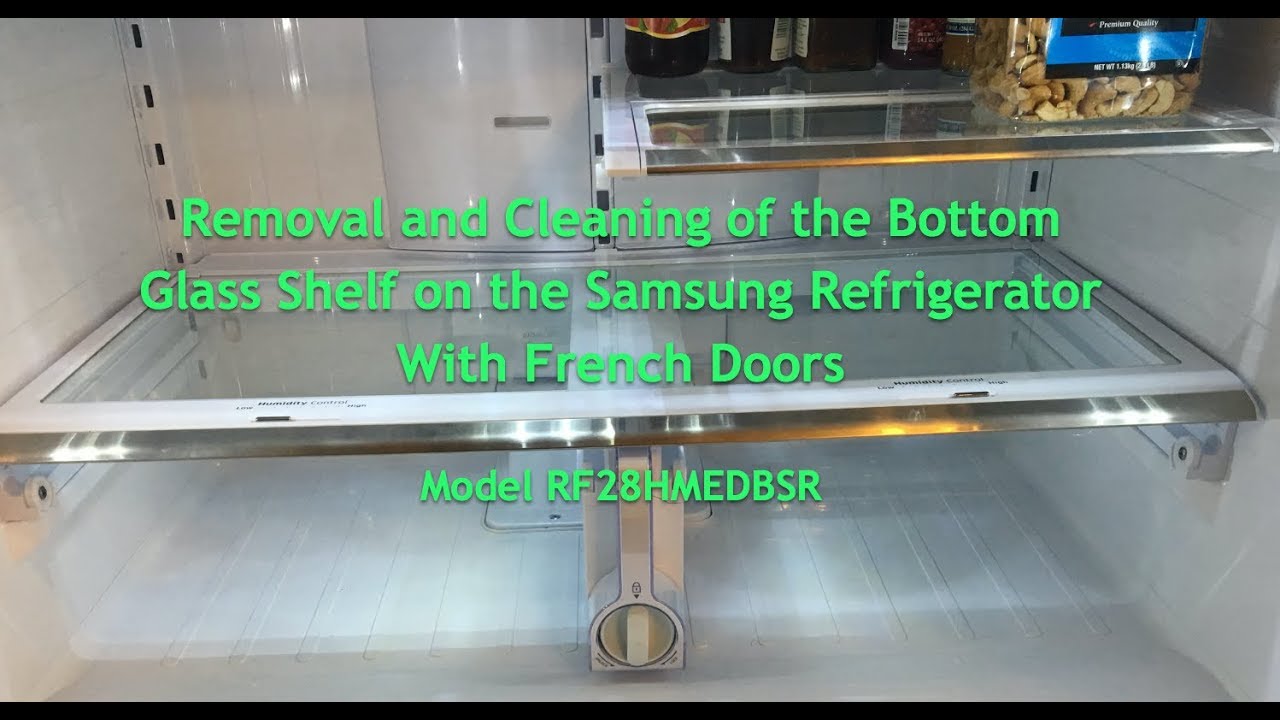
Credit: www.youtube.com
Step-by-step Guide: Removing Glass Shelves
Every Samsung fridge model is a bit different, but the basic process is similar. Below is a detailed step-by-step guide to help you remove glass from most Samsung refrigerators.
1. Identify Your Shelf Type
Check your user manual or look closely at the shelf. Is it:
- A simple glass tray sitting on supports?
- Framed in plastic or metal?
- Sliding or fixed?
- Above a crisper or bin?
This will affect how you remove it.
2. Empty The Shelf
Take out all items from the shelf and the shelves above it. This prevents food from falling or obstructing your work.
3. Adjust The Fridge Temperature
Set your fridge to the warmest setting or unplug it for 10-15 minutes. Cold glass is more likely to break from sudden force or temperature change.
4. Open The Doors Wide
Samsung fridges often have wide doors. Open them fully to give yourself enough space to maneuver the glass out.
5. Remove Obstacles
Pull out any bins, drawers, or items that might block your path. For example, if you’re removing a crisper cover, pull out the crisper drawers first.
6. Release The Shelf
Most Samsung glass shelves are supported at each end. The removal method depends on your model:
- Sliding Shelves: Pull the shelf toward you. When it stops, lift the front edge, then pull out completely.
- Fixed Glass: Lift the front edge gently, then pull forward.
- Framed Glass: Sometimes you need to press tabs or release small locks under the shelf.
- Shelves with Screws: Use a Phillips screwdriver to loosen screws if present.
Be gentle. If the shelf feels stuck, do not force it. Check for hidden clips or plastic trims.
7. Lift And Tilt
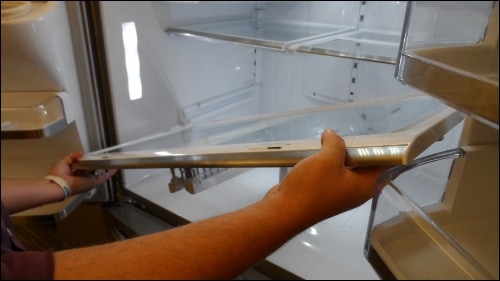
Once released, tilt the shelf at an angle if necessary to clear the side walls or door frame. Always support the glass with both hands.
8. Place On A Safe Surface
Set the glass shelf on a flat, padded surface away from the edge of counters or tables. This prevents chips and breakage.
Example: Removing The Glass From A Samsung Crisper Drawer Cover
Many Samsung fridges have a glass cover above the crisper drawer. To remove it:
- Pull out the crisper drawer fully.
- With both hands, lift the front edge of the glass gently.
- Slide the glass toward you and out of the shelf frame.
- Place it on a soft towel.
Some models have a plastic trim holding the glass. In this case, gently release the trim before removing the glass.
Removing Broken Or Stuck Glass
Removing broken glass or a shelf that’s jammed is more difficult. Here’s how to do it safely.
Removing Broken Glass
- Wear cut-resistant gloves and use a flashlight to locate all shards.
- Remove large pieces first, using both hands.
- Vacuum up small pieces using the hose attachment (unplug fridge first).
- Wipe the area with a damp paper towel to catch any tiny fragments.
- Check the frame and supports for hidden glass.
Removing Stuck Glass
Sometimes shelves get stuck due to sticky spills or ice buildup.
- Do not force the shelf—it can shatter.
- Warm the area with a hair dryer on low or a bowl of warm water placed inside (door closed for 15 minutes).
- Loosen sticky edges with a plastic pry tool or spatula.
- Gently wiggle the shelf while lifting.
- If it doesn’t move, repeat the warming process.
Never use metal tools—they can damage the interior and void your warranty.
Special Cases: Removing Glass In Different Samsung Fridge Models
Samsung has many fridge models, and the removal process can vary. Here’s how to handle the most common designs.
French Door Models
Most French door Samsung fridges have wide shelves with side supports.
- Open both doors fully.
- Remove bins from both sides if needed.
- Tilt the shelf slightly sideways to clear the center divider.
Side-by-side Models
These have narrower shelves but sometimes include extra locks.
- Check for small locking tabs at the back or sides.
- Press or lift tabs to release the shelf.
- Slide the shelf out straight.
Bottom Freezer Models
The freezer may have glass shelves, often with metal rails.
- Pull out the freezer drawer.
- Lift the glass shelf at the back, then tilt and remove.
- Be careful of ice buildup, which can make glass stick.
Flex Zone Or Convertible Models
Some high-end Samsung fridges have a convertible zone with adjustable shelves.
- Check for extra wiring or sensors.
- Disconnect any attached parts before removing the glass.
- Follow the manual closely to avoid damaging electronics.
Cleaning And Maintaining Samsung Glass Shelves
Once you’ve removed the glass, it’s a good time for a thorough cleaning. Proper care keeps your fridge looking new and prevents smells.
How To Clean Glass Shelves
- Let glass reach room temperature before washing.
- Wash with warm, soapy water using a soft sponge.
- Avoid harsh chemicals or abrasive pads.
- Rinse and dry completely before reinstalling.
If there are sticky residues, soak the glass for a few minutes. For stubborn spots, use a small amount of baking soda.
Cleaning The Shelf Frame
If your shelf has a plastic or metal frame:
- Wipe with a damp cloth.
- Use a small brush to remove crumbs from corners.
- Dry thoroughly to avoid mold.
Removing And Cleaning Trims
Some trims snap on and off. Remove them gently, wash separately, and dry before putting back.
Deodorizing Tips
- Sprinkle a little baking soda on the glass before wiping.
- Place an open box of baking soda in the fridge to absorb odors.
- Avoid scented cleaners—fridge odors can transfer to food.
Common Mistakes And How To Avoid Them
Many users damage their fridge or glass shelves by making simple mistakes. Here are the most common errors and how to avoid them:
Forcing The Shelf
Never yank or force a stuck shelf. Tempered glass is strong but not unbreakable. Forcing can shatter the glass or damage the frame.
Skipping The Manual
Each Samsung model is slightly different. Check the manual for your specific model for hidden clips, screws, or special instructions.
Cleaning With Hot Water On Cold Glass
Pouring hot water on cold glass can cause it to crack. Always let the glass warm up first.
Using Metal Tools
Metal tools can scratch the glass or plastic supports, and may void your warranty. Use only plastic or wooden tools.
Not Wearing Gloves
Even small chips in tempered glass can cut skin deeply. Gloves are essential when handling or cleaning broken glass.
How To Reinstall Glass Shelves In Your Samsung Fridge
After cleaning or replacing the glass, proper reinstallation is just as important as removal.
Steps To Reinstall
- Make sure the glass is completely dry.
- Check the shelf frame for cracks or damage.
- Align the shelf with the side supports or frame.
- Insert the back edge first, then lower the front edge.
- Push gently until you feel the shelf lock into place.
- Reinstall trims or frames if you removed them.
- Replace drawers or bins.
If the shelf doesn’t fit easily, do not force it. Double-check the alignment and try again.
Testing Stability
After reinstalling, gently press on each corner of the shelf. It should not wobble or shift. If it does, remove and try again—misaligned glass can slip and break under load.

Credit: www.samsung.com
When To Replace Samsung Fridge Glass
If your glass shelf is cracked, chipped, or no longer fits properly, it’s time for a replacement.
Signs You Need A Replacement
- Visible cracks or chips
- Glass no longer sits flat
- Frame is warped or broken
- Sharp edges
- Glass rattles or moves
Where To Buy Replacement Glass
Only buy replacements from authorized Samsung parts dealers or the official Samsung website. Using generic glass may not fit properly and can void your warranty. You can check Samsung Parts for genuine shelves.
Measuring For Replacement
Measure your old shelf before ordering:
- Width (side to side)
- Depth (front to back)
- Thickness (important for weight support)
Write down the fridge model number and serial number for best results.
Comparing Samsung Glass Shelf Types
Samsung offers several types of glass shelves. Here’s a quick comparison to help you understand the differences:
| Shelf Type | Material | Common Location | Ease of Removal |
|---|---|---|---|
| Standard Glass | Tempered Glass | Main Fridge Area | Easy |
| Framed Glass | Glass + Plastic/Metal Frame | Crisper Covers | Moderate |
| Sliding Glass | Tempered Glass | Upper Shelves | Easy |
| Fixed Glass | Tempered Glass | Freezer | Hard |
Real User Experiences And Expert Tips
Many Samsung fridge owners have learned helpful lessons the hard way. Here are some insights that might save you time and trouble.
User Stories
- Sticky Spills: One user found their shelf stuck by a jam spill. Warm water and patience finally freed the glass without breakage.
- Broken Edge: A cracked shelf edge seemed harmless, but it eventually shattered when loaded with heavy bottles. Replacing at the first sign of damage avoided a bigger mess.
- Wrong Replacement: Buying a non-Samsung shelf online, a user found it did not fit their frame. Always check model compatibility.
Expert Tips
- Warm the glass before cleaning or removal in cold weather.
- Label bins and drawers before removing, so they go back in the right spot.
- Inspect shelf supports for cracks or bends regularly.
- Store removed glass on a flat, padded surface away from children and pets.
Troubleshooting: If Glass Won’t Come Out
If you’ve followed all the steps but the glass still won’t budge, try these solutions:
Use Even Pressure
Apply pressure evenly to both sides of the glass. Twisting or lifting only one side can jam the shelf further.
Check For Hidden Locks
Some Samsung models have hidden latches or tabs. Use a flashlight to look closely at the shelf supports.
Try The “warm Towel” Method
Place a warm (not hot) wet towel over the shelf for 5–10 minutes. This can help loosen sticky spills.
Contact Support
If the shelf is still stuck and you risk breaking it, call Samsung support or a certified technician.
Data: How Often Do Samsung Fridge Shelves Break?
Understanding shelf durability can help you decide when to check or replace your glass.
| Age of Fridge | % of Users Reporting Broken Glass | Common Causes |
|---|---|---|
| 0–2 Years | 3% | Accidents, overloading |
| 2–5 Years | 7% | Wear, heavy items |
| 5+ Years | 15% | Age, repeated removal |
Tip: Older fridges are more likely to have brittle or damaged glass. Inspect carefully before removal.
Comparing Samsung Glass Removal To Other Brands
Is removing glass in a Samsung fridge easier than with other brands? Here’s a quick comparison with two common competitors.
| Brand | Typical Shelf Removal Method | Tools Needed | Ease of Removal |
|---|---|---|---|
| Samsung | Slide and lift, some with tabs | Gloves, screwdriver (rarely) | Moderate |
| LG | Slide, some with snap locks | Gloves, sometimes pliers | Moderate–Hard |
| Whirlpool | Lift straight up, simple supports | Gloves | Easy |
Samsung shelves are sturdy but can be trickier to remove because of extra supports or frames. Always check your manual for unique features.
Pro Tips For Long-term Shelf Care
Keeping your glass shelves in top condition will save you money and reduce the risk of breakage.
- Do not overload shelves. Even tempered glass has limits.
- Clean up spills immediately to prevent sticky jams.
- Use liners under jars or bottles to catch leaks.
- Inspect for chips or cracks every few months.
- Store heavy items near the sides, where the shelf is best supported.
These simple habits can add years to your fridge’s life and make removal easier next time.
Frequently Asked Questions
How Do I Know If My Samsung Fridge Shelf Is Tempered Glass?
Almost all modern Samsung fridge shelves are made of tempered glass for safety. Look for a small stamp or label on the edge that says “tempered” or check your user manual. Tempered glass shatters into small pieces, not sharp shards, making it safer.
Can I Use Generic Glass For Replacement?
It’s not recommended. Generic glass may not fit your Samsung fridge’s frame or might not be strong enough. Only use shelves from authorized dealers or the Samsung official site to maintain safety and warranty.
Why Is My Glass Shelf Stuck In The Fridge?
Sticky spills, ice buildup, or misaligned frames are the main reasons. Try warming the area with a warm towel or hair dryer on low. Never force the glass—this can cause it to break.
Is It Safe To Remove Glass From My Fridge Alone?
Yes, but it’s safer to have help, especially with large or heavy shelves. Always wear gloves and work slowly. If you feel unsure, ask a family member for assistance.
What Should I Do If I Break The Glass While Removing It?
Stay calm. Wear gloves, carefully pick up large pieces, and vacuum small fragments. Clean the area with a damp cloth. Order a replacement from the official Samsung parts site or a trusted dealer. For more safety tips, see the Consumer Reports Refrigerator Cleaning Guide.
Removing glass in a Samsung fridge is a task that requires care and patience. By following the correct steps and safety tips, you can avoid common mistakes and keep your fridge clean and safe for years to come. If you ever feel unsure, don’t hesitate to consult your user manual or contact Samsung support for help.
Credit: www.samsung.com